Key takeaways
Lead with people, then the Page. For a small B2B team, the founder's profile and one or two teammates carry reach. The Company Page holds proof, jobs and news.
Pick one goal and the number that proves it. A goal decides your topics, your rhythm and what you measure each month.
Stay on two or three topics, in a voice people recognise. Since March 2026, LinkedIn's feed matches posts to people by meaning, so being clearly about something is how you get found.
Post 2 to 5 times a week and comment most days. Buffer's study of more than 2 million posts calls that posting range the sweet spot.
Measure what LinkedIn can't show you. Post analytics stop at reach and followers. Leads, conversations and demo requests go in your own sheet.
Keep it human and manual. LinkedIn allows AI help with drafts, but bans pods, automated comments and extensions that automate activity.
A LinkedIn marketing strategy for a small B2B team comes down to five decisions: one business goal, who posts (the founder first, the Company Page second), two or three topics, a rhythm of two to five posts a week plus daily comments, and one monthly review of the numbers tied to your goal. Ads come last, once you know which posts work.
We make VoiceMoat, an AI social media tool for LinkedIn and Twitter, and we cover what it does near the end. Every step below works without it.
This page is the overview and the hub. Each step links to the guide that goes deeper, and the second half gives you a worked example, examples by company stage, before-and-after rewrites, a 90-day plan and a blank template to copy.
In this guide:
What a LinkedIn marketing strategy is
Is LinkedIn marketing worth it for a small B2B team?
What changed on LinkedIn in 2026
Step 1: pick one goal and one number
Step 2: write down who you're trying to reach
Step 3: decide who posts
Step 4: fix the profiles
Step 5: choose two or three content pillars
Step 6: pick formats and a rhythm you can keep
Step 7: comment and talk like a person
Step 8: run the Company Page in an hour a week
Step 9: add ads only after organic works
Step 10: review once a month
Keep each person's voice when a team posts
Employee advocacy without the cringe
How to measure it: from impressions to pipeline
A worked example: one complete strategy
Strategy examples by company stage
Before and after: three rewrites
A 30, 60 and 90-day plan
Mistakes and how to fix them
A blank one-page template
Rules that keep your account safe
How VoiceMoat helps
FAQ
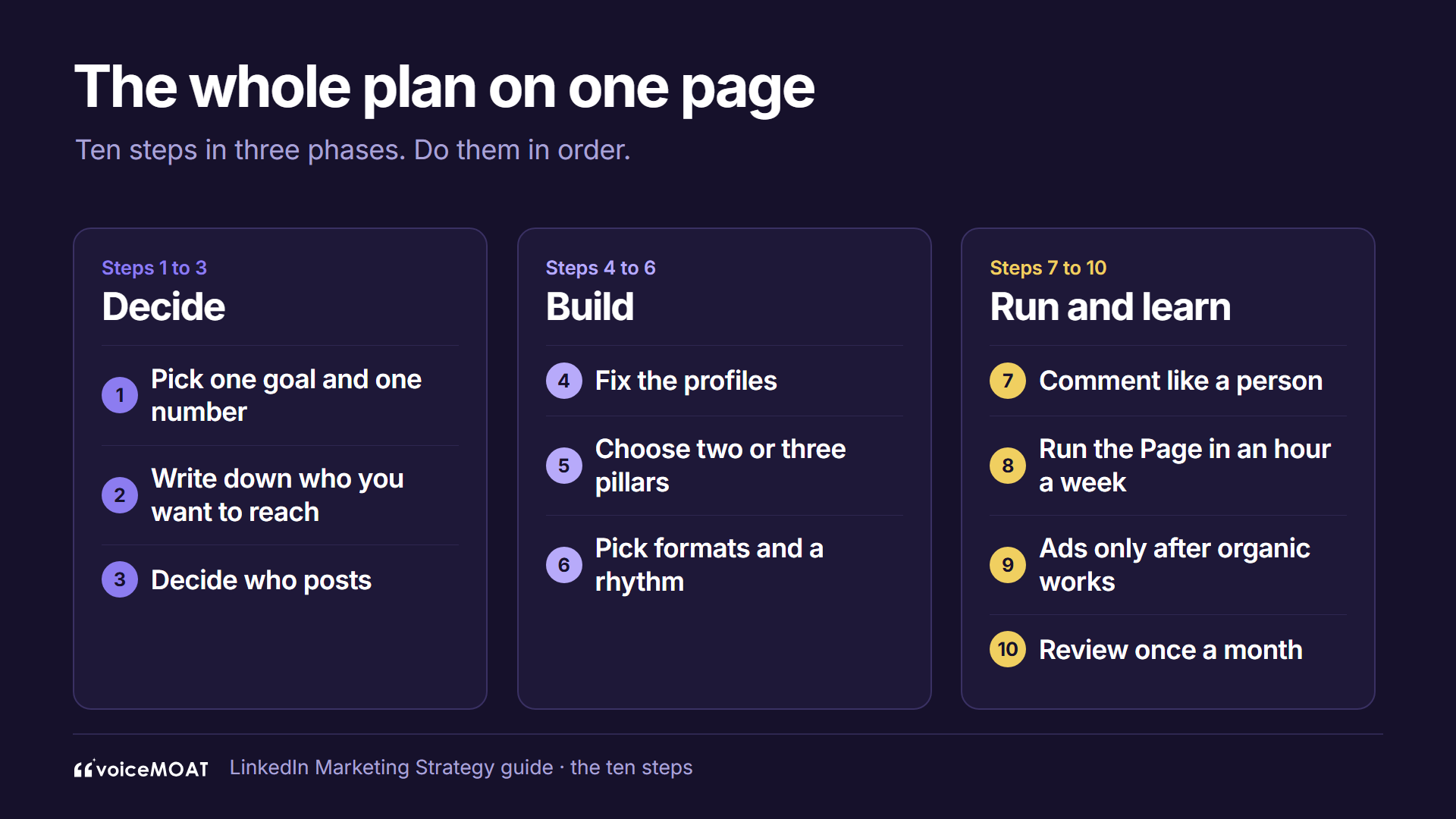
The whole plan on one page.
What a LinkedIn marketing strategy is
A LinkedIn marketing strategy is a written plan for how a business uses LinkedIn to reach a goal: who it wants to reach, who posts, what they post about, how often, how they engage, and how they measure the result.
Most guides from Buffer, Hootsuite and Sprout Social start with the Company Page and ads, because they sell to marketing teams. A team of one to ten people has a different problem: little time, and a founder whose name people already search.
Channel | What it's good for | Who runs it |
|---|---|---|
Personal profiles | Reach, trust, conversations, inbound leads | Founder, then one or two teammates |
Company Page | Proof, jobs, product news, a home for newsletters and ads | Whoever owns marketing, an hour a week |
Ads | Scaling posts that already work | Later, with a test budget |
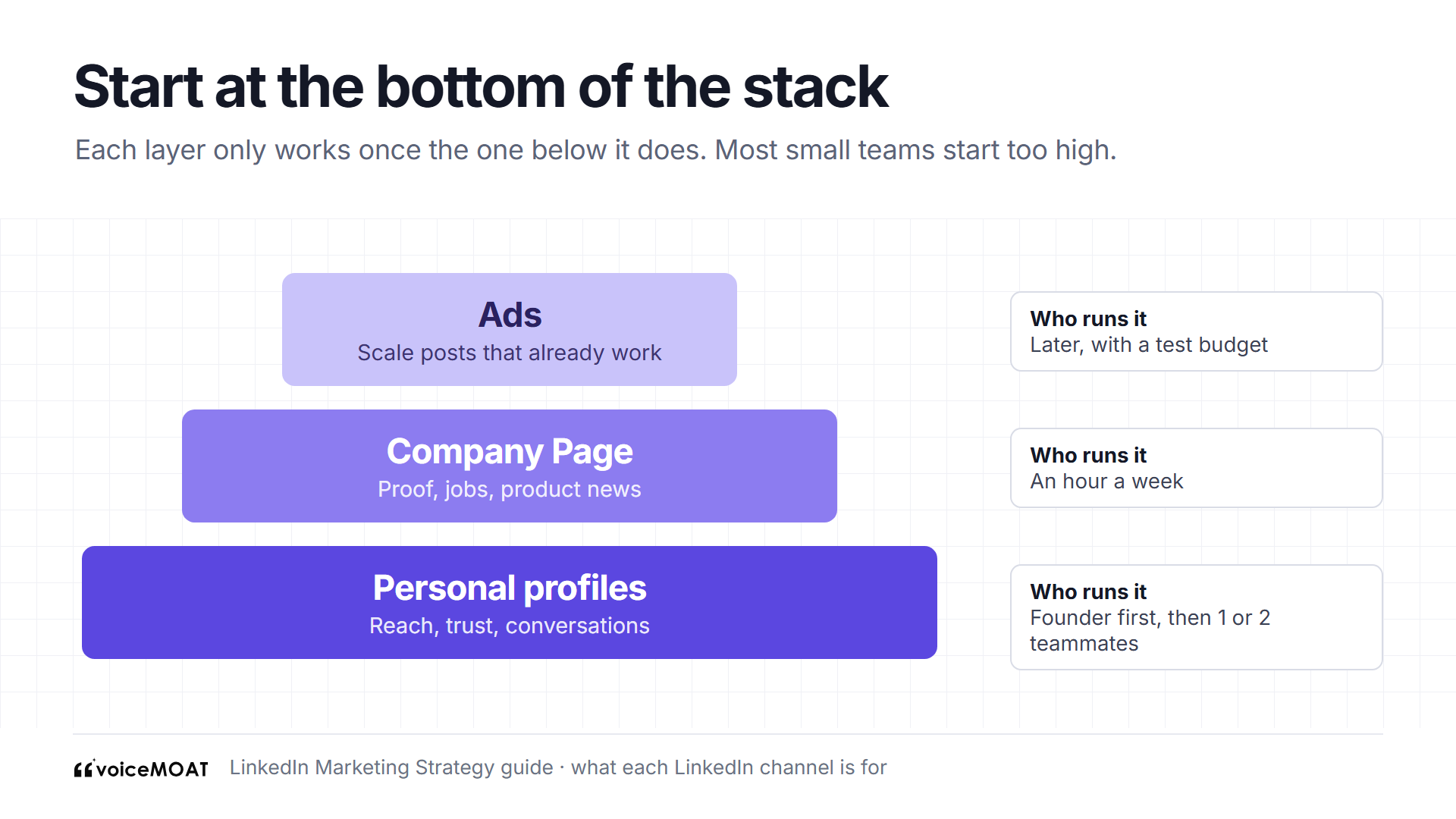
People carry reach. The Page holds proof. Ads come last.
We covered vendor data on the reach gap between founders and Pages in our guide to personal branding for founders.
A strategy is different from a content calendar. The calendar says what goes out on Tuesday. The strategy says why Tuesday's post exists, who it's for and how you'll know it worked. If you only have a calendar, you'll post steadily and still not know whether LinkedIn is doing anything for the business.
Is LinkedIn marketing worth it for a small B2B team?
Usually yes, if three things are true. Check them before you commit a quarter to it.
Question | If yes | If no |
|---|---|---|
Are your buyers on LinkedIn for work? | Finance leads, founders, HR, engineers, recruiters, agency owners: they use it daily | Consumer products and local trades often do better elsewhere |
Can one person give it three or four hours a week? | You can run the whole plan below | Start with comments only, 20 minutes a day, until time frees up |
Is there something only you can say? | Lessons from customers, opinions about your market, numbers from your own work | Fix that first. A strategy can't post opinions you don't have |
When it isn't worth it yet: if you sell to buyers who don't use LinkedIn, if nobody on the team will put their own name on posts, or if you need results in the next month. LinkedIn rewards people who show up for a long time, so it works best as a quarter-by-quarter channel, not a launch spike.
What it costs: organic LinkedIn is free apart from time. Ads start at a $10 daily minimum, covered in Step 9. Tools are optional, and every step here works with LinkedIn alone.
What changed on LinkedIn in 2026
The dated record is in LinkedIn algorithm changes in 2026. Five changes shape this plan:
March: LinkedIn rebuilt how the feed finds posts, matching them to members by meaning instead of keywords. The same month it said engagement pods and automated comments are not allowed.
May: content that appears AI-generated and lacks a clear perspective became less likely to reach people beyond your network.
July: comments began to be ranked by relevance to each reader.
August: "who to follow" suggestions started matching creators by topic.

The 2026 changes reward clear topics and real opinions.
The short version: clear topics and real opinions now travel further than volume or tricks. That has a practical meaning for a team. If your founder posts about pricing one week, hiring the next and a podcast the week after, LinkedIn has a harder time knowing who to show those posts to. If she posts about contractor pay for finance teams every week, in a way people recognise, the feed has something to match.
Step 1: pick one goal and one number
Write down what LinkedIn should do for the business this quarter. Pick one. Two goals at once usually means two half-plans.
Goal | The number that proves it | Where to find it |
|---|---|---|
Inbound leads | Conversations started or demo requests that mention LinkedIn | Your CRM or a "how did you hear about us" field |
Hiring | Applicants who saw your posts | Ask in interviews |
Awareness in a niche | Out-of-network share and followers gained per post | LinkedIn post analytics |
Founder credibility | Profile viewers from posts, invitations from buyers | LinkedIn post analytics |

One goal, one number, one place to find it.
LinkedIn's post analytics show impressions, members reached, the in and out of network split, profile viewers, followers gained and viewer demographics for each post. Leads you have to track yourself.
How to set the target: look at the last 90 days. If LinkedIn brought two demo requests, aim for five, not fifty. A target you can hit tells you the plan works. A target you'll miss by a mile tells you nothing.
Worked example (invented): Ledgerline, a six-person startup selling contractor payroll software, picks "10 demo requests that mention LinkedIn this quarter". Every choice below follows from that line.
Step 2: write down who you're trying to reach
Every ranking guide says "know your audience". Few say how. For a small team, the audience is usually a few hundred people with the same job title. You can write them down.
A 30-minute buyer worksheet:
Titles: the three job titles that sign or influence the deal. For Ledgerline: head of finance, finance operations manager, founder at a 20 to 200-person company.
Names: 20 real buyers you'd like to sell to. Follow them. You'll read their posts in Step 7.
Their words: the phrases they use on sales calls and in their own posts. "Contractor invoices", "month-end close", "currency fees". These go into your headline and posts.
Their objections: the three reasons they say no. Each one is a post.
Who they already follow: look at who comments on their posts. Those are the creators your buyers trust, and the comment sections you'll join.
What they don't want: pitches in direct messages, vague thought leadership, posts about your funding round.

Write down the buyer before the first post.
Where to find this fast:
Read the last ten sales call notes and copy every phrase a buyer used twice.
Open five buyers' profiles and read their last ten posts and comments.
If you have a Company Page, its Page analytics show who visits and follows. Post analytics show demographics of who saw each post, so after a month you can check whether you're reaching the right titles.
Keep the worksheet next to your drafts. When a post idea doesn't serve anyone on it, drop the idea.
Step 3: decide who posts
The founder posts first. Buyers trust the person who built the thing.
Add one or two teammates with something to say: a salesperson who hears objections all day, an engineer who can explain how it works.
Each person keeps their own voice and topics. Five people posting the same press release reads as a campaign.
Budget the time. Our rough estimate: about three to four hours a week per person covers two or three posts and daily comments. Our founders guide has a sample week.
Team size | Who posts | Who supports |
|---|---|---|
1 to 3 | Founder only | Nobody. Keep it to two posts a week and daily comments |
4 to 10 | Founder plus one teammate | Someone collects ideas from sales and support calls |
10 to 25 | Founder plus two or three teammates | A marketer owns the Page, the calendar and the monthly review |
Split topics between people. At Ledgerline (invented), the founder takes the market and opinions, the head of sales takes objections and deals, and nobody else posts until those two are steady. Overlap is fine; copying each other isn't.
Step 4: fix the profiles
LinkedIn's follow suggestions read fields like the headline, title and skills, so the profile has to say what you post about. A stranger who opens your profile from a post should know in five seconds why to follow.
Headline: what you do and what you post about. An invented example: "Co-founder at Ledgerline. Posts on B2B pricing and selling to finance teams."
About: who you help, what you've done, what you post about, in the same words as your posts.
Featured: your best post, a case study or a newsletter.
Follow button: make Follow the main button so strangers can follow without an invitation.
Photo and banner: a clear face, and a banner that repeats the topic in a short line.
Experience: one line per role on what changed because you were there. Buyers read this before a call.

Every callout answers "what will I get if I follow?"
Profile checklist for each person who posts:
Headline names a topic, not only a job title
About opens with who you help, not where you were born
Featured has at least one post or proof item
Follow is the main button
Contact info has the company site
The words in the headline also appear in your last five posts
Go deeper with our LinkedIn profile optimization guide, LinkedIn headline examples and LinkedIn About section examples. If you're stuck, try the free headline generator, summary generator or profile analyzer.
Step 5: choose two or three content pillars
A pillar is a topic you'll post about for a year. For a small B2B team:
The problem you solve, told through what you see customers struggle with.
How you work, such as pricing decisions, hiring, building in public.
Proof, meaning results, before and after, lessons from a deal you lost.
Pillars by business type (all invented):
Business | Pillar 1: the problem | Pillar 2: how we work | Pillar 3: proof |
|---|---|---|---|
Payroll software for finance teams | Mistakes founders make with contractor pay | Shipping in a regulated market | Customer stories with numbers |
Developer tools startup | Why builds break at scale | How we decide what not to build | Benchmarks and migration stories |
B2B design agency | Why rebrands fail inside companies | Pricing and scoping projects | Before and after client work |
Recruiting firm for engineers | What candidates turn down and why | How we run a search | Placements and salary data from our own searches |

Three pillars, chosen for a year.
How to test a pillar: write ten post titles for it in ten minutes. If you can't, it's too narrow or you don't have opinions about it yet. If every title could come from any company in your market, it's too broad.
The LinkedIn content strategy guide shows how to find your pillars from posts that already worked. For each post, use our guide to writing a LinkedIn post. Stuck for ideas inside a pillar? The free post ideas generator gives you starting points to rewrite in your own words.
Step 6: pick formats and a rhythm you can keep
Formats. Choose the format from the idea, not the other way round.
You want to share | Format | Why |
|---|---|---|
An opinion or a story | Text, sometimes with one image | Fastest to make, easiest to read in the feed |
Steps, a framework or a checklist | Document (carousel) post | People swipe through and save it |
Proof: a result, a screenshot, a chart | Image | The proof is the picture |
A demo or a face-to-camera take | Short video | Shows the product and the person |
A quick question to your buyers | Poll | Starts comments, and the answers feed later posts |

Pick the format from the idea, not the other way round.
Buffer reports from its own data that carousels got 278% more engagement than video posts and 596% more than text-only posts. The page gives no sample size for that finding, and Buffer sells a scheduler, so treat it as a reason to try documents, not a rule. Our guide to posting a LinkedIn carousel covers the steps, and there are free carousel templates.
Rhythm. Buffer analyzed more than 2 million posts from over 94,000 accounts. Compared with one post a week, the same accounts got about 1,182 more impressions per post at 2 to 5 posts a week. Buffer calls that range "the sweet spot". Read it as direction.
Start at two posts a week per person, and move up once it's easy.
Batch drafts once a week, in one sitting, from a running list of ideas.
Use a calendar. Our free content calendar generator gives you a month to start from, and the posting frequency calculator helps you check what your hours allow.
Keep the same days. Buffer's analysis of more than a million posts found weekdays did best, with Thursday, Wednesday and Tuesday on top. Your own audience can differ, so check your analytics after a month.
A sample week for one person (invented):
Day | Post | Comments |
|---|---|---|
Monday | Batch two drafts, 45 minutes | 15 minutes |
Tuesday | Opinion post (pillar 1) | 20 minutes, reply to everyone |
Wednesday | None | 20 minutes on buyers' posts |
Thursday | Document post (pillar 2 or 3) | 20 minutes, reply to everyone |
Friday | None | 15 minutes |
Rhythm, formats and a 90-day plan for one person are covered in how to grow on LinkedIn in 2026.
Step 7: comment and talk like a person
Comments are where small accounts meet buyers. LinkedIn now ranks comments for each reader, so a useful one can reach people who don't know you.
Comment on posts in your pillars most days. Add a number, a disagreement or a question.
Reply to every real comment on your own posts. Buffer found posts where the creator replied to comments got about 30% more engagement, in its study of 72,000 posts.
Connect after a few exchanges, with one line on why. The free connection message generator helps with the first line.
Don't pitch in comments or first messages.

A comment worth reading is a small post.
A comment that works, invented example. Under a finance lead's post about month-end close:
Weak: "Great post, so true!"
Better: "We see the same thing with contractor invoices: about a third arrive in the last two days of the month. Have you tried moving the contractor cut-off earlier, or does that just move the rush?"
The second one shows you know the problem, gives a detail and asks a question the author wants to answer.
If you use AI for comment drafts, pick a tool that leaves the sending to you. We compare the options in AI LinkedIn comment generators.
Step 8: run the Company Page in an hour a week
The Page isn't where reach comes from, but buyers check it. LinkedIn's own Page best practices give the basics:
Fill in every field. LinkedIn says Pages with complete information get 30% more weekly views.
Post weekly. LinkedIn says companies that post weekly see a 2x lift in engagement.
Invite your connections to follow the Page.
Notify employees about your most important post, up to once a week.
Reshare the team's best posts, and post product news, jobs and customer stories.
Newsletters: any member can start one, while a Page needs more than 150 followers to be considered.
All of these figures come from LinkedIn about its own product.
The hour, split:
Minutes | Task |
|---|---|
15 | Write one Page post: product news, a job, or a customer story |
10 | Reshare the best team post of the week with one line of context |
10 | Check the Page's comments and messages |
10 | Update Featured, the About text or open jobs if anything changed |
15 | Note Page followers and visitors in your tracking sheet |
Step 9: add ads only after organic works
Ads are optional for a small team. Add them once you know which posts work.
Budget: LinkedIn's minimum is $10 a day for any format, and it suggests $25 for new advertisers.
Boost people, not just the Page. Thought Leader Ads let your Page sponsor a post by the founder or a teammate, once they approve it.
Promote proven posts. A post that already did well organically is the safest test.
A first ad test in four steps:
Pick the post from the last 60 days that started the most conversations with buyers, not the one with the most likes.
Target the job titles from your Step 2 worksheet.
Run it at LinkedIn's suggested $25 a day for two weeks.
Judge it on your Step 1 number. If no demo requests or conversations came from it, stop and spend the money on time instead.
Step 10: review once a month
Look at the last month in one sitting, against the goal from Step 1.
Personal posts: out-of-network share, followers gained and profile viewers per post. Our guide to reading LinkedIn post analytics explains each number.
Page: LinkedIn's Page analytics cover content, followers, visitors and competitors.
Engagement rate: compare posts fairly with our free engagement rate calculator.
Then decide: cut the pillar that travels least, and do more of the posts that started conversations.
Five review questions:
Did we hit the Step 1 number? If not, how far off?
Which three posts started conversations with buyers, and what do they have in common?
Which pillar reached the fewest people outside our network?
Did each person post on the days they planned? If not, what got in the way?
What one change do we make next month?
Write the answers in the same document as the strategy, so next month starts from last month.
Keep each person's voice when a team posts
Every ranking guide tells you to "be authentic" or "write in your own voice". None of them says how to keep that up when three people post, or when AI helps with drafts. This matters more in 2026: LinkedIn said posts and comments "need to represent your voice and your perspectives", and that content which appears AI-generated without a clear perspective is less likely to travel beyond your network.
Voice here means the things that make a post recognisably yours: the words you pick, the opinions you hold, the stories only you have, and the rhythm of your sentences. Topics tell LinkedIn what you're about. Voice tells readers it's you.
Write a one-page voice note for each person who posts:
Words I use: five to ten phrases from your best posts and from how you talk to customers.
Words I never use: "game-changer", "delve", "excited to announce", or whatever makes you wince.
Three opinions I hold: about your market, that someone smart could disagree with.
Stories I can tell: five moments from work you can reuse in posts.
How I open and close: a question, a number, a short story; and whether you end with a question or a plain stop.
Length and rhythm: short lines or paragraphs, how often you use lists.

One page per person keeps the team from blurring into one voice.
Rules that keep a team from blurring together:
Nobody posts the same text. If the launch matters, each person says what it means for their own pillar.
The marketer edits for facts, not for voice. Fix the numbers and the spelling; leave the phrasing.
Keep a swipe file of your own best posts. When a draft feels off, compare it with three of them.
Read every draft out loud before it goes out. If it doesn't sound like you talking to a customer, rewrite the line that trips you.
If you use AI for drafts:
Give it your own past posts and your voice note, not a generic prompt.
Edit for the three things drafts lose first: specific details, a real opinion, and your rhythm.
Never post a draft you couldn't defend in a comment thread.
Our guides on why AI LinkedIn posts all read the same and training AI on your voice go further. The free brand voice analyzer gives a quick read of a sample.
Employee advocacy without the cringe
Employee advocacy means teammates sharing and posting about the company from their own profiles. Most guides treat it as "ask everyone to reshare the launch". On a small team, that's how you get ten identical posts that nobody reads.
What works on a team of under 25:
Opt in, never required. People who want to post will do it well. People who are told to will paste the press release.
Give raw material, not copy. Share the customer quote, the chart or the story, and let each person say why it matters to them.
Use the Page's tools. LinkedIn lets a Page notify employees about one important post a week, and Thought Leader Ads let the Page sponsor a teammate's post once they approve it.
Credit people. When a teammate's post does well, reshare it from the Page with a line of thanks.
Keep it on their topics. An engineer posting about a hiring lesson is advocacy. An engineer posting your pricing page isn't.
A simple monthly ask (invented): "This month we shipped multi-currency payouts. If you want to post about it, here are three customer quotes and the before-and-after numbers. Say what it changed for your work. No need to tag the Page." Two people post. Both posts read differently. That's the goal.
How to measure it: from impressions to pipeline
Every guide says to track KPIs. None explains that personal-profile measurement has to be built by hand. LinkedIn's post analytics are per post, and leads never appear in them. So keep one sheet.
Tracking sheet columns, one row per post:
Column | Where it comes from |
|---|---|
Date, author, pillar, format | You |
Impressions and members reached | LinkedIn post analytics |
In network and out of network share | LinkedIn post analytics |
Profile viewers and followers gained | LinkedIn post analytics |
Comments from people on your buyer list | You, counted by reading the comments |
Conversations started | You: direct messages or calls that began from this post |
Leads or demo requests | Your CRM |

Post analytics are per post, so keep your own sheet.
Connect LinkedIn to the pipeline:
Ask every new lead "How did you hear about us?" as a free-text field, and tag "LinkedIn" answers in your CRM. Self-reported answers catch the buyer who read six of your posts and then searched your name.
Tag links you share. Put UTM parameters on links in your Featured section, your About and any comment where you share a link, so your site analytics can show LinkedIn visits.
Log conversations. When a buyer messages you after a post, note which post in the CRM.
Ask in sales calls. "Was there a post that made you reach out?" The answer tells you which pillar is doing the work.
What good looks like: don't compare your numbers with someone else's. Compare this month with last month, and look at the posts that started conversations. A post with 900 impressions and two buyer conversations beat a post with 20,000 impressions and none.
A worked example: one complete strategy
Here's the whole plan for one invented company, filled in, so you can see how the steps connect.
Ledgerline (invented): six people, sells contractor payroll software to finance teams at 20 to 200-person companies. LinkedIn brought two demo requests last quarter, both from the founder's posts.
Field | Ledgerline's answer |
|---|---|
Goal this quarter | 10 demo requests that mention LinkedIn |
Buyer | Heads of finance and finance operations managers at 20 to 200-person companies |
Who posts | Founder (3 a week), head of sales (2 a week) |
Pillars | Contractor pay mistakes; building in a regulated market; customer stories |
Formats | Text for opinions, one document post a week, screenshots for proof |
Comments | 20 minutes a day each, on posts by finance leaders from the buyer list |
Company Page | One post a week, reshares of the team's best posts |
Ads | None until month three, then $25 a day on the best post for two weeks |
Measurement | Tracking sheet, "how did you hear" field, UTMs on Featured links |
Monthly review | First Monday, 45 minutes |

Copy the template below and replace every answer with yours.
How the first month runs: week one fixes both profiles and writes the voice notes. Weeks two to four, the founder posts Tuesday, Wednesday and Thursday, and the head of sales posts Tuesday and Thursday. Both comment every weekday. The Page posts one customer story a week. On the first Monday of month two, the review shows the document posts on contractor pay mistakes started the most buyer conversations, so pillar 1 gets a second document post each week.
Strategy examples by company stage
The same ten steps look different at each stage. These three are invented.
Solo founder or consultant (1 person)
Goal: five discovery calls a quarter.
Who posts: you, twice a week.
Pillars: two, the problem and proof.
Comments: 20 minutes a day, the highest-value part of your week.
Page: fill it in and post monthly. That's enough.
Ads: no.
Seed-stage startup (3 to 10 people)
Goal: demo requests or waitlist sign-ups.
Who posts: founder three times a week, plus one teammate twice a week.
Pillars: three, split between the two people.
Page: one post a week, reshares of the team.
Ads: a Thought Leader Ads test on a proven founder post in month three.
Growing team with one marketer (10 to 25 people)
Goal: pipeline from LinkedIn, tracked in the CRM.
Who posts: founder, plus two or three teammates on their own topics.
Pillars: three company pillars, with each person owning one angle.
Page: weekly posts, a newsletter once the Page passes 150 followers, employee notifications for the most important post.
Ads: a monthly budget for sponsoring the team's best posts.
The marketer's job: run the calendar, edit for facts, keep the tracking sheet and lead the monthly review.
Before and after: three rewrites
All invented, to show what the steps change.
1. Headline
Before: "CEO at Ledgerline | Fintech | Payroll | Passionate about innovation"
After: "Co-founder at Ledgerline. Posts on contractor pay and what finance teams get wrong about it."
What changed: a topic people can follow, in the buyer's own words.
2. A launch post
Before (Page copy pasted by the founder): "We're thrilled to announce multi-currency payouts! Ledgerline now supports 40 currencies. Learn more at the link below."
After (founder's own post): "A customer paid a contractor in Portugal last year and lost 6% to fees and a bad rate. She told us on a call, and it took us eight months to fix. Today contractors can be paid in their own currency. If you pay people abroad, check your last three invoices for the fee line. That's what made us build it."
What changed: a real story, a number, a reason to care, and a useful action that works even if you never buy.
3. An AI-style draft
Before: "In today's fast-paced business landscape, managing contractors can be challenging. Here are 5 tips to streamline your payroll process and unlock efficiency."
After: "Most founders I talk to set contractor payment terms once and never look again. Then month-end arrives and 30 invoices land in two days. Move your cut-off to the 20th. It's the cheapest fix we know."
What changed: a specific scene, one opinion and one fix, in plain words.

Specifics and opinions are what drafts lose first.
A 30, 60 and 90-day plan
Days | Focus | Tasks |
|---|---|---|
1 to 30 | Set up | Write the goal and buyer worksheet. Fix every profile. Write voice notes. Pick pillars. Post twice a week per person. Comment every weekday. Start the tracking sheet |
31 to 60 | Build the habit | Add a document post each week. Add the second person if they're ready. Set up the "how did you hear" field and UTMs. First monthly review |
61 to 90 | Review and scale | Second review. Cut the weakest pillar or change its angle. Test one Thought Leader Ad on a proven post if the goal allows. Decide the next quarter's goal |
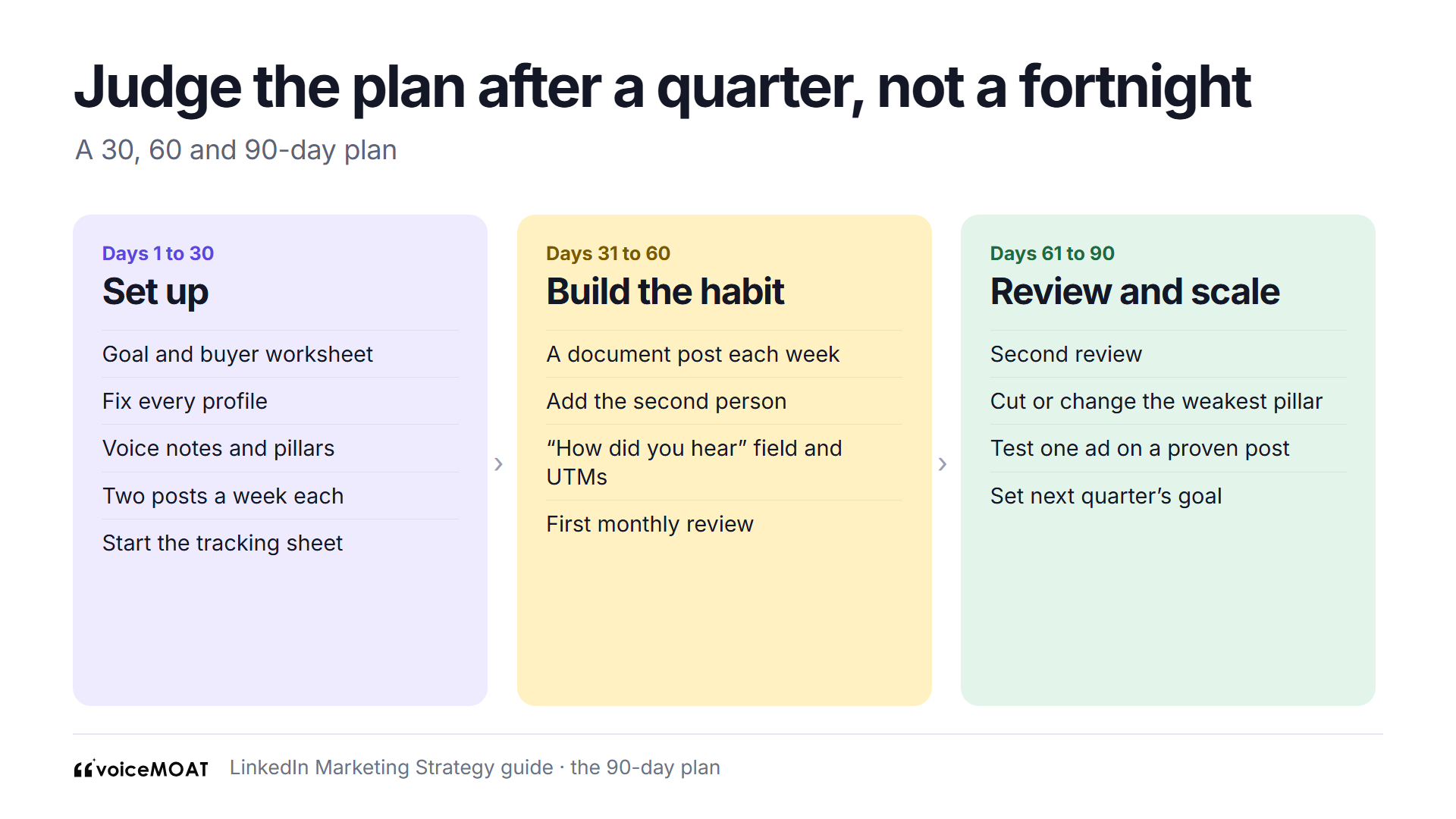
Judge the plan after a quarter, not a fortnight.
LinkedIn publishes no figure for how long this takes. A quarter is long enough to see which pillars start conversations, and short enough to change course.
Mistakes and how to fix them
Mistake | Why it hurts | Fix |
|---|---|---|
Posting only from the Company Page | Buyers follow and trust named people more readily than logos (vendor data in our founders guide) | Founder posts first, the Page supports |
Five or more topics | The feed and readers can't tell what you're about | Two or three pillars for a year |
Everyone posts the same launch text | Reads as a campaign, and people scroll past | Raw material, each person in their own words |
Pitching in comments and first messages | Buyers stop replying | Help first; ask after a few real exchanges |
Judging the plan after three weeks | Too little data to see a pattern | Review monthly, judge after a quarter |
Counting likes only | Likes don't pay bills | Track conversations and leads in your own sheet |
Posting AI drafts unedited | LinkedIn limits AI-looking posts without a perspective | Edit for details, opinions and rhythm |
Joining pods or buying automation | Against LinkedIn's rules, and accounts get restricted | Comment by hand, schedule posts only |
Ads before any post has worked | You pay to boost something nobody wanted | Promote a post that already started conversations |
A blank one-page template
Copy this into a document and fill in one line per field. Keep it to one page.
Field | Your answer |
|---|---|
Goal this quarter | |
The number that proves it, and where it lives | |
Buyer: titles, company size, three objections | |
Who posts, and how often | |
Pillars (two or three) | |
Formats per pillar | |
Comment routine | |
Company Page routine | |
Ads (if any, and when) | |
Measurement: sheet, CRM field, UTMs | |
Monthly review date and owner |
Rules that keep your account safe
LinkedIn's User Agreement help page bans bots and browser extensions that "scrape, modify the appearance of, or automate activity" on its site.
No engagement pods. LinkedIn said they're not allowed, and that it limits the reach of posts that look artificially boosted.
No automated comments or mass invitations. LinkedIn may hide automated comments and restrict accounts.
AI is fine for drafts. LinkedIn says: "It's ok to use AI to help you write, but your posts and comments need to represent your voice and your perspectives."
Scheduling posts is normal. Writing ahead and publishing at a set time isn't the same as automating activity.
How VoiceMoat helps
VoiceMoat is an AI social media tool for LinkedIn and Twitter. audenAI, the brain inside VoiceMoat, does the work and you decide what goes out.
Rhythm (Step 6): Studio drafts posts from your ideas and your own posts, and you can schedule them to your LinkedIn profile.
Comments (Step 7): the Chrome extension adds Comment as you to posts in your feed. It puts a draft in LinkedIn's box, and you edit it and press Comment yourself.
Review (Step 10): press Sync and the extension reads your newest 40 posts from your own logged-in session.
Small teams: Enterprise adds team seats, one for content and one for analytics.
What it can't do:
It can't post to a Company Page. LinkedIn posting goes to personal profiles only.
It can't run ads or show Page analytics.
It can't show out-of-network share or followers gained per post. Those stay on LinkedIn's own analytics.
It can't track leads or conversations. That stays in your CRM and your own sheet.
It can't tell you LinkedIn approves of it. LinkedIn's rules cover extensions that change or read its pages. The extension never comments for you, but you should know that before you install it.
Free | $1 trial | $5 trial | Creator | Pro | Enterprise | |
|---|---|---|---|---|---|---|
Price | $0 | $1 for 3 days | $5 for 3 days | $35 a month | $69 a month | $150 a month |
Credits | 10 a day | 100 in total | 250 in total | 150 a day | 250 a day | 400 a day |
Schedule how far ahead | No scheduling | 15 days | 15 days | 7 days | 15 days | 30 days |
Scheduled posts a day | None | 4 | 4 | 3 | 4 | 5 |
LinkedIn analytics sync | Sample only | Yes | Yes | Yes | Yes | Yes |
Team seats | No | No | No | No | No | Yes |
A pair of LinkedIn comment drafts costs 2 credits. To try it, start VoiceMoat: Creator is $1 for 3 days.
Frequently asked questions
What is a LinkedIn marketing strategy?
It's a written plan for how a business uses LinkedIn: one goal, the buyer, who posts, which topics, how often, how you engage and how you measure.
How do you build a LinkedIn marketing strategy?
Pick one goal and number, write down your buyer, decide who posts, fix the profiles, choose two or three pillars, set a rhythm, comment daily, keep the Page tidy, and review monthly.
What is the best LinkedIn marketing strategy for B2B?
For a small B2B team, have the founder and one or two teammates post 2 to 5 times a week on topics buyers care about, comment daily on buyers' posts, and keep the Page complete.
Is LinkedIn marketing worth it?
For B2B teams whose buyers use LinkedIn for work, usually yes, if one person can give it three or four hours a week for at least a quarter.
How much does LinkedIn marketing cost?
Organic posting costs only time; LinkedIn's ad minimum is $10 a day, and it suggests $25 for new advertisers.
Should a small business focus on a personal profile or a Company Page?
Start with personal profiles, because buyers trust a named person, and keep the Page complete and posting weekly, since buyers check it and it's needed for ads.
How often should a business post on LinkedIn?
Two to five posts a week per person, the range Buffer's study of more than 2 million posts calls the sweet spot, plus a weekly Page post.
How long does a LinkedIn marketing strategy take to work?
LinkedIn publishes no figure, so plan for a quarter before judging, review monthly, and be wary of any guide that promises results by a date.
Can I use AI for LinkedIn marketing?
Yes, for drafts, as long as posts represent your own voice and perspectives; AI-looking content without a clear perspective is less likely to reach beyond your network.
Are LinkedIn automation tools safe?
Scheduling posts is normal, but bots, pods, automated comments and extensions that automate activity break LinkedIn's rules and can get an account restricted.
AI disclosure
This guide was drafted with AI assistance and edited by Prateek Singh. LinkedIn's help, business and newsroom pages and Buffer's studies were read on the source pages on 11 November 2026. Every company and example in the guide is invented. VoiceMoat is our product.
Keep reading

Growth
How to Grow on LinkedIn in 2026: 7 Steps and a 90-Day Plan
How to grow on LinkedIn in 2026: make your profile name your topics, post 2 to 5 times a week, use comments as a second feed, and track the numbers that show growth, with a 90-day plan.
10 min read
·

Growth
LinkedIn Post Analytics: How to Read and Export Your Numbers
How to read LinkedIn post analytics one number at a time, what counts as a good result, and how to export your impressions, followers and demographics.
8 min read
·

Brand
Personal Branding for Founders in 2026: What to Post, Where, and How Often
What founders should post, which network to start on, how often to post on LinkedIn and Twitter, and how much time it takes each week, using only numbers we could trace, including RevBoss's 2026 benchmark of 1,202 LinkedIn posts.
10 min read
·

Growth
LinkedIn algorithm changes in 2026: every update, dated, and what it means for your reach
LinkedIn rebuilt its feed in March 2026, began cutting the reach of generic AI-written posts beyond your network from May, and started ranking comments in July. Every change, dated and sourced, sorted into what LinkedIn said, what the data shows and what has no source.
15 min read
·
From the Twitter algorithm series
The Twitter/X algorithm in May 2026: why voice wins under the new transformer
Read ›