Key takeaways
Check who presses send. A tool that drafts and a tool that posts for you are different products with different risks.
LinkedIn acts on automated comments. It said in February 2026 that comments posted without human review can lose visibility, and that repeat offenders may be restricted.
No extension can promise zero risk. LinkedIn's rules also cover extensions that change its pages or scrape them.
A good comment adds something the post and the other comments don't already have.
VoiceMoat's extension fills the box and stops there. You press Comment or Reply yourself.
An AI LinkedIn comment generator drafts a comment on a post you're reading. The ones worth using leave the sending to you. LinkedIn said in February 2026 that comments posted through a script or browser plugin without human review can be pushed out of the default view, and that accounts that keep doing it may be restricted.
Search for one and you'll find dozens of Chrome extensions, most with a handful of users. They look alike until you ask one question: who actually presses the button?
We make VoiceMoat, which has a Chrome extension that does this. We cover it near the end, including what it can't promise.
The four kinds of comment tool

Who presses send, by kind of tool.
Kind | What it does | Who presses send | Main risk |
|---|---|---|---|
Paste-in generator | You paste a post, it suggests a comment | You | Slow, and no memory of how you write |
Drafting extension | Drafts inside LinkedIn, fills the box | You | Comments that read the same, and LinkedIn's extension rules |
Auto-commenter | Comments on posts for you, often on a schedule | The tool | Reduced visibility and account restriction |
Engagement pod | Other members comment on your posts in exchange | Other people | LinkedIn is acting against pods too |
If you remember one line from this page: anything in the third row isn't worth it.
What LinkedIn actually says
There are three separate statements, and they're stricter than most tool pages admit.
On automated comments. In February 2026, Gyanda Sachdeva, LinkedIn's VP of Product Management, described automated comments as ones posted through a third-party script or browser plugin without human oversight. According to Social Media Today, LinkedIn will remove them from the default Most Relevant view, may stop them reaching beyond your direct connections, and may restrict members who keep doing it.
On comment volume. LinkedIn's help documents say that excessive comment creation or use of an automation tool may limit the visibility of those comments.
On extensions in general. LinkedIn's help pages say it doesn't allow third-party software or browser extensions that scrape the site, change its appearance or automate activity on it, and that members who use them "risk having their accounts restricted or shut down."
That last rule matters here. Its pages don't mention tools that only draft text, in either direction. They don't say a drafting extension is fine, and they don't single one out either. So be wary of any extension that calls itself "100% safe" for LinkedIn, ours included. Keeping a human on the button takes you out of the clearest category, automated comments. It doesn't make an extension officially approved.
We also couldn't find any LinkedIn statement about comments that are simply written with AI. The statements are about automation and volume. What gets a comment ignored is usually simpler: it could have been left on any post.
What makes a comment worth posting

Invented example.
Most AI comments fail the same test. Delete the post above them and they still make sense.
An example, with invented details:
Flat: Great insights! Consistency really is the key to success on LinkedIn.
Worth posting: The part about stopping at three themes matches what happened to us. We dropped to two and the weekly post stopped feeling like homework. Did yours get narrower over time too?
The second one only works under that one post, and it gives the author something to answer. Before you post a drafted comment, check four things:
Would it make sense under a different post? If so, rewrite it.
Is it already there? Read the comments above yours. Saying what three people said adds nothing.
Is anything in it made up? A draft can't know what happened to you. If it claims an experience you didn't have, take it out.
Would you say it to this person's face? If not, it isn't yours yet.
Our guide to using AI for LinkedIn comments and DMs has prompts if you'd rather use a chat assistant.
What to check before you install one
Does it ever post by itself? Look for words like auto-comment, schedule or autopilot.
Does it learn from your own comments, or only from a setting like "professional"?
Does it read the comments already there, so yours adds something?
What does it read, and when? Extensions can see the pages you open. Check the store listing and the privacy policy, and prefer tools that only read on your click.
Who's behind it? Plenty of listings have a few users and no company name.
How VoiceMoat's Chrome extension works
VoiceMoat is an AI social media tool for LinkedIn and Twitter. Its extension adds one pill to every post in your feed.
On LinkedIn:
Press Comment as you on any post.
You get two drafts, a Short one (one line) and a Thoughtful one (3 to 4 lines).
It reads the comments already under the post first, so yours adds something new, and skips ads and name-only comments.
Press Put in comment box, edit it, and press LinkedIn's own Comment button.
It learns how you comment from your own recent LinkedIn comments. That happens only when you click Analyze or Re-train, at most once every 3 days, in one tab it closes when done. Never in the background.
On Twitter: Reply as you drafts a reply, and Put in reply box fills Twitter's own box. You press Reply. Since version 1.18.0 there's no posting route in the extension at all, and what used to be bulk replies is now one by one. On your own new post, a slim strip shows the time left in your first 2 hours and the replies you haven't answered. A bait check flags lines like "Like if you agree," with Rewrite without it or Keep it, and it never blocks you. For more on why we work this way, see why we refuse to build reply bots, and for how to reply well, the reply guy playbook.
It can also draft whole posts inside Twitter's composer and LinkedIn's Start a post, or remix a post into your own.
What it can't promise. The pill changes how LinkedIn's page looks and the extension reads the page you have open, and LinkedIn's rules cover extensions that do those things. It never comments for you, but we can't tell you LinkedIn approves of it, because LinkedIn doesn't approve drafting tools one by one.
What it costs
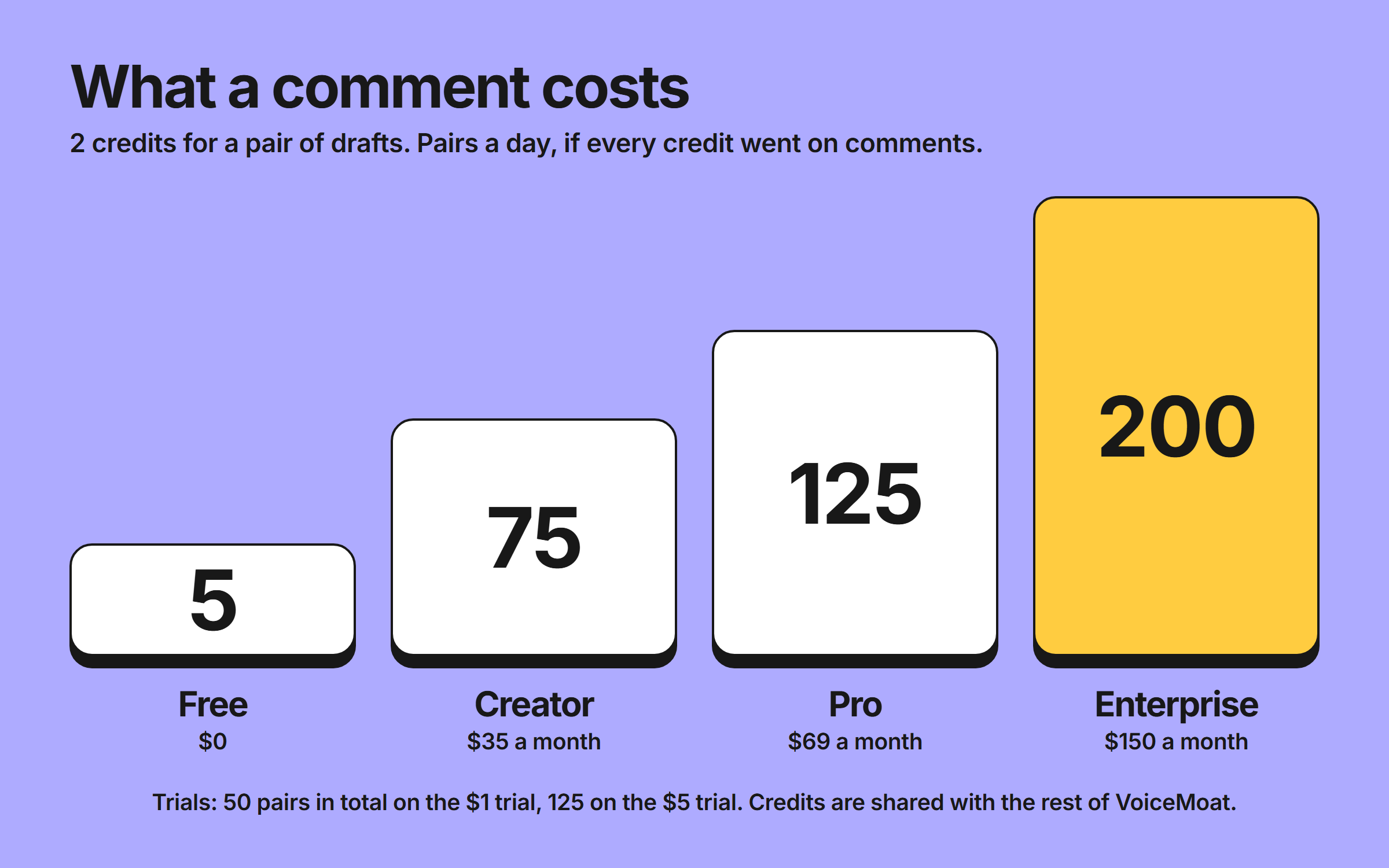
From our plan limits, 9 November 2026.
The extension has no separate price. Each draft uses the same credits as the rest of VoiceMoat: 2 for a LinkedIn comment pair, 1 for a Twitter reply, 3 for a reply that reads a post's images.
Free | $1 trial | $5 trial | Creator | Pro | Enterprise | |
|---|---|---|---|---|---|---|
Price | $0 | $1 for 3 days | $5 for 3 days | $35 a month | $69 a month | $150 a month |
Credits | 10 a day | 100 in total | 250 in total | 150 a day | 250 a day | 400 a day |
LinkedIn comment pairs, if you spent them all on comments | 5 a day | 50 in total | 125 in total | 75 a day | 125 a day | 200 a day |
If you only leave a comment now and then, a paste-in generator or your own keyboard will do. If you comment most days and want the drafts to be yours, see how the extension works. It needs Chrome 116 or later.
Frequently asked questions
Is it allowed to use AI to comment on LinkedIn?
LinkedIn's statements target automation and excessive volume, and we couldn't find one about AI-written comments as such. Its help pages also say it doesn't allow extensions that scrape its site, change its appearance or automate activity, and they don't address tools that only draft text.
Can LinkedIn detect automated comments?
LinkedIn says it does and that it limits their visibility. It hasn't published how, and we found no reliable accuracy figures.
What happens if LinkedIn detects automated comments?
They can be removed from the default Most Relevant view and may not reach beyond your direct connections. Members who keep doing it may be restricted.
Is there a free AI LinkedIn comment generator?
Yes. Planable offers a free one where you paste in a post, with no sign-up. It doesn't remember how you write.
Does VoiceMoat's extension post comments for me?
No. On LinkedIn and Twitter it fills the box and you press the button yourself. Since version 1.18.0 it has no way to post.
How much does a LinkedIn comment cost in VoiceMoat?
2 credits for a pair of drafts, one Short and one Thoughtful. Creator includes 150 credits a day.
Does it work for Twitter replies too?
Yes. Reply as you drafts a reply and fills Twitter's own reply box. Each costs 1 credit, or 3 if it reads the post's images.
Which browsers does it work in?
Chrome 116 or later.
AI disclosure
This article was drafted with AI assistance and edited by Prateek Singh. LinkedIn's rules were read on its help pages on 9 November 2026. VoiceMoat is our product and its extension is one of the options described.
Keep reading

AI and Voice
Using AI for LinkedIn Engagement: Comments, Connections, and Cold DMs
A working guide to using AI for LinkedIn comments, connection requests, and cold DMs, with real ChatGPT and Claude prompts, plus why templated messages still read as templated and how voice-learned drafting fixes it.
17 min read
·

Growth
The reply guy playbook: how to use AI for Twitter replies (without sounding like a bot) in 2026
Use AI for Twitter replies as a drafting partner, not an autopilot: drafts in your voice, edited for each post, a handful a day. This playbook shows what Twitter's open-source code really says about replies (a 5.0 weight on predicted probability, 20.0 between mutual follows), the cadence that keeps editing real, and a self-check for bot-shaped replies.
11 min read
·

Growth
The 9 best Chrome extensions for Twitter creators in 2026
The best Chrome extensions for Twitter creators in 2026, all working inside x.com: VoiceMoat for replies in your voice, plus Tweet Hunter Sidebar, SuperX, Buffer, Posteora (formerly Xposter AI), Postiz, Minimal Theme for X, ControlPanel for Twitter and Dewey. Ranked by the job each one does, with prices checked in October 2026. Black Magic for Twitter shut down in July 2026, so it is now in the exclusions.
20 min read
·

Brand
The case against reply-bot automation at scale
Reply automation is one of the most common requests AI tools get. VoiceMoat doesn't build it. audenAI drafts replies; you send them. Here's the case for why, and why scaling past human review collapses the thing you're trying to build.
8 min read
·
From the Twitter algorithm series
The Twitter/X algorithm in May 2026: why voice wins under the new transformer
Read ›