Key takeaways
Start from one goal and one number. "Build my brand" can't be measured. "More profile viewers from my posts" can.
Find your pillars in your own post data. Export a year of LinkedIn analytics, tag each post by topic, and compare each topic with your usual post.
Keep 2 or 3 pillars and write down your voice. LinkedIn says it now matches creators "by topical relevance rather than popularity", and it says AI-looking posts without a clear perspective travel less.
Post 2 to 5 times a week and plan a month at a time. Buffer's study of more than 2 million posts calls that range the sweet spot.
Review monthly and change one thing. If you change five, you won't know which one worked.
A LinkedIn content strategy is a short written plan for what you post, who it's for, how you come across and how you'll know it's working. Set one goal, describe your reader by their problems, then find two or three pillars in your own post data rather than copying a template. Write down your voice, match a format to each pillar, post two to five times a week, plan a month at a time and review the numbers monthly.
We make VoiceMoat, an AI social media tool for LinkedIn and Twitter, and we cover what it does near the end. You can follow every step here with LinkedIn's own analytics and a spreadsheet.
In this guide:
What is a LinkedIn content strategy?
Why most LinkedIn content strategies fail
Where your content lives: profile, Page or both
Step 1: set one goal and one number
Step 2: describe your reader by their problems
Step 3: audit your own posts
Step 4: choose 2 or 3 pillars
Step 5: write down your voice
Step 6: give each pillar a format and a role
Step 7: shape each post
Step 8: set a weekly rhythm and a simple calendar
Step 9: review monthly and change one thing
Comments and engagement, done by hand
How to measure it
A worked example: one invented founder's first 90 days
LinkedIn content strategy examples by role
Common mistakes and how to fix them
A LinkedIn content strategy template you can copy
Ready-to-publish checklist
Using AI in your content strategy
How VoiceMoat helps
What is a LinkedIn content strategy?
A LinkedIn content strategy is the set of decisions you make once, so you don't have to make them every morning. It answers seven questions.
Part | The question it answers | Example (invented) |
|---|---|---|
Goal and number | What should LinkedIn do for me this quarter, and how will I see it? | 20 profile viewers a week from my posts by the end of March |
Reader | Who is each post for? | Founders of small software companies who sell before they hire a salesperson |
Pillars | Which 2 or 3 topics do I come back to? | Pricing lessons, first customers, building the team |
Voice | How do I come across, and what would I never say? | Short and direct, real numbers, no hustle talk |
Formats and roles | What shape does each idea take, and what job does each post do? | Pricing as document posts that teach; first customers as text stories that prove |
Rhythm | How often, and on which days? | Three posts a week, Tuesday, Thursday, Friday |
Review | What do I check each month, and what do I change? | Median impressions per pillar, followers gained per post, one change |
What it isn't:
A posting schedule. A schedule says when. A strategy says what, for whom and why.
A list of 50 post ideas. Ideas go stale. Pillars keep producing new ones.
A long document. If it doesn't fit on one page, you won't open it in week six.

The seven parts of a strategy, in the order you decide them.
Why most LinkedIn content strategies fail
The ranking guides from SocialBee, ContentStudio, Expandi, AuthoredUp, Supergrow and others share one outline: goals, audience, pillars, formats, calendar, measurement. They skip the hard parts.
The pillars come from a list. "Authority, proof, personality" are fine labels, and everyone else uses them too.
Nobody tests the pillars. None shows how to check a pillar against your own past posts.
Voice is left out. A few say "develop a point of view" or "write posts that feel human". None says how to write your voice down, keep it the same across a founder and a team, or check a draft against it.
Ratios are given with no evidence. "40/40/20" and "4-1-1" mixes appear with no source.
Vendor numbers go unlabelled. Most format and frequency figures come from companies that sell LinkedIn tools, ours included. We say so each time.
Some advice breaks LinkedIn's rules. At least one ranking guide recommends engagement pods, which LinkedIn says aren't allowed.
LinkedIn doesn't use the word "pillar". It does say its follow suggestions match creators "by topical relevance rather than popularity", reading fields such as your headline and skills (LinkedIn Engineering, August 2026). That's the practical reason to stay on a few topics.
Where your content lives: profile, Page or both
Decide this first, because it changes everything after it. A personal profile and a company Page reach people in different ways and should post different things.
Personal profile | Company Page | |
|---|---|---|
Best at | Opinions, stories, lessons, the person behind the work | Proof, product news, hiring, events, resharing the team |
Who usually posts | The founder, an executive, a seller, an expert | A marketer or whoever runs the Page |
Rhythm to start with | 2 to 5 posts a week | 2 posts a week, raised once you can keep it up |
First number to watch | Followers gained and profile viewers per post | Followers and clicks |
Voice | One person's | The company's, agreed in writing |
If you run both, give them different jobs:
The person tells the story, the Page holds the proof. An invented example: the founder posts "Why we raised prices 30% and lost only two customers". The Page posts the customer case study a week later.
Don't post the same text twice. Reshare with a line of your own, or post a different angle.
Plan them on one calendar. Two columns, so a launch week doesn't turn into six posts saying the same thing.
For a Page, LinkedIn's own planning advice is a useful start. Its guide for nonprofit Pages suggests a "2-2-1" mix: for every five posts, two informational, two stories showing impact and one call to action. It also says to use at most one call to action a post, and "If you're only posting once a week, try posting twice" (LinkedIn for Nonprofits). It's written for nonprofits, and the logic carries over to any Page.
If a team posts too, give each person their own pillar inside the company's topics, so five people aren't posting the same launch. Each keeps their own voice; Step 5 covers how to write it down.
For profiles, outreach and Pages as a whole, see our LinkedIn marketing strategy guide.
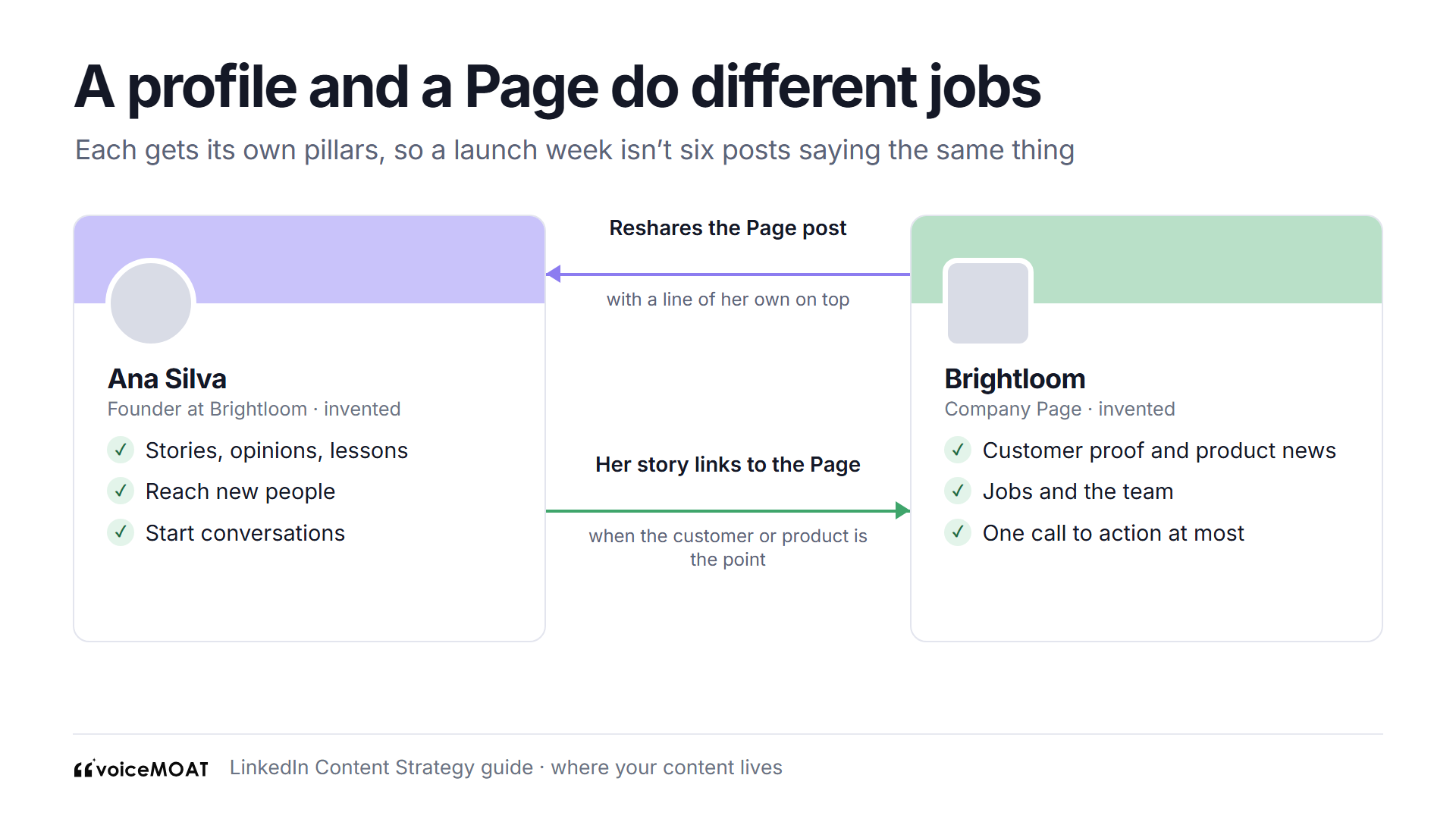
Profile and Page do different jobs. Plan both, separately.
Step 1: set one goal and one number
Pick the one thing LinkedIn should do for you this quarter, then the number on LinkedIn's own post analytics that shows it.
Goal | Number to watch | Where LinkedIn shows it |
|---|---|---|
Get known in your field (personal branding) | Followers gained from each post | Post analytics, Profile activity |
Reach new people | Out-of-network share of impressions | Post analytics, Discovery |
Win clients or leads (B2B) | Profile viewers from each post, then messages | Post analytics, Profile activity |
Hire or raise | Profile viewers from each post | Post analytics, Profile activity |
Find a job | Profile viewers, then recruiter messages | Post analytics, Profile activity |
One goal at a time. Lead posts and reach posts pull in different directions.
Write it down with a date. An invented example: "By the end of March, 20 profile viewers a week from my posts."
Pick a number you can move in a quarter. "Get a client from LinkedIn" may take longer than three months. "Profile viewers from posts" moves every week and leads there.
Remember the numbers are estimates. LinkedIn says its analytics "may not be precise", and members reached counts distinct people, unlike impressions.
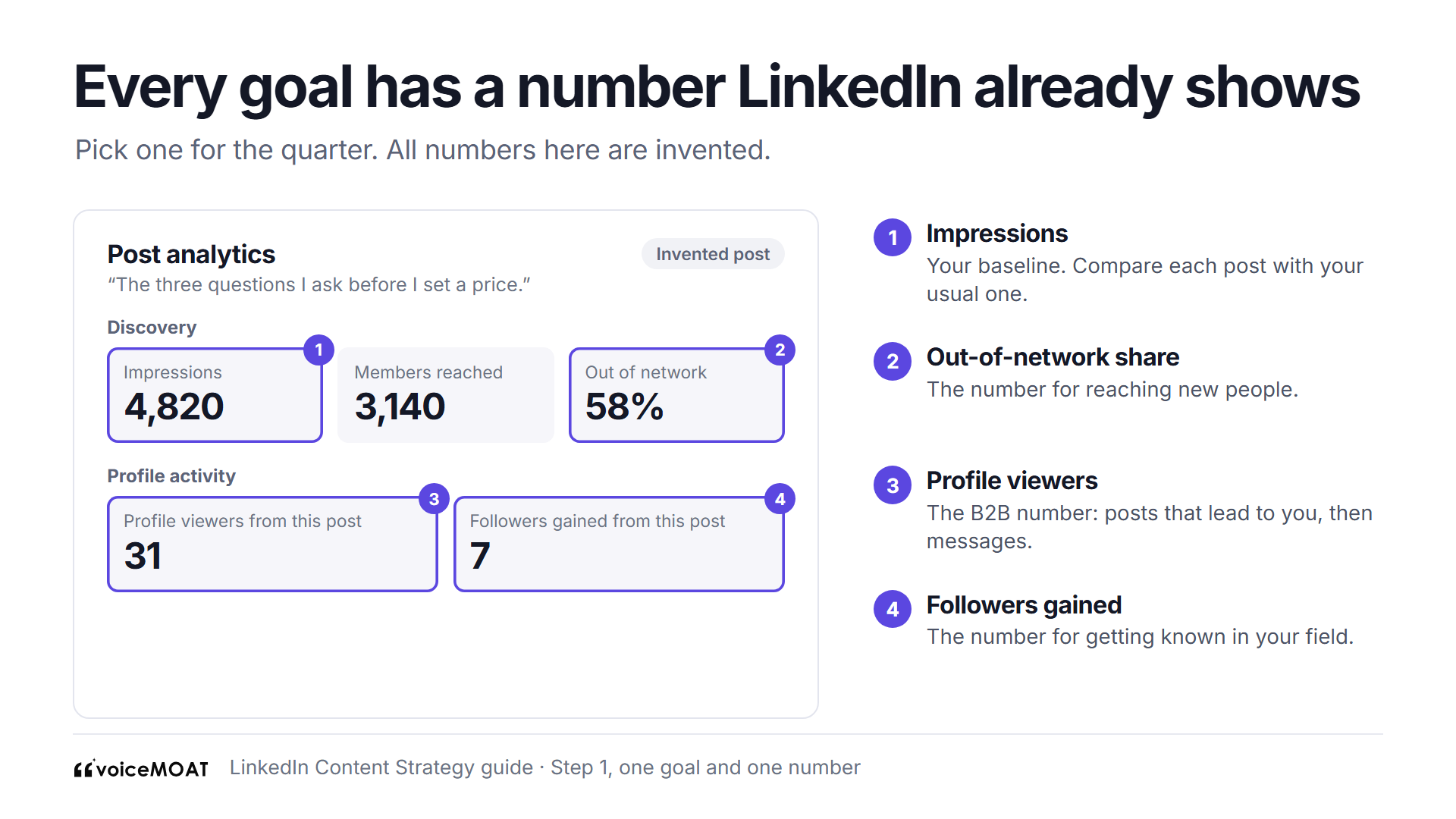
Pick the number first, then find it here. All figures are invented.
Step 2: describe your reader by their problems
Job titles don't tell you what to post. Problems do.
Write one sentence about one reader. An invented example: "A founder of a 10-person software company who has to sell before hiring a salesperson."
List five problems they'd pay to solve, and the questions people actually ask you in calls, DMs and comments.
Note what they already believe. If your reader thinks "discounts win deals", a post that disagrees, with your proof, gets read.
Note where they are. Someone who doesn't know they have the problem needs a different post from someone comparing fixes.
Where to find real questions:
Your sent emails and DMs from the past three months
Questions asked on sales or discovery calls
Comments on your own posts and on posts in your field
Search autocomplete for your topic, which shows the words people type
LinkedIn says members value posts on "professional news, industry insights, career tips, and business advice" (LinkedIn). Your reader's problems should sit inside one of those.
Step 3: audit your own posts
The template guides skip this. Your past posts already show which topics your audience responds to.
Get the data. On desktop, open Analytics & tools, choose a range up to the past 365 days, and export it to an .XLSX file (LinkedIn Help). LinkedIn says this view is rolling out gradually. For comments and followers gained, open each post's own analytics.
Tag every post. Give each post one topic in plain words. Five to eight topics is enough.
Compare each topic with your usual post. Use the median (the middle post), not the average, because one post that took off will drag an average far up.
An invented example for a founder with 40 posts in a year:
Topic | Posts | Median impressions | Against usual (900) | Comments per post | Followers gained per post |
|---|---|---|---|---|---|
Pricing lessons | 9 | 1,600 | 1.8x | 14 | 6 |
First customers | 7 | 1,250 | 1.4x | 11 | 4 |
Hiring | 6 | 950 | 1.1x | 5 | 1 |
Product updates | 12 | 600 | 0.7x | 2 | 0 |
Industry news | 6 | 700 | 0.8x | 3 | 0 |
Read the pattern. Here, pricing and first customers lead on reach, comments and followers. Product updates get posted most and do least.
Trust topics with five or more posts. Two posts is a coincidence.
Check out-of-network share on the best topics. A topic that only reaches people who already know you won't grow an audience.
Tag format too. Add a column for text, image, document or video, so Step 6 has data.

Median, not average. Topics with five or more posts only.
How to run it in a spreadsheet, step by step:
Paste the export into a sheet. Keep date, post link and impressions.
Add a "topic" column and a "format" column. Fill them by hand, or ask an AI assistant to suggest a topic for each post and then check every one.
Find your usual post: the median of the whole impressions column.
Make a pivot table by topic with the count and the median impressions.
Divide each topic's median by your usual post. Above 1.2x is worth a look. Below 0.8x twice in a row is a warning.
Fewer than 15 posts? Skip the table for now. Choose three topics you could talk about for an hour without notes, post on each for six weeks, then run the audit.
Our free Claude skill, Define my content pillars, runs the same clustering on posts you paste in, and works in Claude or ChatGPT.
Step 4: choose 2 or 3 pillars
A pillar is a topic you return to every week, with your own angle. Test the strongest two or three topics from your audit.
Proof: has it done better than your usual post at least five times?
Supply: could you write 20 posts on it from your own work, without inventing stories?
Goal fit: does it serve the goal from Step 1? Viral posts that bring the wrong people don't count.
Angle: could only you write it? "Pricing" is a category. "What 40 sales calls taught me about pricing" is a pillar.

Four questions every pillar has to pass.
Then write one line for each, in this shape. These are invented:
Pillar | Angle | Share of posts |
|---|---|---|
Pricing lessons | What I've learned raising prices at a small software company | 40% |
First customers | How the first 10 customers actually found us | 40% |
Building the team | One honest lesson a month on hiring | 20% |
Make the split uneven on purpose. Give more posts to what your data says works.
Drop something. In the example, product updates move to comments. Saying no is half the value of pillars.
Make your profile say the same words. Your headline, About and skills are among the fields LinkedIn's follow suggestions read. Our guide to LinkedIn profile optimization covers each field.
Pillar examples by goal (invented):
Goal | Pillar | Angle |
|---|---|---|
Personal brand | Design reviews | What I change in the first five minutes of a design review |
B2B leads | Onboarding mistakes | Why new customers stall in week two, from 30 onboardings |
Hiring | How we work | One real decision a month and how the team made it |
Job search | What I'm building | A weekly note on the side project I ship on Fridays |
More on angles and how pillars drift: content pillars that survive. It's written for Twitter, and the tests carry over.
Step 5: write down your voice
No ranking guide covers this, and it's what makes a strategy hold for more than a month. Pillars decide what you talk about. Voice decides whether people recognise you when they see a post with your name cut off.
Voice has two halves, and it helps to keep them apart:
Style: how your posts look. Sentence length, line breaks, emoji, how you open, words you use and words you don't.
Stance: what your posts say. The views you hold, the stories you've lived and the framings you'd never use.
A post can match your style perfectly and still say something you don't believe. That's the most common way a strategy drifts, especially with AI drafts or a ghostwriter.
Why it matters for LinkedIn in 2026. LinkedIn's rule on AI is "your posts and comments need to represent your voice and your perspectives", and it says AI-looking content without a clear perspective is less likely to reach people beyond your network (LinkedIn, May 2026). A written voice is how you keep that perspective across a month of posts.
Fill in a voice card. It takes 20 minutes and lives at the top of your strategy page.
Section | What to write | Invented example |
|---|---|---|
Style notes (3) | Habits you can see in your best posts | Short sentences. One idea per line. No emoji. |
Things I believe (3 to 5) | Views you'd defend in a meeting | Raise prices before you hire. Most churn starts in onboarding. |
Stories I've lived (3 to 5) | Real events you can retell | The customer who left over a 10% rise and came back. |
Framings I avoid (2 or 3) | Ways of saying things that aren't you | Hustle talk. "Game-changer". Fake urgency. |
Words I use | Your own terms for your work | "Small software company", never "SaaS startup" |
How to fill it from your own posts:
Take your five best posts from the Step 3 audit.
Underline every sentence that states a view. Those go in "Things I believe".
Circle every real event. Those go in "Stories I've lived".
Read three posts in your field that made you wince. Their worst habits go in "Framings I avoid".

Write down how you come across before you plan a month of posts.
A before-and-after rewrite (both invented, same topic and length):
Before: Pricing is one of the most important decisions a founder makes. Many founders undercharge. Raising your prices can transform your business. Don't be afraid to charge what you're worth. What do you think?
After: We raised prices 30% in March. Two customers left. One came back in June. I'd held prices flat for a year because I was scared of exactly that email. The email came, and it was fine. If you've never lost a customer over price, you're probably too cheap.
What changed:
A real number and a date replaced "one of the most important decisions".
A lived story replaced a general claim.
A clear view at the end replaced a bait question.
The style matches the card: short sentences, no emoji.

Same topic, same length. Only the second one could be yours.
If several people post:
Each person keeps their own card. Don't make the founder and the head of sales write alike.
Share one company list of claims everyone can make and words nobody uses, such as product names written the same way.
Have a second person read for stance, not style. "Would you say this out loud to a customer?" catches more than a grammar check.
To check how a draft compares with your own posts, try the free brand voice analyzer. For patterns that make posts read as AI, see our checklist of AI tells.
Step 6: give each pillar a format and a role
Let the idea pick the format: steps, a picture or one sharp opinion.
Format | What the data says | Good for |
|---|---|---|
Document or carousel | Highest median reach in AuthoredUp's data (1,198), yet under 5% of posts | Steps, frameworks, before and after. See our carousel guide |
Image | 57% of posts in the same data, median reach 1,031 | A chart, a screenshot, a photo of the real thing |
Text | The easiest to keep up | One clear opinion or story |
Video | Median reach fell 36% year on year in AuthoredUp's data. LinkedIn calls video its fastest growing format | A test. LinkedIn suggests vertical, captioned, 90 seconds or shorter |
Article or newsletter | No comparable public data | Long pieces past the post limit. LinkedIn suggests an article when a post runs past 3,000 characters |
AuthoredUp sells LinkedIn tools, and its sample covers March 2025 to February 2026, so read these as direction. Test one format a month: a document post on your strongest pillar, compared with that pillar's usual post.

Let the idea pick the format.
Give each post a role, too. A format is the shape. A role is the job the post does for your reader.
Role | What it does | Invented first line |
|---|---|---|
Teach | Shows how to do something | "The three questions I ask before I set a price." |
Opinion | Takes a side, with a reason | "Annual discounts cost small companies more than they bring in." |
Proof | Shows a result, with the numbers | "We raised prices 30% in March. Here's what happened next." |
Behind the scenes | Shows how you work or decide | "Why we said no to our biggest prospect last week." |
Offer | Asks for something | "We're hiring our first salesperson. Here's who we want." |
A starting mix for a month of 12 posts (invented): four teach, three opinion, three proof, one behind the scenes, one offer. The 40/40/20 and 4-1-1 ratios in other guides come with no evidence, so use any split as a start and let your Step 9 numbers move it.
Keep offers rare. LinkedIn's own Page advice is one call to action a post at most, and one post in five as a call to action.
Match roles to pillars. Pricing might lean to teach and opinion; first customers to proof.

A starting mix. Your own numbers should move it.
Step 7: shape each post
A strategy decides the topic. The post still has to get read. Each post has four parts.
Opening line. Only the first lines show before "see more", so the reason to keep reading goes there. A number, a claim or the start of a story. Try the free LinkedIn hook generator when you're stuck.
Body. Short paragraphs, one idea each. White space helps on a phone.
Ending. A clear view, a takeaway or one real question. Skip "Agree?". LinkedIn lists engagement bait among the things it shows less (LinkedIn).
Length. LinkedIn's limit is 3,000 characters (LinkedIn Help). No LinkedIn source names a best length, so match the idea: a strong opinion can be 400 characters, a lesson with steps 1,500 or more. Check with the free character counter.
Small rules that help:
One idea a post. Two ideas make two posts.
Hashtags are optional. LinkedIn's Page guide says up to five relevant ones.
Put links where they help the reader, and test a post with the link in the first comment against one with it in the post, on your own account, before believing anyone's rule.
Tag people only when they're part of the story.

The parts of a post. The opening line does the most work.
For the full method, use our guide to writing a LinkedIn post and how to end a post.
Step 8: set a weekly rhythm and a simple calendar
How often. Buffer analyzed more than 2 million posts from over 94,000 accounts, comparing each account with its own quieter weeks. Against one post a week, 2 to 5 posts a week brought about 1,182 more impressions per post. Buffer calls that range "the sweet spot", and says the gains shrink as you post more and quality still matters. Buffer sells a scheduling tool.
Pick the rate you could hold through a bad month. Size it to your real week with the free posting frequency calculator.
A sample week (invented, for three posts):
Day | Post | Other work |
|---|---|---|
Monday | None | Pick next week's three ideas from your list |
Tuesday | Pillar 1, text | Reply to comments for the first hour |
Wednesday | None | Comment on 5 posts in your topics |
Thursday | Pillar 2, document | Reply to comments |
Friday | Pillar 1 or 3, image | Note what did well this week |
No LinkedIn source names a best day or hour. Post when your readers work, on the same days each week, so weeks compare fairly.
The calendar. Keep it to five columns: date, pillar, format, role, first line.
A sample month (invented, using the pillars from Step 4):
Week | Tuesday | Thursday | Friday |
|---|---|---|---|
1 | Pricing, text, opinion: "Annual discounts cost small companies more than they bring in." | First customers, document, proof: "How our first 10 customers found us, one slide each." | Pricing, image, teach: "The one chart I check before any price change." |
2 | First customers, text, proof: "Customer three found us through a comment I left." | Pricing, document, teach: "Five steps to raise prices without a panic." | Team, text, behind the scenes: "Why we waited 18 months to hire sales." |
3 | Pricing, text, proof: "We raised prices 30% in March. Two left. One came back." | First customers, image, teach: "The onboarding checklist our first customers shaped." | First customers, text, opinion: "Our first three customers came from comments I left on other people's posts." |
4 | Pricing, text, opinion: "Free trials are a pricing decision. Treat them like one." | Team, document, offer: "We're hiring our first salesperson. Here's who we want." | First customers, text, teach: "The question that told me our first customer would pay more." |
That's five pricing, five first customers and two team posts: about 40/40/20, as planned.

One invented month, three posts a week.
Plan themes for the month. Draft one week at a time. Plans go stale when something happens in your field.
Keep an idea list per pillar, fed by customer questions. Our free LinkedIn post ideas generator helps when it runs dry.
Need a template? The free content calendar generator gives you up to four weeks of dated topics, and LinkedIn post templates has fill-in formats. To plan against a target number, see our AI content calendar guide.
Pages can schedule ahead. LinkedIn says Page posts can be scheduled up to three months out, though only the date and time can change afterwards.
Repurpose before you write new. A post that beat your usual by 1.5x or more can come back as another format a month later: a text post becomes a document, a document becomes three short opinions. Our guide to repurposing content into posts covers the method.
Step 9: review monthly and change one thing
Once a month, rerun the Step 3 table on the new posts only.
If you see | Try |
|---|---|
One pillar is well above your usual post again | Give it more of next month's posts |
One pillar is below your usual post for two months | Change its angle or format once. If it stays low, drop it |
Reach is fine but followers gained per post is near zero | The posts are interesting but not clearly yours. Sharpen the angle, your voice card and your profile |
Out-of-network share is falling | Check for posts with no clear view of your own |
Everything fell in the same week | Look for a missed week or a holiday before changing the plan |
Comments are up, profile viewers flat | The posts start talk but don't point to you. Add proof posts on your offer |
Change one thing at a time. Pillar mix, format or rhythm, not all three.
Ignore single outliers. One post that went far makes the next ten look like a drop.
Give it three months before judging the whole strategy. LinkedIn publishes no figure for how long this takes.
How to read each number is in our guide to LinkedIn post analytics.
Comments and engagement, done by hand
Posting is half the work. The other half happens in comments, and it's where many new readers first see you.
Reply to every real comment in the first hour. It keeps the talk going while the post is fresh.
Comment on five posts a day in your pillars. Add a fact, a disagreement or a story. "Great post" helps nobody.
Turn good comments into posts. If you write 150 words under someone else's post, that's a draft for your own.
What's not allowed. LinkedIn defines an engagement pod as "a coordinated group of people that like, comment and share posts to attempt to boost visibility and virality", and says it limits the reach of this kind of activity. It may hide automated comments, "posted to LinkedIn using a browser extension, script, or third party tool", from "Most Relevant" (LinkedIn, March 2026). Its help pages also bar bots and extensions that automate activity on the site (LinkedIn Help). Write your comments yourself. More in LinkedIn's 2026 changes.
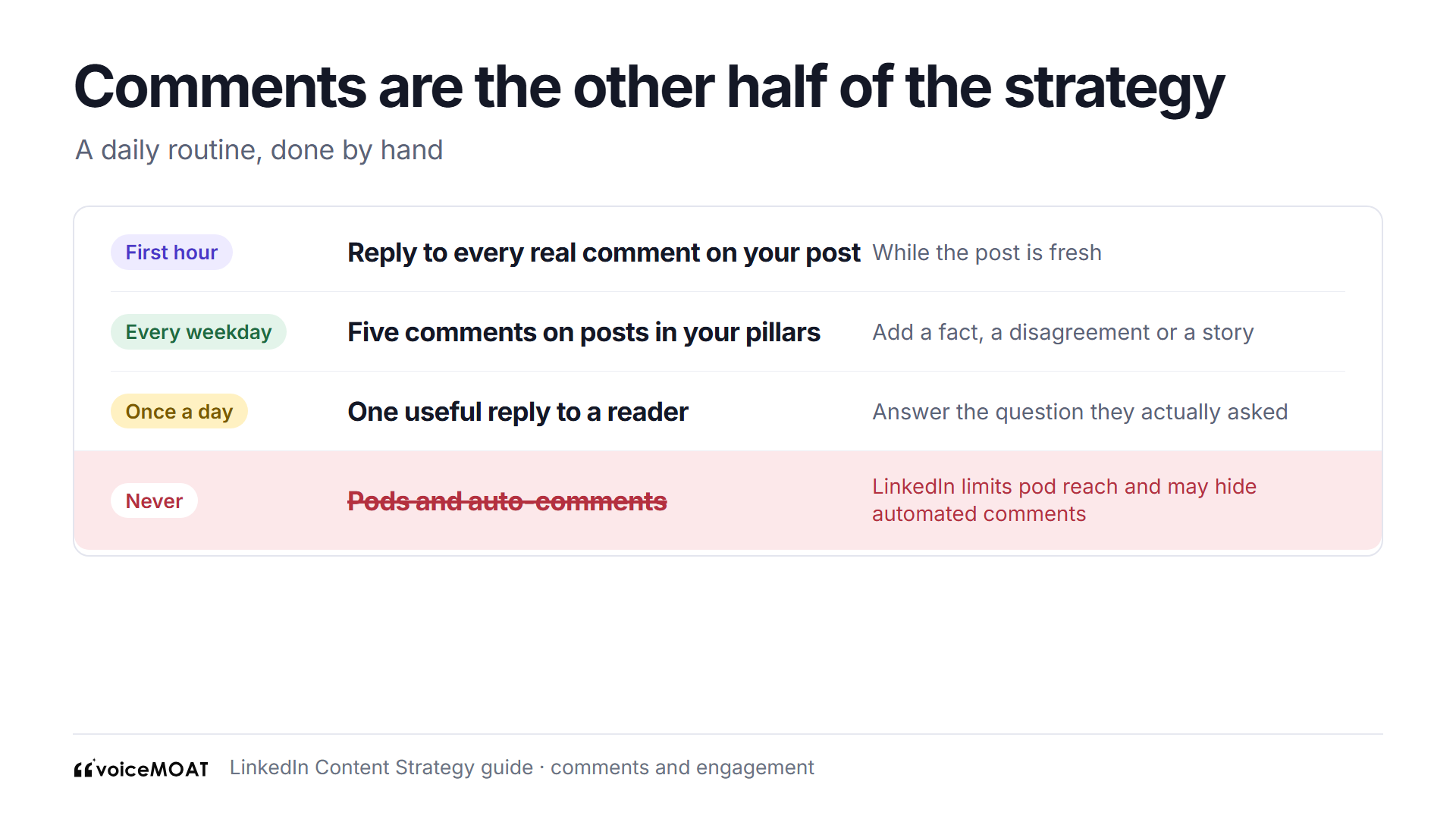
Comments are part of the plan. Write them yourself.
How to measure it
Most guides stop at "track your metrics". Here's a method for a personal profile that takes 20 minutes a month.
Keep one row per post with date, pillar, format, role, impressions, comments, followers gained and profile viewers. Then, once a month:
Measure | How to work it out | What it tells you |
|---|---|---|
Usual post | Median impressions of all posts this month | Your baseline. Every other number is compared with it |
Pillar strength | Each pillar's median divided by the usual post | Which topics to post more or less |
Followers gained per post | Total followers gained from posts divided by posts | Whether readers want more of you |
Profile viewers per post | Total profile viewers from posts divided by posts | Whether posts lead to you (the B2B number) |
Out-of-network share | Average across your top three posts | Whether you reach new people |
Rhythm kept | Posts made divided by posts planned | Whether the plan fits your week |
Leading numbers move weekly: impressions, comments, profile viewers.
Lagging numbers move over months: followers, messages, clients, interviews.
Write one sentence of decision at the bottom of the sheet: "Next month, two more pricing posts and one fewer team post."
The free engagement rate calculator works out engagement rate for any post.

One page, once a month, one change.
A worked example: one invented founder's first 90 days
This is invented, to show the steps working together. It isn't a result we measured.
Week 0. Goal: 20 profile viewers a week from posts by the end of the quarter. Starting point: 6 a week. Reader: founders of small software companies. Audit of 40 posts finds pricing (1.8x) and first customers (1.4x) above the usual post of 900, product updates below.
Weeks 1 to 4. Pillars: pricing 40%, first customers 40%, team 20%. Voice card written. Three posts a week, as in the sample month. Rhythm kept: 12 of 12.
Month 1 review. Pricing holds at 1.7x. First customers falls to 1.0x, but its document post reaches 1.6x. Change: first customers moves to document posts only.
Month 2 review. First customers back to 1.4x. Profile viewers 11 a week. Followers gained per post is flat on team posts. Change: team posts become a single monthly "how we decided" post.
Month 3 review. Profile viewers 17 a week, short of 20. Comments up. Change for next quarter: add one proof post a fortnight on the offer.
What to notice: one change a month, each tied to a number, and the goal was missed and still moved.
LinkedIn content strategy examples by role
The steps are the same for everyone. The goal, the pillars and the voice change. Every example here is invented.
You are | Goal to start with | Pillars usually come from |
|---|---|---|
Building a personal brand | Followers gained per post | What you know best and what you've lived |
A B2B founder or seller | Profile viewers, then conversations | Your buyers' problems and your own results |
A professional or job seeker | Profile viewers from posts | Your craft, your projects, what you're learning |
A company Page | Followers and clicks | Customer problems, proof and the people behind the company |
Founder of a small company
Goal: profile viewers from posts, then sales conversations
Pillars: lessons from building, first customers, one strong opinion about your market
Invented first line: "We lost our biggest customer in May. This is the email that would have kept them."
B2B seller or account executive
Goal: profile viewers from your buyers' companies
Pillars: the buyer's problem, what you see on calls (with no names), how buying decisions get made
Invented first line: "Every stalled deal this quarter had the same missing person in the room."
Consultant or freelancer
Goal: messages from people who could hire you
Pillars: your method, before and after from projects (with permission), mistakes clients make before they call you
Invented first line: "The first thing I cut from every website I rebuild is the same."
Job seeker or student
Goal: profile viewers, then recruiter messages
Pillars: what you're building, what you're learning, the field you want to work in
Invented first line: "Week six of building a budgeting app. The bug that took me three days was one line."
Recruiter
Goal: replies from candidates in one field
Pillars: what hiring managers actually want, salary and process honesty, open roles with real detail
Invented first line: "Three engineers turned down the same offer this month. All three gave the same reason."
CEO or executive
Goal: followers among customers, hires and investors
Pillars: decisions and why, the market as you see it, the people on your team
Invented first line: "We said no to a deal worth a quarter of our revenue. Here's how we decided."
Company Page
Goal: followers and clicks
Pillars: customer proof, how the product solves one problem, the team behind it
Invented first line: "Last month, a four-person clinic cut its booking time in half. Here's what they changed."

Same steps, different pillars. All six are invented.
For an executive or founder, the voice card from Step 5 matters most if someone else drafts the posts. For a Page, agree the company's card in writing, so whoever runs it posts the same way.
Common mistakes and how to fix them
Mistake | Why it hurts | Fix |
|---|---|---|
Six pillars | Nobody can say what you're about | Keep the top two or three from your audit |
Copying a template's pillars | You look like everyone else using it | Derive pillars from your own posts (Step 3) |
No goal number | You can't tell if anything worked | One goal, one number, one date (Step 1) |
Judging on one post | One outlier hides the trend | Use the median, review monthly |
Posting the same text on profile and Page | Readers see the same thing twice | Give each a different job |
Every post sells | Readers stop reading | One offer in about five to ten posts |
Bait endings ("Agree?") | LinkedIn says it shows engagement bait less | End on a view or one real question |
AI drafts nobody checks | Posts drift from what you think | Check each draft against your voice card |
Joining an engagement pod | LinkedIn says pods aren't allowed and limits their reach | Comment by hand on posts in your topics |
Changing five things in a month | You won't know what worked | One change per review |
Starting at seven posts a week | It stops by week three | Start at a rate you could hold through a bad month |
A LinkedIn content strategy template you can copy
Copy this into a doc or the top of your spreadsheet and fill it in. It should fit on one page.
The calendar has five columns: date, pillar, format, role, first line.
Ready-to-publish checklist
Run this on every post for the first month. After that, you'll do it without the list.
[ ] It belongs to one pillar.
[ ] It's written for the reader in Step 2.
[ ] The opening line gives a reason to keep reading.
[ ] It has one idea.
[ ] It includes something real: a number, a story or an example that happened.
[ ] It says something you believe, and nothing on your "framings I avoid" list.
[ ] It looks like your other posts (the style notes on your card).
[ ] It ends on a view, a takeaway or one real question, not bait.
[ ] It's under 3,000 characters, or it's an article.
[ ] You'll be around to reply in the first hour, by hand.

Run it on every post for the first month.
Using AI in your content strategy
LinkedIn's rule is short: "It's ok to use AI to help you write, but your posts and comments need to represent your voice and your perspectives." It also says AI-looking content without a clear perspective is less likely to reach people beyond your network (LinkedIn, May 2026).
Use AI for the sorting, such as tagging a year of posts by topic, or grouping customer questions by problem.
Give it your voice card, not just a topic. A tool that only gets "write about pricing" returns the average post about pricing.
Keep the views and stories yours. Any example should be one that happened.
Check stance, not just style. Read each draft and ask, line by line, "would I say this to a customer?"
Read every draft as a stranger would, and add something only you could have written.
How VoiceMoat helps
VoiceMoat is an AI social media tool for LinkedIn and Twitter. audenAI, the brain inside VoiceMoat, does the work and you decide what goes out.
The audit (Step 3): press Sync and the Chrome extension reads your newest 40 LinkedIn posts from your own logged-in session, or upload LinkedIn's .xlsx export. Analytics then shows "What format works" and, on Pro and up, "What topics work", which sorts your posts by topic and compares each group's median with your usual post.
Voice (Step 5): VoiceMoat builds a voice profile from your own posts. In Studio, Style counts how many of your habits a draft matches, free and live as you type. Stance (1 credit) reads each line against the claims, stories and framings in your own posts, and says On voice, Check one line or Off voice. The two are never blended into one score.
Pillars and calendar (Steps 4 and 8): Grow pre-fills its themes from the topics on your own posts, then draws a four-week pillar calendar you can edit for free before anything is drafted. On Pro and Enterprise, the mix leans toward the topics that measured best.
Drafts and schedule: Grow drafts each planned post from your own posts and ideas, at 2 credits a post, and each Grow post gets a Stance check. Studio drafts one-off posts. Nothing is queued until you press Schedule.

Stance reads each line against the claims in your own posts. Invented draft.
What it can't do:
It can't show out-of-network share or followers gained per post. Those stay on LinkedIn's own analytics page, so Step 9 still needs it.
It can't pick your goal. Grow leaves your goal and audience to you on purpose.
Its topic labels may not match yours. They come from VoiceMoat's own sorting. If they don't fit how you see your work, tag by hand.
Stance needs something to check against. With no claims found in your posts yet, there's nothing to compare, and Studio says so.
Grow isn't on Free or either trial. You can sync, see formats and run Stance on a trial, but the pillar calendar needs a paid plan.
Free | $1 trial | $5 trial | Creator | Pro | Enterprise | |
|---|---|---|---|---|---|---|
Price | $0 | $1 for 3 days | $5 for 3 days | $35 a month | $69 a month | $150 a month |
Credits | 10 a day | 100 in total | 250 in total | 150 a day | 250 a day | 400 a day |
LinkedIn analytics sync and import | Labelled sample only | Yes | Yes | Yes | Yes | Yes |
What topics work | No | No | Yes | No | Yes | Yes |
Stance check (1 credit) | No | Yes | Yes | Yes | Yes | Yes |
Grow pillar calendar | No | No | No | 7 days | 7 or 15 days | 7, 15 or 30 days |
Scheduled posts a day | None | 4 | 4 | 3 | 4 | 5 |
If you'd rather not keep the spreadsheet by hand, try VoiceMoat: Creator is $1 for 3 days.
Frequently asked questions
What is a LinkedIn content strategy?
It's a one-page plan covering your goal, your reader, two or three topics, your voice, the formats you use, how often you post and how you'll measure it.
What type of content works best on LinkedIn?
Posts on a clear topic with something real in them; in AuthoredUp's vendor data, document posts had the highest median reach and images were the most common format.
How many content pillars should I have on LinkedIn?
Two or three is enough for most people, because LinkedIn says its follow suggestions match creators by topic.
How often should I post on LinkedIn as an individual?
Start with two to five times a week, which Buffer's study of more than 2 million posts calls the sweet spot.
How often should a company Page post on LinkedIn?
Start with two posts a week and raise it once you can keep it up; LinkedIn's own Page guide says to try twice if you post once.
How long should a LinkedIn post be?
As long as the idea needs, up to LinkedIn's 3,000-character limit; past that, write an article.
Should every LinkedIn post sell something?
No; keep offers to about one post in five to ten, and at most one call to action a post.
Is there a LinkedIn content strategy template?
Yes: one goal with a number, one reader, two or three pillars with angles, a voice card, a format per pillar, a weekly rhythm and a five-column calendar, as in the template above.
Can I use AI for my LinkedIn content strategy?
Yes, for sorting posts and shaping drafts, as long as each post carries your own voice and perspective, which LinkedIn says it needs to travel.
How long does a LinkedIn content strategy take to work?
Give it three months before judging the whole plan, reviewing monthly; LinkedIn publishes no figure for this.
AI disclosure
This article was drafted with AI assistance and edited by Prateek Singh. LinkedIn's help, engineering, news and nonprofit pages and the study figures were read on the source pages on 11 November 2026. VoiceMoat is our product.
Keep reading

Growth
How to Grow on LinkedIn in 2026: 7 Steps and a 90-Day Plan
How to grow on LinkedIn in 2026: make your profile name your topics, post 2 to 5 times a week, use comments as a second feed, and track the numbers that show growth, with a 90-day plan.
10 min read
·

Growth
AI Content Calendar: How to Plan LinkedIn and Twitter Posts Around a Real Goal
How to build an AI content calendar for LinkedIn and Twitter that starts from a goal and your own numbers, with a free prompt, the mistakes to avoid and what VoiceMoat's Grow includes on each plan.
9 min read
·

Growth
LinkedIn Post Analytics: How to Read and Export Your Numbers
How to read LinkedIn post analytics one number at a time, what counts as a good result, and how to export your impressions, followers and demographics.
8 min read
·

Craft
Twitter content pillars that survive scale (and the ones that don't)
Most pillar advice tells you to pick 3 to 5 topics. That's necessary, not sufficient. Pillars without voice are just content categories your 200 competitors share. Here's how to pick pillars that stay recognizably yours over months and years.
9 min read
·
From the Twitter algorithm series
The Twitter/X algorithm in May 2026: why voice wins under the new transformer
Read ›