ai and voice
Why Every AI LinkedIn Post Sounds the Same (and How to Break the Pattern)
·
18 min read
·
By Prateek Singh, founder of VoiceMoat
Key takeaways
AI LinkedIn posts sound the same because a general model returns the statistical average of everything it read: safe, agreeable, coherent English with no memory of how you actually write.
The giveaway is a template: a bold hook, a mildly contrarian line, a tidy list of three, a neat moral, and a soft question at the end. Once you see it, you cannot unsee it.
ChatGPT, Gemini, Claude, and Copilot each drift generic in slightly different ways, but the root cause is identical: no personal context, so every model defaults to corporate-safe.
Edit checklists (cut the buzzwords, break the rhythm, add a real number and a named scene) genuinely work, but you have to repeat them on every single draft, forever.
VoiceMoat is the Personal Brand OS for LinkedIn and Twitter, whose writing partner, audenAI, learns your real voice once, so posts, replies, and DMs start in your rhythm instead of the template. Disclosure: VoiceMoat is our product.
If your AI LinkedIn posts sound the same as everyone else’s, you are not imagining it and you are not doing it wrong. Paste a rough idea into ChatGPT, Gemini, Claude, or Copilot, ask for a LinkedIn post, and you get back the same shape every time: a punchy one-line hook, a mildly contrarian claim, three tidy lessons, a clean moral, and a gentle question at the end. It reads fine. It also reads like it was written by nobody. This article explains exactly why that happens, shows how each model defaults to generic in its own way, and gives you a repeatable way out, including the honest trade-off between editing every draft by hand and using a tool that has already learned your voice.
How big is the AI LinkedIn problem?
Spend ten minutes scrolling LinkedIn and you can spot the AI-assisted posts without a detector. They share a cadence, a vocabulary, and a rhythm that did not exist at that scale two years ago. The reason is simple: a very large share of professional posts now pass through the same handful of models, and those models were trained to produce the most probable, least risky sentence at every step. When millions of people funnel their raw thoughts through the same statistical funnel, the output converges. Everyone’s LinkedIn starts to sound like the same slightly-too-polished coworker.
This is not a moral panic about AI. Used well, these tools are genuinely useful for beating the blank page, outlining, and pressure-testing an angle. The problem is narrower and more fixable: the default output has a recognizable house style, and that house style is now so common that it actively signals low effort. Readers scan text in an F-shaped pattern and skim past anything that feels generic, as Nielsen Norman Group research on online reading has documented for years. A post that opens with a template hook gets pattern-matched as AI and scrolled past before your actual idea lands.
So the stakes are practical, not philosophical. Sounding the same is not a style preference. On a feed built for attention, it is a distribution problem. If you want the mechanism in one line: the model is optimizing for plausible, and plausible is the enemy of memorable.
Why do LLMs converge on LinkedIn-safe English?
Trained to be safe, coherent, and agreeable, not original
A large language model predicts the next most likely token given everything before it. Then it is tuned further, with human feedback, to be helpful, harmless, and agreeable. Those are good goals for an assistant. They are terrible goals for a distinctive voice. Originality lives in the low-probability choices: the odd word, the abrupt sentence, the opinion that risks a disagreement in the comments. A model optimized to avoid risk and to please the average reader will steer away from exactly those choices. The training objective, described in the research literature on reinforcement learning from human feedback (arXiv), rewards output that a broad set of raters would approve of. Broad approval is the definition of generic.
This is why every model reaches for the same softening moves: hedges like ‘in today’s fast-paced world,’ permission words like ‘let’s dive in,’ and the reassuring three-item list. Those patterns scored well with raters because they are inoffensive. They read as competent and cost the writer nothing to approve. Multiply that by every professional prompting for a post and you get a feed that sounds like one enormous, agreeable committee. We break down the underlying dynamic in more depth in Why every AI draft sounds the same.
No personal context means you get the statistical average
Here is the part most people miss. When you open a fresh chat and type ‘write a LinkedIn post about hiring,’ the model knows nothing about you. It does not know your job, your history, the deal that fell through last quarter, the phrase you always use, or whether you write in short punches or long rolling sentences. With no personal context, it cannot write as a specific person. It can only write as the average of everyone who ever wrote about hiring. The output is not wrong. It is just nobody’s.
That is the real root cause behind every ‘why do my ChatGPT LinkedIn posts sound generic’ search, and it is identical for Gemini, Claude, and Copilot. The absence of you is the whole problem. You can partly fix it inside a single chat by pasting samples of your writing and describing your style, which we walk through in How to make ChatGPT sound like you on LinkedIn. But that context evaporates the moment the conversation ends, which is why the corporate default keeps coming back on the next post.
The AI LinkedIn template everyone now recognizes
Hook, contrarian line, tidy insight list, moral, CTA
The generic AI LinkedIn post is not random. It follows a five-part skeleton so consistent you can predict the next line before you read it:
The one-line hook, dropped on its own for drama: ‘Most people get this completely wrong.’
The mild contrarian turn: ‘But here is what nobody tells you.’
The tidy list of three, often with emoji bullets, each item a clean parallel phrase.
The neat moral that ties it up: ‘The lesson? Consistency beats intensity.’
The soft call to action: ‘What would you add? Let me know in the comments.’
Individually, none of these is a crime. The hook-and-payoff structure exists because it works. The problem is uniformity: when every post uses the identical scaffold with the identical rhythm, the structure itself becomes the tell. Your reader is not reacting to your idea. They are reacting to the shape, and the shape says ‘generated.’ A specific, voice-first version of the same idea breaks at least three of those five beats: it might open mid-thought, skip the contrarian setup entirely, replace the tidy list with one concrete scene, and end on a flat statement instead of a question. The content can be the same. The fingerprint is different. Our free LinkedIn post generator is built around that idea: it returns four options that take genuinely different positions on your topic rather than four wordings of the same scaffold, and it refuses the closing question outright.
How LinkedIn’s own Rewrite with AI reinforces the pattern
LinkedIn’s built-in Rewrite with AI feature makes this worse, not better, for a subtle reason. It is trained and tuned to produce posts that perform on LinkedIn specifically, which means it has learned the platform’s most rewarded patterns and pushes your draft toward them. Feed it your rough, slightly awkward, actually-human paragraph and it will hand back a cleaner version that has been sanded into the exact house style described above. It removes the friction that made the post yours. If you already suspect your posts sound like everyone else’s, running them through an on-platform rewriter is the fastest way to guarantee it. The same convergence happens across tools, which is why we treat it as a category problem in Why your AI tweets sound generic or robotic.
Does each AI model sound generic in the same way?
Not quite. The root cause is identical (no personal context, so they default to the average), but each model has a slightly different accent when it goes generic. Knowing the accent helps you spot and strip it faster. Here is how the four most common assistants tend to drift, and where each still needs your voice to sound like you.
Model | How it defaults to generic on LinkedIn | Where it still needs your voice |
|---|---|---|
ChatGPT | Reaches for polished symmetry: even paragraphs, the list of three, tidy morals, and confident summarizing phrases like ‘the bottom line.’ Very fluent, very forgettable. | Give it real samples and a concrete scene, or it writes the credible-sounding average of your topic. |
Gemini | Leans informational and slightly formal: it explains and contextualizes when you wanted a take, and can read like a helpful briefing rather than a person with an opinion. | Push it to commit to one argument and cut the throat-clearing context so a point of view survives. |
Claude | Writes smooth, careful, warm prose and hedges to stay balanced: it often qualifies claims and softens edges, so posts feel thoughtful but non-committal. | Ask for your natural bluntness and specific stakes, or it rounds every sharp corner into diplomacy. |
Copilot | Skews corporate and productivity-toned by default given its workplace framing: buzzwords, professional register, and safe framings arrive fastest here, so DMs and posts read robotic. | Feed it how you actually talk, not how a memo talks, to shake the office voice. |
Read those side by side and the pattern is clear: ChatGPT over-polishes, Gemini over-explains, Claude over-hedges, and Copilot over-corporate-izes. We test these differences head to head in The best AI assistant for writing LinkedIn posts. But notice the second column. Every single one lands in the same place: it needs your voice. That is the tell that model-hopping is not the fix. Switching from ChatGPT to Claude changes the accent of the generic, not the fact of it.
The durable fix is not choosing a better engine. It is grounding the draft in your own writing. This is exactly why VoiceMoat exposes only two user-facing tiers, audenAI Standard and audenAI Deep, and deliberately does not ask you to pick an underlying model. The differentiator that stops a post sounding generic is your voice, not the engine. Making you shop for a model would be solving the wrong variable.
[ from the team behind this blog ]
Post on LinkedIn and Twitter in a way that reads like you
VoiceMoat is the Personal Brand OS for LinkedIn and Twitter. audenAI, the brain inside it, learns from your own posts, then helps you create, schedule and grow.
Creator plan $35 a month after the trial. Cancel anytime.
The AI tells to hunt and kill in your LinkedIn drafts
Buzzwords, permission words, and the em-dash giveaway
Before you rewrite anything structurally, do a fast search-and-destroy on the surface tells. These are the words and marks that pattern-match as AI on sight. Three categories cause most of the damage: buzzwords that mean nothing, permission words that ask the reader to let you continue, and punctuation habits (especially the em-dash used mid-sentence for a dramatic pause) that models overuse far more than most humans do. Here is a working banned-phrase checklist for LinkedIn. If a draft contains these, it is almost certainly running on autopilot:
Opening filler: ‘In today’s fast-paced world,’ ‘In an era of,’ ‘Now more than ever.’
Permission words: ‘Let’s dive in,’ ‘Let’s unpack this,’ ‘Buckle up,’ ‘Here’s the thing.’
Empty intensifiers: ‘game-changer,’ ‘unlock,’ ‘supercharge,’ ‘leverage,’ ‘seamless,’ ‘robust.’
The tidy-moral closer: ‘The lesson?’ ‘The takeaway is simple,’ ‘At the end of the day.’
The reflexive CTA: ‘Thoughts?’ ‘Agree?’ ‘What would you add?’ on every single post.
Structural tics: the dramatic em-dash mid-sentence, the list of exactly three, perfectly even paragraph blocks.
You can automate the first pass. Paste your draft into a chat with the prompt below, or run it through a free helper like the humanize AI text tool, and you clear most of the surface tells in one move. Just know that stripping words is cosmetic. It removes the smell of AI without adding the substance of you. That is the difference between a post that no longer sounds like a bot and a post that sounds like a specific human, and only the structural edits in the next section close that second gap.
Copy-paste prompt: ‘Here is a LinkedIn draft. Remove every AI tell: delete opening filler, permission phrases (let’s dive in, buckle up), empty buzzwords (unlock, leverage, game-changer, seamless), and any mid-sentence em-dash. Break the paragraph symmetry so line lengths vary. Do not add a tidy moral or a Thoughts?-style question at the end. Keep my exact facts and any specific numbers or names. Return only the cleaned draft.’
Six edits that make an AI LinkedIn post sound human
Once the surface tells are gone, six structural edits do the real work of turning a generic draft into a post that sounds like you. Run them in order. They move from fastest and most mechanical to slowest and most valuable.
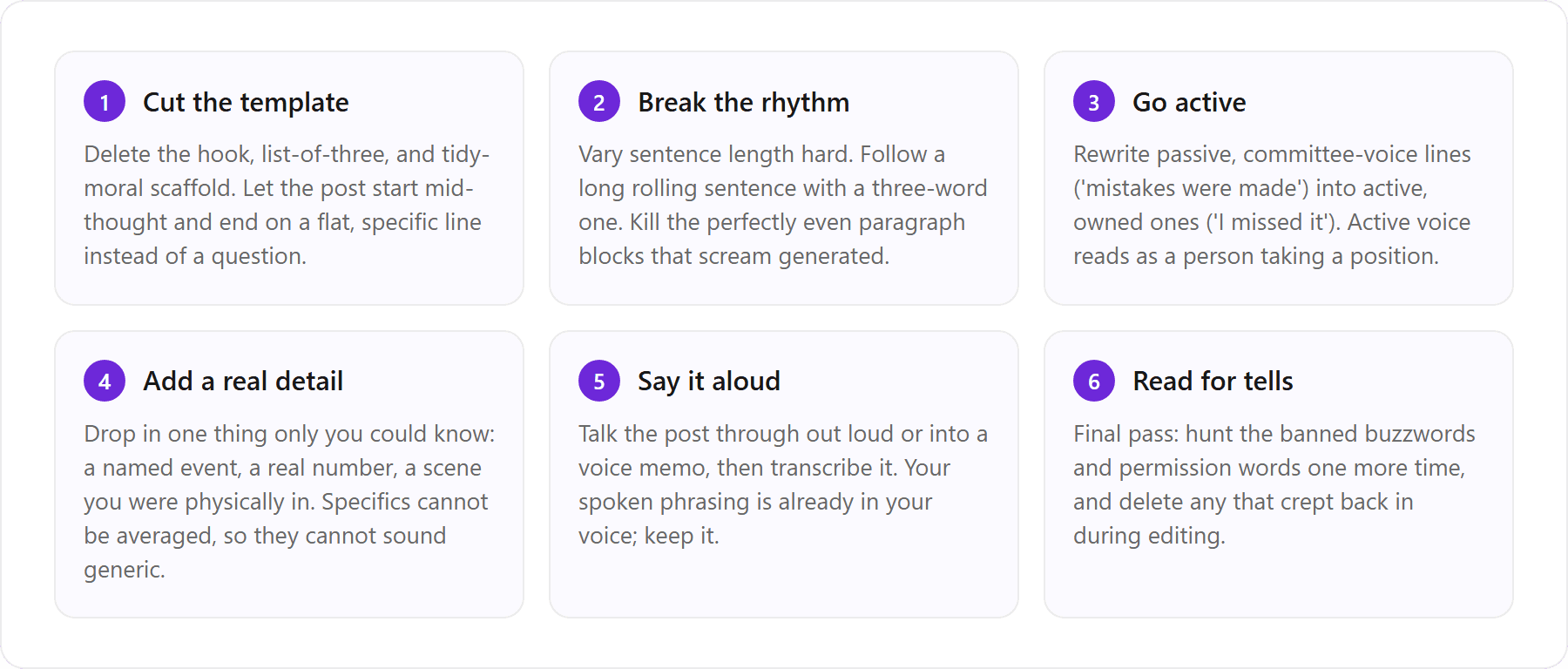
Break paragraph symmetry, convert passive to active
The two fastest wins are rhythm and voice. Generic AI text has an eerily even texture: paragraphs of similar length, sentences of similar shape, a steady metronome that never surprises you. Real writing lurches. It runs a long sentence, then stops. Then it fragments. Break the symmetry on purpose and the post immediately reads more human, even before you change a single fact. Then convert passive constructions to active ones. Passive voice is how organizations write to avoid blame (‘a decision was reached’); active voice is how people write (‘we decided, and I pushed for it’). Active sentences carry ownership and opinion, which is exactly what the generic default sands away. Our full De-AI playbook for human-sounding writing goes deeper on both moves.
Add a named event, a real number, or a scene you were in
This is the single highest-leverage edit, so it is worth doing well. A model can generate a plausible claim about hiring. It cannot generate the specific Tuesday you rescinded an offer, the exact 34 percent that surprised your team, or the thing your CFO said in the hallway afterward. Specifics are the one input the statistical average cannot fake, because they never appeared in the training data in that combination. Every concrete detail you add is a place where the generic literally cannot follow you. Then, if you can, say the whole thing out loud and transcribe it. Spoken language is already voice-shaped: it has your filler, your emphasis, your natural sentence length. Transcribing and lightly cleaning a voice memo often beats any amount of prompt engineering.
Here is the honest catch. These six edits work, but they are the manual, per-post version of the fix. You do not do them once and graduate. You do them on this draft, and the next draft, and the one after that, because the model resets to the corporate average every time you open a fresh generation. The checklist treats the symptom on each occurrence. It never treats the cause. That is fine if you post twice a month. It becomes a real tax if you are trying to post daily on LinkedIn and Twitter. The durable alternative is a tool that has already learned your voice, so most of these edits are baked into the first draft instead of applied by hand each time. More on that below.
Why does my ChatGPT cold DM sound like a bot?
Voice-matched outreach vs template spam
Cold DMs expose the no-context problem even more brutally than posts, and it is why ‘ChatGPT cold DM sounds like a bot’ is such a common complaint. A general model has no memory of how you actually message people. It does not know that you open with a lowercase ‘hey’ and get to the point in one line, or that you never say ‘I hope this message finds you well.’ So it reaches for the safest, most polite filler it can find: the formal greeting, the flattering preamble, the ‘I would love to connect and explore synergies.’ The recipient has seen that exact opener a hundred times this week. It reads as a bot because, functionally, it is: a template with the blanks filled in.
The fix for outreach is the same as for posts. The message has to carry your real phrasing and one specific, true reason you are reaching out to this person, not a mail-merge compliment. This is where reusing your learned voice pays off across surfaces instead of just posts. In VoiceMoat, reply and DM drafting in Engage runs on the same audenAI voice model as your posts, so outreach carries your actual rhythm and vocabulary rather than a template opener. A DM that reads like the way you already talk gets answered. A DM that reads like every other automated pitch gets archived. We cover the wider playbook in Using AI for LinkedIn engagement: comments, connections, and cold DMs.
What generic posts actually cost you
It is tempting to treat sounding generic as a cosmetic issue. It is not. On LinkedIn, voice is the whole asset. The reason anyone follows a person rather than a brand page is that they want a specific point of view from a specific human. When your posts converge on the template, you quietly hand back the one thing that made you worth following. The costs stack up:
Lower reach: readers pattern-match the template as low-effort and scroll past before your idea registers, so the algorithm sees weak early engagement and stops showing it.
Weaker trust: a post that sounds like everyone else’s reads as if you did not really mean it, which is corrosive for anyone selling expertise.
No compounding: distinctive voice is what makes people remember you across posts. Generic posts do not accumulate into a recognizable presence, so each one starts from zero.
Detection risk: AI-flavored text is increasingly easy to spot, both by humans and by tools like Originality.ai, and a feed that reads as automated invites exactly the skepticism you are trying to overcome.
None of this means stop using AI. It means the generic default is a liability you have to actively fight on every post, which brings us back to the core question: do you want to fight it by hand forever, or fix it once?
The durable fix: AI that learns your voice, not a vending machine
The lasting fix for AI LinkedIn posts that sound the same is not a better prompt or a better model. It is the Personal Brand OS for LinkedIn and Twitter that learns your voice once and keeps writing in it, so audenAI drafts away from the corporate average instead of resetting to it on every generation. A general chatbot is a vending machine: you put in a prompt, it returns the statistical average, and it forgets you the moment the chat closes. A voice-trained tool is the opposite. It starts from you and stays there.
How VoiceMoat and audenAI write in your voice by default
VoiceMoat is the Personal Brand OS for LinkedIn and Twitter. Its writing partner, audenAI, learns your real LinkedIn and Twitter voice once from your genuine posts (your sentence rhythm, your vocabulary, the hooks and structures and punctuation you actually use), so the posts, replies, and DMs it drafts read like a specific person rather than the LinkedIn-safe template every model defaults to. Because the voice is learned rather than re-pasted, the corporate default does not come back on the next generation the way it does in a fresh chat. Concretely, that means LinkedIn drafting in your voice in VoiceMoat Studio, reply and DM drafting in Engage on the same voice model, scheduling for both platforms, and analytics to see what actually lands. audenAI suggests; you approve every draft.
One disambiguation, because the names look alike: VoiceMoat is the Personal Brand OS for LinkedIn and Twitter, not the Voicemod voice changer, and audenAI models writing patterns for posts and DMs, not audio. Disclosure: VoiceMoat is our own tool, so read this section as our pitch and let the sample posts and DMs make the case for you. The honest scope is drafting in your voice, reply and DM drafting, scheduling, and analytics across both platforms. It does not write itself without you, and it will not replace your judgment about what is true or worth saying.
That is the whole difference between treating the symptom and treating the cause. The six manual edits above are the per-post cure you reapply forever. Learning your voice once is the structural cure that makes most of those edits unnecessary on the first draft. If you want to stop de-robotizing every post by hand, connect LinkedIn and Twitter, let audenAI learn your voice, and draft your next post and DM free. Paid plans start at $35 per month, and you can see the full breakdown on pricing. Try one real post in your own voice, in VoiceMoat Studio, and judge it against the generic version you would have shipped otherwise.
Frequently asked questions
Why do all ChatGPT LinkedIn posts sound the same?
Because ChatGPT predicts the most probable sentence and is tuned to be safe and agreeable, and because a fresh chat has no personal context about you. With nothing specific to draw on, it can only write the statistical average of everyone who ever wrote about your topic, which lands as the same polished hook, tidy list of three, and neat moral every time. Give it your real samples and one concrete scene and it drifts less, but the default resets on the next post.
Can AI write LinkedIn posts that don't sound like AI?
Yes, but only when the AI has something specific to work from: your real writing samples, a true detail (a named event, a real number, a scene you were in), and instructions to break the template rhythm. A general chatbot loses that context every session, so you re-supply it forever. A voice-trained tool keeps it, which is why the output stops sounding generic by default instead of one careful draft at a time.
How do I remove the AI sound from a LinkedIn post?
Do two passes. First, strip the surface tells: delete opening filler ('in today's fast-paced world'), permission words ('let's dive in'), empty buzzwords ('unlock', 'leverage', 'game-changer'), and the mid-sentence em-dash. Second, do the structural work: break paragraph symmetry, convert passive voice to active, and add one specific detail only you could know. The first pass stops it sounding like a bot; the second makes it sound like you.
How do I make a ChatGPT LinkedIn post not sound corporate?
Cut the corporate scaffolding on purpose. Remove the tidy list of three and the neat moral, rewrite committee-voice passive lines into active ones you own, and drop in a real number or a named moment instead of a general claim. The fastest single move is to say the post out loud, transcribe it, and lightly clean the transcript, because your spoken phrasing is already in your voice rather than the office register.
Why does my Copilot LinkedIn post or cold DM sound robotic?
Copilot's workplace framing pushes it toward a professional, productivity-toned register fastest, so buzzwords and safe corporate phrasing arrive by default. Cold DMs are worse because the model has no memory of how you actually message people, so it reaches for polite filler like 'I hope this finds you well' and 'explore synergies.' Feed it how you really talk and one true, specific reason you are reaching out, and the robotic opener disappears.
Is there an AI tool that writes LinkedIn posts in my own voice instead of the same generic template?
Yes. VoiceMoat is the Personal Brand OS for LinkedIn and Twitter, whose writing partner, audenAI, learns your voice once from your real posts and then drafts posts, replies, and DMs in your own rhythm and vocabulary, so it does not converge on the safe, template-shaped English every general model defaults to. You still approve every draft: audenAI suggests, you decide. (Disclosure: VoiceMoat is our product. Try it for $1 for 3 days; plans from $35 a month.)
AI disclosure
This article was written by Prateek Singh with AI assistance and human review. VoiceMoat and its audenAI writing partner are our own products, so the sections that recommend them are our pitch; we have tried to keep the claims honest and limited to what the tool actually does (drafting in your voice, reply and DM drafting, scheduling, and analytics across Twitter and LinkedIn). Third-party tools named here (ChatGPT, Gemini, Claude, Copilot, LinkedIn, Originality.ai) are the property of their respective owners and are referenced for comparison only.
Keep reading

AI and Voice
Every social MCP connector reaches both platforms. That is not the hard part
We were going to write that connecting one assistant to both Twitter and LinkedIn was rare. It is not. More than twenty connectors do it and several are free, so channel coverage is table stakes and every roundup ranking them by it is measuring the wrong thing. Here is what actually differs between them, and the one thing we read enumerated tool lists for six of them to confirm nobody does at all.
11 min read
·

AI and Voice
Why your Claude writing skill doesn't sound like you
There are dozens of free Claude skills for writing, and almost all of them do the same thing: strip out phrases that read as machine-written. That is subtraction, and it leaves you sounding like nobody in particular rather than like yourself. The handful that actually learn a voice from your own writing have a fraction of the users. Here is the difference, why a skill cannot post anything no matter what it says, and where the file actually goes on every surface.
13 min read
·

AI and Voice
Hootsuite alternatives in 2026, priced from the vendors' own pages
Hootsuite starts at $99 per user a month, not $19. Here is what the realistic alternatives cost, read off each vendor's own pricing page in both billing positions, plus the clause in Hootsuite's terms that its pricing page does not mention.
10 min read
·

AI and Voice
Taplio alternatives in 2026, priced from the vendors' own pages
Four LinkedIn tools people move to from Taplio, priced from each vendor's own pricing page rather than from each other. Includes the arithmetic on Taplio's Pro tier, which does not add up, and one name still on every recommendation list that has quietly shut down.
11 min read
·

AI and Voice
How to train AI to write in your voice: the cross-model guide
You can get ChatGPT, Claude or Gemini to write in your voice, but only partly and only for one session, because chat models forget your style between chats. This cross-model guide covers the analyze-then-write prompts that work, the settings that make them stick, the four levels of personalized AI content, a reusable instruction block for tweets, and the persistent alternative for anyone who posts regularly.
16 min read
·
From the Twitter algorithm series
The Twitter/X algorithm in May 2026: why voice wins under the new transformer
Read ›

