ai and voice
How to train AI to write in your voice: the cross-model guide
·
16 min read
·
By Prateek Singh, founder of VoiceMoat
Key takeaways
You can get ChatGPT, Claude or Gemini to write in your voice, but only partly and only for one session: paste your samples, ask the model to analyze your style, then write against that analysis.
Personalized AI content has four levels: generic, prompt-personalized, memory-personalized and trained on your own posts. Only the last starts from your patterns instead of a description of them.
Custom instructions, Claude Projects and Gemini Gems cut the re-pasting, but they store a fixed description, drift over long chats and do not raise the voice ceiling.
For tweets, keep a separate Twitter profile and a six-part instruction block: role, voice rules, taboos, real examples, output format and a self-check.
Negative rules (no em dashes, no delve, no cliches) strip the AI tells. They remove the machine's voice; they do not add yours.
If you post regularly, a tool that learns from your own posts once saves the re-teaching. VoiceMoat is our product; judge it against the prompts here on your own posts.
Updated 23 October 2026. This guide now also covers personalized AI content (the four levels of personalization and what each produces) and a Twitter-specific section on making ChatGPT write tweets in your voice, with a reusable instruction block.
If you have searched for how to train AI to write in your voice, you already know the problem: ChatGPT, Claude, and Gemini can write a competent post in seconds, but it comes out sounding like everyone else’s post. This is the honest, cross-model guide to closing that gap. You will get the exact prompts that make a model analyze your writing and then draft in your style, the settings that make it stick a little longer, and a clear-eyed account of where every prompt-based method quietly breaks. We cover ChatGPT, Claude, and Gemini together, because the technique is the same across all three, and so is the ceiling.
Can ChatGPT write like you? The honest answer
Yes, with a real but limited success. Give a model a handful of your posts and a clear instruction, and it will imitate your tone, your sentence rhythm, and a lot of your vocabulary. What it will not do on its own is remember that voice tomorrow, or learn from the edits you make today. That gap is the whole story, so it is worth being precise about what ‘writes like you’ actually means.
What AI can match: tone, rhythm, and vocabulary
Given enough examples, a model is genuinely good at surface patterns: whether you write in short punchy lines or long rolling sentences, whether you open with a question or a claim, which words you reach for and which you avoid. These are the same signals a human editor would notice. If you want the deeper version of what voice is actually made of, we break it down in the 10 signals of voice.
What it cannot do: hold your voice across sessions
Here is the part the tutorials skip. A general chat model is stateless about you. When you close the window, the analysis you pasted is gone, and the next chat starts from the generic default again. Custom instructions and memory help at the margin, but they do not learn from your corrections, and they were not built to carry a full writing profile. This is why prompting is the right tool for a one-off post and the wrong tool for a posting habit. If your goal is to publish on Twitter and LinkedIn every week, you will feel the difference fast.
The realistic ceiling
Set expectations honestly. A well-fed prompt gets you part of the way, which is enough that a stranger might not clock it and not enough that a regular reader would mistake it for you. The last stretch is the hard part, because it depends on the model remembering your edits and your best-performing posts, which is exactly what it cannot do. That is the honest ceiling of a prompt.
Here is the whole method on one screen. The five steps below work the same way in ChatGPT, Claude, and Gemini, so once you have done it once you can run it anywhere.
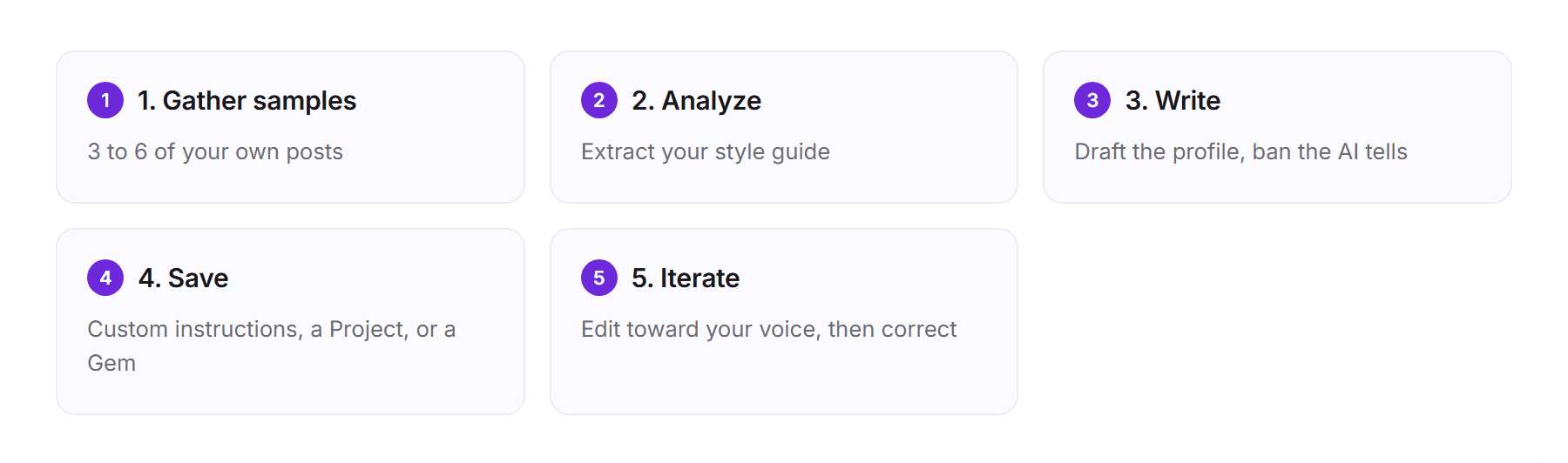
The five-step method to train any AI on your writing voice, start to finish.
Personalized AI content: the four levels
Personalized AI content is content an AI generates from a model of your own writing, so it carries your voice. Generic AI content comes from the model’s trained average, the same agreeable register for everyone who types the same prompt. (Marketers also use the phrase for tailoring content to audience segments; this guide is about the writer side.) How personalized your output gets depends on which level you are working at.
The four levels of AI content personalization, and the ceiling each one hits.
Level | What it is | What you get | The ceiling |
|---|---|---|---|
0. Generic | A raw prompt | Fluent, on topic, reads like everyone | It is the average by design |
1. Prompt-personalized | You paste samples or a style guide (steps 1 to 3 below) | Gestures at your style, then drifts back | A description in context, gone when the chat ends |
2. Memory-personalized | Custom instructions, memory, a Project or a Gem (step 4) | Remembers your topics and preferences | Stores notes about you, not a model of how you write |
3. Trained on your posts | A profile built from your own published posts | Drafts that start from your patterns and can be checked against them | Needs a one-time setup and enough posts to learn from |
The jump that matters is between levels 2 and 3. The first three describe your voice to a general model; level 3 starts from your own posts. Here is the difference in texture, using two constructed examples on the same idea:
In today’s fast-paced world, building an audience takes consistency and authenticity. Here are three key strategies to unlock your full potential. Stay consistent. Provide value. Engage genuinely. (Level 0, constructed example.)
I grew faster the month I stopped trying to sound smart. Nobody screenshots the polished take. Consistency matters, sure. But consistency in a voice nobody recognizes is just noise on a schedule. (Level 3, constructed example.)
The first could come from anyone; the second has a rhythm and a point of view you could pick out of a feed. Personalized AI content is not impersonation: it uses your own posts, with your consent, and you approve what gets published. For a general assistant versus a purpose-built tool, see the best AI tools for personal branding.
Step 1: gather your writing samples
Everything downstream depends on the input. The model cannot infer a voice it has never seen, so the first job is to collect real examples of you writing like you.
How many samples: 3 to 6 versus 20,000 words
You will see advice ranging from three or four posts to twenty thousand words. Both are right for different goals. For a single social post, three to six of your strongest recent posts are enough to anchor tone and rhythm. For a style guide you intend to reuse, more is better, because the model averages across what you give it, and a wider sample captures your range instead of one mood. Pick examples you would be happy to see echoed back.
Which samples to pick for a social media voice
Posts you wrote yourself, not ones you already ran through an AI, or you will train it on the generic voice you are trying to escape.
A spread of modes: a hot take, a teaching post, a personal story, a reply. Your voice shifts between them, and the model should see that range.
Your best-performing posts, so the style it learns is the one your audience already responded to.
Nothing you copied or quoted, so the sample is your voice and not someone else’s.
Step 2: ask the AI to analyze your writing style
Do not jump straight to ‘write a post like me.’ First make the model describe your style in its own words. This forces it to extract concrete patterns you can then reuse, and it gives you a style summary you can save. Paste five or six samples, then use a prompt like this one.
Here are several posts I wrote. Analyze my writing style and return a concise profile covering: sentence rhythm and length, tone and how it shifts, the words and phrases I reach for and the ones I avoid, my hook patterns, my punctuation habits, and my typical structure. Be specific and quote short examples. Do not flatter me; describe what is actually there.
The output is your style guide: a portable summary you can drop into any model. Read it critically. If it misses something that matters, tell it, and have it revise. The better this profile, the better the drafts that follow.
As a sanity check, a good style guide reads like something a sharp editor would say about you, not marketing filler. ‘Your tone is professional and engaging’ is useless. ‘You open with a one-line claim, you keep paragraphs to two sentences, you favor concrete nouns over adjectives, and you almost never use exclamation marks’ is a profile you can actually write against. If what comes back is vague, the drafts will be vague too, so push the model to be specific and to quote your own lines before you move on.
Step 3: the analyze-then-write method
Now use the profile to generate. Keep the analysis in the same chat (or paste the saved profile) and ask for a draft on your topic. The two-step order matters: a model that has just articulated your style writes closer to it than one told only to sound like you.
Using the style profile above, write a [Twitter post / LinkedIn post] about [topic]. Match my rhythm, tone, vocabulary, and hook pattern. Give me three versions. Do not use em dashes, and do not use words like ‘delve’, ‘leverage’, ‘unlock’, or phrases like ‘in today’s fast-paced world’.
Add negative constraints (no em dashes, no clichés)
The banned-word list matters more than it looks. Large models lean on a small set of tells: the em dash, a handful of overused verbs, a breathless intro. Cutting them removes the most obvious signals that a machine wrote the text. We keep running lists of the em-dash AI tell and the words AI overuses, and you can paste any draft into our free humanize AI text tool to catch the ones you miss. Just remember what this step does and does not do: it removes the machine’s voice, it does not add yours. For the deeper reason so much AI output converges on the same feel, see why AI drafts all sound the same, and for the full de-AI playbook, see how to make AI writing sound human.
[ from the team behind this blog ]
Post on LinkedIn and Twitter in a way that reads like you
VoiceMoat is the Personal Brand OS for LinkedIn and Twitter. audenAI, the brain inside it, learns from your own posts, then helps you create, schedule and grow.
Creator plan $35 a month after the trial. Cancel anytime.
Step 4: save your voice into custom instructions, projects, and gems
To avoid re-pasting your profile in every chat, save it where the model will reuse it. Each assistant has its own slot, and each has limits worth knowing.
ChatGPT custom instructions and memory (and their limits)
In ChatGPT, paste your style profile into custom instructions so it applies to new chats, and let memory retain a few stable preferences. This is genuinely useful, and it is also where people overestimate what they are getting. Per OpenAI’s own documentation on custom instructions and memory, these are static preferences, not a learning loop: the model does not study your edits and improve. Over a long chat, the instructions also get diluted by everything else in the context. Refresh them when drafts start drifting.
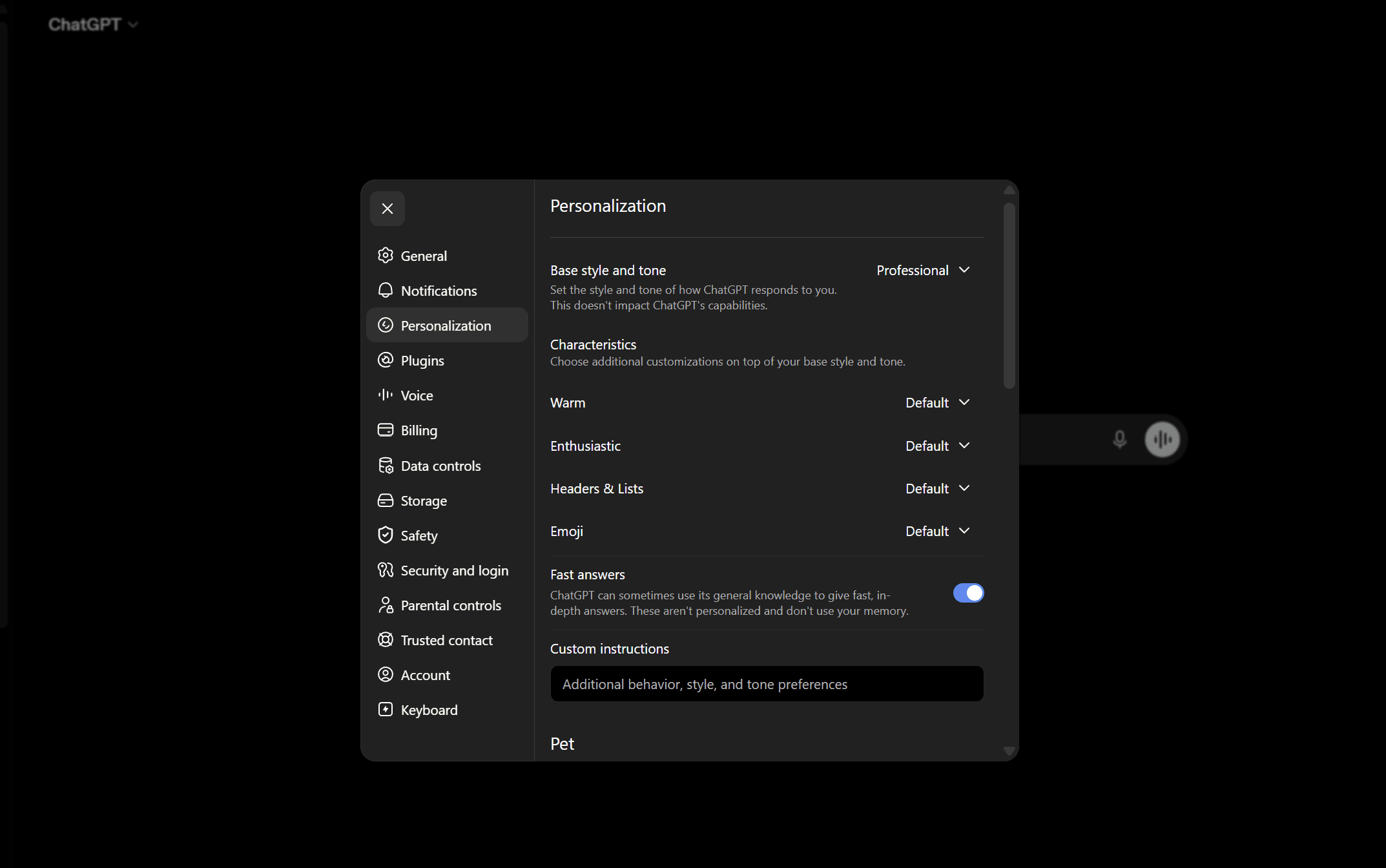
Save your style guide into ChatGPT Custom Instructions so it applies to new chats. It still will not learn from your edits.
Claude Projects and Gemini Gems: how to make Gemini write like you
Claude offers Projects, where you can pin your style profile and reference posts as persistent context for everything in that project (see Anthropic’s Projects documentation). To make Gemini write like you, save your profile as a Gem, a reusable custom assistant, per Google’s Gemini help on Gems. Both are better than re-pasting every time, and both share the same ceiling as ChatGPT: they hold a fixed instruction set, they do not learn from the way you rewrite their output.
A practical note on how long any of this lasts. The more you pile into a single chat, the more your saved instructions get crowded out by the rest of the context, so a draft ten messages deep drifts further from your voice than the first one did. Start a fresh chat for a fresh post, and refresh your saved profile every few weeks as your writing changes. None of these systems will do that upkeep for you, which is the recurring theme of this guide.
Step 5: iterate, edit, and de-robotize
No first draft lands. The realistic loop is generate, then edit toward your voice, then feed the edit back as a correction. Be specific: ‘too formal, I never say furthermore’, ‘the hook is buried in line three, move it up’, ‘cut the summary sentence at the end, I never write those’. Specific feedback moves a draft further than another vague ‘make it sound like me’.
Once your setup is in place, check that it works before you trust it: how to tell if AI really writes like you gives you seven tests, from a stance read to a blind test with people who know your writing.
The de-robotizer rewrite prompt
Rewrite this so it reads like I wrote it, not an assistant. Break any too-even rhythm, cut the throat-clearing intro, remove hedging, and keep only the words I would actually use. No em dashes, no clichés, no summary sentence at the end.
One caution: every session you do this in is a session you will have to repeat. The edits you just made teach the model nothing for next time.
A worked example: one post, start to finish
Theory is easy; the loop is where it gets real. Say you want to post on LinkedIn about a launch that slipped a week. Step one, you paste six of your recent posts. Step two, the model returns a profile: short opening line, one idea per paragraph, dry humor, no hashtags, and you never use the word excited. Step three, you ask for three versions using that profile, with the em dash and the word delve banned. Step four, you save the profile to custom instructions so tomorrow’s post starts from the same place. Step five, you pick version two, cut its throat-clearing first sentence, swap one corporate verb for the one you actually use, and post it.
That final edit is the tell. It took you thirty seconds, and it is exactly the kind of correction the model will not remember. Next week, on the next post, you make the same thirty-second fix again. Multiply that across a year of posting and you have the real cost of prompting: not any single session, but the fact that none of them add up.
How to make ChatGPT write tweets in your voice
The five steps work on any platform, but your Twitter voice and your LinkedIn voice are usually different: shorter, sharper and more opinionated on Twitter; more structured on LinkedIn. Feed a model a mix of both and you get a muddy average that fits neither. Keep two profiles, labelled by platform, and tell the model which one to use. For tweets, build the profile from 30 to 50 of your most characteristic posts (not just your best performers) and make it cover:
Vocabulary. 15 to 20 words that are unmistakably yours, and your register (plain, technical, profane, formal).
Rhythm. Short and punchy, long and winding, or alternating; whether you lead with the point or build to it. Our free voice and tone analyzer reads this from a few pasted posts.
Hooks. Your three or four recurring opener shapes: question, claim, number, story cold open.
Formatting. Line breaks, one-line paragraphs, lists, capitalization quirks, emoji or the deliberate lack of it.
Topics and angles. The two or three things you are known for, and the angle you usually take on each.
A taboo list. The words and structures you never use. It is the part the model breaks first, so it is the most useful part.
A reusable ChatGPT instruction block for tweets
Put this in custom instructions or a custom GPT, in this order:
Role. “You draft tweets and threads for me. You suggest, I decide.”
Voice rules. Your vocabulary, rhythm and hook patterns, written as instructions, not adjectives. “Short declarative sentences, open with a number or a claim, one idea per post” is usable; “witty and authentic” is not.
Taboos. Hard bans: no em dashes, no “In a world where”, no delve, leverage, unlock or tapestry. Our free AI detector flags these in a draft.
Examples. Three to five of your real tweets, pasted in full and labelled as voice references. Examples beat rules, because they are evidence rather than interpretation.
Output format. “Three options, each under 280 characters, no hashtags, no emoji unless I ask.”
Self-check. “Before returning, reread each draft and cut anything that reads like a generic marketing account.”
Expect drift inside a session: the first draft after the instructions load is usually the closest, and by the fifth or sixth turn the model has slid back toward its default, so restate your rules or start a fresh chat. The practical fixes for that pull toward the average, tell by tell, are in why AI tweets sound generic and how to fix them, and a tested prompt set is in the best ChatGPT prompts for Twitter. For LinkedIn, see how to make ChatGPT sound like you on LinkedIn, and for Claude, how to make Claude write in your voice.
When the manual ChatGPT method is the right call
If you post occasionally, enjoy the editing pass and use the model as a sparring partner, the style guide plus custom instructions is a perfectly good answer and you do not need anything more. It earns its replacement when your content is the asset people follow you for and the editing tax on each post starts eating the time the model was supposed to save.
Common mistakes that keep it sounding like AI
Most people who say the AI still does not sound like them are making one of these mistakes.
Feeding it AI-written samples. If your examples were themselves generated, you are training the model on the generic voice you are trying to escape. Use only posts you actually wrote.
Asking for the voice and the topic in one breath. Analyze first, write second. A model that has just described your style writes closer to it.
Skipping the negative constraints. Without an explicit ban, the em dash and the overused verbs come back every time. Keep the words AI overuses on hand.
Treating setup as permanent. Custom instructions and Gems drift and get dated. If drafts start sliding back toward generic, refresh the profile.
Judging on vibes. If you cannot say whether a draft reads like you, you cannot improve it. Read the draft next to a real post and mark the specific lines that are off.
Why you have to re-teach it every time
Step back and the pattern is clear. General chat models are stateless about your style. Custom instructions and Gems and Projects reduce the re-pasting, but they store a fixed description of your voice, not a living model of it, and none of them learn from your edits. So every new post starts near the generic default, and you pay the same tax again: paste the samples, run the analysis, add the constraints, fix the output. It works, but it does not compound. Your hundredth post is no easier than your first.
Why prompting has a ceiling
The ceiling is mechanical, not a prompting skill issue. A general model is trained to predict likely text across a huge corpus and then tuned with reinforcement learning from human feedback to be a fluent, agreeable assistant. That pulls output toward the center. Your voice sits far from the center, and a pasted sample is only a description of it in the context window, not what the model generates from. So the first lines land close to you and later lines slide back toward the default, within a post and across a session. A custom GPT, a Project or a Gem is the same lever with a nicer handle: the model behind it has the same trained center, which is also why switching between assistants does not fix voice (Claude vs ChatGPT for content writing compares the two).
Here is where the prompt-based approach leaks, tool by tool, and what a purpose-built tool does instead.
Where prompt-based voice matching leaks across ChatGPT, Claude, and Gemini, and what a persistent tool trained on your posts does differently. Based on each tool’s published behavior as of July 2026; verify against current docs.
Capability | ChatGPT, Claude, Gemini | VoiceMoat (audenAI) |
|---|---|---|
Re-paste your samples each session | Yes, every new chat | No, it learns your posts once |
Holds your voice across sessions | Limited, drifts over long chats | Yes, a persistent per-user profile |
Learns from your edits | No | Yes, corrections refine the profile |
Keeps up negative constraints (no em dashes, no clichés) | Manual, re-added per prompt | Built in, it avoids the AI tells by default |
Measures how closely output matches you | No | Yes, Style and Stance checks |
The persistent alternative: learn your voice once with audenAI
Full disclosure first: VoiceMoat is our product, so treat this section as the maker’s take and judge it against the prompts above on your own posts. VoiceMoat is the Personal Brand OS for LinkedIn and Twitter, and audenAI, the brain inside it, learns your voice from your own posts on each platform, so the profile persists instead of being re-pasted into a fresh chat each time.
The difference is where your voice lives. Instead of a style summary you carry from chat to chat, audenAI models your patterns (rhythm, vocabulary, hooks, structure, punctuation) once, from your real posts, and uses them when it drafts posts and threads in Studio and replies in Engage, with scheduling, publishing and analytics in the same place. It checks your drafts for Style (how many of your habits a draft matches) and Stance (whether you would actually say it). It will not copy anyone else’s voice, and it will not push a viral format that does not read like you. For the head-to-head, see why ChatGPT forgets your voice between sessions.
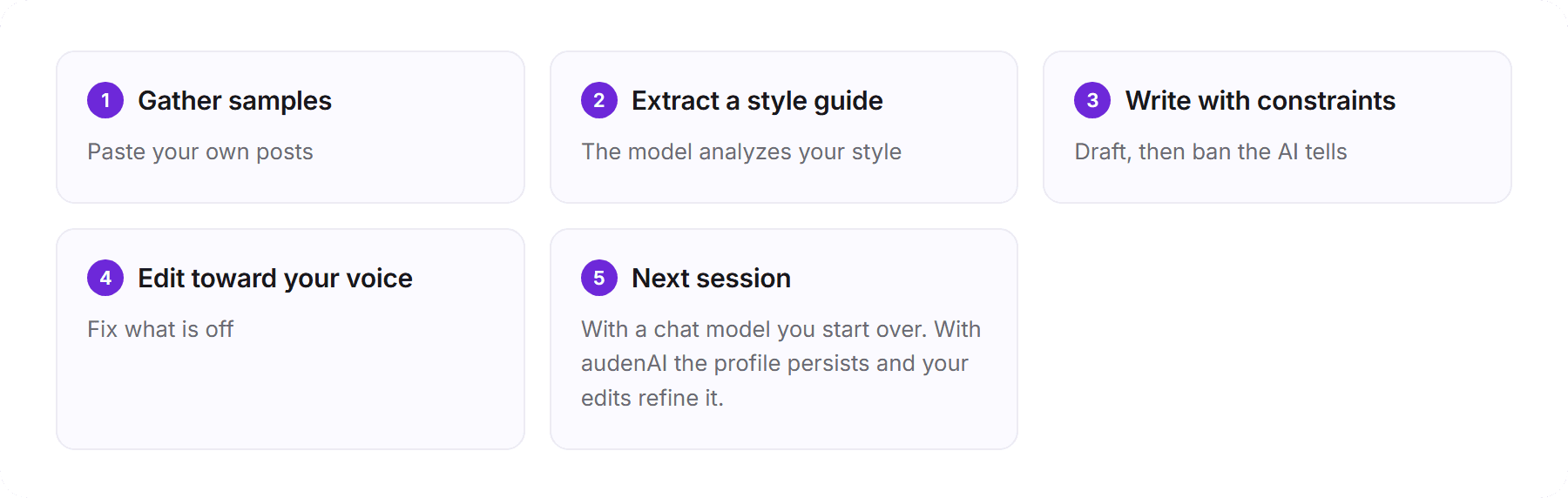
The prompt loop resets every session. A persistent writing model closes it.
So the honest bottom line: use the prompts here whenever you need a one-off post in your voice, and they will get you most of the way. If you post often enough that re-teaching your voice every session gets old, that is the moment a persistent setup pays for itself. You can draft with audenAI for $1 for 3 days, with plans from $35 a month. audenAI suggests, you decide.
Frequently asked questions
Can you train AI to write like you?
Partly. Paste three to six of your own posts, ask the model to describe your style, then ask it to write using that description, with banned words listed. It works within a session. General chat models do not keep your voice between chats or learn from your edits, so for regular posting you either repeat the setup or use a tool trained on your own posts.
What is the best prompt to make ChatGPT sound like me?
Use two prompts, not one. First: "Analyze these posts and describe my writing style: rhythm, tone, vocabulary, hooks, punctuation and structure, with short examples." Then: "Using that profile, write three versions of a post about [topic]. No em dashes, no cliches like delve or leverage." The analyze-then-write order beats a single "sound like me" instruction.
How do I make ChatGPT write tweets in my voice?
Build a Twitter-only style guide from 30 to 50 of your most characteristic tweets (vocabulary, rhythm, hooks, formatting, topics and a taboo list), load it into custom instructions with three to five real tweets as examples, ask for three options under 280 characters, and edit the one you pick. Restart the chat when drafts start drifting.
What is personalized AI content?
It is content an AI generates from a model of your own writing, so it carries your voice, as opposed to generic AI content produced from the model's trained average. There are four levels: a raw prompt, pasted samples, saved instructions or memory, and a profile trained on your own posts. Only the last starts from your patterns.
Do custom instructions or a custom GPT make ChatGPT sound more like me?
They make the method repeatable and save re-pasting, which is a real convenience, but they do not raise the ceiling. A custom GPT runs the same general model with the same trained defaults, so output still drifts toward the average over a long chat.
How do I make Gemini write like me?
The method is the same as ChatGPT: paste samples, ask Gemini to analyze your style, then save the profile as a Gem so it is reusable. Like ChatGPT and Claude, a Gem holds a fixed instruction set and does not learn from your edits, so refresh it as your writing changes.
Is personalized AI content the same as impersonating someone?
No. It uses your own posts, with your consent, to draft in your patterns, and you approve every post before it goes out. It does not impersonate anyone else or act on your behalf.
Is there a tool that remembers my writing voice instead of re-teaching ChatGPT every time?
Yes. VoiceMoat (our product) uses audenAI, the brain inside it, to learn your voice from your own Twitter and LinkedIn posts once and keep that profile between sessions, then checks your drafts for Style and Stance. It costs $1 for a 3-day trial; plans start at $35 a month.
AI disclosure
Written and fact-checked by Prateek Singh. VoiceMoat is the publisher's own product and is disclosed as such in the section that mentions it; its capabilities (drafting in your voice, reply drafting, scheduling, and analytics across Twitter and LinkedIn) are described honestly and not overclaimed. Model behaviors for ChatGPT, Claude, and Gemini reflect their published documentation as of July 2026 and can change; verify against each tool's current docs. Related guides merged in and facts rechecked on 23 October 2026.
Keep reading

AI and Voice
Every social MCP connector reaches both platforms. That is not the hard part
We were going to write that connecting one assistant to both Twitter and LinkedIn was rare. It is not. More than twenty connectors do it and several are free, so channel coverage is table stakes and every roundup ranking them by it is measuring the wrong thing. Here is what actually differs between them, and the one thing we read enumerated tool lists for six of them to confirm nobody does at all.
11 min read
·

AI and Voice
Why your Claude writing skill doesn't sound like you
There are dozens of free Claude skills for writing, and almost all of them do the same thing: strip out phrases that read as machine-written. That is subtraction, and it leaves you sounding like nobody in particular rather than like yourself. The handful that actually learn a voice from your own writing have a fraction of the users. Here is the difference, why a skill cannot post anything no matter what it says, and where the file actually goes on every surface.
13 min read
·

AI and Voice
Hootsuite alternatives in 2026, priced from the vendors' own pages
Hootsuite starts at $99 per user a month, not $19. Here is what the realistic alternatives cost, read off each vendor's own pricing page in both billing positions, plus the clause in Hootsuite's terms that its pricing page does not mention.
10 min read
·

AI and Voice
Taplio alternatives in 2026, priced from the vendors' own pages
Four LinkedIn tools people move to from Taplio, priced from each vendor's own pricing page rather than from each other. Includes the arithmetic on Taplio's Pro tier, which does not add up, and one name still on every recommendation list that has quietly shut down.
11 min read
·

AI and Voice
Later alternatives in 2026, and the caps that actually move you up a tier
Later is one of the cheapest majors on headline price. What moves you up a tier is not the price, it is the 30-posts-per-profile cap and the user count. Here is what the alternatives cost, read off each vendor's own page in both billing positions.
10 min read
·
From the Twitter algorithm series
The Twitter/X algorithm in May 2026: why voice wins under the new transformer
Read ›

