ai and voice
How to Use Gemini, Grok, and Copilot to Write Social Posts That Don't Sound Like AI
·
23 min read
·
By Prateek Singh, founder of VoiceMoat
Key takeaways
To write social posts that don't sound like AI, use each model for what it is good at: Gemini and Copilot for structure and context, Grok for Twitter-native punch, Perplexity for sourced research, Claude for tone. No single model does all four well.
Prompting gets any assistant to roughly 80 percent. The last 20 percent, sounding like the specific person writing, is what every guide quietly hands back to you as manual editing.
The reason output sounds like AI is simple: the model has no reference for how you write. No prompt fully fixes a missing reference, so the durable fix is a system that trains on your own posts, not a longer prompt.
Use research tools (Perplexity) to find and verify facts, then rewrite in your own voice. Never copy-paste a research assistant's draft, because its house style is the flattest voice of all.
VoiceMoat is the Personal Brand OS for LinkedIn and Twitter that automates the voice layer: its writing partner, audenAI, learns your voice from your existing posts and drafts in it, so 'read like me' stops being a manual pass. (VoiceMoat is our product; the prompts here work with any assistant.)
You can write social posts that don’t sound like AI with Gemini, Grok, Copilot, Perplexity, or Claude, but only if you stop treating the model as a one-click generator and start treating it as a drafting engine you steer. Every guide you have read gets you to a competent draft in seconds, then leaves you staring at something that is technically fine and unmistakably machine-made. This article is the practical prompt-pack for fixing that. You will get copy-paste prompts for each assistant, a five-step workflow that de-AIs any draft, a research-first path for sourced threads, and an honest account of the one part of the job no prompt actually solves. The techniques are tool-agnostic, so once you learn the workflow you can run it in whichever assistant you already pay for.
Why AI social posts sound like AI (and where the real fix lives)
AI posts sound like AI for a boring, structural reason: the model is averaging. Trained on a vast pile of text, it reaches for the most probable phrasing, which is by definition the most common phrasing, which is the phrasing everyone else’s AI also reaches for. That is why so many LinkedIn posts open with ‘In today’s fast-paced world’ and why so many threads end on ‘The takeaway?’ followed by a tidy moral. It is not that the model is bad. It is that its default is the middle of the road, and the middle of the road is exactly where you do not want your voice to be.
There is a second, more specific reason, and it is the one the tutorials skip: the model has no reference for how you personally write. It knows what a good LinkedIn post looks like in general. It has no idea what a good LinkedIn post looks like from you. So even a well-crafted prompt can only move the output toward a generic version of good, never toward your version of it. That gap is the whole subject of this article, and it is worth naming plainly now: the durable fix is not a cleverer prompt, it is a system that trains on your own posts. We come back to what that looks like later. For a deeper diagnosis of the sameness problem, see why every AI LinkedIn post sounds the same and why your AI tweets sound generic or robotic.
The generic ‘add a number, cut adverbs’ advice is not a system
Search for how to make AI writing sound human and you will collect a familiar list of tips: add a specific number, cut the adverbs, use shorter sentences, delete the word ‘delve’, end on a question. All of it is real advice, and all of it helps at the margin. But a pile of tips is not a system. It tells you what to remove, not what to add. You can strip every obvious AI tell out of a draft and still be left with something that sounds like a competent stranger, because removing the machine’s fingerprints does not add yours. That is the difference between de-AI-ing a draft and making it sound like you, and most guides blur the two together.
The missing 20% is your voice, not your facts
Think of an AI-assisted post as having two layers. The first is substance: the facts, the argument, the structure, the hook. Modern assistants are genuinely good at this layer, and a solid prompt gets you most of the way there, call it 80 percent. The second layer is voice: the rhythm of your sentences, the words you reach for and the ones you avoid, the way you open and the way you land. This is the last 20 percent, and it is the part that makes a reader think ‘that is definitely them’ instead of ‘that is definitely AI’. The uncomfortable truth of nearly every AI-writing guide, including the honest ones, is that they get you through the first layer brilliantly and then hand the second layer back to you as homework. The rest of this piece is about doing that homework fast, and then about a way to skip it entirely.
The 5-step workflow to write posts that don’t sound like AI
Here is the whole method on one screen. It works identically in Gemini, Grok, Copilot, Perplexity, and Claude, because the steps are about how you steer the model, not which model you steer. Do it once and you can run it anywhere.
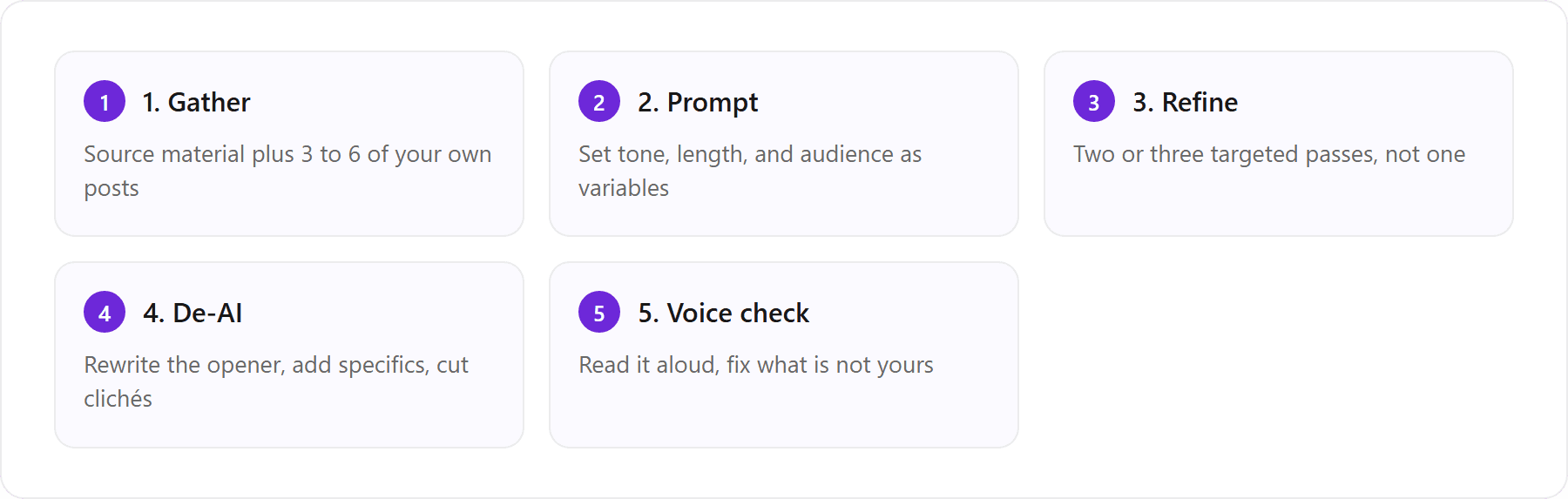
The five-step de-AI workflow: gather your material, prompt with variables, refine over a few passes, de-AI the draft, then run a voice check before posting.
Step 1: Gather your source material and past posts
Everything downstream depends on the input. Two kinds of input matter. First, the source material for this specific post: the article, the data point, the experience, the opinion you want to share. Second, and this is the part people skip, three to six examples of your own past posts. The model cannot echo a voice it has never seen, so giving it real samples of you writing like you is the single highest-leverage thing you can do before you type a word of instruction. Pick posts you actually wrote (not ones you already ran through AI), and pick a spread: a hot take, a teaching post, a short personal note. Your voice shifts between modes, and the samples should show that range.
Step 2: Prompt with tone, length, and audience variables
A vague prompt gets a vague post. Instead of ‘write a LinkedIn post about remote work’, treat the prompt as a small brief with variables filled in: who the audience is, what one idea the post should land, how long it should be, what tone to hold, and what to avoid. The more constraints you give, the less room the model has to drift toward its generic default. A useful structure is: context, then the samples, then the task, then the guardrails. Naming the guardrails explicitly (no clichés, no corporate throat-clearing, no em-dashes, no ‘in today’s landscape’) removes the most common tells before they appear.
Step 3: Refine over two or three passes
The first output is a starting point, not a deliverable. The mistake most people make is judging the model on its first try and either shipping it or giving up. Instead, refine in targeted passes. Pass one: ‘The hook is generic, give me five sharper openers.’ Pass two: ‘Tighten the middle, it drags.’ Pass three: ‘This ending sounds like a TED talk, land it plainer.’ Each pass is a single, specific instruction, which the model handles far better than a sprawling ‘make it better’. Two or three passes usually gets the substance layer where you want it.
Step 4: De-AI the draft (rewrite the opener, add specifics, cut clichés)
Now strip the machine fingerprints. The opener is the biggest tell, so rewrite the first line yourself, in your own words, every time. Swap abstractions for specifics: not ‘engagement went up’ but ‘replies tripled the week I stopped scheduling’. Cut the clichés and the throat-clearing. And watch for a specific vocabulary cluster the models overuse: delve, leverage, unlock, navigate, harness, foster, elevate, embark, robust, seamless, comprehensive, holistic, tapestry, testament, landscape, realm. When you see one, replace it with the plain word you would actually say. For the full method here, our de-AI playbook for making AI writing sound human goes deeper, and you can run a draft through the free humanize AI text tool to catch what you missed.
One warning about this step: hand-editing works, but it is slow, and it is exactly the labor every guide quietly assumes you will do post after post. Keep a running note of the words and openers you always end up changing. That note is the shape of your voice, and later in this article it becomes the argument for automating this layer instead of grinding it by hand forever.
Step 5: Run a voice check before you post
The final gate is your ear. Read the post out loud. If a sentence is one you would never say to a colleague, it is not yours, so change it. Ask three questions: Does the opener sound like me or like a template? Is there a specific detail only I could have written? Would a regular reader recognize this as mine with the byline hidden? If any answer is no, you are still in AI territory. You can also paste the draft into a free voice tone analyzer for a second opinion, or check it against the free AI detector to see how machine-made it still reads. Neither tool is the final word, but both catch drift you have gone blind to.
How to use Gemini to write LinkedIn posts
Gemini is a strong LinkedIn drafting partner because it handles structure and longer context well, and because it can pull in fresh context from Google’s index when you ask it to. The trap is that Gemini’s default register leans polished and slightly corporate, which is precisely the register LinkedIn is drowning in. So the workflow is: use Gemini for structure and substance, then de-AI hard for voice.
A copy-paste Gemini prompt for LinkedIn
Paste three to six of your own LinkedIn posts first, then this prompt. The samples are what stops Gemini from writing a generic post at you.
Above are several LinkedIn posts I wrote, so you can see my voice. Now write a LinkedIn post about [TOPIC] for [AUDIENCE, e.g. early-stage founders]. Land one idea: [THE IDEA]. Keep it to about [140] words, short paragraphs, one line per thought. Open with a concrete claim or a specific moment, never with ‘In today’s world’ or a rhetorical question. No clichés, no corporate throat-clearing, no em-dashes, and do not use the words delve, leverage, unlock, robust, or seamless. Match the rhythm and vocabulary of my samples above. Give me two versions with different openers.
How to stop Gemini sounding like AI on LinkedIn
Even with a good prompt, Gemini has three habits to police. First, it loves a balanced, on-the-one-hand-on-the-other structure that reads as diplomatic and dull; tell it to take a clear position. Second, it over-signposts with phrases like ‘Here’s the thing’ and ‘The reality is’; strike them. Third, it defaults to a motivational-poster ending; ask it to end on a plain statement or a real question, not a lesson. After that, apply the Step 4 de-AI pass and rewrite the opening line yourself. Google’s own writing guidance in its product and research blog leans toward plain, concrete language for a reason, and your LinkedIn posts should too.
How to use Grok to write better Twitter posts and viral tweets
Grok’s advantage is that it is Twitter-native. It has a feel for the platform’s cadence, its irreverence, and its real-time context, which makes it better than most models at a punchy tweet or a spiky take. That same instinct is its liability everywhere else: unedited Grok can read as trying too hard, and its ‘viral’ register is a recognizable style of its own. Use it for Twitter, steer it hard, and do not carry its tone anywhere near LinkedIn. Before you commit to it, our Grok review covers its pricing, accuracy and where it falls short for creators.
A Grok prompt to write a viral tweet
There is no prompt that guarantees virality, and anyone selling one is selling snake oil. What a good prompt does is generate options sharp enough that one might land. Feed Grok a few of your best-performing tweets first, then this.
Here are a few tweets I wrote that did well, so you have my voice. Now give me eight standalone tweets about [TOPIC / TAKE]. Each must work on its own, under 280 characters, no hashtags, no emoji unless it earns its place. Open with the sharpest part of the idea, not a wind-up. Vary the angle: one contrarian, one specific how-to, one short story, one blunt one-liner. Sound like my samples, not like a motivational account. No ‘Let that sink in’, no ‘This is huge’, no thread-bait.
Then judge the eight coldly, keep the one or two that sound like you, and rewrite them in your own words. For a wider comparison of which model actually writes the best tweets, we ran the test in best AI for writing tweets: Grok vs ChatGPT vs Claude vs DeepSeek, and there is a prompt-library in best ChatGPT prompts for Twitter that adapts cleanly to Grok.
Fixing Grok’s Twitter-native tone for LinkedIn’s register
If you want to reuse a Grok tweet as the seed of a LinkedIn post, do not just paste it into a longer box. LinkedIn rewards a slower, more considered register, and Grok’s default spikiness reads as flippant there. Ask it explicitly to ‘rewrite this for LinkedIn: same idea, calmer and more specific, no hype words, add one concrete detail from real experience’. Better still, take the idea and redraft the LinkedIn version in the assistant you trust most for tone. Repurposing across platforms has its own playbook in repurpose blogs, newsletters, and YouTube videos into threads and posts with AI.
[ from the team behind this blog ]
Post on LinkedIn and Twitter in a way that reads like you
VoiceMoat is the Personal Brand OS for LinkedIn and Twitter. audenAI, the brain inside it, learns from your own posts, then helps you create, schedule and grow.
Creator plan $35 a month after the trial. Cancel anytime.
How to use Copilot as a LinkedIn post generator
Copilot’s edge is context. Because it lives inside Microsoft 365, it can draft from the document, deck, or email you are already working in, which means the post can be grounded in something real rather than invented from a topic string. That grounding is genuinely useful for turning a report or a meeting summary into a LinkedIn post. The catch is that Copilot’s default voice is the most buttoned-up of the group, tuned for workplace safety, so it needs the most aggressive de-AI pass to sound like a person rather than a press release.
Feeding Copilot your Microsoft 365 context
The move that makes Copilot worth using is pointing it at real material. Reference the file directly (‘using the Q3 findings in this doc, draft a LinkedIn post about the one surprising result’), then constrain the voice the same way you would in any model. A working prompt: ‘Draft a LinkedIn post from the attached summary. Pull out the single most counterintuitive point. Write it for [AUDIENCE], about 130 words, plain language, first person, one concrete number from the doc. No corporate tone, no clichés, no em-dashes, open with the finding not with context-setting.’ Then rewrite the opener yourself and cut anything that sounds like it belongs in an internal memo. Copilot gets you an accurate, grounded draft; you supply the voice.
Can Perplexity write social media posts?
Yes, Perplexity can write social media posts, but that is not what it is best at, and treating it as a drafting tool wastes its real strength. Perplexity is a research engine: it finds current information, cites sources, and lets you verify claims before you build a post on them. So the honest answer is that Perplexity is excellent for the research half of a post and mediocre for the voice half. Use it to get the facts right, then draft the voice elsewhere. Its house style, tuned to sound authoritative and neutral, is arguably the flattest of any tool here, which is exactly why you should not publish its prose.
Research-first workflow: find, verify, outline, then draft
The right Perplexity workflow separates research from writing. Ask it to gather what is known about your topic with sources. Read the sources yourself, because citations can be thin or mismatched, and verify the specific claim you plan to lead with. Have Perplexity outline the argument. Then, and only then, move to a drafting assistant (or your own keyboard) to write the post in your voice against that verified outline. Research first, voice second, never the two collapsed into one ‘write me a sourced post’ request.
Turn Perplexity research into a tweet thread with numbered source citations
For a sourced thread, Perplexity is a strong starting point because it can attach citations to each claim. Use a prompt like this, then rewrite every tweet in your own words before posting.
Research [TOPIC] and give me the 6 most important, verifiable facts, each with its source and a direct link. Rank them by how surprising they are to an informed reader. For each fact, note the single number or detail that makes it land. Do not write the thread yet. Just give me the facts, the sources, and the strongest angle across all six.
From that, you build a thread of six or seven tweets: one claim per tweet, the source number in a final citations tweet so the thread stays readable. The facts come from Perplexity; the sentences come from you. If you want the assistant to help assemble the thread, hand the verified facts to Claude or Gemini with your voice samples, not back to Perplexity.
Why you should not copy-paste Perplexity drafts
It is tempting, once Perplexity has the facts, to just ask it for the finished thread and ship it. Resist. Perplexity’s writing is optimized to sound like a neutral, encyclopedic summary, which is the opposite of a voice. A copy-pasted Perplexity thread reads as a Wikipedia article chopped into tweets: correct, sourced, and completely anonymous. Worse, because its style is so recognizable, it can read as more machine-made than a general chatbot’s output. Use it for what it is great at, verified substance, and add the voice layer yourself.
Best Claude and Gemini prompts for Twitter threads
For a Twitter thread, the substance layer is really a structure problem: a strong hook, a logical build, and each tweet earning the next. Claude tends to handle narrative flow and tone with the least hand-holding, while Gemini is reliable and fast for a structured, informational thread. Here are working prompts for both. Paste your own best threads or tweets above each one so the model has your voice to anchor to.
A Claude prompt for a Twitter thread
Above are threads I wrote, for my voice. Write a Twitter thread of [7] tweets about [TOPIC]. Tweet 1 is the hook and must make a specific promise or a sharp claim, no ‘a thread’, no numbering in the hook. Each following tweet makes one point and flows from the last. Keep every tweet under 280 characters, plain language, no hashtags, no emoji-as-decoration. End on a real point, not a call to like and retweet. Match the rhythm and word choice of my samples. Give me two hook options and let me pick before you write the rest.
Asking Claude to stop after the hooks is deliberate: choosing the opener before it commits to a structure keeps the whole thread from inheriting a weak first line. For a fuller comparison of the two models on social writing, see Claude vs ChatGPT for writing social posts.
A Gemini prompt to write a Twitter thread
Here are threads I wrote, so you have my voice. Draft a Twitter thread of [6] tweets on [TOPIC] for [AUDIENCE]. Structure: hook, then four tweets that each deliver one concrete, useful point (include at least one specific number or example), then a closing tweet that states the core idea plainly. Under 280 characters each, no hashtags, no wind-up phrases like ‘Let’s dive in’. Sound like my samples above, not like a brand account. Return the hook as three options first.
Whichever model you use, the thread that comes back is a draft, not a post. Run it through Steps 4 and 5: rewrite the hook in your own words, swap any abstraction for a specific, and read the whole thing aloud. The prompts get you a well-built skeleton. You still have to make it sound like you, which brings us to the part no prompt solves.
Which model for which job, and the fix each one needs before you post. Based on each tool’s typical behavior as of July 2026; verify against current docs, since model behavior changes often.
Model | Best use | Tone watch-out | Fix before posting |
|---|---|---|---|
Gemini | Structured LinkedIn posts and threads with fresh context | Polished, corporate, over-balanced | Take a clear position; rewrite the opener; cut signposting |
Grok | Twitter-native tweets and spiky takes | Tries too hard; recognizable ‘viral’ style | Keep only what sounds like you; never reuse the tone on LinkedIn |
Copilot | Posts grounded in your Microsoft 365 docs | Most buttoned-up; reads like a memo | Aggressive de-AI pass; first person; add a real detail |
Perplexity | Sourced research and citations for threads | Flat, encyclopedic, anonymous | Use facts only; write every sentence yourself |
Claude | Narrative threads and tone-sensitive posts | Can get wordy and earnest | Tighten; pick the hook before it writes the body |
The missing 20%: automating the voice layer instead of hand-rewriting
By now the pattern is obvious. Every prompt in this article gets a model to roughly 80 percent: good structure, solid substance, the AI tells mostly removed. And every prompt ends the same way, with an instruction to rewrite the opener yourself, add your own specifics, and read it aloud in your voice. That last 20 percent, sounding like the specific person posting, is the part that never gets automated by a better prompt, and it is the part you keep paying for in time, post after post after post.
Why model-hopping never fixes voice
The instinct when a draft sounds off is to switch models: maybe Claude will sound more like me than Gemini did. It will not, not in the way you want. Each model has a different generic default, so hopping between them changes the flavor of the average, not the fact that it is an average. None of them has a reference for how you write, because none of them has ever been trained on your writing specifically. This is a training problem wearing a prompting costume. You can prompt forever and still be manually adding your voice at the end, because the missing piece is not a better instruction, it is a model of you. And this is where it helps to be clear about categories: a general chatbot and a tool that trains on your own posts are different kinds of software, even when both can output a tweet.
How VoiceMoat writes the sourced post in your voice
Disclosure: VoiceMoat is our own product, so we are the biased source on this one; the prompts above work with any assistant regardless. With that said, this section exists because the article’s thesis is literally our reason for building the thing. VoiceMoat is the Personal Brand OS for LinkedIn and Twitter, and grow, and instead of asking you to hand-rewrite each draft so it reads like you, it trains on your existing posts so the voice layer is handled before you ever paste anything. Its writing partner, audenAI, learns your writing patterns (rhythm, vocabulary, hooks, structure, punctuation) once, from your real posts, and applies them to every draft. So the goal of this whole article, social posts that don’t read like AI, becomes the default output rather than the result of a manual editing pass you run every time. (One disambiguation, because search engines conflate them: VoiceMoat is a writing and scheduling tool for Twitter and LinkedIn, not the Voicemod voice changer.)
Mechanically, it works the way this article’s workflow does, minus the hand-editing. You draft posts and threads in Studio, where audenAI writes in your voice from the start; you draft replies in Engage; and you schedule and read analytics in the same place. Because the voice model is persistent and specific to you, your edits refine it instead of evaporating when you close a chat window. It will not clone anyone, and it will not push a viral-shaped post that does not read like you. If you want the head-to-head, we wrote VoiceMoat vs ChatGPT for social media and ChatGPT vs specialized AI tools for personal branding, both of which show where a general chatbot stops and a voice-trained tool starts. You can automate the voice layer instead of hand-rewriting and judge it against the prompts here on your own writing.
Automation and scheduling without flattening your voice
Once the drafting works, the temptation is to automate the whole pipeline: have a model generate posts on a schedule and push them straight to a queue. Tools like Pabbly and n8n make this easy to wire up, and Chrome-extension workflows can auto-fill a scheduler from a generated draft. Automation is not the enemy here. Flattening is.
Pabbly, n8n, and Chrome-extension workflows
The risk with a Pabbly or n8n pipeline is that it scales whatever voice you feed it, and if the drafting step is a general model on its default, you are now mass-producing the exact flat, average voice this article is trying to help you escape, just faster and at higher volume. Automation multiplies your inputs, so if the input is generic, the output is generically wrong at scale. If you automate, keep a human voice-check in the loop, or keep the voice model inside the pipeline rather than bolted on after. That second option is part of why VoiceMoat drafts in your voice and schedules across Twitter and LinkedIn in one place: the voice layer stays inside the pipeline, so scaling your posting does not mean scaling a flat voice. However you build it, do it safely: our guide to whether it is safe to use AI on LinkedIn and Twitter covers the platform rules that automation can quietly break.
The through-line of this whole piece is simple. Prompts get you to 80 percent on any assistant, and the tips in Step 4 knock off the obvious AI tells. The last 20 percent, the part where a post actually reads like you, is either something you do by hand every single time, or something you automate by training on your own writing. If hand-rewriting for voice is the part you want to stop doing, see how audenAI does it at voicemoat.com/product/studio ($1 for a 3-day trial).
Frequently asked questions
How do I stop Gemini sounding like AI on LinkedIn?
Feed Gemini three to six of your own posts before you prompt, then constrain it: take a clear position (it defaults to balanced and diplomatic), strip its signposting phrases like 'Here's the thing' and 'The reality is', and ask it to end on a plain statement rather than a motivational lesson. After that, rewrite the opening line yourself and swap any abstraction for a specific detail. Gemini handles structure well; the voice has to come from your samples and your final edit, not from a longer prompt.
Can Perplexity write social media posts?
Yes, but it is far better at the research half than the writing half. Perplexity finds and cites current sources, which makes it excellent for gathering verified facts for a post or a sourced thread. Its actual prose is flat and encyclopedic, arguably the most anonymous of any tool, so you should use its facts and outline but write the sentences yourself in your own voice. Research first, voice second, never collapsed into one 'write me a sourced post' request.
What is the best Grok prompt for viral tweets?
No prompt guarantees virality, but the best approach is to paste a few of your own best-performing tweets first, then ask Grok for eight standalone tweets under 280 characters, no hashtags, each opening with the sharpest part of the idea and varying the angle (contrarian, how-to, short story, blunt one-liner). Then judge them coldly, keep the one or two that sound like you, and rewrite them in your own words. Grok's Twitter-native instinct helps; its 'viral' default tone is a tell you have to edit out.
What is the best Claude prompt for a Twitter thread?
Paste your own threads for voice, then ask Claude for a thread of about seven tweets where tweet one is a hook that makes a specific promise, each following tweet makes one point and flows from the last, all under 280 characters, ending on a real point rather than a call to like and retweet. The key move is asking Claude to give you two hook options and stop before writing the body, so you pick the opener before the whole thread inherits a weak first line.
How long does it take to write a post this way?
With the five-step workflow, a single well-edited post takes roughly ten to fifteen minutes: a few minutes to prompt with your samples, two or three refinement passes, then the de-AI and voice-check passes where you rewrite the opener and read it aloud. The de-AI and voice steps are the slow part, and they repeat for every post. That recurring cost is exactly why a tool that trains on your own writing can save the most time for people who post regularly.
Can any AI actually write social posts that sound like me and not like AI?
Not from prompting alone. General assistants like Gemini, Grok, and Claude have no model of how you personally write, so even good prompts leave a last 20 percent you have to rewrite by hand. Tools that train on your own writing close that gap: VoiceMoat, the Personal Brand OS for LinkedIn and Twitter, learns your voice from your existing posts through its audenAI writing partner and drafts in it, then lets you schedule without flattening the result. (VoiceMoat is our product; it is the Personal Brand OS for LinkedIn and Twitter, not a voice changer.)
AI disclosure
This article was written by Prateek Singh with AI assistance and human editing. The prompts and workflow are tool-agnostic and work with any assistant. VoiceMoat and its audenAI writing partner are our own product, so treat the section about them as the maker's view and judge it against the prompts here on your own writing. Model behavior for Gemini, Grok, Copilot, Perplexity, Claude, and ChatGPT changes often; verify specifics against each tool's current documentation.
Keep reading

AI and Voice
Every social MCP connector reaches both platforms. That is not the hard part
We were going to write that connecting one assistant to both Twitter and LinkedIn was rare. It is not. More than twenty connectors do it and several are free, so channel coverage is table stakes and every roundup ranking them by it is measuring the wrong thing. Here is what actually differs between them, and the one thing we read enumerated tool lists for six of them to confirm nobody does at all.
11 min read
·

AI and Voice
Why your Claude writing skill doesn't sound like you
There are dozens of free Claude skills for writing, and almost all of them do the same thing: strip out phrases that read as machine-written. That is subtraction, and it leaves you sounding like nobody in particular rather than like yourself. The handful that actually learn a voice from your own writing have a fraction of the users. Here is the difference, why a skill cannot post anything no matter what it says, and where the file actually goes on every surface.
13 min read
·

AI and Voice
Hootsuite alternatives in 2026, priced from the vendors' own pages
Hootsuite starts at $99 per user a month, not $19. Here is what the realistic alternatives cost, read off each vendor's own pricing page in both billing positions, plus the clause in Hootsuite's terms that its pricing page does not mention.
10 min read
·

AI and Voice
Taplio alternatives in 2026, priced from the vendors' own pages
Four LinkedIn tools people move to from Taplio, priced from each vendor's own pricing page rather than from each other. Includes the arithmetic on Taplio's Pro tier, which does not add up, and one name still on every recommendation list that has quietly shut down.
11 min read
·

AI and Voice
How to train AI to write in your voice: the cross-model guide
You can get ChatGPT, Claude or Gemini to write in your voice, but only partly and only for one session, because chat models forget your style between chats. This cross-model guide covers the analyze-then-write prompts that work, the settings that make them stick, the four levels of personalized AI content, a reusable instruction block for tweets, and the persistent alternative for anyone who posts regularly.
16 min read
·
From the Twitter algorithm series
The Twitter/X algorithm in May 2026: why voice wins under the new transformer
Read ›

