ai and voice
AI tweets: why they sound generic or robotic, and how to fix them
·
11 min read
·
By Prateek Singh, founder of VoiceMoat
Key takeaways
AI tweets sound generic because language models predict the likeliest next word, which blends every tweet into a safe, forgettable average.
The tells cluster: filler openers, hedging, stock words, even rhythm, sycophantic replies and template hooks. Newer models favor words like quietly and steady, so keep your banned list current.
Three kinds of tool get called "AI tweet" tools: generators, writers trained on your posts, and checkers. Know which problem you are solving.
The manual fixes work (your own samples, a specific prompt, a banned-word list, editing aloud) but you repeat them each time.
VoiceMoat, a Personal Brand OS for LinkedIn and Twitter, drafts from a model of your own posts and checks drafts for Style and Stance. (Disclosure: our product; $1 for a 3-day trial, plans from $35 a month.)
Updated 22 October 2026. New opening that answers what AI tweets are and why they sound generic, a new section on AI tweet generators, writers and checkers, and an updated banned-word list that reflects how newer models write. The before-and-after example is now clearly labeled as illustrative.
AI tweets are posts drafted by a general assistant such as ChatGPT, Claude, Gemini or Grok, or by a dedicated AI tweet generator. Most of them sound generic for one reason: a language model writes toward the most likely next word, so its tweets land on the average of everything it has read, and the average tweet is bland. You fix that by giving the model what it cannot guess (your own past tweets, one real detail, a banned-word list) and by editing the draft out loud before you post.
This guide keeps the diagnosis short and spends most of its time on fixes: the tells to strip, four manual repairs, how to rescue a whole thread, and what the different kinds of AI tweet tools actually do. The deeper diagnosis lives in why all AI-written tweets sound the same, and the LinkedIn version is why every AI LinkedIn post sounds the same.
Why do AI tweets sound generic?
A tweet from a general assistant is a prediction, not a choice. The model looks at the words so far and picks a likely next one, based on patterns across a huge amount of internet text. That is great for coherence and poor for personality, because the most likely next word is, almost by definition, the least surprising one.
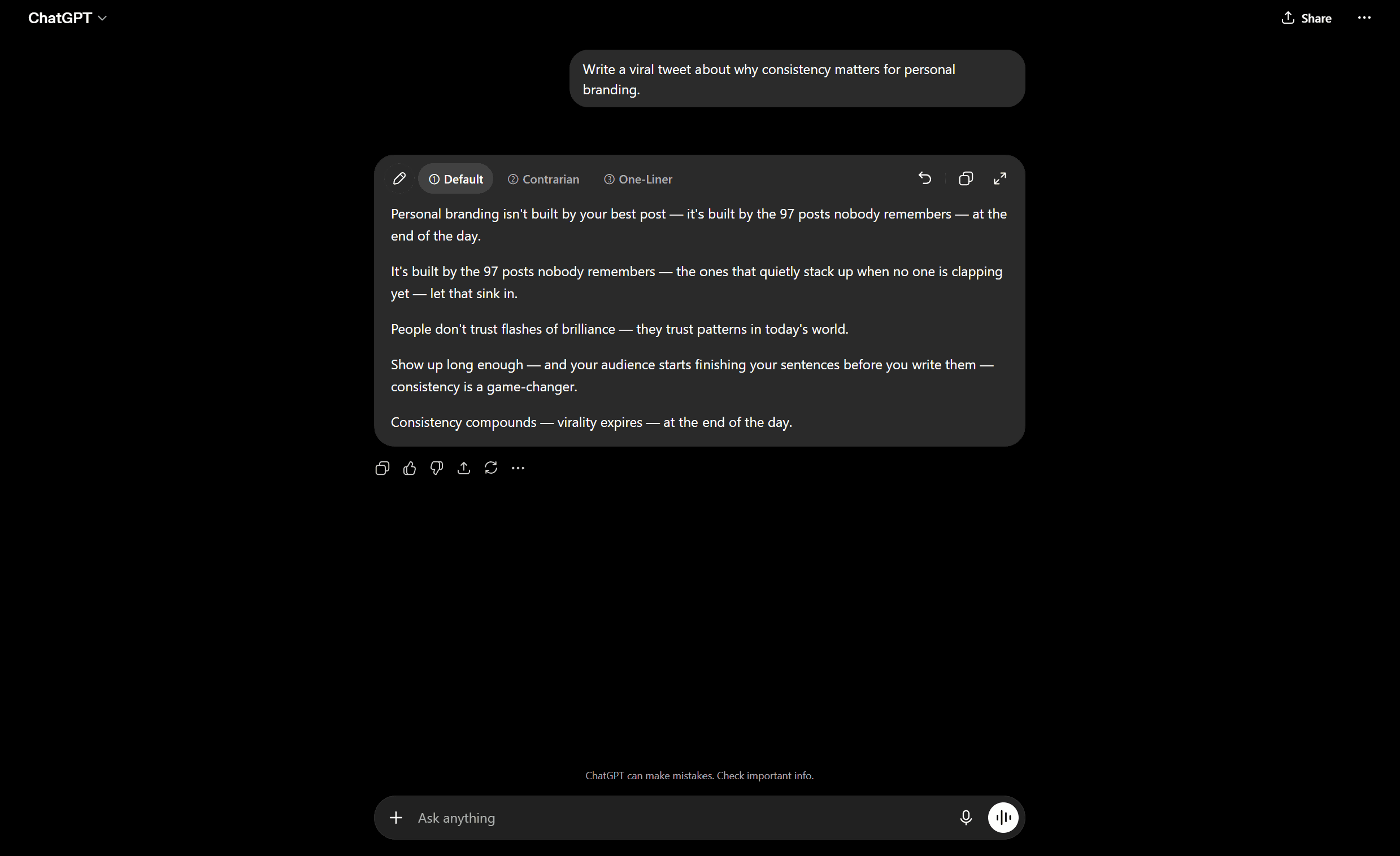
The default output: technically fine, unmistakably generic.
The statistical average problem
Imagine every tweet ever written about “consistency and growth” poured into one bucket, then ask for the single most representative sentence. You would not get anyone’s voice. You would get the center: “Consistency is key to building an audience.” True, clean and dead. Next-word prediction pulls toward that center on every word, which is why AI tweets read as robotic even when the grammar is perfect.
Why common topics get the most generic phrasing
The more common your topic, the more generic the output. Productivity, personal branding and morning routines sit in the most crowded part of the training data, where the averaging is strongest. Niche topics come out slightly fresher because there are fewer worn grooves. The lesson is not to avoid common topics; it is that on common topics you have to supply the specifics the model will not.
What are the tell-tale signs of an AI tweet?
Readers cannot name the averaging problem, but they feel it. The feeling comes from a small set of repeatable tells. Here is each one beside a rewrite, so the contrast does the teaching. The rewrites are written for this article.
The five most common AI tweet tells, with a rewrite of each (examples written for this article).
The AI tell | Generic AI version | Rewrite |
|---|---|---|
Filler opener | In today’s fast-paced world, building an audience matters more than ever. | Nobody owes you attention. You earn it one useful tweet at a time. |
Hedging | It’s worth noting that consistency can potentially help with growth. | Post daily for 90 days. Then decide if it works. Not before. |
Stock vocabulary | Leverage this robust, seamless framework to delve into audience growth. | Here is the exact three-step routine I use every Monday. Steal it. |
Uniform rhythm | Great writers read a lot. Great writers write daily. Great writers edit hard. | Great writers read constantly. They also write when it’s boring, then cut the parts they love. |
Sycophantic reply | This is such an incredible and insightful take. Thanks so much for sharing! | Point 2 is the one everyone skips. I learned that the hard way. |
Filler openers and hedging
The loudest tell is the throat-clearing opener: “In today’s world”, “When it comes to”, “Let’s be honest”. Hedging is the same instinct aimed at claims: “can potentially”, “it’s worth noting”, “arguably”. Both exist because the model is tuned never to be wrong, and a tweet that is never wrong is also never memorable. Cut the first sentence and every hedge, and most AI tweets improve before you change a real word.
Uniform rhythm and over-polish
People write in bursts. We run long, then stop short. We start a sentence with “And”. We leave a fragment because it hits harder. Models smooth that into an even, medium-length beat. Over-polish is the visual version: balanced clauses, list items of equal length, a neatness nobody produces at speed. If a thread reads like a committee proofread it, that evenness is the tell.
The stock vocabulary list
Some words are overrepresented in AI output because they are safe and common in the training text. Keep this list somewhere you can paste it into a prompt:
delve, dive into, unpack, explore
robust, seamless, streamlined, cutting-edge
leverage, utilize, harness, unlock
elevate, empower, supercharge, game-changer
in today’s world, in the ever-evolving landscape, in an era of
it’s worth noting, arguably, that being said, at the end of the day
tapestry, testament, realm, journey, navigate
newer additions: quietly, steady, matters, practical, prioritize
That last line matters. Wikipedia’s volunteer guide, Signs of AI writing, tracks how the favorite words shift by model generation: “delve” was the classic tell of 2023 and early 2024, while its entry for models from mid-2026 on lists words like quietly, steady, matters and practical, plus more full stops and shorter sentences. So update your list as the models change. None of these words is wrong alone; the problem is density. Four in one tweet and the reader files it under “machine”. For a line-by-line treatment, see the de-AI playbook for making AI writing sound human and our AI tells checklist.
Why do AI replies on Twitter sound fake?
Replies fail differently. Ask a model to reply and it defaults to warm, agreeable and slightly breathless: “This is such a great point, thank you for sharing!” On Twitter that reads as a bot. Real replies disagree, add a detail the original missed, or tell a one-line story. Force the reply to earn its place: react to one specific line, add a fact, or push back gently. “Point 2 is the one people skip” beats “Amazing thread!” because it proves you read it. More in how to use AI to write Twitter replies that read like you.
Why do AI tweet hooks sound cringe?
Ask for a “scroll-stopping hook” and the model reaches for viral templates it has seen thousands of times. Retire these, or at least never post them straight from the model:
“Unpopular opinion:” followed by a very popular opinion.
“Nobody is talking about this” about something everybody is talking about.
“I studied 100 top creators so you don’t have to.”
“Here’s a thread that will change how you think forever.”
“Let that sink in.” and “Read that again.”
The fake-vulnerable open: “3 years ago I was broke. Today…”
A hook works when it is specific and true, not when it follows a shape. Our guide to how to write hooks has nine hook types with examples, and AI hook prompts for Twitter and LinkedIn explains why every shared hook formula goes stale.
AI tweet generators, writers and checkers: what each one does
People searching for AI tweets usually want one of three kinds of tool. They solve different problems, so it helps to know which one you need.
Three kinds of AI tweet tool and what each is for.
Tool type | What it does | Where it falls short |
|---|---|---|
AI tweet generator | Turns a topic into draft tweets from a general model | Starts from the average, so drafts need the fixes in this guide |
AI tweet writer trained on your posts | Drafts from a model of your own past tweets | Needs enough of your own posts to learn from |
AI tweet checker or detector | Flags patterns that read as machine-written | No detector is proof; all misfire on some human writing |
If you just want to check a draft, our free AI detector highlights the exact words and patterns that read as AI and gives a human fix for each, without a “percent AI” verdict. The humanize AI text tool rewrites flagged lines toward a natural voice. For how the scoring detectors compare, see the best AI detectors compared, and for which general assistant writes the best first draft, see Grok vs ChatGPT vs Claude vs DeepSeek for tweets. Founders weighing tools for a build-in-public account can start with AI Twitter for SaaS founders.
[ from the team behind this blog ]
Post on LinkedIn and Twitter in a way that reads like you
VoiceMoat is the Personal Brand OS for LinkedIn and Twitter. audenAI, the brain inside it, learns from your own posts, then helps you create, schedule and grow.
Creator plan $35 a month after the trial. Cancel anytime.
Fix 1: Feed the model your own past tweets
The most effective single fix is to give the model something specific to imitate: your own tweets. Pasting real examples drags the output away from the global average toward your personal one. “Likely” is now conditioned on how you write, so punctuation, sentence length and word choice start to resemble yours.
How many samples do you need?
For a one-off prompt, five to ten of your best recent tweets is a practical starting point. Fewer gives the model little to lock onto; many more in one prompt eats space you could spend on the instruction. Pick tweets that are unmistakably you, not just your most viral ones, because virality often comes from the topic rather than the voice.
The honest limitation: pasting samples is the manual, per-session version of the right idea. The model forgets between chats, so you re-teach your voice each time. The full pasting method is in how to make ChatGPT write tweets in your voice.
Fix 2: Write a specific prompt
A vague prompt produces a vague tweet. Remove the model’s freedom to be generic by giving it the three things it cannot invent: who you are talking to, the one point you want to make, and one real detail. Paste this and fill the brackets:
You are drafting a tweet in my voice. Here are 8 of my recent tweets; study the sentence length, punctuation and words I actually use: [paste 8 tweets]. Topic: [topic]. Audience: [who it’s for]. Angle, the one specific thing I want to say: [angle]. Rules: no filler opener, no hedging, none of these words: delve, robust, seamless, leverage, elevate, quietly. Include exactly one concrete detail (a number, a name, a date or a moment). Vary the sentence length. Give me 3 options, each under 280 characters, no hashtags.
The “one concrete detail” line is the quiet workhorse. A number, a name or a moment cannot be averaged, so it forces the model off the center and onto something only you could post.
Fix 3: Keep a banned-word list
The word list above is a prompt ingredient, not just a reading aid. Paste it into every request as a hard rule, because telling the model what to avoid is more reliable than hoping. Add to it whenever a word makes you wince in your feed. Within a few weeks you will have a personal blocklist that targets the tells your topic attracts.
Fix 4: Edit out loud and keep one rough edge
No prompt gets you all the way. Read the tweet aloud. Wherever you stumble or wince, rewrite until it is something you would say. Then put one rough edge back: a fragment, an aside, a slightly too casual word. Over-polish is a tell, so roughing up one line makes the whole tweet read human. For a free second opinion, the voice tone analyzer flags where a draft still reads flat.
How do you humanize an AI-generated Twitter thread?
A thread is harder than a single tweet, because the tells compound across ten posts and any shift in voice shows when they sit side by side. Here is the rescue workflow.

Vary length and respect the character limit
If every tweet in a thread is a tidy two-sentence block, it reads like a machine emitting paragraphs. Make some tweets a single line and let others run long. Watch the cut-off too: a tweet that ends mid-thought on purpose reads human; one that ends on a comma because the model did not plan for the limit is a tell.
Keep one voice across the whole thread
The subtle thread-killer is drift: casual in tweet one, corporate in tweet four, exclamation marks by tweet seven. Pasted-sample prompts struggle most here because each tweet re-rolls the dice. The durable alternative is to draft the whole thread in your voice from the start, so humanizing becomes light editing rather than a rescue.
The faster fix: drafts that start in your voice
Every manual fix above has the same weakness: you repeat it on the next tweet, and the one after. The alternative is a tool that learns your voice once from your own posts and drafts from it by default. VoiceMoat is in that category. Disclosure: it is our product, so treat this section as the maker’s pitch.
VoiceMoat is a Personal Brand OS for LinkedIn and Twitter. Its brain, audenAI, learns from your own posts (rhythm, vocabulary, hook patterns, structure, punctuation), so drafts in Studio start in your patterns and read like you instead of the generic average. It checks your drafts for Style (how many of your writing habits a draft matches) and Stance (whether it says things you would actually say), and it also schedules, publishes and shows analytics for both platforms. It is the same next-word prediction underneath, conditioned on you from the start rather than on the internet’s average. One clarification, because search engines mix these up: VoiceMoat works on written posts, not audio, and is unrelated to voice-changer apps.
Why a humanizer cannot give you a consistent voice
Humanizer and paraphraser tools such as QuillBot and HumanizeAI take AI text and swap obvious tells for less obvious ones. That is useful for loosening a stiff line, and our own humanize tool exists for exactly that. But a humanizer does not know who you are, so it trades one generic voice for another, one tweet at a time. Starting from a model of your own posts keeps the voice consistent across replies, hooks and threads.
Before and after: a generic tweet vs a specific one
Same idea, two versions. Both are illustrative, written for this article; neither is a real user’s tweet or a recorded tool output.
Generic AI default: “In today’s fast-paced world, consistency is key to growing your audience on Twitter. By showing up every day and providing value, you can unlock incredible growth. Remember, success doesn’t happen overnight!”
Specific rewrite: “I posted every day for six months and learned one thing. Explaining gets nods. Arguing gets replies. Consistency is the floor, not the strategy.”
The opener is gone, the stock words are gone, and there is an actual opinion you could disagree with. That is the difference between editing the average out and never generating it.
So: AI tweets sound generic because models write the statistical average; the manual fixes work, but you pay for them each time; and drafting from a model of your own posts moves the fix to the start. If you want to try that route, VoiceMoat has a 3-day trial for $1, and plans start at $35 a month (see pricing; prices checked 22 October 2026).
Frequently asked questions
What are AI tweets?
AI tweets are posts drafted by a general assistant such as ChatGPT, Claude, Gemini or Grok, or by a dedicated AI tweet generator. Some are posted as drafted; most good ones are edited by a person first. The term also covers AI-written replies and threads.
Why do AI tweets sound generic?
Because a language model predicts the most likely next word, which pulls each draft toward the average of all the tweets it has read. The average is smooth, safe and personality-free. It gets worse on common topics, where the averaging is strongest. Supplying your own past tweets, a clear angle and one concrete detail pulls the draft away from the average.
Can people tell a tweet was written by AI?
Often, yes. Readers react to a cluster of tells: filler openers, hedging, stock words like delve and leverage, even rhythm, sycophantic replies and template hooks. No single tell proves anything, and newer models use fewer of the old ones, so it is the combination that gives a tweet away.
Is there a free AI tweet checker?
Yes. VoiceMoat's free AI detector highlights the words and patterns in a draft that read as AI and gives a human fix for each, rather than a percent-AI score. No detector is proof, because every one misfires on some human writing.
How do I make ChatGPT tweets sound less like AI?
Paste five to ten of your own tweets, name the audience and the one point, ban the stock vocabulary, require one concrete detail, vary sentence length, then read the draft aloud and keep one rough edge. The catch is that you repeat this every session, because the model forgets between chats.
How do I humanize an AI-generated Twitter thread?
Strip filler openers from every tweet, cut the stock words, vary tweet length across the thread, add one specific detail per tweet, and read the whole thread aloud, keeping one voice from first tweet to last. Voice drift across tweets is the hardest part to fix after the fact.
Is there a tool that drafts tweets in my own voice?
Yes, that is the category VoiceMoat sits in. It is a Personal Brand OS for LinkedIn and Twitter whose brain, audenAI, learns from your own posts and drafts from them, then checks drafts for Style and Stance. Disclosure: VoiceMoat is our product. It has a 3-day trial for $1, and plans start at $35 a month.
AI disclosure
This article was drafted with AI assistance and edited by Prateek Singh. It names third-party assistants (ChatGPT, Claude, Gemini, Grok) and rewriting tools (QuillBot, HumanizeAI) as the subjects under discussion, not as endorsements. VoiceMoat and its audenAI writing partner are our own product, so the section that introduces them is the maker's pitch; the before-and-after example is illustrative. Judge the claims on their merits. Facts rechecked and keyword re-targeted on 22 October 2026.
Keep reading

AI and Voice
Every social MCP connector reaches both platforms. That is not the hard part
We were going to write that connecting one assistant to both Twitter and LinkedIn was rare. It is not. More than twenty connectors do it and several are free, so channel coverage is table stakes and every roundup ranking them by it is measuring the wrong thing. Here is what actually differs between them, and the one thing we read enumerated tool lists for six of them to confirm nobody does at all.
11 min read
·

AI and Voice
Why your Claude writing skill doesn't sound like you
There are dozens of free Claude skills for writing, and almost all of them do the same thing: strip out phrases that read as machine-written. That is subtraction, and it leaves you sounding like nobody in particular rather than like yourself. The handful that actually learn a voice from your own writing have a fraction of the users. Here is the difference, why a skill cannot post anything no matter what it says, and where the file actually goes on every surface.
13 min read
·

AI and Voice
Hootsuite alternatives in 2026, priced from the vendors' own pages
Hootsuite starts at $99 per user a month, not $19. Here is what the realistic alternatives cost, read off each vendor's own pricing page in both billing positions, plus the clause in Hootsuite's terms that its pricing page does not mention.
10 min read
·

AI and Voice
Taplio alternatives in 2026, priced from the vendors' own pages
Four LinkedIn tools people move to from Taplio, priced from each vendor's own pricing page rather than from each other. Includes the arithmetic on Taplio's Pro tier, which does not add up, and one name still on every recommendation list that has quietly shut down.
11 min read
·

AI and Voice
How to train AI to write in your voice: the cross-model guide
You can get ChatGPT, Claude or Gemini to write in your voice, but only partly and only for one session, because chat models forget your style between chats. This cross-model guide covers the analyze-then-write prompts that work, the settings that make them stick, the four levels of personalized AI content, a reusable instruction block for tweets, and the persistent alternative for anyone who posts regularly.
16 min read
·
From the Twitter algorithm series
The Twitter/X algorithm in May 2026: why voice wins under the new transformer
Read ›

