ai and voice
Is It Safe to Use AI on LinkedIn and Twitter? Detection, Reach, and the Rules in 2026
·
21 min read
·
By Prateek Singh, founder of VoiceMoat
Key takeaways
Is it safe to use AI on LinkedIn? Yes if you draft and edit in your own voice, no if you paste raw ChatGPT output unedited. The real risk is voiceless, generic writing, not a hidden watermark.
There are three separate risks people wrongly treat as one: reach suppression (common), reputation damage with readers and recruiters (real), and account or legal trouble (very rare for normal posting).
LinkedIn and platforms increasingly flag low-effort AI content, and humans spot the tells fast: em-dashes, 'in today's fast-paced world', and unnaturally symmetrical structure.
Detector-bypass and 'humanizer' prompts are an arms race you lose. The durable fix is writing that is actually yours, with specifics only you would know.
VoiceMoat is the Personal Brand OS for LinkedIn and Twitter, whose audenAI writing partner drafts from your own past posts, so the output reads as genuinely yours rather than the generic slop platforms suppress. Disclosure: VoiceMoat is our own product.
Is it safe to use AI on LinkedIn? The honest answer is yes if you treat AI as a drafting partner and edit the output into your own voice, and no if you paste raw ChatGPT text and hope nobody notices. The confusion comes from lumping three very different worries into one question. People ask ‘is it safe’ and mean, all at once, will my reach get crushed, will I look like a fraud to recruiters and peers, and could I get my account banned or sued. Those are three separate risks with three different likelihoods, and once you pull them apart the safe path gets a lot clearer. This guide separates the risks, explains the 2026 flagging and reach mechanism on LinkedIn and Twitter (still widely called Twitter), gives you a recovery playbook if a post gets suppressed, and lands on the move that beats every detector: writing that is genuinely yours.
In 2026 LinkedIn added a “Seems like AI slop” option and began cutting the reach of generic AI-looking posts beyond your network; the details, dated, are in LinkedIn algorithm changes in 2026.
The short answer: three different risks, not one
When someone asks whether it is safe to use AI on LinkedIn or Twitter, they are usually stacking three fears on top of each other. Untangling them is the single most useful thing you can do, because the fixes are different and the probabilities are wildly different. One is near-certain if you post lazy AI. One depends on your audience. One almost never happens. Treat them separately and you stop making bad trade-offs, like obsessing over a ban that will not come while ignoring the reach penalty that quietly kills every post you publish.
Risk 1: reach suppression
This is the risk that actually costs you something, and it is the most common. Both LinkedIn and Twitter optimize for content that holds attention. When a post reads as generic AI filler, people scroll past it, and the algorithm reads that scroll-past as a signal that the content is low value. Distribution shrinks. You do not get a warning, a badge, or a strike. Your post just quietly reaches a few hundred people instead of a few thousand, and you assume the topic was boring. It usually was not. The writing was interchangeable, and interchangeable writing loses. If you want the deeper version of why this happens, we cover it in why every AI LinkedIn post sounds the same.
Risk 2: reputation and credibility
This is the risk to how people see you. Founders raising a round, job seekers being vetted by recruiters, consultants selling expertise: for all of them, obviously AI-written content signals low effort or, worse, that the substance behind the profile is thin. Readers are now fluent in the tells. A post that opens with ‘In today’s fast-paced world’ and closes with ‘The takeaway? Consistency is key’ reads as a machine went through the motions, and that impression sticks to you, not to ChatGPT. The reputational hit is real but audience-dependent. A hobby account posting memes pays no price. A person whose whole pitch is expertise pays a steep one.
Risk 3: account and legal trouble
This is the risk people fear most and face least. For normal posting, using AI to help write a LinkedIn post or a tweet will not get your account banned or land you in legal trouble. Neither platform prohibits AI-assisted writing. What their rules target is spam, coordinated inauthentic behavior, mass automation, and scams, not the fact that you asked an assistant to help draft a post. You can get in trouble for running fifty fake accounts that auto-post AI spam. You will not get in trouble for editing a ChatGPT draft into a post you publish under your own name. Keep this risk in perspective so it does not distort your choices. Separate from enforcement, readers can add context under a post, and our guide to Twitter Community Notes covers what draws a note and what to do next.
The three risks of using AI on LinkedIn and Twitter, separated by who they hit, how likely they are in 2026, and the fix that actually addresses each.
Risk | Who it affects most | How likely in 2026 | The actual fix |
|---|---|---|---|
Reach suppression | Anyone posting for growth, leads, or audience | High for uniform, unedited AI output | Write in a distinct voice readers stop to read |
Reputation and credibility | Founders, job seekers, consultants, thought leaders | Medium, depends on your audience | Add specifics and stories only you could know |
Account or legal trouble | Spammers and mass-automation operators | Very low for normal individual posting | Follow the terms of service, disclose where required |
Can the platforms detect AI writing?
The stale claim that ‘LinkedIn can’t detect AI’ is outdated, and it was always more marketing than fact. The better framing is that detection is fuzzy, probabilistic, and increasingly used as one input into how content gets distributed, not as a courtroom verdict. You should assume platforms can and do make guesses about whether writing is AI-generated, and that those guesses feed quietly into reach.
Will LinkedIn detect ChatGPT posts? (the 2026 flagging rollout)
Increasingly, yes, at least well enough to sort content into buckets. LinkedIn has been public about wanting to reduce low-quality, repetitive content in the feed, and coverage through 2025 and 2026 has tracked a broader platform push against what people now call ‘AI slop’. Reporting from outlets like TechRadar and Forbes has documented the wider industry shift toward demoting generic AI content rather than banning it. The practical takeaway is simple: LinkedIn does not need to prove your post came from ChatGPT to reduce its reach. It only needs to notice that the post looks and performs like the generic content it is trying to suppress, and unedited AI output looks exactly like that. So the honest answer to ‘will LinkedIn detect ChatGPT posts’ is that detection is beside the point. The pattern gets caught whether or not a specific model is fingerprinted.
Can you tell if a tweet is written by ChatGPT?
Often, yes, and not because of a watermark. Humans catch ChatGPT tweets by feel. The giveaways are a suspiciously balanced structure, a setup-and-payoff rhythm in every single tweet, hashtag-stuffed closers, and the same ‘hot take’ cadence that thousands of other accounts are posting the same week. On Twitter specifically, the tell is uniformity: a real person’s timeline has range and mess, and an AI-generated one has an eerie sameness. We break the pattern down in why your AI tweets sound the same. Automated detection of short text like a tweet is genuinely unreliable, so the more accurate answer to ‘can you tell if a tweet is written by ChatGPT’ is that a trained human often can, and a detector often cannot, which is exactly the opposite of what most people assume.
How AI detectors actually work, and why they miss
AI detectors like Originality.ai and GPTZero estimate the probability that text was machine-generated by measuring statistical properties such as perplexity (how predictable the next word is) and burstiness (how much sentence length varies). AI text tends to be smooth and predictable, so the tools score smoothness as suspicious. The problem is that these are probabilities, not proof, and they fail in both directions. They flag careful human writers as AI and clear polished humans get caught, while lightly edited AI slips through. They perform worse on short text and non-native English, which raises real fairness concerns. We put several detectors through their paces in AI detection tools tested, and the pattern was consistent: useful as a rough signal, dangerous as a judge. This is why building your strategy around beating a detector is a mistake. The detector is not the gatekeeper. Your reader is.
How humans and recruiters spot AI writing
Long before any algorithm scores your post, a human decides whether to keep reading. That human is faster and, honestly, more accurate than most detectors, because they are not measuring perplexity, they are measuring whether the words sound like a person who knows something.
Can recruiters tell if a LinkedIn post was written by AI?
Many can, and increasingly do. Recruiters and hiring managers read LinkedIn all day, so they have developed a strong nose for generic AI content. What tips them off is not a detector score, it is the absence of anything specific: no real numbers, no named situations, no opinion that could offend anyone, no story only you could tell. A post that could have been written by any of ten thousand people about any of ten thousand companies reads as filler, and filler makes a candidate look interchangeable. The reverse is also true and worth remembering: a post grounded in one concrete story you actually lived is almost impossible to mistake for AI, even if AI helped you draft it. So the answer to ‘can recruiters tell if a LinkedIn post was written by AI’ is that they can spot generic AI, and the fix is not to hide the AI, it is to add the specifics that no model could have invented for you.
The tells: em-dashes, ‘in today’s fast-paced world’, and suspicious symmetry
The tells are consistent enough to list. Watch for the em-dash habit (default AI leans on them heavily), throat-clearing openers like ‘In today’s fast-paced world’ or ‘In an era of’, rhetorical question closers like ‘The result?’, tidy rule-of-three lists that appear in every post, and an overall symmetry where each sentence is roughly the same weight and rhythm. Real writing is lumpy. It has a short punchy line next to a long winding one, a tangent, a word choice that is a little off in a way only a person would pick. If your draft is perfectly balanced, that is a warning sign, not a win. Our full checklist for de-slopping a draft lives in how to make AI writing sound human. For a reader-side version you can run in 30 seconds, see the 9 signs of AI writing.
The reach mechanism: how AI content quietly loses you reach
The reach penalty for AI content is almost never a deliberate punishment. It is an emergent result of how the ranking systems work, which makes it more dangerous, because there is nothing to appeal and no notification to react to. Enforcement is a different thing, and you can check for it: here is how to run a Twitter shadowban test and read Twitter’s own label report.
Scroll-past trains the algorithm to bury you
Both LinkedIn and Twitter show a new post to a small test audience first, then expand reach based on early signals: dwell time, comments, reshares, and how many people stop rather than scroll. Generic AI content underperforms in that test window because it does not earn attention, so the system never expands it. This is the core mechanism, and it applies on Twitter too, where the ranking model rewards content that holds people. We wrote a whole cornerstone on it in the Twitter algorithm guide on why voice wins. The scroll-past penalty is self-reinforcing: weak early signals mean small reach, small reach means fewer chances to prove the post is good, and the post dies in the test bucket.
The reach and engagement numbers people cite
You will see confident percentages online claiming AI posts get some exact amount less reach. Treat those as directional, not measured. Reach depends on your network, your history, the topic, and timing, so no single number generalizes, and most published figures are marketing estimates rather than controlled studies. What is well supported is the direction: content that holds attention gets expanded, and content that reads as interchangeable gets throttled. It shows the shape of the effect, a voice-matched cadence compounding while generic output flattens, not a benchmark you should quote as fact.
Is ChatGPT content bad for LinkedIn reach?
Unedited ChatGPT content is bad for reach. ChatGPT as a drafting tool is not. The distinction is everything. If you ask ChatGPT for a post and publish whatever it produces, you are shipping exactly the smooth, generic pattern that underperforms in the test window, so yes, it hurts your reach. If you use ChatGPT to get past the blank page and then rewrite it into something specific and yours, the model saved you time and the reach penalty disappears, because the published post no longer reads as generic. So ‘is ChatGPT content bad for LinkedIn reach’ and ‘does AI written LinkedIn posts hurt reach’ have the same answer: the raw output hurts, the edited-into-your-voice version does not.
[ from the team behind this blog ]
Post on LinkedIn and Twitter in a way that reads like you
VoiceMoat is the Personal Brand OS for LinkedIn and Twitter. audenAI, the brain inside it, learns from your own posts, then helps you create, schedule and grow.
Creator plan $35 a month after the trial. Cancel anytime.
Can you get in trouble for using AI on LinkedIn or Twitter?
For normal use, no. Let us separate what the platforms actually prohibit from the fear-driven claims that circulate about bans, copyright, and disclosure.
Terms of service: what the platforms actually say
Neither LinkedIn nor Twitter bans AI-assisted writing in their terms. LinkedIn even ships its own AI writing features, which would be strange if using AI were against the rules. What the LinkedIn user agreement and Twitter’s rules actually prohibit is behavior: spam, scraping, mass automation, fake accounts, impersonation, and coordinated inauthentic activity. The rule of thumb is that they care about how you post, not whether an assistant helped you write. One person publishing edited AI drafts under their real name is fine. A bot farm blasting auto-generated posts is not. So ‘can you get in trouble for using ChatGPT on LinkedIn’ comes down to whether you are automating spam (a real problem) or just drafting (not a problem).
Copyright and disclosure FUD, separated from fact
Two recurring fears deserve a calm answer. First, copyright: current guidance in the US is that purely AI-generated text may not be copyrightable, but for a social post you are not registering, this is essentially irrelevant to whether you are ‘in trouble’. It affects ownership claims, not platform safety. Second, disclosure: outside specific regulated contexts (some ads, some jurisdictions, some employer policies), there is no blanket legal duty to label a LinkedIn post or a tweet as AI-assisted. Disclosure can be an ethical or brand choice, and in some professional settings it is expected, but it is not a law you are breaking by omitting it. If you want the broader safety and etiquette breakdown across both platforms, we cover it throughout this series, including making ChatGPT sound like you on LinkedIn.
Why detector-bypass prompts are a losing game
A whole cottage industry sells prompts and ‘humanizer’ tools that promise to make AI text undetectable. Skip them. Not because they are unethical (though the framing is off), but because they solve the wrong problem and lose over time.
The short shelf life of ‘avoid AI detection’ prompts
Detector-bypass prompts and humanizer tools are an arms race, and you are on the losing side of it. Detectors update, so any trick that works this month gets caught next month, and the humanizer output has its own tells that reviewers learn to spot. More importantly, you are optimizing to fool a machine when the machine was never the real gatekeeper. Even if a humanizer scrubs the statistical fingerprint, it does not add a single specific detail, real opinion, or lived story, so the post still reads as hollow to a human and still underperforms in the reach test. You can win the detector game and lose the only game that matters. If you are tempted, our free humanize AI text tool will show you the ceiling of that approach quickly: it can smooth phrasing, but it cannot manufacture substance you did not provide.
The Claude LinkedIn post prompt to avoid AI detection, and why it decays
People search for a ‘Claude LinkedIn post prompt to avoid AI detection’ expecting a magic string. There is no durable one. Any prompt that instructs a model to ‘write undetectably’ or ‘vary burstiness to beat detectors’ produces output that decays the moment detectors retrain, and it still lacks your specifics. The durable move is the opposite of bypass: give the model your real material and your real voice, then edit. That is the thesis of this whole guide, and it is where a purpose-built tool earns its place. VoiceMoat exists precisely so you are not writing detector-bypass prompts at all. Instead of teaching a model to hide, its audenAI writing partner drafts from your own past posts, so the output is already yours. We will get concrete about how that works below.
What acceptable AI use looks like: draft and edit vs full generation
There is a clean line between acceptable AI use and the risky kind, and almost everyone, platforms and readers included, sits on the same side of it. Acceptable use is draft-and-edit. Risky use is full generation you paste unedited.
The line most platforms and readers accept
The accepted pattern is that AI helps you get past the blank page and organize thoughts, and you supply the judgment, the specifics, and the final voice. That is genuinely how most good writers now work, and it triggers none of the three risks. Full auto-generation, where you type a topic and post the raw output, triggers all three: reach suppression because it reads generic, reputation damage because readers notice, and the faint policy risk if you scale it into automation. Here is the practical split, mapped to the risk each side triggers.
A simple use-it-safely checklist
Acceptable, low-risk practices (draft and edit in your voice):
Use AI to brainstorm angles, outline, or break a blank page, then write the real draft yourself.
Feed the model your own rough notes, a real story, or a specific number, and ask it to shape them.
Rewrite AI output line by line until the phrasing is yours, cutting em-dashes and generic openers.
Add at least one concrete detail no model could have invented: a name, a metric, an opinion, a moment.
Read the final post aloud. If it does not sound like you talking, it is not done.
Risky practices (full generation, detector games):
Typing a topic into ChatGPT and posting the raw output unedited (triggers reach suppression and reputation risk).
Running content through a humanizer to ‘beat detection’ instead of making it specific (still hollow, still throttled).
Automating bulk posting across accounts (the one pattern that actually risks the terms of service).
This is exactly where a tool like VoiceMoat belongs: firmly in the draft-and-edit column, never in the full auto-generation column. Its audenAI writing partner produces a first draft in your voice that you review, edit, and approve before anything publishes. audenAI suggests, you decide. That is the acceptable-use pattern this section endorses, built into the workflow instead of left to willpower.
LinkedIn flagged my post as AI generated: a recovery playbook
If a post underperformed hard and you suspect it got tagged as generic AI, do not panic and do not overreact. ‘LinkedIn flagged my post as AI generated’ usually means the post landed in the low-reach bucket, not that you got a strike. Here is the calm sequence to recover and rebuild.
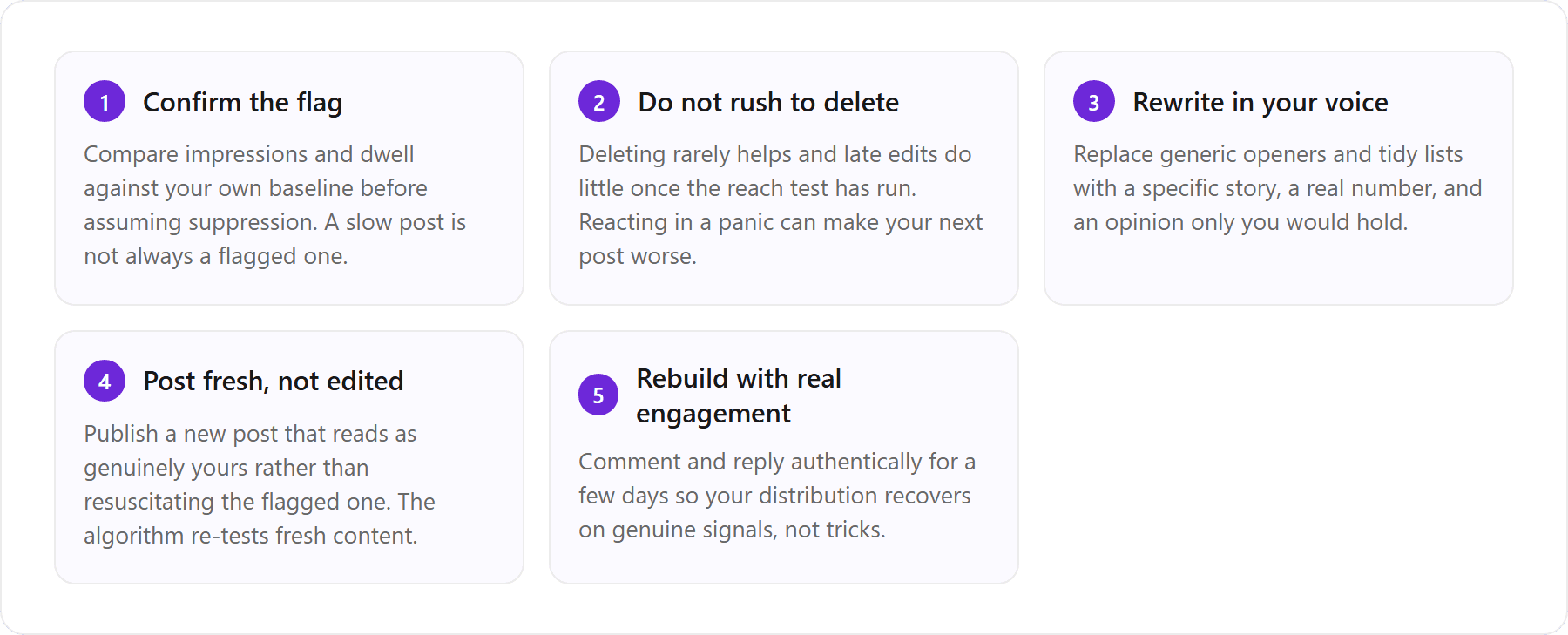
What to do with a suppressed post
The instinct to run a suppressed post through a detector-bypass tool and repost it is the wrong one. Rewriting flagged content in your own voice beats laundering it through a humanizer every time, because the humanizer leaves the post just as hollow and the reach test will fail again. This is a place VoiceMoat can genuinely help: it can draft the rewrite from your real posting history so the replacement reads as yours from the first line, not as scrubbed AI. To be clear about the limit, that does not ‘remove a flag’ or guarantee reach. Nothing honestly can. It just replaces generic writing with writing that has a real chance of holding attention, which is the only lever that actually moves distribution.
How to rebuild reach after a flag
Rebuilding is boring and it works. Post consistently in a recognizable voice, engage in comments where your expertise shows, and give the algorithm a run of posts that hold attention so it re-learns that your content is worth expanding. Distribution is not permanently damaged by one weak post. It responds to your recent track record, so a few strong, specific, human-sounding posts pull you back up faster than any trick. For engagement specifically, the same voice rules apply to comments and replies, which we cover in using AI for LinkedIn engagement.
The real fix: writing that is genuinely yours
Here is the whole guide in one line: you do not need to beat a detector, you need writing that is genuinely yours. Every one of the three risks, reach suppression, reputation, and the faint policy concern, dissolves when your posts read as a specific person who knows something, because that is what platforms expand and what readers trust. Safe, acceptable AI use on LinkedIn and Twitter is not about hiding the machine. It is about keeping the writing yours.
Why voice-matched writing sidesteps all three risks
Voice-matched writing wins on all three fronts at once. It sidesteps reach suppression because a distinct voice holds attention and clears the early test window. It protects your reputation because specific, human-sounding posts read as competence, not filler. And it never brushes the policy line because you are publishing edited work under your own name, not automating slop. The generic-AI approach fails all three simultaneously, which is why chasing a detector workaround is solving the least important problem. Fix the voice and the whole safety question mostly answers itself. If you want the step-by-step on teaching a model your voice by hand, we lay it out in how to train AI to write in your voice.
How VoiceMoat and audenAI keep you out of the slop bucket
Disclosure: VoiceMoat is our own product, so treat this as the maker’s perspective, not an independent recommendation. VoiceMoat is the Personal Brand OS for LinkedIn and Twitter for creating, scheduling, engaging, and growing, and because its audenAI writing partner drafts from your own past posts, the output reads as genuinely yours rather than the generic AI slop that platforms suppress and recruiters flag. That is the mechanism, and it is deliberately the acceptable draft-and-edit pattern, not full auto-generation. audenAI learns your writing patterns from your Twitter and LinkedIn history once, then Studio gives you first drafts in your voice, Engage helps you reply in that same voice, scheduling keeps you consistent, and Analytics shows what actually landed. You review and approve every post. One quick disambiguation, since search engines still confuse the two: VoiceMoat is the Personal Brand OS for LinkedIn and Twitter, not the Voicemod voice changer, so ‘in your voice’ means your writing style, not audio. Being honest about the ceiling: audenAI drafts in your voice, it does not promise any specific platform outcome, and no tool can guarantee reach. What it does is start you from your voice instead of from generic output, which is the durable way to stay out of the slop bucket. You can see how the drafting works on the Studio page for drafting posts in your own voice.
Want AI help without the slop? Let audenAI learn how you write and draft posts in your own voice across Twitter and LinkedIn. Try it for $1 for 3 days; plans from $35 a month., and every draft is yours to edit and approve before it ever goes out.
Frequently asked questions
Is it ok to use ChatGPT for LinkedIn posts?
Yes, as long as you use it to draft and then edit the output into your own voice. LinkedIn does not ban AI-assisted writing, and it even ships its own AI features. What underperforms is raw, unedited ChatGPT output, because it reads as generic and loses reach. Add specifics only you would know, cut the generic openers and em-dashes, and post it under your own name.
Will LinkedIn detect ChatGPT posts?
Increasingly it can sort content into low-quality and high-quality buckets, and unedited AI content tends to land in the low-reach bucket. LinkedIn does not need to prove a specific model wrote your post. It only needs to notice the post looks and performs like generic content, which raw AI output does. Detection is beside the point: the pattern gets caught whether or not a model is fingerprinted.
Can recruiters tell if a LinkedIn post was written by AI?
Many can spot generic AI content because they read LinkedIn all day. The tells are the absence of specifics: no real numbers, no named situations, no opinion, no story only you could tell. The fix is not to hide the AI, it is to add concrete details no model could have invented for you. A post grounded in one real story you lived is almost impossible to mistake for AI, even if AI helped draft it.
Is ChatGPT content bad for LinkedIn reach?
Unedited ChatGPT content is bad for reach because it reads as generic and fails the early engagement test that decides how far a post spreads. ChatGPT used as a drafting tool, then rewritten into something specific and yours, is not. Same tool, opposite outcome. The raw output hurts reach, the edited-into-your-voice version does not.
Can you get in trouble for using ChatGPT on LinkedIn?
For normal individual posting, no. Neither LinkedIn nor Twitter prohibits AI-assisted writing. Their rules target spam, mass automation, fake accounts, and coordinated inauthentic behavior, not the fact that an assistant helped you write. You will not be banned for editing a ChatGPT draft into a post you publish under your own name. You could get in trouble for automating bulk AI spam across accounts.
Is there a safe way to use AI on LinkedIn and Twitter without getting flagged or losing reach?
The safe pattern is draft-and-edit in your own voice, not full auto-generation you paste unedited. Rather than detector-bypass prompts, use your real writing as the source. VoiceMoat (our own product, the Personal Brand OS for LinkedIn and Twitter) trains its audenAI writing partner on your past posts so drafts start from your voice and you approve every one. Try it for $1 for 3 days.
AI disclosure
This article was drafted with AI assistance and edited by Prateek Singh. It cites third-party tools and outlets for context. Disclosure: VoiceMoat is our own product (the Personal Brand OS for LinkedIn and Twitter, whose audenAI writing partner drafts in your own voice), so the section about it reflects the maker's perspective, not an independent recommendation. Reach and detection claims are directional, not measured benchmarks.
Keep reading

AI and Voice
Every social MCP connector reaches both platforms. That is not the hard part
We were going to write that connecting one assistant to both Twitter and LinkedIn was rare. It is not. More than twenty connectors do it and several are free, so channel coverage is table stakes and every roundup ranking them by it is measuring the wrong thing. Here is what actually differs between them, and the one thing we read enumerated tool lists for six of them to confirm nobody does at all.
11 min read
·

AI and Voice
Why your Claude writing skill doesn't sound like you
There are dozens of free Claude skills for writing, and almost all of them do the same thing: strip out phrases that read as machine-written. That is subtraction, and it leaves you sounding like nobody in particular rather than like yourself. The handful that actually learn a voice from your own writing have a fraction of the users. Here is the difference, why a skill cannot post anything no matter what it says, and where the file actually goes on every surface.
13 min read
·

AI and Voice
Hootsuite alternatives in 2026, priced from the vendors' own pages
Hootsuite starts at $99 per user a month, not $19. Here is what the realistic alternatives cost, read off each vendor's own pricing page in both billing positions, plus the clause in Hootsuite's terms that its pricing page does not mention.
10 min read
·

AI and Voice
Taplio alternatives in 2026, priced from the vendors' own pages
Four LinkedIn tools people move to from Taplio, priced from each vendor's own pricing page rather than from each other. Includes the arithmetic on Taplio's Pro tier, which does not add up, and one name still on every recommendation list that has quietly shut down.
11 min read
·

AI and Voice
How to train AI to write in your voice: the cross-model guide
You can get ChatGPT, Claude or Gemini to write in your voice, but only partly and only for one session, because chat models forget your style between chats. This cross-model guide covers the analyze-then-write prompts that work, the settings that make them stick, the four levels of personalized AI content, a reusable instruction block for tweets, and the persistent alternative for anyone who posts regularly.
16 min read
·
From the Twitter algorithm series
The Twitter/X algorithm in May 2026: why voice wins under the new transformer
Read ›

