ai and voice
Repurpose Blogs, Newsletters, and YouTube Videos into Threads and Posts with AI
·
19 min read
·
By Prateek Singh, founder of VoiceMoat
Key takeaways
To repurpose a blog, newsletter or video with AI, start from the full text or transcript, give the model 3 to 5 of your own best past posts as a reference, and reshape each platform separately instead of pasting one summary into both feeds.
Repurposing is not reposting: rebuild the idea for the new place rather than copying it word for word.
Three modes keep your voice when you repurpose content for Twitter: post the single sharpest line on its own, retell the argument as a fresh thread, or post the side thought you cut.
One strong long piece yields about five to eight Twitter posts over two to three weeks. Treat that as a ceiling, resurface core ideas every six to twelve months, and skip pieces that flopped or no longer reflect your view.
Properly repurposed posts are not duplicate content; Google picks one version of near-identical pages and does not describe duplicates as a penalty.
Dedicated repurposing tools are fast but templated; raw ChatGPT or Claude prompts are flexible but need your own posts as a reference every time. VoiceMoat (our own product) learns from your posts once and reshapes one source into a native thread and post; $1 for 3 days, plans from $35 a month.
Updated 23 October 2026. This guide now also covers how to repurpose content for Twitter without flattening your voice: three repurposing modes, the difference from reposting, how many posts one piece can yield, what to skip, duplicate content, and a 30-minute weekly routine.
The fastest way to repurpose a blog into a Twitter thread and LinkedIn post with AI is not to paste the article into ChatGPT and ask for “a thread and a post.” That is exactly the move that makes AI repurposing read like a template. It works, technically, and it also flattens everything you wrote into a house style that sounds identical to every other AI-repurposed feed. The better workflow is boring but reliable: get the real text, hand the model a few examples of how you actually write, and reshape the piece separately for each platform. This guide gives you the copy-paste ChatGPT and Claude prompts to do that for blog posts, newsletters, and YouTube videos, plus the platform-specific rules that keep a thread reading like a thread and a LinkedIn post reading like a LinkedIn post.
Why does AI repurposing usually flatten your voice?
Repurposing is the single scenario where generic AI is most obvious. When you write a fresh tweet, the model has a blank slate and a short target. When you ask it to compress a 1,500-word article into a thread, it has to throw most of the words away, and the thing it optimizes for is compression, not fidelity to how you sound. So it reaches for the safest, most average phrasing it knows. That is why so many repurposed threads share the same skeleton: a “Here’s what nobody tells you” hook, five numbered lessons, and a “Which one hit hardest?” close. It is not that the model is bad at writing. It is that summarizing pulls it toward a mean, and the mean is not you. If you want the deeper mechanics of this, we cover it in why every AI LinkedIn post sounds the same and why AI drafts sound the same.
“Just paste the text” is not a voice fix
Pasting the full article instead of a URL is a real improvement, and we will get to why, but it fixes accuracy, not voice. The model now has your actual argument in front of it, so it stops hallucinating. It still has no idea what your sentences usually sound like. Do you write in short fragments or long rolling sentences? Do you use numbers, or stories, or blunt one-liners? Do you swear, joke, hedge, or never? None of that lives in the source article at the level the model needs. It lives in your past posts. Until you show it those, “just paste the text” gets you an accurate summary in a stranger’s voice.
How split-and-shorten tools lose narrative and tone
Many dedicated repurposing tools work by splitting your article at sentence boundaries and shortening each chunk to fit a tweet. That is fast, and it destroys narrative. A good blog post builds an argument: setup, tension, turn, payoff. A split-and-shorten pass turns that arc into a flat list of disconnected facts, because it never understood the arc in the first place. Tone gets lost the same way. The dry aside that made your paragraph land does not survive being chopped to 240 characters by a tool that treats every sentence as equally important. A partner trained on your own posts is what preserves your voice and your structure through that compression. That gap, keeping the voice intact while the length collapses, is exactly what audenAI (the brain inside VoiceMoat, the Personal Brand OS for LinkedIn and Twitter) is built to close.
Repurposing vs reposting: what’s the difference?
Reposting is publishing the same content again, unchanged: the identical tweet a few months later, or an essay cross-posted word for word to a second platform. Repurposing is rebuilding the idea in a form that is native to the new place. A verbatim repost either lands the way it did the first time or reads as lazy, and a verbatim cross-post reads as out of place because the format and audience are different.
Repurposing done well is closer to rewriting than reposting. You take an idea you have already had and say it again from scratch, in the shape the new surface rewards. That is also why it doesn’t read as recycling: a retold thread is a new piece that shares a root with the original. The kind of reposting that does work is deliberately resurfacing your own evergreen posts on a schedule, covered in the Justin Welsh repurposing system, read voice-first.
How to repurpose content for Twitter without flattening your voice: three modes
Most ‘repurpose for Twitter’ advice says: take the essay, pull out the five strongest points, turn each into a one-line tweet. The points survive; the texture, digressions and framings that made the essay worth reading do not. Three modes avoid that, because none of them compresses your words into a summary.
Mode 1: the standalone line
Pick the single sharpest line or paragraph from the long piece and post it on its own, with the link in a reply or no link at all. No summary, no bullets. The line worked in the essay, and it works on Twitter for the same reason. A strong piece usually has 3 to 5 lines that clear this bar; spread them across two or three weeks instead of stacking them in one thread.
Mode 2: the thread that retells, not summarizes
Tell the argument again instead of extracting it. Open with a Twitter-native hook, then walk through the argument from scratch in your own words, not by quoting yourself. Retelling usually finds new framings, examples and pacing, which is the point: the thread becomes its own piece, related to the essay but not a summary of it. Budget roughly 30 to 60 minutes per thread. The prompts later in this guide help with the first draft; the retelling is what keeps it yours.
Mode 3: the thing you didn’t say
Often the best Twitter posts from a long piece are the ideas that almost made it in: the side observation, the footnote-level take, the point you cut because it was off-topic. They don’t read as derivative because they aren’t. The essay surfaced them; the post gives the essay a longer tail without feeling like ‘another thread from the same piece’.
The repurposing workflow, step by step
Whether you use a raw prompt or a tool, the same five moves separate on-voice repurposing from templated slop. Do them in order and almost any model gives you a usable draft.
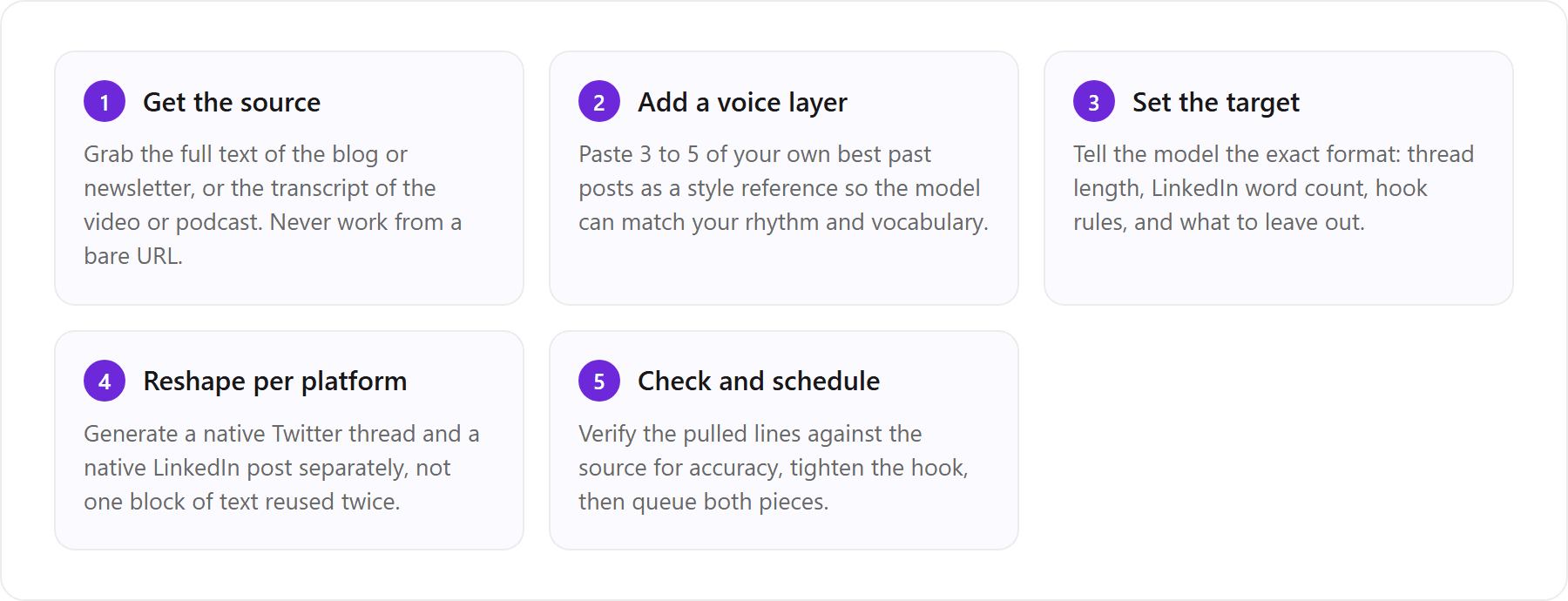
Start from the text, not a URL
Paste the full article body into the prompt. When you hand a model a URL, it either cannot read it, reads a stripped version, or fills gaps from memory, and all three routes cost you accuracy. Pasting the raw text also lets you delete the parts you do not want repurposed (the intro throat-clearing, the CTA, the author bio) before the model ever sees them, so it works from the substance, not the packaging.
Pull the transcript for YouTube and podcasts
Video and audio are just text you have not extracted yet. For YouTube, open the video, click the three-dot menu, and choose “Show transcript” to get the auto-captions, which you can then copy in full (Google documents this in the YouTube captions help). For podcasts, most hosts now publish a transcript, or you can run the audio through a transcription tool. Once you have plain text, a YouTube video repurposes exactly like a blog post: the transcript becomes your source, and every prompt below works on it unchanged.
Cross-reference your top-performing posts
Your voice reference should not be random old posts. Use your best-performing ones, the tweets and LinkedIn posts that actually landed, because those encode the hooks and rhythms your audience already rewards. Keep a running file of 5 to 10 of them and paste the relevant handful into every repurposing prompt. This is the highest-leverage step in the entire workflow, and it is the one people skip. If you want to build that reference properly, how to train AI to write in your voice walks through choosing the right examples.
How do you turn a blog post into a Twitter thread with AI?
A Twitter thread is not a summary with line breaks. It is a sequence of small, self-contained hits, each one earning the read of the next. The job is to find the 7 to 9 strongest ideas in your article and give each one its own tweet, led by a hook that could stand alone even if nobody read the rest. Here are the prompts that do this for ChatGPT and Claude.
ChatGPT prompt to turn a blog post into a thread
You are helping me repurpose my blog post into a Twitter thread in my own voice. First, here are 4 of my recent tweets so you can match my style: [paste 4 tweets]. Now here is my blog post: [paste full text]. Write a 7 to 9 tweet thread. Rules: tweet 1 is a hook that states the single most surprising or useful idea in under 240 characters, with no “a thread” label. Each following tweet makes one point in 1 to 3 short lines. Use my vocabulary and sentence length from the examples, not a formal summary tone. End with one takeaway tweet, no generic “follow for more.” Do not use hashtags or emojis unless my examples do.
Claude prompt to turn a blog post into a thread
I want to turn my blog post into a Twitter thread that sounds like me, not like AI. Style reference (match this rhythm and word choice): [paste 3 to 5 of my posts]. Source article: [paste text]. Write 8 tweets. Open with a hook tweet built from the strongest single line in the article. Keep each tweet to one idea and under 260 characters. Vary sentence length the way my examples do. No hashtags, no “follow for more,” no em dashes. After the thread, list which 3 lines you pulled straight from the article so I can fact-check them.
A few structure rules make threads work regardless of which model you use. The hook does all the heavy lifting: if tweet 1 does not stop the scroll, nothing after it gets read, so make it a claim, a number, or a tension, never a table of contents. Keep one idea per tweet, because a tweet trying to make two points makes neither. Cut transition tweets like “But here’s the thing” that carry no information. And end on a concrete takeaway the reader can act on, not a request to like and follow. Claude tends to keep narrative flow a bit better across a thread, while ChatGPT is quicker to hit an exact tweet count; we compare them head to head in Claude vs ChatGPT for social posts. If your hooks keep coming out stale, AI hook prompts for Twitter and LinkedIn explains why they go generic and how to refresh them.
[ from the team behind this blog ]
Post on LinkedIn and Twitter in a way that reads like you
VoiceMoat is the Personal Brand OS for LinkedIn and Twitter. audenAI, the brain inside it, learns from your own posts, then helps you create, schedule and grow.
Creator plan $35 a month after the trial. Cancel anytime.
How do you turn a blog post or newsletter into a LinkedIn post?
LinkedIn rewards a completely different shape than Twitter. A thread wins by fragmenting; a LinkedIn post wins by holding one thought and giving it room to breathe. The opening line is the whole game, because LinkedIn hides everything after the first line or two behind a “see more” fold. So the repurposing task is: extract the single most compelling idea from your article, open on it hard, then develop that one idea in short paragraphs with white space between them.
ChatGPT prompt to turn a blog into a LinkedIn post
Turn my blog post into one LinkedIn post in my voice. Voice reference: [paste 3 of my LinkedIn posts or comments]. Article: [paste text]. Rules: open with a one-line hook on its own line that makes someone stop scrolling (a claim, a number, or a short story beat), not a summary. Then 120 to 200 words of body in short paragraphs with white space between them. Make one clear point, not five. Close with a single reflective line or a question, no “Agree? Comment below” and no hashtag stacks. Keep my everyday words, do not upgrade the vocabulary or make it more corporate.
Turn a newsletter into a batch of tweets
A newsletter is a goldmine because it usually contains several distinct ideas that were never meant to be read as one post. Instead of forcing it into a single thread, mine it for a week of standalone tweets. This prompt pulls a mixed batch you can schedule out.
Here is my latest newsletter issue: [paste text]. Pull out 6 standalone tweets I can post over the next week. Each tweet must stand on its own without the newsletter context, stay under 260 characters, and use my voice from these examples: [paste 3 tweets]. Mix the formats: 2 one-line observations, 2 short lists, 1 contrarian take, 1 practical tip. No hashtags. Number them so I can queue them.
For the LinkedIn side specifically, three reshaping rules matter most. Length: aim for 120 to 250 words, long enough to develop the idea, short enough to finish. Open: the first line must work as a standalone hook above the fold, so lead with the payoff, not the setup. Close: end on a question or a reflective line that invites a comment, but skip the tired “Thoughts?” and the wall of hashtags, which read as engagement bait. If your LinkedIn drafts keep coming out stiff and same-y, why every AI LinkedIn post sounds the same covers the specific tells and fixes.
How do you turn a YouTube video into a Twitter thread?
Turning a YouTube video into a Twitter thread with AI is a two-step job: get the transcript, then repurpose the transcript. The catch with spoken content is that transcripts are messy. People repeat themselves, trail off, and pad with filler that reads fine out loud but looks bad in text. So your prompt has to tell the model to tighten spoken rambling into written lines, not transcribe it verbatim.
Claude prompt to write tweets from a YouTube transcript
Below is the transcript of my YouTube video. Transcript: [paste transcript]. Write a 7 tweet thread that teaches the main lesson of the video in my voice. Voice reference: [paste 3 of my tweets]. Ignore filler, “um,” false starts, and repeated points. Tweet 1 is a hook drawn from the strongest moment in the video. Keep the spoken ideas but tighten them into written lines under 260 characters each. No timestamps, no “in this video,” no hashtags. End with the one thing a viewer should try. After the thread, tell me which moments in the transcript you built each tweet from.
The same prompt works in ChatGPT with the voice-reference swap. Claude tends to handle long, noisy transcripts a little more gracefully because it holds more context comfortably and is good at ignoring the filler you told it to drop. Either way, always ask the model to cite which transcript moments it used, so you can catch the spot where it confidently invented a point the video never made.
One more tip for podcasts and videos where you are the speaker: before you extract anything, listen back for the moments where you said something you would never have typed the same way. Spoken versions of your takes are often sharper than written ones, and those moments make the best standalone posts.
Dedicated video tools: TubeOnAI, Tugan, and BlogTweet
If you repurpose video constantly, dedicated tools remove the transcript step. TubeOnAI takes a YouTube link and returns summaries and social drafts. Tugan turns a URL, video, or newsletter into threads and posts. BlogTweet converts a blog URL into a thread in one click. Qura sits in the same lane for repurposing long-form into social. They are genuinely fast, and that speed is the trade: they apply a fixed template and a house voice, so everyone using the same tool ships posts that share the same shape. They are great for volume when the sound of the post does not matter much, and frustrating when it does.
One source, many formats (without saying the same thing twice)
The real payoff of repurposing is not turning one blog into one post. It is turning one blog into a thread, a LinkedIn post, a carousel, and a batch of newsletter-ready lines, each of which reads like it was made for its home, not reformatted from a shared block. The mistake is treating “repurpose” as “reformat.” The same idea should show up in four genuinely different shapes.
Thread, LinkedIn post, carousel, and newsletter from one piece
Here is how one blog post maps to four native formats. A Twitter thread opens with a sharp hook, runs 7 to 9 short tweets, one idea each, and closes on a takeaway. A LinkedIn post opens with a one-line pattern interrupt above the fold, develops a single point in 120 to 250 words with white space, and closes on a question. A carousel takes the same points but one per slide, with a cover slide that functions as the hook and a final slide that functions as the CTA. A newsletter section keeps the full narrative arc but adds the connective tissue and personal aside that a thread had to cut. Four outputs, one idea, four shapes.
Repurpose your own old tweets
Your own back catalogue is the most underused source. Pick a post from a year or more ago, rewrite it for today, and note what has changed in your thinking. If it helps, reference the original. Long-time followers see the evolution, and newer followers get fresh content. To carry a tweet over to LinkedIn, see how to repurpose tweets into LinkedIn posts.
Reshape per platform instead of copy-pasting
Twitter and LinkedIn reward opposite instincts, so the same words cannot win on both. Twitter rewards compression, punch, and a fast hook; LinkedIn rewards a slower open, a single developed idea, and a reflective close. Pasting the same summary into both feeds is the tell that a tool or a lazy prompt did the work. This is the point where VoiceMoat differs from a generic model: it reshapes per platform natively for Twitter and LinkedIn rather than reformatting one block of text twice, so the thread and the post read like two different pieces that happen to share a source. For the fuller argument on why platform-native beats copy-paste, our 2026 roundup of AI content tools compares the options on exactly this.
Repurposing rules: how much, how often, and what to skip
How many Twitter posts can one long piece yield?
As a rule of thumb, five to eight posts from a strong long piece, spread over two to three weeks: three to five standalone lines (Mode 1), one retold thread (Mode 2) and one or two side-take posts (Mode 3). Treat that as a ceiling, not a quota. A dense essay may yield all eight; a tight single-point post yields two or three. Padding to hit a number produces exactly the thin filler a general model hands you when you ask it to ‘make a thread from this’.
How often can you repurpose the same idea?
For your core ideas, every six to twelve months is a healthy rhythm, retold rather than repeated. Your audience turns over and your thinking moves, so a resurfaced idea can carry something genuinely new. The warning sign is that your timeline starts to feel like a loop to your most loyal readers. Spread resurfacing across quarters, change the angle each time, and keep Mode 3 posts in reserve for weeks when you’d otherwise re-run a recent idea.
What not to repurpose
Pieces that flopped. Repurposing amplifies. If the original didn’t land, more versions spread the miss.
Time-sensitive takes past their window, unless you frame them openly as a look back.
Confidential client detail. Specifics that were fine in a private newsletter or gated post often don’t belong on a public timeline.
Ideas you no longer hold. If your view has changed, write a new piece about the change instead.
Does repurposing hurt SEO through duplicate content?
Not when it is done properly. Google’s guidance on duplicate URLs describes picking one version of near-identical pages to show in search; it does not describe duplicates as a penalty. So copying an essay word for word to three sites mostly means two of the copies add nothing. A retold thread or a side-take post is not a duplicate at all; it is a separate piece on the same topic. The feed works the same way: readers respond to the version made for the platform they’re on.
A 30-minute weekly routine to repurpose content for Twitter
Block 30 minutes once a week, ideally on your lightest day:
Pick one strong long piece from the last two to four weeks.
Read it once as a reader would. Flag the five lines that hit hardest: your Mode 1 candidates.
Name the one or two arguments worth retelling: your Mode 2 candidates.
Note the side thoughts you cut: your Mode 3 candidates.
Schedule the Mode 1 posts across the next two weeks, draft the Mode 2 thread now, and save the Mode 3 posts for days you’re short of ideas.
If the raw inputs are the bottleneck, using Twitter bookmarks as research covers how to feed the pipeline with study rather than templates.
Dedicated tools vs raw prompts vs voice-matched repurposing
There are three real lanes for repurposing, and they trade off differently. Raw ChatGPT or Claude prompts are the most flexible and the cheapest, but they flatten your voice unless you feed them your own writing every time. Dedicated tools like BlogTweet, TubeOnAI, and Tugan are the fastest, but they apply a template and a generic house voice. Voice-matched repurposing is the third lane: it grounds output in the real source and rewrites it in your learned voice. Here is the honest comparison.
Factor | Dedicated tools (BlogTweet, TubeOnAI) | Raw ChatGPT / Claude prompt | Learned voice (VoiceMoat with audenAI) |
|---|---|---|---|
Grounding in your real source | Good (works from your URL or video) | Good if you paste full text, weak from a URL | Good (works from the pasted source or transcript) |
Keeps your voice | Templated house voice | Only if you supply examples each time | Learns from your posts once, applies it every time |
Per-platform reshaping | Fixed template per format | Whatever you prompt for, manually | Native Twitter and LinkedIn shapes, automatic |
Twitter + LinkedIn in one place | Varies by tool | You manage both by hand | Both in one workflow |
Cost | Usually a monthly subscription | Free tier or model subscription | $1 for a 3-day trial, then from $35/mo |
When is a raw ChatGPT prompt enough?
A raw prompt is the right tool more often than tool vendors admit. If you repurpose occasionally, if you are happy to paste your voice examples each time, and if you enjoy the editing pass, ChatGPT or Claude with the prompts above will get you there for free or close to it. The friction only compounds when the volume does. Doing the paste-examples-every-time dance once a week is fine. Doing it for a thread, a post, a carousel, and a newsletter batch, five times a week, across two platforms, is where hand-managing your own voice stops scaling and starts getting skipped, which is when the generic drift creeps back in.
Where VoiceMoat fits: repurposing in your learned voice
VoiceMoat is the Personal Brand OS for LinkedIn and Twitter that turns one blog post, newsletter, or YouTube transcript into a thread and a post, reshaped per platform and rewritten in your own learned voice, instead of pasting the same flattened text into both feeds. The mechanism is simple and honest: audenAI, the brain inside VoiceMoat, learns from your own posts once. After that, you do not re-paste voice examples on every job. You drop in the source, and it drafts in Studio, handles replies in Engage, schedules the output, and reports back in Analytics, across both Twitter and LinkedIn. Because audenAI learns from your own posts, it keeps your sentence rhythm, vocabulary, and hooks through the compression rather than collapsing everything into one templated tone. You can repurpose long-form into posts in your voice in Studio. For transparency: VoiceMoat is our own product, so we are biased; the raw prompts above work on their own, and this is the paid shortcut. (Worth clearing up a common mix-up: VoiceMoat is the Personal Brand OS for LinkedIn and Twitter, not Voicemod, the voice changer.)
How do you keep your voice consistent across every repurposed piece?
Consistency is the part that quietly breaks. Any single repurposed thread can be edited into your voice by hand. The problem is the twentieth one, and the fortieth, when the editing energy is gone and “good enough” ships. Over dozens of pieces, small drifts add up, and the feed slowly slides toward the model’s average voice instead of yours. Hand-editing every output cannot hold that line, because it depends on you having the same energy every time, which nobody does.
The fix is to anchor every piece to the same learned voice instead of re-deciding it per post. Whether you do that with a carefully maintained reference file and disciplined prompting, or with a tool that stores the voice for you, the principle is identical: one anchor, applied to every thread and post you repurpose. VoiceMoat holds that anchor because audenAI learns from your posts once and applies it to everything you repurpose after, so piece forty reads like piece one. That is the whole point of a voice moat: the more you publish, the more consistently it reads like you, and the harder it is for a copy-paste competitor to match. Try it for $1 for 3 days; plans from $35 a month.
Try VoiceMoat for $1 for 3 days and repurpose your latest blog post into a Twitter thread and a LinkedIn post in your own voice, reshaped for each platform instead of pasted twice.
Frequently asked questions
How do I repurpose a blog post into a Twitter thread and LinkedIn post without it sounding generic?
Do not paste the same summary into both feeds, because that is what makes AI repurposing read like a template. Give the model your own past posts as a reference and reshape the piece for each platform. VoiceMoat (our own product, the Personal Brand OS for LinkedIn and Twitter) does both: audenAI rewrites the source from your own posts and reshapes it into a native thread and a native post, so one article becomes two pieces that still read like you.
How do I turn a blog post into a Twitter thread with ChatGPT?
Paste the full blog text (not a URL) into ChatGPT along with 4 of your recent tweets as a voice reference, then ask for a 7 to 9 tweet thread where tweet 1 is a standalone hook and each following tweet makes one point in a few short lines. Tell it to match your vocabulary and sentence length from the examples and to skip hashtags and "follow for more."
What is the best prompt to turn a blog into a LinkedIn post?
Ask the model to turn the article into one LinkedIn post that opens with a one-line hook on its own line (a claim, number or story beat), develops a single point in 120 to 250 words with white space between short paragraphs, and closes on a reflective line or question. Include 3 of your own LinkedIn posts as a voice reference and tell it not to upgrade your vocabulary or add hashtag stacks.
Can Claude write tweets from a YouTube transcript?
Yes. Pull the video transcript first (YouTube's "Show transcript" option gives you the auto-captions), paste it into Claude with 3 of your tweets as a voice reference, and ask for a 7 tweet thread that ignores filler and false starts and tightens the spoken ideas into written lines under 260 characters. Ask Claude to cite which transcript moments it used so you can fact-check.
How do you repurpose content for Twitter without flattening your voice?
Use modes that don't compress your words into a summary: post the single sharpest line from the piece on its own, retell the argument from scratch as a new thread, or post the side thought you cut from the original. Each one is written fresh, so it keeps your voice, unlike the extract-five-bullets approach most guides teach.
How many Twitter posts can one long piece of content yield?
About five to eight from a strong piece, spread over two to three weeks: three to five standalone lines, one retold thread and one or two side-take posts. Treat that as a ceiling, not a quota. A tight single-point piece may only yield two or three, and padding past that produces filler.
Does repurposing content hurt SEO through duplicate content?
Not when you rebuild the idea. Google's guidance describes choosing one version of near-identical pages to show in search, not a penalty, so word-for-word copies mostly add nothing. A retold thread or side-take post is a separate piece on the same topic, not a duplicate.
Why does my repurposed content sound generic?
Because summarizing pulls a general model toward its average voice, not yours. Compressing a long article forces it to throw away most of your words, and the safest phrasing it reaches for sounds the same for everyone. The fix is to supply your own past posts as a voice reference every time, or use a tool like VoiceMoat where audenAI learns from your posts once and applies that to every repurposed thread and post.
AI disclosure
This article was drafted with AI assistance and reviewed by a human editor for accuracy and voice. It names third-party tools (ChatGPT, Claude, Gemini, BlogTweet, TubeOnAI, Tugan, Qura) as the subjects of the guide and is not sponsored by them. VoiceMoat is our own product, so our recommendation of it is not neutral; the raw ChatGPT and Claude prompts here work on their own, and VoiceMoat is presented as the paid shortcut. Prompts and workflow steps are illustrative starting points. Related guides merged in and facts rechecked on 23 October 2026.
Keep reading

AI and Voice
Every social MCP connector reaches both platforms. That is not the hard part
We were going to write that connecting one assistant to both Twitter and LinkedIn was rare. It is not. More than twenty connectors do it and several are free, so channel coverage is table stakes and every roundup ranking them by it is measuring the wrong thing. Here is what actually differs between them, and the one thing we read enumerated tool lists for six of them to confirm nobody does at all.
11 min read
·

AI and Voice
Why your Claude writing skill doesn't sound like you
There are dozens of free Claude skills for writing, and almost all of them do the same thing: strip out phrases that read as machine-written. That is subtraction, and it leaves you sounding like nobody in particular rather than like yourself. The handful that actually learn a voice from your own writing have a fraction of the users. Here is the difference, why a skill cannot post anything no matter what it says, and where the file actually goes on every surface.
13 min read
·

AI and Voice
Hootsuite alternatives in 2026, priced from the vendors' own pages
Hootsuite starts at $99 per user a month, not $19. Here is what the realistic alternatives cost, read off each vendor's own pricing page in both billing positions, plus the clause in Hootsuite's terms that its pricing page does not mention.
10 min read
·

AI and Voice
Taplio alternatives in 2026, priced from the vendors' own pages
Four LinkedIn tools people move to from Taplio, priced from each vendor's own pricing page rather than from each other. Includes the arithmetic on Taplio's Pro tier, which does not add up, and one name still on every recommendation list that has quietly shut down.
11 min read
·

AI and Voice
How to train AI to write in your voice: the cross-model guide
You can get ChatGPT, Claude or Gemini to write in your voice, but only partly and only for one session, because chat models forget your style between chats. This cross-model guide covers the analyze-then-write prompts that work, the settings that make them stick, the four levels of personalized AI content, a reusable instruction block for tweets, and the persistent alternative for anyone who posts regularly.
16 min read
·
From the Twitter algorithm series
The Twitter/X algorithm in May 2026: why voice wins under the new transformer
Read ›

