ai and voice
Best ChatGPT Prompts for Twitter: Tweets, Threads, and Growth
·
18 min read
·
By Prateek Singh, founder of VoiceMoat
Key takeaways
The base prompt formula for tweets is topic + audience + tone + style + constraint: name the subject, name the reader, set the voice, give a structural rule, and add a hard limit like 280 characters or 'no hashtags'.
The hook is the highest-leverage line. Ask ChatGPT for 10 first-line options and pick one, because the opening decides whether the rest of the tweet or thread ever gets read.
ChatGPT nails structure and speed but stalls around 80 percent: without your own tweets pasted in every session, it defaults to a recognizable house style that thousands of other accounts also produce.
Automating tweets with Zapier or Buffer plus ChatGPT scales posting, but it also scales the blandness, because the model never learns your voice no matter how many posts it ships.
VoiceMoat, the Personal Brand OS for LinkedIn and Twitter, takes the re-pasting away: audenAI, the AI inside it, learns how you write from your own posts once and drafts in your voice. Full disclosure: it is our own product, and the prompts here work in any AI you already use.
The best ChatGPT prompts for Twitter all share the same skeleton: they tell the model exactly what to write about, who it is for, what tone to hit, and what constraint to respect, and then they ask for a batch of options instead of one safe answer. That structure is the difference between a prompt that returns a paragraph of motivational sludge and one that returns ten tweets you would actually post. This guide gives you the exact prompts, organized by task (single tweets, threads, and growth assets) and by niche, so you can copy, fill the brackets, and paste. It also tells you the part most prompt packs leave out: why the output still drifts toward the same cadence every other ChatGPT user gets, and the faster way to fix that for good.
Can ChatGPT actually write good tweets?
Yes, ChatGPT can write good tweets, and it can write them fast. Give it a clear topic and a tight constraint and it will produce clean, grammatical, on-format copy in seconds. It understands the shape of a tweet, the shape of a thread, and the difference between a hook and a body line. For raw throughput (turning one idea into ten drafts before your coffee is cold) it is genuinely useful, which is why almost every serious Twitter account now keeps a chat window open. If you want a head-to-head on how it compares to other models for this specific job, we tested that separately in Best AI for Writing Tweets.
What ChatGPT is good at (and where it stalls at 80%)
The honest ceiling is around 80 percent. ChatGPT reliably handles structure, spelling, length, and format. Where it stalls is voice. Out of the box it writes in a recognizable house style: balanced sentences, a fondness for ‘It’s not X, it’s Y’ constructions, tidy tricolons, and a closing line that reaches for uplift. That style is competent and completely anonymous. It reads like every other account that also pastes the same prompt, because it is the statistical average of the text the model was trained on. You can push past 80 percent by pasting a stack of your own best tweets into every session, which primes the model on your rhythm and vocabulary. It works, and it is also a chore you have to repeat in every new chat, because the model forgets you the moment the window closes.
This is worth naming up front because it shapes everything below. The prompts in this article get you to that 80 percent quickly and reliably. Closing the last stretch (the part where a tweet reads like you specifically, not like a competent stranger) is a different problem than prompt-writing, and the real fix is a tool that remembers your voice rather than a longer prompt you retype forever. That is exactly what VoiceMoat, our own product, is built for, and we cover it honestly at the end after you have the prompts in hand.
How to write tweets with ChatGPT: the base prompt formula
Almost every good tweet prompt is the same five-part formula wearing different clothes. Learn the formula once and you can build any prompt on the spot instead of hunting for a template. The parts are topic, audience, tone, style, and constraint. Miss one and the output gets vaguer: skip the audience and it writes for nobody, skip the constraint and it writes a paragraph, skip the style and it defaults to the house voice.
The topic + audience + tone + style formula
Topic is the specific thing the tweet is about, and specific is the operative word: ‘the hidden cost of context-switching for solo developers’ beats ‘productivity’. Audience is who should feel personally spoken to. Tone is the emotional register (blunt, warm, dry, contrarian). Style is a structural rule for the output, such as ‘one-sentence claim, then one line of proof’. Constraint is the hard limit that keeps it a tweet and not an essay. Here is the formula as a fill-in-the-blanks prompt.
You are a Twitter copywriter. Write a single tweet about [TOPIC] for [AUDIENCE]. Tone: [TONE]. Style: one clear claim, then one line of proof. Constraint: under 280 characters, no hashtags, no emoji. Give me 10 different versions, each with a different first line.
Anatomy of a high-performing tweet prompt: each component and the job it does in the output.
Component | What it does | Filled example |
|---|---|---|
Topic | The specific subject the tweet is about | The hidden cost of context-switching for developers |
Audience | Who should feel spoken to | Solo founders who also write their own code |
Tone | The emotional register | Blunt, a little contrarian, no hype |
Style | A structural rule for the output | One-sentence claim, then one line of proof |
Constraint | The hard limit that keeps it a tweet | Under 280 characters, no hashtags, no emoji |
Persona priming: ‘act as a Twitter copywriter’
Opening with a role (‘You are a Twitter copywriter who writes for founders’) measurably tightens the output. It is not magic and it will not give you a voice, but it narrows the model’s target from ‘general helpful assistant’ to ‘someone who writes short, punchy social copy’. That means fewer preambles, fewer disclaimers, and fewer 40-word sentences. OpenAI’s own prompting guidance makes the same point in plainer terms: the more clearly you define the role and the task, the closer the first draft lands. Keep the persona short and concrete. ‘Act as a Twitter copywriter for B2B SaaS founders’ works. ‘Act as the world’s greatest viral genius growth hacker’ just adds hype the model then tries to live up to.
Writing inside the 280-character limit
ChatGPT is bad at counting characters, so do not trust it to police length for you. It will confidently claim a tweet is 240 characters when it is 310. The standard limit is 280 characters for most accounts, with paid tiers allowed much longer posts, per Twitter’s help center. The practical move is to ask for tweets ‘under 280 characters’ as a constraint, then eyeball or paste the winners into a counter before posting. Better still, ask the model to write shorter than it wants: ‘aim for 180 to 240 characters so there is room to breathe’. Short tweets outperform maxed-out ones more often than not, because white space is a hook of its own.
The best ChatGPT prompts for single tweets
Single tweets are where you should spend most of your prompting energy, because a strong standalone tweet is what earns the follows that make your threads land later. The three prompts below cover the full loop: generating ideas, sharpening the hook, and forcing enough variation that you actually have something to choose from.
Tweet-idea generation prompts by niche
The blank-page problem is really an idea problem, not a writing problem. The fix is to make ChatGPT mine your actual work for tweetable moments instead of inventing generic advice. Feed it your niche, your audience, and the outcome you deliver, then ask for ideas rooted in lessons, mistakes, and small wins. This is a ChatGPT tweet ideas prompt you can run once a week to fill a backlog.
Act as a content strategist for [NICHE]. I help [AUDIENCE] achieve [OUTCOME]. Give me 20 specific tweet ideas drawn from lessons, mistakes, contrarian takes, and small wins in that work. No generic motivation, no ‘here’s why consistency matters’. Each idea in under 12 words, phrased as the angle, not the finished tweet.
If your best ideas already live in longer content (a blog, a newsletter, a talk), you do not need to invent from scratch at all. Point the model at that material and let it extract the tweetable claims. We walk through that full workflow in Repurpose blogs, newsletters, and videos into threads and posts with AI. For a zero-setup starting point, our free AI tweet generator runs a version of this idea prompt without a login.
Hook formulas and pattern interrupts for the first line
The first line does most of the work. In the feed, a reader sees your opening and nothing else until they decide to stop, so the hook is the single highest-leverage thing you can prompt for. Pattern interrupts are what stop the scroll: a surprising number, a blunt admission, a contrarian claim, or a specific mistake. Ask ChatGPT to generate hooks separately from bodies so you can mix and match the best opener with the best payoff.
Here are 5 tweets that performed well for me: [PASTE 5 TWEETS]. Write 10 opening lines for a tweet about [TOPIC] that use pattern interrupts: a surprising number, a blunt admission, a contrarian claim, or a specific mistake. Do not use a question as the hook. Match the rhythm of my examples above.
One warning: hook templates go stale fast, because the moment a formula works, thousands of accounts copy it into the ground. ‘Unpopular opinion:’ and ‘Nobody is talking about this:’ were sharp two years ago and now read as noise. We cover why this happens and how to keep hooks fresh in AI hook prompts for Twitter and LinkedIn. The durable move is to feed the model your own past hooks, so its new ones inherit your angle instead of the internet’s current cliche.
Generate 10 variations and pick one
Never accept ChatGPT’s first tweet. The first output is the model’s safest, most average guess, which is exactly the copy you do not want. Always ask for ten versions with different angles, then delete nine. This single habit does more for quality than any clever prompt, because it turns you from a writer into an editor, and editing is where taste lives. When you review the batch, look for the one that made you slightly uncomfortable or that you could not have written on autopilot. That is usually the one worth posting, lightly edited into your own words.
[ from the team behind this blog ]
Post on LinkedIn and Twitter in a way that reads like you
VoiceMoat is the Personal Brand OS for LinkedIn and Twitter. audenAI, the brain inside it, learns from your own posts, then helps you create, schedule and grow.
Creator plan $35 a month after the trial. Cancel anytime.
The best ChatGPT prompts for Twitter threads
Threads are where ChatGPT’s structural strength pays off most, because a thread is really a small piece of architecture: a hook that makes a promise, a middle that keeps it, and a close that asks for something. The model is good at that skeleton once you specify it. The prompt below is a reliable ChatGPT Twitter thread generator you can reuse for any topic.
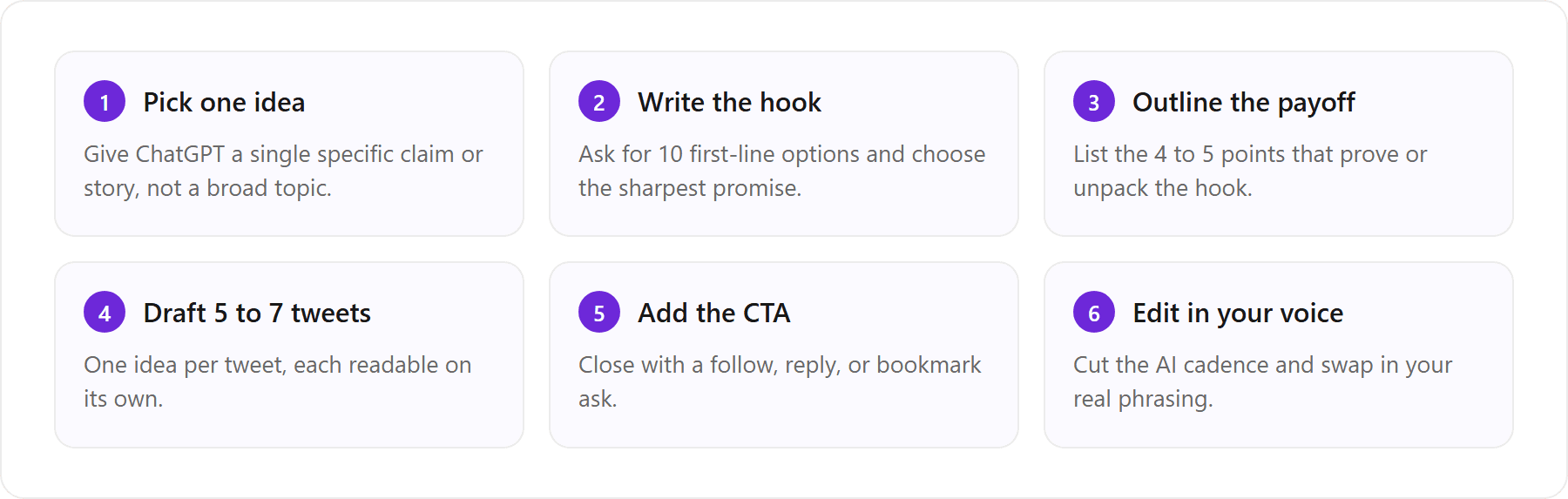
The 5 to 7 tweet thread structure (hook to value to CTA)
Five to seven tweets is the sweet spot for most threads: long enough to deliver real value, short enough that people finish. The structure is hook, then one point per tweet, then a call to action. Each tweet should stand on its own so a reader who lands mid-thread still gets something. Here is the prompt to write a Twitter thread with ChatGPT that follows that shape.
Write a Twitter thread of 6 tweets about [TOPIC] for [AUDIENCE]. Tweet 1 is the hook and promises a specific, concrete payoff. Tweets 2 to 5 each make one point with a real example or number. Tweet 6 is a short CTA to follow me for more on [THEME]. Keep every tweet under 280 characters, no hashtags, one idea per tweet. Number the payoff tweets 1/, 2/, 3/, 4/.
The viral thread template with numbered payoff tweets
The ‘listicle thread’ (a numbered set of tips, tools, mistakes, or steps) remains the most reliable format because the hook can promise an exact count, which sets a clear expectation the thread then satisfies. ‘I audited 50 founder profiles. Here are the 7 mistakes almost all of them made’ works because the reader knows precisely what they are getting. To build one, ask ChatGPT for the hook first, lock it, then generate the numbered payoff tweets against that promise. Keeping the two steps separate stops the model from writing a vague hook that the body cannot deliver on.
Can ChatGPT write viral Twitter threads?
ChatGPT can write the structure of a viral thread. It cannot make a thread go viral. Virality depends on the idea being genuinely interesting or useful, on timing, on your existing audience, and on a hook that feels like it came from a specific person with a real point of view. The model gives you a competent, well-sequenced draft, which is the necessary floor, not the whole building. If your input idea is generic, ChatGPT will faithfully produce a generic thread, and generic threads do not travel. Treat it as a fast co-writer for structure and a first pass on wording, then supply the actual insight and the actual voice yourself. The threads that break out are the ones where the human did the thinking and the model did the typing, not the reverse.
The best ChatGPT prompts for Twitter growth
Growth on Twitter is not just individual bangers; it is a coherent account. The best ChatGPT prompts for Twitter growth work at the account level: a bio that instantly says who you help, content pillars so you are not reinventing your topics daily, and a posting cadence you can actually sustain. Twitter still reaches a wide slice of online adults, and reference data from Pew Research shows how varied that audience is, which is exactly why a sharp, specific bio and consistent pillars matter more than volume.
Bio, content pillars, and posting cadence prompts
Run this once when you set up or refresh your account, then revisit it quarterly. It turns a pile of your existing tweets into a bio, a topic strategy, and a realistic schedule in one pass.
Based on these tweets [PASTE 10 TWEETS], do three things. 1) Write 3 versions of a Twitter bio under 160 characters that make my niche and the outcome I deliver obvious in the first line. 2) Propose 4 content pillars I can rotate through every week. 3) Suggest a realistic weekly cadence (how many single tweets vs threads) for someone who can post 5 days a week without burning out.
For the bio specifically, it is worth running a dedicated prompt that optimizes for the profile format rather than the feed. We collect the strongest versions in ChatGPT Twitter bio and LinkedIn profile prompts. The cadence output is a starting hypothesis, not gospel; adjust it against what your own analytics tell you once you have a few weeks of data.
How to use ChatGPT to write tweets automatically
You can use ChatGPT to write tweets automatically, and there are two honest routes. The manual route is a saved prompt and a scheduling tool: you generate a batch in one sitting, then queue them in a scheduler so posting is hands-off even though writing is not. The automated route uses the API and a connector to generate and post with no human in the loop. Both scale your output. Only one of them is usually a good idea.
The no-code automation route (and its blandness tax)
The no-code stack looks tidy on paper. A tool like Zapier or ClickUp triggers on a schedule, calls the ChatGPT API with a stored prompt, and pipes the result into Buffer or Typefully to post. Wire it up once and it will happily publish a tweet every day forever. The catch is what it publishes. The model in that pipeline never learns you; it runs the same stateless prompt on a timer, so it ships the same house-style copy at scale. Automation does not remove the blandness, it industrializes it, and an account posting confident, anonymous AlfredO-grade filler every day trains its own audience to scroll past. Before you automate, be honest about whether you are automating something worth reading.
There is also a stitching cost people underestimate: API keys, Zap maintenance, a separate scheduler, and a prompt you still have to re-tune every time your topics shift. The alternative is a purpose-built path where drafting in your voice and the scheduling live in one place, so you are not gluing three tools together to publish copy that still does not read like you. That is the contrast the last two sections are about.
Why every ChatGPT tweet still sounds the same
If you have ever felt that your ChatGPT tweets and a stranger’s ChatGPT tweets are weirdly interchangeable, you are right, and the reason is structural, not a prompting mistake you can fully out-clever. A stateless model averages toward the mean of everything it has read. Feed ten thousand accounts the same ‘write me a punchy tweet’ prompt and the outputs cluster around the same cadence, the same sentence shapes, and the same tidy ending, because that cluster is literally the statistical center of the training data. We break this down in detail in Why your AI tweets sound generic, but the short version is: sameness is the default, not the bug.
The re-paste-your-best-tweets chore
Every good prompt pack, including this one, eventually tells you to paste your own best tweets into the prompt. That advice is correct and it works: sample-priming is the single most effective way to nudge ChatGPT toward your voice. It is also a chore with no end. ChatGPT’s memory can carry notes and preferences between chats, but it has not studied your posts, so you paste your samples into a new chat, get decent output, close the tab, and do it again tomorrow. You are doing the model’s homework every single day. The longer your prompt gets to compensate, the more brittle it becomes, and you still plateau around that 80 percent because a handful of pasted examples can only steer so far.
Impersonating Gary Vee vs sounding like you
A popular workaround is to prompt ChatGPT to ‘write like Gary Vee’ or some other well-known account. It works, sort of, and that is the problem. The model can imitate a famous, heavily-quoted voice because that voice is all over its training data. It cannot imitate you, because you are not in there at scale. So you end up choosing between sounding like a generic assistant or sounding like someone else’s caricature, when the entire point of building on Twitter is to read like yourself. Borrowed voice does not compound into a personal brand; it just makes you a lower-resolution copy of the person you borrowed from.
The only durable fix is a system trained on your own posts, one that keeps what it learned about how you write instead of relying on whatever you paste into a chat. That is where audenAI comes in, and it is the whole idea behind the next section.
The faster way: tweets in your own voice with VoiceMoat
VoiceMoat is the Personal Brand OS for LinkedIn and Twitter. audenAI, the AI inside it, learns how you write from your own posts, then helps you write, schedule, engage, analyse and grow, with Style and Stance checks on your drafts so posts read like you. Try it for $1 for 3 days. Plans from $35 a month.
The mechanism is the part that matters here: audenAI learns your tweet history once, picks up your hooks, your rhythm and your vocabulary, and writes new drafts in your voice, with no re-pasting each session. Every draft shows a Style check against your own habits, and Stance checks whether it says what you would actually say. That closes the exact gap this article has been circling, the last stretch that a pasted-samples prompt can only approximate.
The flow is concrete. You connect Twitter once, and audenAI studies your past tweets to build a model of how you actually write. From then on, Studio drafts single tweets and full threads in your voice, and Engage drafts replies in the same voice so your conversations read like you too, not like a bot. Everything is schedulable in one place, so you are not stitching ChatGPT to Zapier to Buffer to get a post out. You draft in your voice and queue it in the same tool. You can see the drafting side in Studio, which drafts tweets and threads in your own voice. Try it for $1 for 3 days, with plans from $35 a month on the pricing page.
Full disclosure: VoiceMoat is our own product, so treat this as the maker’s take, and the prompts above genuinely work in any AI you already use. One quick clarification, since the names get confused in search: VoiceMoat is the Personal Brand OS for LinkedIn and Twitter, not the Voicemod voice changer. Different product, different problem. If you would rather stay in ChatGPT, our guide to making ChatGPT write tweets in your voice covers the best you can do with prompting alone, honestly compared to letting a tool learn your voice once.
Raw ChatGPT prompts vs a voice-trained tool for writing tweets, session after session.
Factor | Raw ChatGPT prompts | VoiceMoat (audenAI) |
|---|---|---|
Setup each session | Re-paste 10 to 20 sample tweets in every new chat | Connect Twitter once; voice stays learned |
Voice | Generic house style until you prime it | Modeled on your own tweet history |
Thread structure | Good, but only if you specify it every time | Built in: hook to payoff to CTA |
Hashtag / emoji control | Manual, restated in each prompt | Set once as a preference |
Scheduling to Twitter | Not built in; needs a separate tool | Draft and schedule in one place |
Cost | Free tier or ChatGPT Plus | $1 for 3 days, then from $35/mo |
Skip the re-pasting: let audenAI learn your tweets once and draft every post in your voice. Try VoiceMoat Studio for $1 for 3 days, with plans from $35 a month, and stop retyping your samples into a chat every day.
Frequently asked questions
What is the best ChatGPT prompt for tweets?
The best prompt follows the topic + audience + tone + style + constraint formula and asks for options, not one answer. For example: 'You are a Twitter copywriter. Write a tweet about [topic] for [audience]. Tone: [tone]. Style: one claim, then one line of proof. Constraint: under 280 characters, no hashtags. Give me 10 versions with different first lines.' Generating ten and editing down beats accepting the first draft every time.
Can ChatGPT write viral Twitter threads?
ChatGPT can write the structure of a viral thread (a strong hook, one point per tweet, a clear CTA) but it cannot make a thread go viral. Virality depends on a genuinely interesting idea, timing, your existing audience, and a point of view that feels like a real person. If your input idea is generic, ChatGPT will faithfully produce a generic thread. Supply the insight and the voice yourself; let the model handle sequencing and first-pass wording.
How do I use ChatGPT to write tweets automatically?
Two routes. Manual: generate a batch with a saved prompt, then queue them in a scheduler like Buffer or Typefully. Automated: use the API with a connector like Zapier or ClickUp to generate and post on a timer. Both scale output, but automation also scales blandness, because the model never learns your voice and keeps shipping the same house-style copy. Automate only content that is actually worth reading.
How many characters should a tweet be?
The standard limit is 280 characters for most accounts, with paid tiers allowed longer posts. Aiming shorter, around 180 to 240 characters, usually reads better because white space acts as its own hook. ChatGPT is unreliable at counting characters, so verify length before posting rather than trusting its estimate.
How do I make ChatGPT sound like me on Twitter?
Paste 10 to 20 of your best tweets into every session so the model can mirror your rhythm and vocabulary. It works, but it plateaus and you have to repeat it in each new chat, because ChatGPT's memory keeps notes about you, not a model of how you write. To get past that, use a tool that learns your voice once instead of a prompt you retype forever.
How do I get ChatGPT to stop making all my tweets sound the same?
A general model averages toward generic copy unless you paste your tweets every session. Tools built for this, like VoiceMoat (our own product), take a different route: audenAI learns your tweet history once and drafts new tweets and threads in your voice, so you edit instead of re-priming. Try it for $1 for 3 days; plans from $35 a month.
AI disclosure
Written with AI assistance and reviewed by Prateek Singh. It names third-party tools (ChatGPT, Claude, Grok, Zapier, Buffer, Typefully, ClickUp) for comparison and does not represent any of them. VoiceMoat and audenAI are our own products, so those sections are the maker's view; the prompts work in any AI assistant. Prompt outcomes vary. Updated 12 October 2026 with ChatGPT's memory feature and current VoiceMoat plans from docs.voicemoat.com.
Keep reading

AI and Voice
Every social MCP connector reaches both platforms. That is not the hard part
We were going to write that connecting one assistant to both Twitter and LinkedIn was rare. It is not. More than twenty connectors do it and several are free, so channel coverage is table stakes and every roundup ranking them by it is measuring the wrong thing. Here is what actually differs between them, and the one thing we read enumerated tool lists for six of them to confirm nobody does at all.
11 min read
·

AI and Voice
Why your Claude writing skill doesn't sound like you
There are dozens of free Claude skills for writing, and almost all of them do the same thing: strip out phrases that read as machine-written. That is subtraction, and it leaves you sounding like nobody in particular rather than like yourself. The handful that actually learn a voice from your own writing have a fraction of the users. Here is the difference, why a skill cannot post anything no matter what it says, and where the file actually goes on every surface.
13 min read
·

AI and Voice
Hootsuite alternatives in 2026, priced from the vendors' own pages
Hootsuite starts at $99 per user a month, not $19. Here is what the realistic alternatives cost, read off each vendor's own pricing page in both billing positions, plus the clause in Hootsuite's terms that its pricing page does not mention.
10 min read
·

AI and Voice
Taplio alternatives in 2026, priced from the vendors' own pages
Four LinkedIn tools people move to from Taplio, priced from each vendor's own pricing page rather than from each other. Includes the arithmetic on Taplio's Pro tier, which does not add up, and one name still on every recommendation list that has quietly shut down.
11 min read
·

AI and Voice
How to train AI to write in your voice: the cross-model guide
You can get ChatGPT, Claude or Gemini to write in your voice, but only partly and only for one session, because chat models forget your style between chats. This cross-model guide covers the analyze-then-write prompts that work, the settings that make them stick, the four levels of personalized AI content, a reusable instruction block for tweets, and the persistent alternative for anyone who posts regularly.
16 min read
·
From the Twitter algorithm series
The Twitter/X algorithm in May 2026: why voice wins under the new transformer
Read ›

