ai and voice
Claude vs ChatGPT for Writing Social Posts (LinkedIn and Twitter)
·
14 min read
·
By Prateek Singh, founder of VoiceMoat
Key takeaways
ChatGPT wins on speed and idea volume: it returns more options faster, which helps when you need ten hooks to pick from.
Claude tends to hold tone better across a long LinkedIn post and follow-up edits, so it drifts into hype language less often.
For Twitter threads, ChatGPT leans punchy and listicle-shaped while Claude leans narrative, so the better tool depends on the format you want.
The real variable is not Claude vs ChatGPT but whose voice the model writes in: both default to a generic average until something is trained on you specifically.
VoiceMoat, the Personal Brand OS for LinkedIn and Twitter, adds the missing layer: audenAI learns how you write from your own posts, so the same prompt comes back in your cadence. Disclosure: VoiceMoat is our product.
Claude vs ChatGPT for writing social posts is the comparison every creator eventually runs, usually late at night, pasting the same idea into two tabs to see which one sounds less like a press release. This article does that test properly and shows the actual LinkedIn posts and tweets side by side, scored by platform instead of by vibe. Then it names the thing both comparisons quietly skip: neither tool writes in your voice by default, because neither is trained on you. If you want the broader writing comparison beyond social, read our companion piece on Claude vs ChatGPT for content writing in 2026. This one stays on LinkedIn and Twitter posts specifically: formats, hooks, and platform fit.
The one-line verdict everyone repeats (and why it is only half true)
The internet has settled on a tidy answer: ChatGPT is faster and more creative, Claude is more thoughtful and better at tone. It gets repeated in every thread because it is roughly true. ChatGPT does generate more options more quickly, and Claude does tend to keep a steadier register over a long post. If you only need a one-line takeaway, that is a fair one.
The problem is that the tidy answer measures the wrong axis. It compares two general models against each other while ignoring the axis that actually decides whether a post performs: does it sound like a real person your audience already follows, or does it sound like AI wrote it? On that axis, Claude and ChatGPT are far closer to each other than either is to your own writing. Both were trained to produce the safe average of everyone, which is exactly the register that makes readers scroll past. So the honest verdict is: pick either for a first draft, but do not expect either to solve the voice problem, because that is not the problem they were built to solve. For the deeper diagnosis of why that happens, see why every AI LinkedIn post sounds the same.
Our test method: same prompts, real outputs, platform scoring
A comparison is only useful if you can reproduce it. We ran identical prompts through Claude and ChatGPT, kept the default settings a normal user would have, and scored the outputs against what each platform actually rewards. No cherry-picking the best of five runs, and no rewriting the prompt to flatter one tool.
The prompts we ran on both tools
We used four prompts, two per platform, covering the jobs creators actually delegate to AI:
A single LinkedIn post sharing a lesson learned from a project (300 to 500 words, conversational).
A LinkedIn carousel-style breakdown of a framework, written as a scannable post.
A single tweet distilling a strong opinion into one line.
A five-tweet Twitter thread teaching one practical idea.
For each, we gave both tools the same raw input: a two-sentence idea, the audience, and the goal. We did not hand either tool example posts in our own voice, because the point was to see the default behavior most people get on the first try.
How we scored: voice, format fit, hook strength, edit distance
Four criteria, each scored one to five:
Voice: does it read like a specific human, or like generic AI? Lower when it reaches for words no person says out loud.
Format fit: does it respect the platform (line breaks and a hook-forward open on LinkedIn, tightness and a scroll-stopping first line on Twitter)?
Hook strength: would the first line make someone stop? This is where most AI drafts quietly fail.
Edit distance: how much manual rewriting before it is publish-ready? This is the number that matters most, because it is the time you actually spend.
Prompt we reused for both tools (copy and adapt): “Write a LinkedIn post about [idea in two sentences]. Audience: [who]. Goal: [what you want them to feel or do]. Conversational, first person, no hashtags, a strong first line, short paragraphs.”
Claude vs ChatGPT for LinkedIn posts
Side-by-side: the same LinkedIn post from each tool
Given the same lesson-learned prompt, ChatGPT opened with a confident, slightly grand hook (“I used to think X. I was wrong.”) and moved fast through three punchy beats. It reads well on the first pass. On the second pass you notice the tells: a tidy rule of three, a closing question aimed at the algorithm, and at least one sentence that sounds like a motivational poster. ChatGPT format fit on LinkedIn was strong; voice was where it lost points.
Claude, on the same prompt, produced a slightly longer post with more connective tissue between ideas. It was less likely to reach for the poster line and more likely to keep a single, even tone from the hook to the close. The hook was a touch softer than ChatGPT’s, so it sometimes needed a stronger first line, but the body required fewer surgical edits to remove hype. In our scoring, Claude edged ahead on voice and edit distance for LinkedIn, while ChatGPT edged ahead on hook punch.
Brand-voice consistency across a long post and follow-ups
The gap widens over multiple turns. When you ask for a revision (“make it warmer,” “cut it by a third,” “add a concrete example”), ChatGPT sometimes resets toward its default register, so the tone you liked in draft two can drift back to generic by draft four. Claude is generally steadier across a chain of edits and inside a longer context, which matters if you are shaping one post over several passes or keeping a house style consistent across a batch.
In practice, if you use ChatGPT Projects or a long Claude conversation to hold your style notes, both improve, but Claude tends to honor those notes for longer before drifting. Neither, importantly, learns them permanently: close the tab and the next session starts from the same generic baseline. That is the ceiling of prompt-based voice, and it is the same ceiling described in our guide to making Claude write in your voice.
Does Claude write better LinkedIn posts than ChatGPT?
On our test set, slightly, for the specific reasons above: it holds tone across a long post and follow-up edits, and it reaches for hype language less often, so the finished post needs less de-AI cleanup. But “better” here is a two-to-three point edge on a five-point scale, not a different league. If your priority is a punchy hook and you do not mind trimming, ChatGPT is right there. And on the axis your audience actually judges (does this read like you), both land in the same generic band.
Claude vs ChatGPT for tweets and Twitter threads
Side-by-side: the same tweet and thread from each tool
On the single-tweet prompt, ChatGPT was quicker to land a tight, quotable line and happily gave us ten variations to choose from. That optionality is genuinely useful: you skim, you pick, you post. Claude tended to return fewer but slightly more considered options, often with a cleaner rhythm but less of the punchy compression Twitter rewards. For a one-liner, ChatGPT’s volume advantage usually wins, because picking the best of ten beats polishing one.
On the five-tweet thread, the personalities diverged. ChatGPT defaulted to a listicle shape (numbered points, each self-contained, a bold claim per tweet). Claude defaulted to a narrative shape (a thread that reads like one argument unrolling). Neither is wrong; they fit different content. A tips thread suits ChatGPT’s structure; a story or a nuanced take suits Claude’s.
Punchy listicles vs narrative: which tool fits Twitter
Twitter rewards two things above all: a first line that stops the scroll, and tweets that each earn the next. ChatGPT’s listicle default nails the first line more often and makes each tweet stand alone, which is why so many growth threads sound ChatGPT-shaped. The cost is sameness: once you have seen fifty numbered threads with the same cadence, the format itself reads as AI. Claude’s narrative default is rarer in the wild, so it can feel more human, but it demands a stronger hook from you because the payoff is spread across the thread rather than front-loaded.
If your threads keep coming back flat regardless of tool, the format is usually not the culprit. See why your AI tweets sound generic or robotic for the specific tells to strip out before you post.
Is Claude or ChatGPT better for Twitter threads?
For structured, tactical threads (how-to, listicles, frameworks), ChatGPT is the more natural fit and its volume lets you A/B the hook. For narrative or opinion threads where tone carries the piece, Claude’s steadier voice and connective flow tend to need less rescue. If we had to pick one default for most creators’ most common thread type, ChatGPT’s speed and format instincts give it a narrow edge on Twitter, the mirror image of Claude’s narrow edge on long LinkedIn posts. For the wider field including Grok and DeepSeek, our best AI for writing tweets test covers the rest.
[ from the team behind this blog ]
Post on LinkedIn and Twitter in a way that reads like you
VoiceMoat is the Personal Brand OS for LinkedIn and Twitter. audenAI, the brain inside it, learns from your own posts, then helps you create, schedule and grow.
Creator plan $35 a month after the trial. Cancel anytime.
Speed, idea generation, and volume
Where ChatGPT pulls ahead on options and throughput
This is ChatGPT’s clearest, most consistent win. Ask for fifteen hooks and you get fifteen usable-ish hooks fast. Ask for a week of post angles and it fills the calendar. For pure ideation, breaking a blank page, generating raw quantity to react to, ChatGPT’s throughput is hard to beat, and Claude does not really try to compete on sheer count.
Here is the honest caveat, and it is the one the whole comparison usually forgets: raw output volume only helps if the drafts read like you. Ten generic hooks are not ten hooks, they are one generic hook you now have to rewrite ten times over. Higher volume from a model that writes in the average voice of the internet just means more generic posts to fix, not more posts to ship. Speed at the top of the funnel is only speed if it does not create editing work at the bottom. That is the thread we pick up in the next section.
The hybrid workflow most creators land on
After a few weeks of switching tabs, most people stop asking “which one” and start using both for different jobs. The pattern that keeps emerging looks like this.
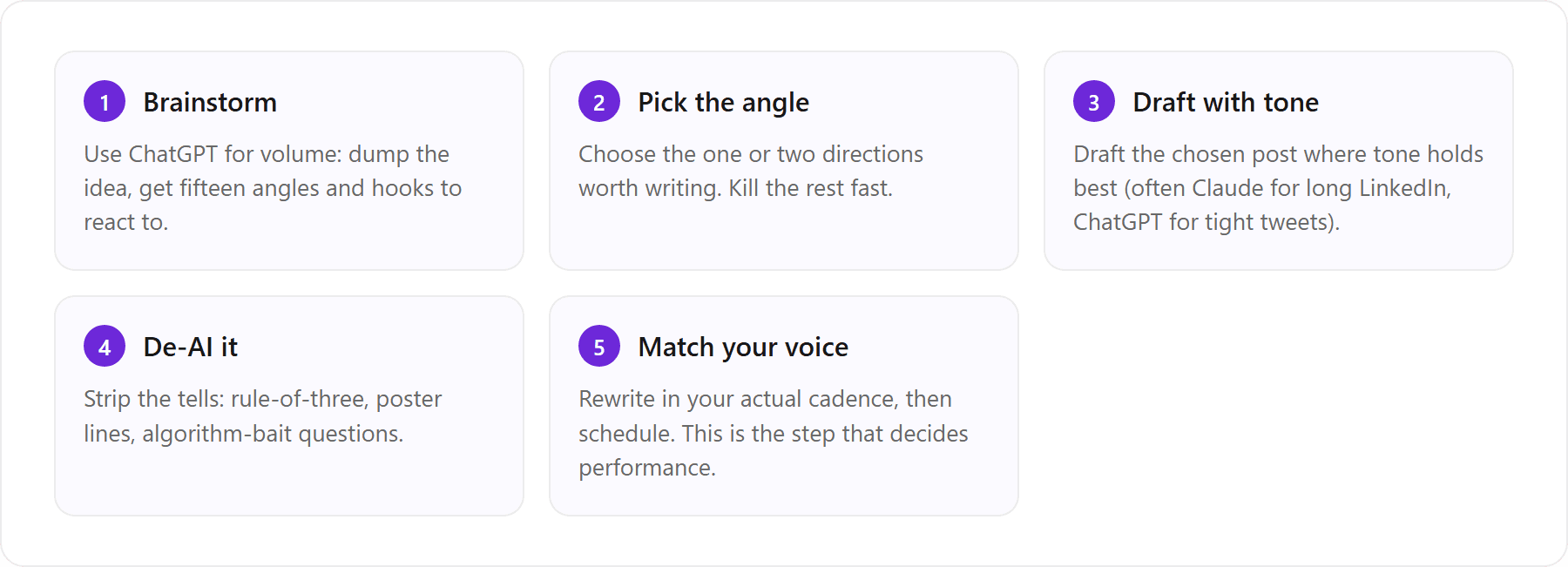
Draft in one, refine in the other: when it helps
Drafting in ChatGPT and refining in Claude (or the reverse) genuinely helps when your bottleneck is either quantity or tone, but it does not touch the last step in that flow. Both tabs still hand you the average voice, so step five, the rewrite into your cadence, is where you spend the real time. That is the honest limit of a two-chatbot workflow: it makes drafting faster, not more you.
This is where a voice-trained layer fits without replacing your brainstorming. Many creators keep a general model for open-ended ideation and move the actual drafting, replying, and scheduling into a tool that is trained on their own posts. VoiceMoat is built for exactly that slot: the Personal Brand OS for LinkedIn and Twitter, which does the drafting in your voice (Studio), the replies (Engage), plus scheduling and analytics, so the general chatbot stays your sketchpad and VoiceMoat becomes the drafting-and-shipping layer. It complements the brainstorm, it does not try to be it. More on the mechanism next.
The variable both tools miss: whose voice they write in
Here is the reframe the whole Claude vs ChatGPT debate is missing. The question is not which general model you pick. It is whose voice the model is writing in, and the answer for both Claude and ChatGPT is the same: nobody’s in particular. They default to a generic register because neither is conditioned on you, the individual writer. Change the model and you change the flavor of generic; you do not get your own voice out of either one.
Both default to the average of everyone
A general model learns from an enormous mix of writing and predicts the most likely next word across all of it. That is precisely why the output is fluent and forgettable: the most likely phrasing is, by definition, the average one. It has never read your last hundred posts, so it cannot know that you open with a short blunt line, never use hashtags, favor a dry aside in parentheses, and end without a call to action. Prompting can nudge it for one session, but it forgets the moment you close the tab. The result is the sameness we break down in how to make AI writing sound human.
How VoiceMoat trains audenAI on your own posts
VoiceMoat is the Personal Brand OS for LinkedIn and Twitter. audenAI, the AI inside it, learns how you write from your own posts, then helps you write, schedule, engage, analyse and grow, with Style and Stance checks on your drafts so posts read like you. Try it for $1 for 3 days. Plans from $35 a month. Disclosure: VoiceMoat is our product, so we kept the Claude-vs-ChatGPT scoring above independent of it and only bring it in on the voice question.
It sits on top of the model layer and learns your own Twitter and LinkedIn history, so the output follows your voice whichever assistant is doing the writing: the same prompt comes back in your cadence, your hooks and your punctuation, instead of the internet’s average.
One clarification, because the name trips people up: VoiceMoat is the Personal Brand OS for LinkedIn and Twitter, not the Voicemod voice changer, and audenAI is a writing partner trained on your own posts, not a model provider. The practical effect is that “Claude vs ChatGPT” stops being the deciding question. Whichever model is under the hood, the job of reading like you belongs to the layer trained on you. audenAI drafts posts in Studio, writes replies in Engage, and the same voice carries across both platforms and into scheduling and analytics. You can see drafting in your voice on the Studio page, which writes social posts in your own voice.
Claude vs ChatGPT for social posts: scored by platform
The head-to-head scores below are from our test set, one to five, higher is better (for edit distance, higher means less editing needed).
Dimension | Claude | ChatGPT |
|---|---|---|
Voice consistency (reads like you) | 3 | 3 |
LinkedIn format fit | 4 | 4 |
Twitter format fit | 3 | 4 |
Idea volume | 3 | 5 |
Speed to first draft | 4 | 5 |
Edit distance to publish-ready (higher = less editing) | 3 | 3 |
Read the table honestly: ChatGPT owns idea volume and speed, Claude and ChatGPT tie on format fit, and the voice-trained option only pulls away on the two rows that decide whether a post sounds like a person, voice consistency and edit distance. That is the whole argument in one grid.
When to pick which
A quick decision framework:
You need volume and speed to break a blank page: ChatGPT.
You are shaping one long LinkedIn post over several edits and want steady tone: Claude.
You want a tactical, listicle-style Twitter thread with a strong front hook: ChatGPT.
You want a narrative or opinion thread carried by tone: Claude.
You are still fixing the same generic voice no matter which you pick: that is not a model problem, and no general model solves it.
One honest extra step. If the deciding factor is which tool reads most like you across many posts, week after week, the answer is not a general model at all: it is a voice-trained social tool like VoiceMoat, because that is the only option in this comparison actually conditioned on your writing. Pick Claude or ChatGPT for the draft; use a layer trained on you for the voice. For the general-purpose writing verdict beyond social, our Claude vs ChatGPT for content writing guide goes deeper, and you can compare plans on the pricing page.
Want the same prompt to come back in your voice on Twitter and LinkedIn, whichever model is under the hood? Try VoiceMoat’s Studio for $1 for 3 days, with plans from $35 a month.
Frequently asked questions
Is Claude better than ChatGPT for writing LinkedIn posts?
Slightly, on our test set, for two specific reasons: Claude tends to hold a steady tone across a long post and through follow-up edits, and it reaches for hype language less often, so the finished post needs less cleanup. But the edge is a couple of points on a five-point scale, not a different league. ChatGPT often lands a punchier hook and gives you more variations to pick from. On whether the post reads like you specifically, both land in the same generic band.
Claude vs ChatGPT for writing tweets: which wins?
For single tweets and tactical, listicle-style threads, ChatGPT usually wins because it returns more options fast and its format instincts fit Twitter's front-loaded structure. For narrative or opinion threads carried by tone, Claude's steadier voice tends to need less rescue. Neither, though, writes in your voice by default, so both leave you a rewrite step before posting.
Is Claude or ChatGPT better for Twitter threads?
It depends on the thread type. ChatGPT defaults to a numbered, self-contained listicle shape that suits how-to and framework threads and lets you A/B the hook across many options. Claude defaults to a narrative shape that suits stories and nuanced takes but needs a stronger hook from you. For most creators' most common thread type, ChatGPT's speed and format fit give it a narrow edge on Twitter.
Should I use a hybrid Claude and ChatGPT workflow?
Yes, if your bottleneck is either idea volume or tone. A common pattern is brainstorming in ChatGPT for quantity, then drafting the chosen post where tone holds best (often Claude for long LinkedIn posts). But a two-chatbot workflow only speeds up drafting; it does not make the writing sound more like you, because both still default to a generic register. The rewrite into your own voice remains the slow step.
Can either tool match my personal writing voice?
Not permanently. You can nudge either Claude or ChatGPT toward your style within a single session using example posts and detailed prompts, but they forget the moment you close the tab and start the next session from the same generic baseline. Matching your voice consistently requires a tool that is trained on your own history rather than a general chatbot.
If both Claude and ChatGPT sound generic, how do I get social posts in my own voice?
Use a tool that trains on your own history rather than a general chatbot. VoiceMoat, the Personal Brand OS for LinkedIn and Twitter, learns how you write from your own posts through audenAI, so the same prompt returns your cadence, hooks and punctuation. It handles drafting in your voice, replies, scheduling, and analytics across both platforms. Try it for $1 for 3 days, with plans from $35 a month; disclosure: VoiceMoat is our own product.
AI disclosure
Written by Prateek Singh with AI assistance and human editing. The Claude vs ChatGPT scoring reflects our own hands-on testing with the same prompts on both tools and is directional, not a formal benchmark. VoiceMoat is our own product and was not part of that test, so it is described in words, not scored. Claude, ChatGPT, Gemini and Grok are products of their respective companies and are named here as the subjects of the comparison. Updated 12 October 2026.
Keep reading

AI and Voice
Every social MCP connector reaches both platforms. That is not the hard part
We were going to write that connecting one assistant to both Twitter and LinkedIn was rare. It is not. More than twenty connectors do it and several are free, so channel coverage is table stakes and every roundup ranking them by it is measuring the wrong thing. Here is what actually differs between them, and the one thing we read enumerated tool lists for six of them to confirm nobody does at all.
11 min read
·

AI and Voice
Why your Claude writing skill doesn't sound like you
There are dozens of free Claude skills for writing, and almost all of them do the same thing: strip out phrases that read as machine-written. That is subtraction, and it leaves you sounding like nobody in particular rather than like yourself. The handful that actually learn a voice from your own writing have a fraction of the users. Here is the difference, why a skill cannot post anything no matter what it says, and where the file actually goes on every surface.
13 min read
·

AI and Voice
Hootsuite alternatives in 2026, priced from the vendors' own pages
Hootsuite starts at $99 per user a month, not $19. Here is what the realistic alternatives cost, read off each vendor's own pricing page in both billing positions, plus the clause in Hootsuite's terms that its pricing page does not mention.
10 min read
·

AI and Voice
Taplio alternatives in 2026, priced from the vendors' own pages
Four LinkedIn tools people move to from Taplio, priced from each vendor's own pricing page rather than from each other. Includes the arithmetic on Taplio's Pro tier, which does not add up, and one name still on every recommendation list that has quietly shut down.
11 min read
·

AI and Voice
How to train AI to write in your voice: the cross-model guide
You can get ChatGPT, Claude or Gemini to write in your voice, but only partly and only for one session, because chat models forget your style between chats. This cross-model guide covers the analyze-then-write prompts that work, the settings that make them stick, the four levels of personalized AI content, a reusable instruction block for tweets, and the persistent alternative for anyone who posts regularly.
16 min read
·
From the Twitter algorithm series
The Twitter/X algorithm in May 2026: why voice wins under the new transformer
Read ›

