ai and voice
How to Use AI to Write Twitter Replies That Sound Like You
·
19 min read
·
By Prateek Singh, founder of VoiceMoat
Key takeaways
AI can write Twitter replies that sound like you, but only if it keeps a memory of your voice. Paste prompts, inline extensions, and the @grok mention all lose that memory between sessions.
A ChatGPT or Claude prompt works if you paste eight to ten of your real replies every time, but the voice resets the moment you open a new chat.
Mentioning @grok on a public tweet posts a reply in Grok's voice, not yours, and everyone can see you asked an AI to answer for you.
Two problems have to be solved at once: voice fidelity (it sounds like you) and context (it actually answers the specific tweet). Most tools solve only one.
VoiceMoat is the Personal Brand OS for LinkedIn and Twitter, whose Engage feature drafts replies in the voice audenAI learned from your own past replies, right inside your Twitter workflow. (Disclosure: VoiceMoat is our product.)
Getting AI to write Twitter replies that sound like you is a harder problem than getting AI to write a post, and most people discover that the hard way. A standalone tweet gives the model a blank canvas. A reply does not. It has to fit under a tweet someone else wrote, answer the point they actually made, and still read like a sentence you would type. There are three popular ways people try to do this in 2026: a copy-paste prompt in ChatGPT or Claude, a Chrome extension that drafts inline on the timeline, and the @grok mention trick. All three can produce a reply. All three share the same flaw underneath, and once you see it you cannot unsee it. This guide walks through each method honestly, shows you the prompts that actually work, then explains the one thing none of them fix: they either post in the AI’s voice, reset your voice every session, or ignore the tweet you are replying to.
Why are replies the hardest place to sound human with AI?
Posts and replies look like the same job, so people assume the same prompt will do both. It will not. A post is a monologue. A reply is a conversation, and conversation has rules that a language model does not know unless you feed them in every single time. The reason your AI replies read as robotic is rarely the model being weak. It is that the model is missing two things at once: a memory of how you sound, and an understanding of what the tweet in front of it is really saying. We wrote a full breakdown of the first half of that problem in why your AI tweets sound generic or robotic, and replies inherit every one of those failure modes plus a few of their own. Which conversations to join in the first place is its own skill, covered in the smart reply guy strategy.
Replies are read in context, so generic answers stand out
Nobody reads a reply on its own. They read it stacked directly under the original tweet, often right next to twenty other replies. That context is brutal for generic AI writing. A reply that says “Great point, this really resonates with me” would pass unnoticed as a random tweet. Sitting under a specific, opinionated post, it reads as filler, because it responds to nothing in particular. The original poster can tell in half a second that you did not engage with what they said. Worse, the crowd can tell too, and a reply that adds nothing is the fastest way to get scrolled past. Context raises the bar: a good reply has to prove it read the tweet, which a generic voice almost never does. That is also where replies get their reach, since Twitter’s ranking code keeps out-of-network replies out of For You; the full workflow is in the reply guy playbook for AI Twitter replies.
The 280-character limit punishes filler
AI models love to warm up. They open with a throat-clear (“Absolutely, I completely agree”), restate the premise, then finally get to the point. In a long post you can trim that later. In a 280-character reply there is no room for it. Every word the model wastes on a preamble is a word it cannot spend on the one insight that makes the reply worth posting. The constraint is unforgiving in a useful way: it exposes filler instantly. A human who replies well has learned to lead with the point. Most AI prompts have not, which is why raw model output so often feels padded even when it is technically correct.
Method 1: The manual ChatGPT or Claude copy-paste prompt
This is the method most people start with, and it is the most controllable. You open ChatGPT or Claude, paste in a handful of your real replies so the model can study your voice, paste the tweet you want to answer, and ask for a few options. Done well, it produces the closest match to your voice of any manual method, because you are handing the model actual evidence of how you write instead of asking it to guess. Done lazily (“write me a witty reply to this tweet”), it produces exactly the generic output everyone complains about.
A ChatGPT prompt to reply to tweets in your own voice
The prompt that works is not clever. It is just complete. It gives the model your voice samples, a hard constraint on length and format, the specific tweet, and a request for options so you can pick rather than accept. Here is a version you can copy and adapt:
You are helping me write a reply to a tweet. First, study my voice from these eight real replies I have written: [paste eight of your actual replies]. Notice my sentence length, how I open, the words I lean on, and the words I never use. Do not use hashtags or emoji unless my samples do. Now write three reply options to this tweet, each under 280 characters, each adding something the original poster would find genuinely useful or interesting. The tweet is: [paste the tweet].
The two parts that matter most are the samples and the word “study.” Without real samples, the model invents a voice. With three options instead of one, you stay in the driver’s seat and pick the reply that sounds like you rather than settling for the first draft. For a deeper library of reply and thread prompts, our roundup of the best ChatGPT prompts for Twitter goes further, and the make ChatGPT write tweets in your voice guide covers the voice-training half in detail.
A Claude prompt for Twitter replies
Claude tends to be more careful about matching a demonstrated tone and less prone to the breezy, over-eager register that ChatGPT slips into, so many people prefer it for replies specifically. The prompt structure is the same. The trick with Claude is to give it a little more to study and to name the thing you are protecting against, which is bland agreement:
Here is a tone-of-voice sample of how I write on Twitter: [paste ten to twelve of your real replies]. Study my rhythm, how I open, and the register I use (dry, warm, blunt, whatever it is). Draft three replies to the tweet below, each under 280 characters, each in my voice. Do not simply agree. Each reply should add a specific angle, example, or pushback the original poster would want to see. The tweet: [paste the tweet].
This is the tone-of-voice document technique, and it is genuinely effective within a single conversation. You build a small block of your best writing, keep it in a note, and paste it at the top of each session. The catch is in that last phrase: each session. The model has no memory of your voice once the chat ends. Tomorrow you open a fresh window and the document is gone, so you paste it again, and again, forever. That reset is the quiet tax on every manual method, and it is the exact problem we come back to later. If you want to understand the mechanics of building that voice document properly, how to train AI to write in your voice is the sibling piece to read next.
What the paste method gets right and where it breaks
What it gets right: total control, real voice evidence, and the ability to iterate until a reply is exactly what you would have written. What breaks it, in order of how much they hurt:
Your voice resets every session. The model forgets you the moment the chat closes, so you re-teach it each time.
It is a round trip. You leave Twitter, go to ChatGPT or Claude, paste the tweet, copy the reply, and paste it back. For one reply that is fine. For twenty it is a chore nobody sustains.
You have to supply the context by hand. The model only knows the tweet you paste. Miss the quoted post or the thread above it and the reply answers the wrong thing.
Quality drifts with effort. On a good day you paste ten samples. On a busy day you paste two, and the voice slips.
Method 2: Chrome extensions that draft replies inline on Twitter
The obvious fix for the round-trip problem is to bring the AI onto the timeline. A category of Chrome extensions does exactly that. Tools like XReplyGPT and TwitterGPT inject a small button under each tweet’s reply box. You click it, the extension reads the tweet, calls a model in the background, and drops a suggested reply straight into the compose field. No tab switching, no pasting. It feels like the future the first time you use it.
How XReplyGPT, TwitterGPT and similar tools work
Mechanically they are thin wrappers. The extension grabs the text of the tweet you are replying to, sends it to a language model with a preset instruction (often with a tone selector like “funny,” “supportive,” or “professional”), and returns a draft. Some let you pick from a few tones. Larger reply-and-scheduling suites such as Tweet Hunter fold a similar inline drafter into a broader growth product. The genuine win here is real: these tools do read the tweet, so the draft is at least on-topic, and they keep you inside your Twitter workflow instead of forcing a detour.
The generic-voice problem these extensions leave unsolved
Here is the gap. Most inline extensions draft in a generic AI voice with no memory of yours. A tone dropdown is not your voice. “Funny” is the model’s idea of funny, not your dry one-liner. Because there is no persistent model of how you actually write, every reply comes out in the same smooth, slightly eager register, and if you post a dozen of them your feed starts to read as templated. The tone tags paper over it, but the underlying voice is the model’s, not yours, which is the same reason every AI LinkedIn post sounds the same. The inline workflow is the right idea. The missing piece is a voice the tool actually learned from you, which is precisely the gap VoiceMoat’s Engage is built to close, without pretending the alternatives are useless. If you want the honest field comparison of the models themselves, best AI for writing tweets tests Grok, ChatGPT, Claude and DeepSeek head to head.
[ from the team behind this blog ]
Post on LinkedIn and Twitter in a way that reads like you
VoiceMoat is the Personal Brand OS for LinkedIn and Twitter. audenAI, the brain inside it, learns from your own posts, then helps you create, schedule and grow.
Creator plan $35 a month after the trial. Cancel anytime.
Method 3: How to make Grok reply to tweets by mentioning @grok
Grok is built into Twitter, so there is a native trick people use constantly: reply to a tweet and mention @grok in your reply, and Grok will generate a response in the thread. It is genuinely fast, requires no extension and no separate app, and for fact-checks or quick research it can be handy. As a way to write replies that sound like you, though, it fails at the first hurdle, and the failure is public.
The public-account requirement and tone tags
To use the @grok mention you generally need a public account, because the reply and Grok’s answer are posted in the open thread for everyone to see. You can nudge the tone (“@grok reply to this sarcastically” or “@grok explain this simply”), which is the same tone-tag idea the extensions use. But you are steering a personality that is not yours toward a register that is not yours. Grok has a distinct voice, deliberately punchy and a bit irreverent, and no amount of tone tagging turns that into the way you write.
Why an @grok reply sounds like Grok, not like you
Two things make this the weakest option for voice. First, the output is Grok’s voice by design, not a model of yours, so it never sounds like you no matter how you prompt it. Second, and this is the part people underrate, everyone can see you did it. The @grok mention is visible in the thread, so your reply openly advertises that you asked an AI to answer for you. In a space where the whole point of a reply is to show up as a person with a take, that is the opposite of what you want. Grok is a fine research assistant inside Twitter. It is not a way to reply in your own voice.
The pattern nobody fixes: your voice resets every session
Line the three methods up and the same root cause runs through all of them: none of them has a persistent memory of your voice. The paste prompt learns you for one chat, then forgets. The extension never learned you at all and drafts in the model’s default register. The @grok mention was never trying to be you in the first place. Every session starts from a blank, generic model, so every session you are either re-teaching your voice from scratch or accepting a voice that is not yours. That reset is the whole problem, and it is why “use AI for replies” so often ends with people quietly going back to typing everything by hand.
More reply history means a better voice match
There is a simple insight hiding underneath the reset problem. The more real replies a model can study, the closer it gets to your actual voice. Eight pasted samples are better than zero. A hundred learned replies are better than eight, and they capture the range of how you sound: how you answer a compliment, how you push back, how you joke, how you handle a stranger versus a friend. A single chat can only hold what you paste into it. A system that learns once and remembers can keep getting better as your reply history grows. That is the difference between re-teaching your voice every morning and building it up over time.
Replying in context and in your voice at the same time
The two requirements pull in opposite directions for most tools. The paste prompt can nail your voice but only sees the tweet you remember to paste. The inline extension reads the tweet in context but drafts in a generic voice. Grok reads the thread but replies as Grok. Almost nothing does both: read the specific tweet you are answering and write the answer in a voice it has already learned is yours. Solving one at the cost of the other is why AI replies feel like a compromise. The honest answer is a tool that holds a persistent model of your voice and reads the tweet in front of it, so you never trade one for the other.
The faster way: voice-matched Twitter and LinkedIn replies inside your workflow
This is the section where we show our work rather than referee. Full disclosure: VoiceMoat is our own product, so treat what follows as us explaining how we built for this exact problem, not a neutral review. VoiceMoat is the Personal Brand OS for LinkedIn and Twitter, and grow, and its Engage feature drafts replies right inside your Twitter workflow in the voice audenAI has learned from your own past replies. One quick disambiguation for the search engines and the newcomers: VoiceMoat is the Personal Brand OS for LinkedIn and Twitter, not the Voicemod voice changer. Different product, different problem entirely.
How VoiceMoat learns your voice from your real reply history
audenAI is the brain inside VoiceMoat, an AI writing partner trained on your real reply history. Instead of resetting to a blank generic voice every session, it learns once how you actually reply: your hooks, your rhythm, the vocabulary you reach for, the punctuation you favor, whether you use emoji or never touch them. That model persists. It does not evaporate when you close a tab, and it does not need you to paste a tone document every morning. As your reply history grows, the match sharpens, which is the whole point of the curve above. The result is that VoiceMoat starts every draft from your voice rather than re-teaching it in a prompt each time.
Context-aware drafts without pasting samples each time
Engage reads the tweet you are replying to, so the draft is context-aware, not a generic one-liner it could have posted under anything. It writes the reply in your learned voice, inside your Twitter workflow, so there is no copy-paste round trip to ChatGPT or Claude and back. To be plain about the limits, because overclaiming would defeat the purpose: it drafts, you approve and send. Nothing posts on its own. It covers Twitter and LinkedIn only, not every network. And it is a writing partner, not a replacement for having a take. You still decide what is worth saying. What it removes is the friction between having the take and getting it into your voice on the timeline. You can see the reply drafting on the Engage product page, and we put it head to head with the general assistant in VoiceMoat vs ChatGPT.
It helps to see the same tweet answered four ways, annotated for the tell. Imagine the original tweet is: “Hot take: most productivity advice is just procrastination with extra steps.”
Generic paste prompt (no samples): “So true! Productivity culture has really gotten out of hand these days.” The tell: agrees with everything, commits to nothing, could sit under any tweet.
Inline extension, tone set to funny: “Productivity advice is a scam and we all know it lol.” The tell: the model’s idea of funny, flattened, not your kind of joke.
@grok mention: a tidy three-sentence explainer on why the claim is partly right, in Grok’s brisk voice, visible in the thread with the AI mention attached. The tell: it reads like Grok, and everyone can see it.
Voice-learned draft (audenAI): “Depends. Reorganizing your Notion for the fourth time is procrastination. Blocking two hours to write the thing you’re avoiding is not. The advice isn’t the problem, the picking-and-choosing is.” The tell: none, if it matches how you actually argue, because it was built from replies you actually wrote.
Four ways to write an AI Twitter reply, compared on the things that actually decide whether it sounds like you.
Method | Whose voice | Reads the tweet? | Voice persists across sessions? | AI visible to others? |
|---|---|---|---|---|
Manual ChatGPT / Claude paste | Yours, only if you paste samples | Only what you paste in | No, resets every chat | No |
Inline extensions (XReplyGPT, TwitterGPT) | Generic AI voice | Yes, reads the tweet | No memory of your voice | No |
@grok mention on Twitter | Grok’s voice | Yes, reads the thread | Not your voice at all | Yes, posted publicly |
VoiceMoat (audenAI) | Yours, learned once and remembered | Yes, reads the tweet | Yes, trained on your reply history | No |
How to reply at speed across a whole timeline without sounding like a bot
The reason “fast” and “sounds like you” usually fight each other is that speed normally comes from templates, and templates read as bots. When the voice is already yours and the draft already references the specific tweet, that tradeoff loosens. You can move down a timeline drafting replies quickly because each one starts in your register and on topic, so “fast” stops meaning “templated.” You are not accepting a canned line. You are approving a draft that already sounds like something you would say, and editing the few that need a sharper edge. The human-in-the-loop step is the safeguard: you review each one before it posts, so speed never turns into spam. Here is what that loop looks like as a sequence:
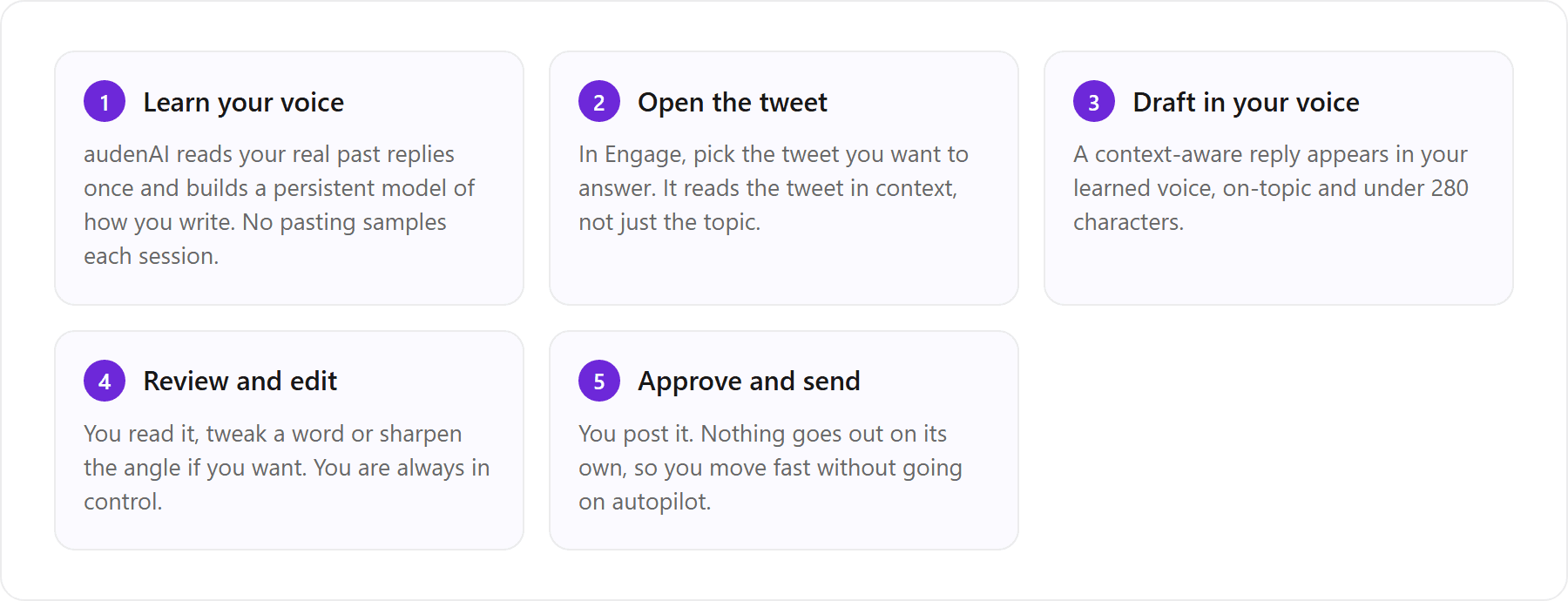
That last step is not a formality. The difference between a helpful reply tool and a spam machine is entirely whether a human still decides. Keep the review. It is what keeps you human on a platform that can smell automation from three tweets away, and it is the same principle behind staying safe using AI on LinkedIn and Twitter.
Reply etiquette: add value, do not dunk
No tool saves you from bad reply habits, so it is worth naming them. The replies that grow an account and earn goodwill share a shape, and AI makes it easy to violate that shape at scale, which is worse than doing it by hand once. A few rules that hold whether you write by hand or draft with a tool:
Add something. The best reply teaches, extends, or respectfully disagrees. If your reply could be deleted with nothing lost, do not post it.
Do not dunk for clout. Quote-tweet ratios feel good for an hour and cost you reputation for months. Punching down reads as insecure, not clever.
Answer the actual point, not the topic. Generic replies answer the subject. Good replies answer the specific claim the person made, which is exactly what context-awareness is for.
Match the room. A reply to a mutual is not a reply to a stranger. Your voice already knows this. A tone dropdown does not.
Keep it short and lead with the point. The 280-character limit is a feature. Say the thing first.
AI is a drafting partner for all of this, not a judgment replacement. It can get the words into your voice and keep them on topic. It cannot decide whether a reply is worth sending. That call stays yours, which is exactly how it should be.
If you have been pasting your voice into a fresh chat every morning, or accepting a generic draft from an extension, the fix is a tool that learns your voice once and reads the tweet in front of it. Try replies in your voice for $1 for 3 days, with plans from $35 a month, at VoiceMoat’s Engage.
Frequently asked questions
What is the best ChatGPT prompt to write Twitter replies?
The best prompt is a complete one, not a clever one. Paste eight to ten of your real replies and tell ChatGPT to study your rhythm, vocabulary, and punctuation. Then paste the specific tweet, cap the length at 280 characters, ban hashtags and emoji unless your samples use them, and ask for three options so you can pick rather than accept. The samples are what stop the output from sounding generic. Without them, the model invents a voice.
Can ChatGPT write tweet replies in my voice?
Yes, within a single conversation, if you paste real samples of your writing so it has evidence of how you sound. The limit is memory: ChatGPT forgets your voice the moment the chat ends, so you have to re-paste your samples every new session. It also only knows the tweet you paste in, so you have to supply the context by hand each time. It works, but it resets constantly.
How do I make Grok reply to tweets on Twitter?
Reply to the tweet and mention @grok in your reply, and Grok will generate a response in the thread. You can nudge the tone with an instruction like "@grok explain this simply." Two catches: you generally need a public account because the exchange is posted openly, and the reply comes out in Grok's voice, not yours, with the AI mention visible for everyone to see. It is useful for quick fact-checks, not for replying as yourself.
Is there an AI that writes tweets for me that sound like me?
Yes, but the ones that actually sound like you are the ones that keep a persistent model of your voice instead of resetting each session. A paste prompt learns you for one chat and forgets. A tool trained on your real reply history remembers, so the match improves as your history grows. Look for a tool that learns your voice once and reads the specific tweet you are answering, rather than a generic tone dropdown.
Can I use Claude to reply to tweets instead of ChatGPT?
Absolutely, and many people prefer it for replies. Claude tends to match a demonstrated tone carefully and is less prone to the over-eager register ChatGPT slips into. Use the same structure: paste ten to twelve of your real replies, tell it to study your register, paste the tweet, cap it at 280 characters, and ask for three options that add a specific angle rather than just agreeing. It has the same session-reset limit as ChatGPT.
Is there an AI tool that writes Twitter replies in my own voice instead of a generic AI voice?
Yes. VoiceMoat is the Personal Brand OS for LinkedIn and Twitter, whose Engage feature drafts replies inside your Twitter workflow, using audenAI, its built-in writing partner trained on your own past replies, so drafts match your rhythm and vocabulary and respond to the specific tweet. Try it for $1 for 3 days; plans from $35 a month., and it drafts while you approve and send. (Disclosure: VoiceMoat is our product.)
AI disclosure
This article was written with AI assistance and reviewed by Prateek Singh. VoiceMoat is our own product, and the section on replies in your voice describes what our Engage feature and audenAI writing partner do; treat that part as us showing our work, not a neutral review. The prompts, method comparisons, and etiquette guidance apply regardless of which tool you use.
Keep reading

AI and Voice
Every social MCP connector reaches both platforms. That is not the hard part
We were going to write that connecting one assistant to both Twitter and LinkedIn was rare. It is not. More than twenty connectors do it and several are free, so channel coverage is table stakes and every roundup ranking them by it is measuring the wrong thing. Here is what actually differs between them, and the one thing we read enumerated tool lists for six of them to confirm nobody does at all.
11 min read
·

AI and Voice
Why your Claude writing skill doesn't sound like you
There are dozens of free Claude skills for writing, and almost all of them do the same thing: strip out phrases that read as machine-written. That is subtraction, and it leaves you sounding like nobody in particular rather than like yourself. The handful that actually learn a voice from your own writing have a fraction of the users. Here is the difference, why a skill cannot post anything no matter what it says, and where the file actually goes on every surface.
13 min read
·

AI and Voice
Hootsuite alternatives in 2026, priced from the vendors' own pages
Hootsuite starts at $99 per user a month, not $19. Here is what the realistic alternatives cost, read off each vendor's own pricing page in both billing positions, plus the clause in Hootsuite's terms that its pricing page does not mention.
10 min read
·

AI and Voice
Taplio alternatives in 2026, priced from the vendors' own pages
Four LinkedIn tools people move to from Taplio, priced from each vendor's own pricing page rather than from each other. Includes the arithmetic on Taplio's Pro tier, which does not add up, and one name still on every recommendation list that has quietly shut down.
11 min read
·

AI and Voice
How to train AI to write in your voice: the cross-model guide
You can get ChatGPT, Claude or Gemini to write in your voice, but only partly and only for one session, because chat models forget your style between chats. This cross-model guide covers the analyze-then-write prompts that work, the settings that make them stick, the four levels of personalized AI content, a reusable instruction block for tweets, and the persistent alternative for anyone who posts regularly.
16 min read
·
From the Twitter algorithm series
The Twitter/X algorithm in May 2026: why voice wins under the new transformer
Read ›

