ai and voice
ChatGPT Twitter Bio and LinkedIn Profile Prompts (2026)
·
19 min read
·
By Prateek Singh, founder of VoiceMoat
Key takeaways
Yes, ChatGPT can write a usable Twitter bio, LinkedIn headline, and About section in seconds. The catch is that it defaults to the same polished, keyword-stuffed voice for everyone.
A good Twitter bio (160 characters) names who you help, what you do, one searchable keyword, a hint of personality, and an optional call to action. A LinkedIn headline (up to 220 characters) adds the outcome and how you deliver it.
A LinkedIn About section (up to 2,600 characters) works best as four beats: a hook, what you focus on now, one concrete proof point, and what you want next. The first two lines matter most because they show before 'see more'.
The fix for generic output is to feed the model your real writing. Paste 6 to 10 things you actually wrote and tell it to mirror your sentence length, vocabulary, and hooks before it drafts anything.
VoiceMoat is the Personal Brand OS for LinkedIn and Twitter. Its audenAI writing partner learns your real posts once and drafts a bio, headline, and About in your voice. Disclosure: VoiceMoat is our own tool. Try it for $1 for 3 days; plans from $35 a month.
If you have ever pasted “write me a chatgpt twitter bio” into a chatbot and gotten back something that could belong to any of ten thousand people, you already know the real problem: the prompt works, but the output does not sound like you. ChatGPT, Claude, and Gemini will all happily draft a Twitter bio, a LinkedIn headline, and an About section in seconds. This guide hands you the exact copy-paste prompts for each of those, then solves the part every other listicle skips. The reason your AI bio reads like a template is not the prompt. It is that the model has never seen how you actually write. We will cover the working prompts first, then the manual trick to fix the voice, and finally the faster way to skip the re-teaching every session.
Why AI bios and About sections sound generic (the real problem)
Before the prompts, it helps to name why the default output falls flat. It is not that ChatGPT is bad at writing. It is that a general chatbot optimizes for the safe average of everything it has read, and the safe average of a million bios is a beige, buzzword-heavy blur. Three specific traps produce that blur.
The static-prompt trap
Most “best prompts” posts hand you a fixed block of text and stop there. A static prompt gives the model your facts (your role, your audience) but zero signal about your style. So it fills the style gap with its own house voice, which is confident, symmetrical, and slightly corporate. You get “passionate marketer helping brands unlock growth” because that is the statistical center of the training data, not because it is you. This is the same root cause behind why your AI tweets sound generic or robotic: the model is guessing at a voice it was never shown.
“Refine it to sound like you” is not a method
A lot of advice ends with “then just tweak it until it sounds like you.” That is not instruction, it is a shrug. The model cannot act on “sound like me” because it has no reference for what you sound like. Telling it to be “more authentic” or “more human” nudges the wording but not the underlying rhythm. You end up editing the same generic draft over and over instead of giving the model the raw material it needs to get it right the first time.
Starting from zero every chat session
Even if you do teach the model your voice by pasting examples, that lesson evaporates when the chat ends. Open a new session next month to update your headline and you start from zero again, re-pasting posts, re-explaining your tone, re-cutting the buzzwords. The knowledge lives in a throwaway conversation, not in a profile that persists. This is why the same person can have a great bio in January and a robotic one in June: the second draft was written from a cold start. For more on the pattern, see why AI drafts sound the same.
Can ChatGPT write my Twitter bio?
Yes. ChatGPT can produce a usable first draft of a Twitter bio in seconds, and for a lot of people that draft is a genuinely useful starting point. The honest caveat is the one above: it defaults to the same keyword-stuffed voice for everyone, which is exactly why the raw output rarely sounds like you. A bio only works when it matches how you actually post, so treat the prompt below as step one, not the finished product. The style-matching sections later in this guide are what turn a competent draft into one that reads like your feed.
A copy-paste ChatGPT Twitter bio prompt
This prompt does three things a naive request does not: it forces the model to state what a good bio needs before writing, it bans the worst filler words, and it counts characters so you do not blow the limit. Paste it into ChatGPT and fill the brackets.
You are helping me write a Twitter bio in 160 characters or fewer. I am a [role] who helps [audience] achieve [specific outcome]. First, list the three jobs a strong Twitter bio must do. Then write five versions. Each must name who I help, what I do, and one keyword people would actually search, plus a small line of personality. No hashtags. Ban the words passionate, guru, ninja, and results-driven. Keep every version under 160 characters and print the character count next to each.
The 160-character limit and how to fit it
Twitter caps the bio at 160 characters, per the Twitter help center. That is tight, so every word has to earn its place. The fastest way to fit is to cut adjectives first (“experienced senior strategist” becomes “strategist”), then cut any role you would not want a stranger to lead with. Most weak bios try to say five things and land none. Pick the one thing you want to be known for, say who it helps, and stop. If the model keeps running long, add “tighten each version to under 150 characters without losing who I help” and it will trim the fat.
What every good Twitter bio needs
A bio that pulls its weight covers five things, in rough priority order:
Who you help: the specific audience, not “people” or “businesses”.
What you do: the concrete thing, in plain verbs (build, write, run, teach), not “leveraging synergies”.
A keyword: one term someone would search or scan for, so the right people recognize themselves.
Personality: one line, aside, or specific detail that a template would never generate.
An optional call to action: a link, a “DM me about X”, or what you post about, so a new visitor knows why to follow.
Claude and Gemini: same prompt, different phrasing
The prompt above works in Claude and Gemini too, with small differences in feel. Claude tends to write slightly warmer, more human-sounding first drafts and is good at holding a constraint like “no buzzwords” across every version, which is why some people prefer it for profile copy. If you want to compare them directly, we ran the test in Claude vs ChatGPT for writing social posts. Gemini is fast and confident but leans harder into the polished, symmetrical voice, so budget extra editing to rough it up. For “claude write my twitter bio,” use the identical prompt and add “write like a real person talking, not a brand account.” For Gemini, add “avoid corporate phrasing” explicitly, because it reaches for it by default.
Twitter bio vs LinkedIn headline vs LinkedIn About: limits and must-haves.
Field | Character limit | Must include | Top mistake |
|---|---|---|---|
Twitter bio | 160 characters | Who you help, what you do, one keyword, a hint of personality, optional CTA | Cramming five roles and zero personality |
LinkedIn headline | Up to 220 characters | Who you help, what you do, the outcome or how, searchable keywords | Just your job title and company name |
LinkedIn About | Up to 2,600 characters (first ~2 lines show before ‘see more’) | A hook, what you focus on now, one proof point, what you want next | Third-person press-release voice |
ChatGPT prompts for your LinkedIn About section
The About section is where most profiles quietly fail. People either leave it blank or fill it with a resume in the third person that nobody reads. A good ChatGPT prompt for a LinkedIn About section forces a structure and a first-person voice, then leans on your real material so it does not drift into press-release mode.
The About structure that works: hook, focus, impact, what you want next
The four-beat structure below is simple and hard to get wrong. A hook that earns the click on “see more.” What you focus on now, so readers know you are current, not historical. One concrete proof point or result, because a single specific number beats three vague claims. And a clear line on what you want next: the roles, clients, or conversations you are open to, so the reader knows what to do. This is the same skeleton that makes strong LinkedIn posts land, which we break down in how to make ChatGPT sound like you on LinkedIn.
The first two lines before “see more”
LinkedIn truncates the About section after roughly two lines on most screens, then shows a “see more” link. According to Nielsen Norman Group research on reading behavior, people scan the top of a block and bail fast, so those two lines are the whole ballgame. Do not open with “I am a passionate professional with X years of experience.” Open with the reader’s problem, a surprising fact, or a plain statement of who you help. When you prompt for the About section, add “the first two lines must make sense on their own and make me want to click see more,” and the model will front-load the interesting part instead of burying it.
The paste-your-resume-as-source prompt
The single biggest upgrade to any About prompt is giving the model source material to work from instead of asking it to invent. Paste your resume and, crucially, a few things you have actually written, so the draft borrows your facts and your phrasing at the same time.
Here is my resume and three posts I wrote: [paste resume, then paste three of your own posts or emails]. Write a LinkedIn About section of up to 2,600 characters, in first person. Structure it as four beats: a one-line hook, what I focus on now, one concrete proof point or result from my resume, and one line on what I want next (roles, clients, or conversations I am open to). Match the vocabulary and sentence length of the posts I pasted, not a corporate template. Do not use the words passionate, results-driven, seasoned, or proven track record. Keep the first two lines strong enough to stand alone before ‘see more’.
The About character limit and how to use it
LinkedIn allows up to 2,600 characters in the About section, which is a lot of room, so long that most people should use far less. A tight 600 to 1,200 characters that someone actually finishes beats 2,600 that no one scrolls through. Ask the model for a version at your target length, then a shorter one, and pick the tighter draft unless the longer one genuinely earns its space. Length is a budget, not a target. Our free LinkedIn summary generator aims at 120 to 220 words for the same reason, and returns three versions that open in different places so you can see which framing of you actually reads best.
[ from the team behind this blog ]
Post on LinkedIn and Twitter in a way that reads like you
VoiceMoat is the Personal Brand OS for LinkedIn and Twitter. audenAI, the brain inside it, learns from your own posts, then helps you create, schedule and grow.
Creator plan $35 a month after the trial. Cancel anytime.
ChatGPT and Claude prompts for your LinkedIn headline
Your headline is the line under your name that follows you across LinkedIn: in search, in comments, in DMs, in every connection request. If it just says “Marketing Manager at Company,” you are leaving the most-seen real estate on your profile blank. A good ChatGPT or Claude LinkedIn headline generator prompt turns that line into a value proposition people can search for. If you would rather not build the prompt yourself, our free LinkedIn headline generator writes four options in deliberately different shapes, and the headline analyzer scores whatever you already have across six checks and shows the weights.
A headline under 220 characters with keywords and a value proposition
LinkedIn allows up to 220 characters in the headline, which is enough for a real sentence, not just a title. This prompt produces keyword-rich options ranked by how searchable they are, so you can trade off discoverability against personality.
Write seven LinkedIn headlines under 220 characters. I help [audience] achieve [outcome] through [how]. Each headline must name who I help, state the outcome, and include two keywords a recruiter or ideal client would search for. No emojis unless I ask. Do not use buzzwords like guru, ninja, or thought leader. Rank them from most searchable to most personal, and tell me which two keywords each one targets.
The who-you-help / what-you-do / how formula
If you strip a strong LinkedIn headline to its bones, it follows one formula: I help [who] do [what] through [how]. “I help B2B founders turn product updates into posts people finish, through voice-matched writing” works because a stranger instantly knows if it is for them. The “how” is what separates you from the hundred other people with the same title. When you use the prompt above, the formula is baked in, but it is worth knowing so you can edit by hand. For a deeper library of profile and post prompts, see our roundup of ChatGPT and Claude prompts for LinkedIn.
The style-matching trick nobody explains well: feed it your real writing
Here is the move that fixes generic output, and almost no bio guide spells it out properly: stop describing your voice and start showing it. A model cannot infer your style from adjectives. It can infer it from examples. When you paste your own writing and tell the model to mirror it, the draft stops sounding like the average of the internet and starts sounding like you.
The “feed it 6 example bios and posts” method, step by step
The method is three steps. First, gather six to ten things you actually wrote: your best tweets, a couple of LinkedIn posts, a paragraph from an email or a Slack message that sounds like you at your most natural. Raw and unpolished is better than formal, because the goal is your real rhythm, not your presentation voice. Second, do not ask for a bio yet. Ask the model to describe your voice back to you first: “Read these six samples and tell me my sentence length, my vocabulary, the way I open, and my punctuation habits, before you write anything.” This forces it to extract the pattern instead of defaulting to its own. Third, only then ask it to draft, and generate ten variations so you can cut nine and keep the one that reads like your feed. The flow below lays out the sequence.
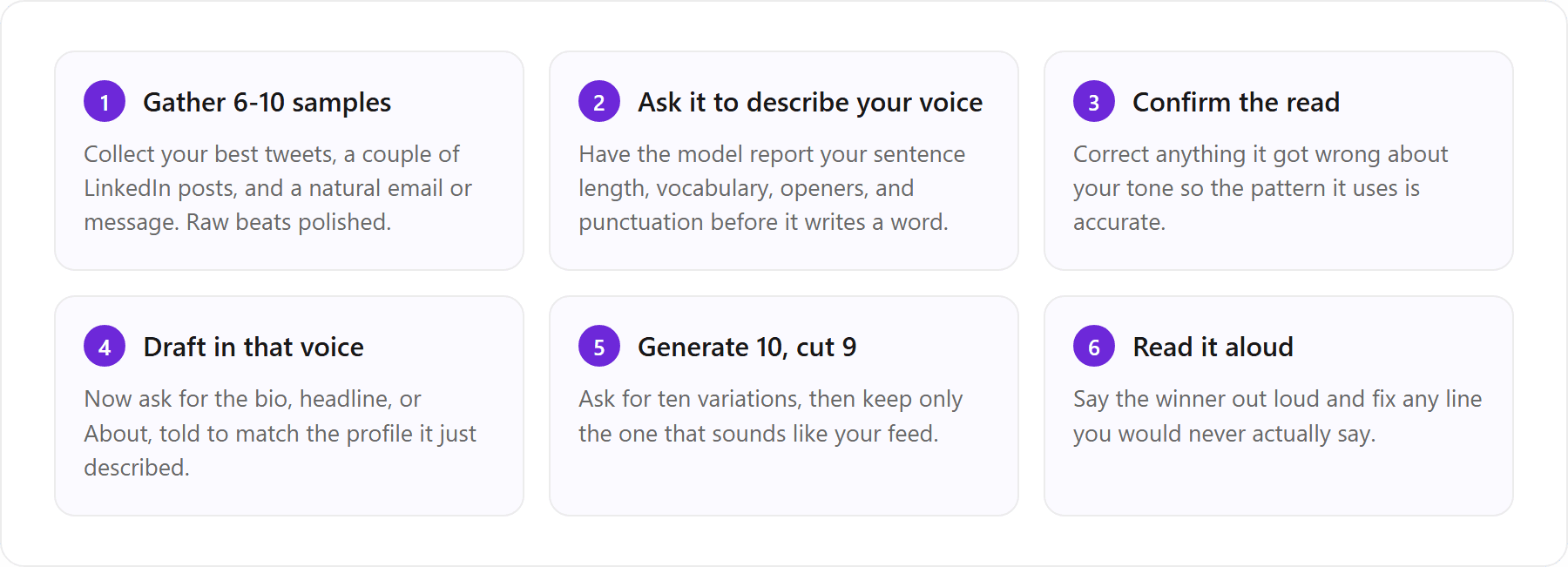
The interview-me-first prompt chain
A close cousin of the example method is to make the model interview you before it writes. This pulls your real phrasing out of your own answers, which is often more honest than anything you would write when you know it is going into a bio.
Before you write anything, interview me. Ask me six questions, one at a time, about who I help, the outcome I deliver, how I am different, the exact words my clients use to describe me, one result I am proud of, and the tone I want. Wait for each answer before asking the next. Then write my Twitter bio, LinkedIn headline, and About section using only my own words and phrasing from the answers. Do not add corporate buzzwords.
Both methods work, and both share one honest flaw: doing this by hand every single time is fiddly. You gather the samples, paste them, coach the voice, cut the variations, and then next quarter, in a fresh chat, you do the whole thing again from scratch. That repetition is exactly the job VoiceMoat automates, because its audenAI writing partner is trained on your real posts once rather than a one-off paste. More on that in the section below.
Read it aloud: strip the press-release voice
Whatever tool wrote your draft, the last edit is the same: read it out loud. Your ear catches what your eye skims. If a line sounds like a brochure when you say it, it will read like one too. This single pass removes most of the tells that mark a profile as AI-written, and it is the cheapest quality upgrade there is.
Words and phrases that give AI away
AI-drafted bios cluster around the same handful of phrases. Swap each of these for something specific and the draft instantly reads more human:
“Passionate about” becomes the specific thing you actually do all day.
“Results-driven professional” becomes one real result with a number.
“Leveraging synergies” becomes plain verbs: help, build, run, write, teach.
“Seasoned expert” becomes the concrete credential or the number of years.
“On a mission to” becomes what you are working on this week.
“Thought leader” becomes a specific topic you post about.
If you want a second opinion, our free humanize AI text tool flags the stiff, templated phrasing so you can see what to cut. For the fuller list of tells and how to de-AI a draft end to end, see why every AI LinkedIn post sounds the same.
The faster fix: a profile that matches how you actually post
Quick disclosure: VoiceMoat is our own tool, so read this section as the maker’s take, not a neutral review. Here is the pitch, kept honest. VoiceMoat is the Personal Brand OS for LinkedIn and Twitter, and because its audenAI writing partner learns from your real posts, it can draft a bio, headline, and About section that read like your feed instead of a keyword-stuffed template. The manual prompts above get you there too. VoiceMoat just removes the part where you re-teach a chatbot your style every session.
Why your bio should sound like your feed
A bio is a promise, and your feed is the delivery. If your headline reads like a polished consultant but your posts are dry and funny, the mismatch makes both feel off. The most trustworthy profiles are the ones where the bio and the posts obviously come from the same person. That is the whole argument for training on your real writing: your feed already is your voice, so the profile should be drawn from it, not from a template that has never seen a word you wrote. One clarification, since the name trips people up: VoiceMoat is the Personal Brand OS for LinkedIn and Twitter, not the Voicemod voice changer, so “writes in your voice” means your writing style, not audio.
How VoiceMoat writes a bio, About, and headline in your voice
The mechanism is simple and the honesty matters. Instead of re-explaining your style to a chatbot in every new session, VoiceMoat learns your writing patterns once from your Twitter and LinkedIn history: your rhythm, vocabulary, hooks, and punctuation. Then audenAI drafts a bio, headline, and About in that same voice inside Studio, and you draft profile copy in your own voice, edit it, and approve it. audenAI suggests, you decide. Nothing publishes on its own, and the draft is a starting point you own, not a finished thing imposed on you. The same trained voice then carries into the rest of the product: drafting posts and threads in Studio, replies in Engage, scheduling, and analytics, across both Twitter and LinkedIn. If you want the broader comparison of a general chatbot against a purpose-built tool, we cover it in how to make ChatGPT write tweets in your voice.
Free tools to sanity-check your draft
You do not need an account to pressure-test a bio. Our free voice tone analyzer reads a draft and tells you what tone it actually projects, which is a fast way to catch a bio that sounds more corporate than you intended. Pair it with the humanize tool above and you can ship a cleaner profile whether or not you ever open the full product.
Before and after: a real voice, not a template
Here is the difference made concrete. Take a Twitter and LinkedIn bio for the same marketer. The first is a typical generic ChatGPT draft. The second is a VoiceMoat draft in the person’s own voice, written by audenAI after it learned the person’s real posts. The point is voice fidelity, not that the chatbot is useless. The chatbot version is grammatical and fine. It just is not anyone in particular.
Generic ChatGPT bio: “Passionate marketer helping brands unlock growth through data-driven strategies and innovative storytelling. Lifelong learner. Coffee enthusiast. Views my own.”
Draft written in your voice by audenAI: “I help B2B founders turn boring product updates into posts people actually finish reading. Ex-agency, now solo. I write about it here most days.”
Same facts, completely different signal. The second one names a specific audience, drops a real detail (ex-agency, now solo), and sounds like a person talking. That is what a Twitter and LinkedIn bio that writes in your voice looks like when the tool has actually read your feed. You could reach the second version by hand with the six-example method. A voice-trained tool just gets you there without the setup every time.
If you would rather skip the manual re-teaching, connect your Twitter or LinkedIn, let audenAI learn how you post, and get a bio, headline, and About that read like you, not a template. You can draft profile copy in your own voice in Studio. Try it for $1 for 3 days; plans from $35 a month.
Frequently asked questions
Can ChatGPT write my Twitter bio?
Yes. ChatGPT can draft a usable 160-character Twitter bio in seconds, and it makes a solid starting point. The catch is that it defaults to the same polished, keyword-stuffed voice for everyone, so the raw output rarely sounds like you. Feed it six to ten things you have actually written and tell it to mirror your sentence length and vocabulary, and the draft gets much closer to your real voice.
What is the best ChatGPT prompt for a Twitter bio?
The best prompt forces structure and bans filler. Tell ChatGPT: you are writing a Twitter bio under 160 characters; I am a [role] who helps [audience] achieve [outcome]; first list the three jobs a strong bio must do, then write five versions that each name who I help, what I do, and one searchable keyword plus a line of personality; ban the words passionate, guru, and results-driven; print the character count next to each. Then paste your own writing so it matches your voice.
What is a good ChatGPT prompt for a LinkedIn About section?
Paste your resume plus three posts you wrote, then ask for a first-person About section up to 2,600 characters, structured as four beats: a one-line hook, what you focus on now, one concrete proof point, and what you want next. Tell the model to match the vocabulary and sentence length of the posts you pasted and to keep the first two lines strong enough to stand alone before the 'see more' cutoff. Ban 'results-driven', 'passionate', and 'proven track record'.
Can Gemini write my LinkedIn bio?
Yes, Gemini can write a LinkedIn headline and About section from the same prompts you would use in ChatGPT. It is fast and confident but leans harder into polished, symmetrical corporate phrasing, so add 'avoid corporate phrasing, write like a real person' explicitly and budget extra editing to rough up the draft.
How long should a LinkedIn headline be?
LinkedIn allows up to 220 characters in the headline, which is enough for a real value proposition rather than just a job title. A strong headline follows the formula 'I help [who] do [what] through [how]' and includes two keywords a recruiter or client would search. You rarely need all 220 characters, but you have far more room than the old 120-character limit people remember.
Can AI write a Twitter bio or LinkedIn About that actually sounds like me?
A general chatbot can draft one, but it tends to sound generic unless you feed it your real writing every time. Tools built for this help more: VoiceMoat (our own product, the Personal Brand OS for LinkedIn and Twitter) trains its audenAI writing partner on your actual posts, then drafts a bio, headline, and About in your voice, which you edit and approve. Try it for $1 for 3 days.
AI disclosure
This article was drafted with AI assistance and edited by Prateek Singh. It names third-party assistants (ChatGPT, Claude, Gemini, Copilot) and the prompt marketplace PromptBase as its subjects. VoiceMoat and its audenAI writing partner are our own products, so the sections discussing them reflect the maker's perspective, not an independent review. Character limits for Twitter and LinkedIn reflect the platforms' published fields at time of writing.
Keep reading

AI and Voice
Every social MCP connector reaches both platforms. That is not the hard part
We were going to write that connecting one assistant to both Twitter and LinkedIn was rare. It is not. More than twenty connectors do it and several are free, so channel coverage is table stakes and every roundup ranking them by it is measuring the wrong thing. Here is what actually differs between them, and the one thing we read enumerated tool lists for six of them to confirm nobody does at all.
11 min read
·

AI and Voice
Why your Claude writing skill doesn't sound like you
There are dozens of free Claude skills for writing, and almost all of them do the same thing: strip out phrases that read as machine-written. That is subtraction, and it leaves you sounding like nobody in particular rather than like yourself. The handful that actually learn a voice from your own writing have a fraction of the users. Here is the difference, why a skill cannot post anything no matter what it says, and where the file actually goes on every surface.
13 min read
·

AI and Voice
Hootsuite alternatives in 2026, priced from the vendors' own pages
Hootsuite starts at $99 per user a month, not $19. Here is what the realistic alternatives cost, read off each vendor's own pricing page in both billing positions, plus the clause in Hootsuite's terms that its pricing page does not mention.
10 min read
·

AI and Voice
Taplio alternatives in 2026, priced from the vendors' own pages
Four LinkedIn tools people move to from Taplio, priced from each vendor's own pricing page rather than from each other. Includes the arithmetic on Taplio's Pro tier, which does not add up, and one name still on every recommendation list that has quietly shut down.
11 min read
·

AI and Voice
How to train AI to write in your voice: the cross-model guide
You can get ChatGPT, Claude or Gemini to write in your voice, but only partly and only for one session, because chat models forget your style between chats. This cross-model guide covers the analyze-then-write prompts that work, the settings that make them stick, the four levels of personalized AI content, a reusable instruction block for tweets, and the persistent alternative for anyone who posts regularly.
16 min read
·
From the Twitter algorithm series
The Twitter/X algorithm in May 2026: why voice wins under the new transformer
Read ›

