ai and voice
Best ChatGPT and Claude Prompts for LinkedIn in 2026
·
21 min read
·
By Prateek Singh, founder of VoiceMoat
Key takeaways
ChatGPT and Claude write good LinkedIn first drafts fast. Give either one 5 to 10 of your best posts, ask it to analyze your style, then draft against that analysis. The analyze-then-write order beats a single 'sound like me' instruction.
The catch in 2026 is the template. The hook-body-CTA shape every prompt hands out is exactly the formulaic pattern LinkedIn's reach signals increasingly suppress, so a 'perfect' AI post can quietly underperform the messy one you wrote yourself.
Custom GPTs and Claude Projects cut down on re-pasting, but they store a fixed description of your voice, drift back toward a generic default over a long chat, and never learn from your edits.
Repurposing and carousel prompts scale your output, but bulk sameness triggers the generic-slop penalty. Specify slide counts and dimensions per platform, and rewrite the copy in your own words before you ship it.
VoiceMoat is the Personal Brand OS for LinkedIn and Twitter. Its edge is drafting posts in your own LinkedIn voice, learned from your posts by audenAI, the AI inside it, instead of the templated hook-body-CTA the algorithm now suppresses. (VoiceMoat is our product; judge every prompt below in ChatGPT or Claude on your own writing.)
The best ChatGPT prompts for LinkedIn all share one blind spot, and it is worth naming before you copy a single one. They will get you a competent draft in seconds, and they will end on the same three words: ‘add your own voice.’ That instruction has no mechanism behind it, which is why the post still reads like every other AI post in the feed. This is the honest, working library for LinkedIn across both ChatGPT and Claude: prompts for viral posts, thought leadership, engagement, outreach, repurposing a podcast or article, and carousels for LinkedIn and Instagram. You will get the exact prompts that still work, a clear account of the one template that now backfires in 2026, and a straight answer on how to close the voice gap for good.
Can ChatGPT and Claude write good LinkedIn posts?
Yes, with a real but specific limit. Both models are strong drafters. Feed either one a topic and a few examples and it will produce a structured, readable LinkedIn post faster than you could open a blank composer. Where they converge, and where the trouble starts, is shape: left to their defaults, ChatGPT and Claude both reach for the same hook-body-CTA scaffolding, the same one-line-paragraph rhythm, and the same tidy takeaway at the end. It is competent, and it is instantly recognizable as machine-written. For a full head-to-head on which model drafts LinkedIn posts better, we ran the test in the best AI assistant for writing LinkedIn posts.
Where ChatGPT and Claude actually help: first drafts and speed
The genuine wins are drafting speed and getting unstuck. Both models are excellent at turning a rough idea, a bullet list, or a voice memo transcript into a coherent first draft. They are good at generating five hook options when you are staring at a blank screen, at compressing a long thought into a scannable post, and at proposing structure for an argument you have not organized yet. Treat that as their real job: a first draft and an idea machine, not a finished, publishable voice. ChatGPT tends to be punchier and more confident by default; Claude tends to be more measured and better at holding a longer, nuanced argument without slipping into hype. Neither difference changes the ceiling.
What LinkedIn’s 2026 flagging now suppresses
Here is the part the prompt roundups skip. Through 2026, LinkedIn’s distribution has leaned harder on originality and dwell time and away from posts that pattern-match to templated, mass-produced content. The exact signals are not public, and you should treat any specific claim about them as directional, but the direction is clear from LinkedIn’s own guidance on creating valuable content and from creators watching their reach: the more a post looks like the standard AI hook-body-CTA, the more it risks getting capped. The irony is sharp. The single template that every ‘best LinkedIn prompt’ article hands you is the exact shape the platform is learning to discount. We break down why so many of these posts come out identical in why every AI LinkedIn post sounds the same. The honest fix is not a cleverer template. It is writing from your own voice, which is what a tool like VoiceMoat (our own product, covered in full below) is built to do.
How to set up ChatGPT or Claude for LinkedIn
Before any topic prompt, do the setup once per session. The single biggest quality jump comes from making the model study your writing first, instead of asking it to imitate a voice it has never seen. The five steps below work identically in ChatGPT and Claude.
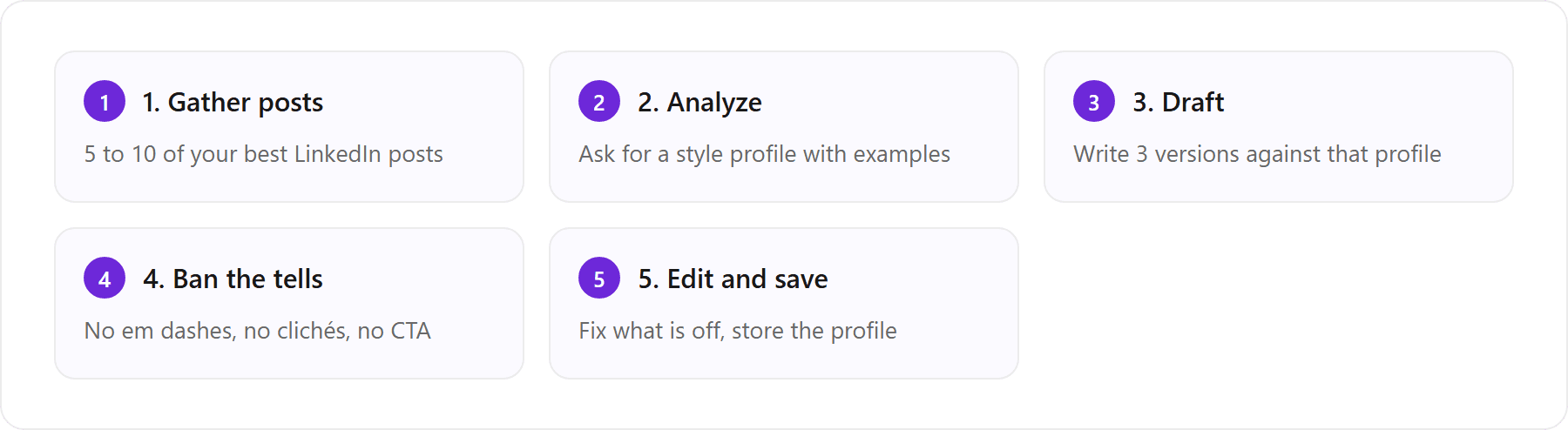
The repeatable setup for LinkedIn drafting in ChatGPT or Claude, start to finish.
The two-step ‘analyze my best posts, then write’ prompt
Do not ask for a post and a voice in one breath. Split it. First, paste 5 to 10 of your strongest LinkedIn posts (ones you wrote yourself, not ones you already ran through an AI) and run this.
Here are several LinkedIn posts I wrote. Analyze my writing style and return a concise profile covering: my hook patterns and how I open, sentence rhythm and length, how I use line breaks and white space, tone and where it shifts, the words and phrases I reach for and the ones I avoid, whether and how I use stories or data, and how I end a post. Be specific and quote short examples from my posts. Do not flatter me. Describe what is actually there.
Read the profile critically and correct anything it got wrong, then keep it in the same chat and draft against it. This analyze-then-write order matters: a model that has just articulated your style in its own words writes measurably closer to it than one told only to ‘sound like me.’ We walk through the LinkedIn-specific version of this in detail in how to make ChatGPT sound like you on LinkedIn.
Custom GPT and Claude Project setup trained on your posts
To avoid re-pasting your samples in every new chat, save them once. In ChatGPT, build a Custom GPT for LinkedIn personal branding: create a new GPT, paste your style profile and 8 to 10 reference posts into its instructions and knowledge, and give it a standing rule to always analyze before drafting (Custom GPTs require a paid ChatGPT plan, per OpenAI’s documentation). In Claude, do the same with a Project: pin your style profile and reference posts as project knowledge so every chat in that project starts with your context loaded (see Anthropic’s Projects documentation). Both are a real improvement over cold-starting each time. Both share the same ceiling, though: they hold a fixed description of your voice, they get crowded out over a long conversation, and neither one learns from the edits you make to its drafts. So the output still drifts back toward the generic default, and you find yourself re-teaching the same corrections. The alternative is to connect your profile once to a system that learns your voice, instead of you re-teaching it to a chat window every session, which is the difference we cover in the VoiceMoat section below.
Banned AI-tell words and negative constraints
Whatever else your prompt does, give the model an explicit list of what to avoid, or the machine tells come back every time. Add a block like this to any drafting prompt: no em dashes, no ‘delve’, ‘leverage’, ‘unlock’, ‘in today’s fast-paced world’, or ‘the harsh truth is’; no one-word-per-line hook padding; no motivational sign-off; and no ‘agree?’ or ‘thoughts?’ bait at the end. This is subtraction, not addition: banning the tells removes the machine’s voice, it does not add yours. Paste any finished draft into our free humanize AI text tool to catch the tells you missed. Just be clear-eyed that a clean, tell-free post can still read as generic, because generic is the default the model returns to.
The best ChatGPT and Claude prompts for viral LinkedIn posts
There is no prompt that guarantees a viral LinkedIn post, and anyone selling one is selling the template that now backfires. What a good prompt can reliably do is generate strong hooks and a clear structure you then rewrite in your own words. On LinkedIn, the whole game is the first two lines, the ones a reader sees before the ‘more’ cut-off, so that is where to spend your prompting effort.
Hook and re-hook prompts for the first two lines before ‘more’
Use this to generate a batch of hooks for one idea, then pick the one that sounds like you and cut the rest.
I want to post on LinkedIn about [specific idea or lesson]. Using my style profile above, write 10 opening hooks of one to two lines each. Vary the angle: a contrarian claim, a specific number, a short confession, a before-and-after, and a concrete moment in time. Every hook must make sense before LinkedIn’s ‘more’ cut-off at about 140 to 210 characters. No curiosity-gap bait, no ‘I’ll tell you a secret’, no emoji. Then, for the two strongest, write the second line that earns the click without giving everything away.
The ‘no curiosity-gap bait’ constraint is doing real work. The classic AI hook (‘Nobody talks about this, but…’) is exactly the pattern readers and the algorithm have both learned to discount. Ask for hooks anchored in a specific number, a real moment, or a genuine disagreement instead.
The hook-body-CTA template (and why it now backfires)
The default structure both models return is: a punchy hook, three to five one-line paragraphs of body, a neat lesson, and a call to action asking for a comment. It is not wrong, exactly. It was the winning format two years ago, which is why the models learned it and why every prompt library still hands it out. The problem is saturation. When a format becomes the default output of hundreds of thousands of AI drafts, it stops signaling effort and starts signaling automation, and that is precisely the pattern LinkedIn’s 2026 distribution appears to discount. So use the model for the hook and the raw material, then break the template on purpose: vary your paragraph lengths, cut the tidy summary line, drop the ‘comment yes if you agree’ close, and let the post end where your thought actually ends. A post that reads like a person wrote it in one sitting now outperforms the polished template.
Prompts for LinkedIn thought leadership
Thought leadership is where the template hurts most, because a borrowed opinion in a borrowed structure reads as neither leadership nor thought. The prompt’s job here is not to invent a take. It is to sharpen and structure a take that is already yours.
Contrarian, data-backed, and confession angles
Give the model your genuine point of view and ask it to build the post around one clear angle rather than hedging across all of them.
My honest position on [topic] is [your actual take, in one blunt sentence]. Using my style profile, draft three LinkedIn posts, each built on a different angle: (1) contrarian, arguing against the common advice and saying why it fails; (2) data-backed, opening with a specific number or result I give you and reasoning from it; (3) confession, a short first-person story of when I got this wrong and what changed. Keep my rhythm. No hedging, no ‘it depends’, no summary paragraph, no call to action. End on the sharpest line, not a tidy conclusion.
The best Claude prompt for thought leadership
Claude tends to hold a longer, more nuanced argument without sliding into hype, which makes it well suited to a substantive thought-leadership post. This prompt leans into that strength and uses Claude’s willingness to push back.
Act as a sharp editor, not a cheerleader. Here is my argument about [topic]: [paste 3 to 5 messy sentences of your real thinking]. First, stress-test it: name the strongest counterargument and the one place my logic is weakest. Then, using my style profile, write a LinkedIn post that makes my case while honestly acknowledging that counterargument in one line, so it reads as thinking rather than a pitch. Keep it under 200 words. No jargon, no em dashes, no motivational close. If my argument is actually weak, tell me before you write it.
The ‘stress-test it first’ step is what separates real thought leadership from a confident-sounding template. A post that names and answers its own strongest objection reads as a person who has actually thought about the topic, which is exactly the signal both readers and the feed reward.
[ from the team behind this blog ]
Post on LinkedIn and Twitter in a way that reads like you
VoiceMoat is the Personal Brand OS for LinkedIn and Twitter. audenAI, the brain inside it, learns from your own posts, then helps you create, schedule and grow.
Creator plan $35 a month after the trial. Cancel anytime.
Prompts for LinkedIn engagement and outreach
Comments and connections are where most of LinkedIn’s actual growth happens, and where AI most obviously outs itself. The failure mode is the same in both directions: a generic, complimentary, faintly robotic message that the reader clocks in half a second. We cover the full engagement playbook in using AI for LinkedIn engagement: comments, connections, and cold DMs; here are the two prompts that matter most.
Engagement prompts that do not read as bait
A good comment adds a point, it does not just applaud. Use this to draft comments that carry your perspective.
Here is a LinkedIn post I want to comment on: [paste the post]. Using my style profile, write three short comment options that each add something: a specific example from my own experience, a respectful point of disagreement, or a sharper way to frame the author’s point. Two to three sentences max. No opening compliment, no ‘great post’, no emoji, no restating what they already said. It should sound like a peer replying, not a fan.
The banned ‘great post’ opener matters more than it looks: the complimentary preamble is the single clearest tell of an automated comment, and it adds nothing. Lead with the substance.
The Claude LinkedIn outreach message prompt (and the spam-filter risk)
For connection requests and cold DMs, the bar is ‘specific enough that it could only have been sent to this one person.’ Claude is good at this if you give it a real reason for reaching out.
Write a LinkedIn connection note to [name], who is [role] at [company]. My genuine reason for connecting: [one specific thing, a post of theirs, a shared interest, a real question]. Keep it under 280 characters (LinkedIn’s note limit). No flattery, no pitch, no ‘I’d love to pick your brain’, no ask on the first message. It should read like one human who has actually noticed their work, not a template. Give me two versions, one warmer and one more direct.
One serious caution on outreach at scale: the moment you generate near-identical messages in bulk and send them fast, you trip both LinkedIn’s automation detection and the recipient’s spam radar. Volume plus sameness is exactly the pattern platforms flag, and it can get your account restricted. AI is fine for drafting a message you personalize and send deliberately; it is a risk the second it becomes a mail-merge. If you are weighing how far to push automation, read is it safe to use AI on LinkedIn and Twitter first.
Repurposing prompts: podcast, article, or transcript into posts
Repurposing is where prompts earn their keep, because the raw thinking already exists. You are not asking the model to invent, only to reshape. The catch is that reshaping at volume is exactly where the sameness penalty bites, so the technique needs a guardrail. For the broader system across formats and platforms, see how to repurpose blogs, newsletters, and videos into posts with AI.
Turn a podcast episode into a LinkedIn post with ChatGPT
Paste the transcript (or a chapter of it) and use this. The key is asking for the ideas first, then the posts, so the model does not just summarize.
Here is a transcript from a podcast episode I was on / recorded: [paste transcript]. First, pull out the five most interesting, specific, or contrarian ideas I actually said, quoting my own words. Skip anything generic. Then, using my style profile, turn the three strongest into standalone LinkedIn posts in my voice. Keep my phrasing where it is good. Each post should stand on its own without the episode context. No ‘in my latest episode’ preamble, no em dashes, no call to action. End each on the strongest line.
The same structure works for an article, a newsletter, or a webinar transcript: extract the specific ideas in your own words first, then shape the best ones into posts. The ‘quote my own words’ instruction is what keeps your phrasing in the output instead of the model’s paraphrase.
Why bulk repurposing triggers the generic-slop penalty
Here is the trap. Repurposing tempts you to run one transcript into ten posts, then do it again next week, and ship all of it. But when every post comes out of the same model with the same default structure, a batch of ten reads as ten variations of one template, not ten distinct thoughts. That interchangeable, high-volume output is precisely what the ‘generic slop’ penalty targets, and it drags down the reach of your good posts alongside the filler. The fix is not to repurpose less; it is to make sure each post still sounds like a specific person made a specific point. That is hard to do by hand across a batch, and it is impossible for a stateless chat model that resets its sense of your voice every session. It is the exact problem a persistent, voice-trained tool is built to solve.
ChatGPT and Claude carousel prompts for LinkedIn and Instagram
Carousels (called documents on LinkedIn) still earn strong dwell time, and both ChatGPT and Claude are good at scripting the slides. The models cannot design the visual; they write the copy, which you then build in Canva, Contentdrips, or your slide tool of choice. The trick is to prompt for the structure a carousel actually needs: one idea per slide, a hook slide that earns the swipe, and a payoff at the end.
Prompt to write LinkedIn carousel slides
Using my style profile, write the copy for a LinkedIn carousel about [topic]. Target 8 slides. Slide 1 is the hook slide: a bold, specific promise or claim in under 8 words plus a one-line subtitle. Slides 2 to 7 each cover exactly one point, with a 3 to 5 word slide title and one or two short supporting lines. The final slide is the payoff plus a single soft next step. Keep my voice and rhythm. No filler slides, no em dashes, no ‘follow me for more’. Give me the slide-by-slide text only, labeled by slide number.
The carousel hook slide
The first slide decides whether anyone swipes, so prompt it separately and generate options: ‘Write 8 hook-slide options for a carousel on [topic]: each a bold claim, a surprising number, or a clear promise in under 8 words, plus a one-line subtitle. No curiosity bait.’ Then pick the one that sounds like you and matches the payoff you can actually deliver. A hook that oversells what the carousel contains reads as a bait-and-switch and kills your credibility.
LinkedIn vs Instagram carousel format differences
The same idea needs different specs on each platform, and you should tell the model which one you are writing for, because slide count, shape, and tone all shift. Treat the figures below as a starting point and confirm the current specs from each platform before you design, since both change their supported formats over time. On LinkedIn, carousels are uploaded as a PDF document, typically run longer (roughly 8 to 12 slides), read best in portrait or square (a 4:5 portrait around 1080 by 1350 pixels is a safe bet), and carry a more educational, professional tone. On Instagram, carousels are a native image post capped at up to 20 slides but usually kept tighter (around 6 to 10), are almost always square (1080 by 1080) or 4:5 portrait, and run more visual and casual with shorter copy per slide. The practical prompt add-on: ‘Write this for [LinkedIn / Instagram]: [slide count], [aspect ratio], and a [educational / casual] tone, with [more / less] copy per slide.’ If you write for both, do not reuse the same script verbatim; ask the model to re-cut the copy for the second platform’s slide count and tone.
A word on the carousel tools themselves: Canva and Contentdrips build the visuals well, and schedulers like Taplio, Supergrow, and MagicPost can queue the finished document. None of them fixes the voice. They speed up the design and the distribution; the words still come from the same template unless you rewrite them.
How to use AI to post on LinkedIn automatically
You can automate the calendar, and you should be careful about automating the account. Schedulers built for LinkedIn (Taplio, Supergrow, MagicPost and others) let you queue and auto-publish posts at set times, which genuinely saves effort and keeps you consistent. What they automate is cadence, not voice. They will happily ship a queue of templated, AI-default posts on schedule, which means your posting frequency goes up while your sameness stays exactly where it was, and at higher volume the generic pattern is more exposed, not less. The other line worth respecting: auto-publishing scheduled posts through an approved tool is normal and safe; using bots to auto-comment, auto-connect, or auto-DM at scale is the behavior LinkedIn actively restricts. Automate publishing, not engagement. The real unlock is not automating more of the template; it is pairing voice-matched drafting with scheduling in one place, so what goes out on a queue already sounds like you rather than like everyone else.
The faster way: your LinkedIn voice, learned once with VoiceMoat
Full disclosure first, so you can weigh this fairly: VoiceMoat is our own product, this is the maker’s perspective, and every prompt above works in ChatGPT or Claude on their own. With that on the table, here is why it exists. VoiceMoat is the Personal Brand OS for LinkedIn and Twitter, and its edge is the exact gap this whole article keeps circling: it drafts posts in your own LinkedIn voice rather than the templated hook-body-CTA the algorithm now suppresses, and Media Studio turns a post into a carousel. The AI inside it is audenAI, which learns from your LinkedIn posts and models the patterns behind them, so drafts already read like you instead of ending on an ‘add your own voice’ instruction you have to fulfill by hand. (To avoid a common mix-up: VoiceMoat is not the Voicemod voice changer, so ‘voice’ here means your writing patterns, not audio.)
The flow is short. You connect LinkedIn, audenAI learns from your posts (rhythm, hooks, structure, vocabulary, the way you actually open and close), and then you draft LinkedIn posts in your own voice in Studio with Style and Stance checks, draft comments straight into LinkedIn’s comment box with the Chrome extension, and schedule your posts in the same place. Because the profile is persistent and specific to you, your edits refine it instead of evaporating when you close the tab, which is the one thing a chat model cannot do. And here is the cross-platform fact that matters: VoiceMoat trains a separate voice for LinkedIn and for Twitter, because you do not write the same way in both places, and both live in one account. You are not maintaining two style guides across two chat windows. For the direct comparison with prompting, we wrote why ChatGPT forgets your voice between sessions.
Manual prompting in ChatGPT or Claude versus a persistent, voice-trained tool, for LinkedIn drafting. Based on each tool’s published behavior as of July 2026; verify against current docs.
What you’re comparing | ChatGPT & Claude prompts | VoiceMoat (audenAI) |
|---|---|---|
Setup per session | Re-paste your posts in each new chat | Learns your posts once, then persists |
Voice | Generic default, closer with heavy prompting | Drafts from your own LinkedIn voice |
Custom GPT / Project gating | Custom GPT needs paid ChatGPT; Projects need paid Claude | Voice profile built in; $1 for a 3-day trial |
AI-tell suppression | Manual banned-word list, re-added every prompt | Avoids the tells by default |
Cross-platform reuse | Separate profiles you maintain by hand | A separate trained voice for each, in one account |
Posting and scheduling | Copy and paste into LinkedIn yourself | Draft, schedule, and post in one place |
It will not clone anyone, and it will not push a viral-shaped post that does not read like you. That is the point: the honest bottom line for prompts is that they get you most of the way for a one-off post, and they never stop resetting. If you post on LinkedIn often enough that re-teaching your voice every session gets old, and you are shipping the very hook-body-CTA template the platform now flags, that is the moment a learned voice pays for itself. Stop shipping the template LinkedIn now suppresses: let audenAI learn your voice once and draft posts and carousels that read like you. Try it for $1 for 3 days; plans from $35 a month. audenAI suggests, you decide.
Frequently asked questions
Can ChatGPT write good LinkedIn posts?
Yes, for first drafts and speed. Give ChatGPT 5 to 10 of your best posts, ask it to analyze your style, then draft against that profile with the AI tells banned. What it cannot do on its own is hold your voice between chats, and its default output is the hook-body-CTA template that LinkedIn's 2026 distribution increasingly discounts. So use it to draft and get unstuck, then rewrite in your own words and break the template before you post.
What is the best Claude prompt for LinkedIn thought leadership?
Make Claude stress-test your argument before it writes. Paste your genuine take in a few rough sentences and prompt: 'Act as a sharp editor, not a cheerleader. Name the strongest counterargument and my weakest point. Then, using my style profile, write a LinkedIn post that makes my case while honestly acknowledging that counterargument in one line, under 200 words, no jargon, no em dashes, no motivational close.' A post that answers its own best objection reads as real thinking rather than a template.
How do I build a custom GPT for LinkedIn personal branding?
In ChatGPT (paid plan required), create a new Custom GPT and paste your style profile plus 8 to 10 of your own reference posts into its instructions and knowledge, with a standing rule to always analyze your voice before drafting. Claude's equivalent is a Project with the same context pinned as project knowledge. Both cut down re-pasting, but both store a fixed description of your voice, drift over long chats, and never learn from your edits, so the output still slides back toward generic.
How do I turn a podcast episode into a LinkedIn post?
Paste the transcript into ChatGPT or Claude and split the task in two. First: 'Pull out the five most specific or contrarian ideas I actually said, quoting my own words, skip anything generic.' Then: 'Using my style profile, turn the three strongest into standalone LinkedIn posts in my voice, keep my phrasing, no in-my-latest-episode preamble, no call to action.' Extracting the ideas first keeps your real phrasing in the output instead of a bland summary.
Can I create LinkedIn carousels with Claude in bulk?
You can script many carousels quickly, but be careful about shipping them all. Claude writes strong slide-by-slide copy if you specify the structure (a hook slide, one idea per slide, a payoff, and the platform's slide count and aspect ratio). The risk is that a bulk batch from one model reads as ten variations of one template, which is exactly what the generic-slop penalty targets. Re-cut the copy per platform and rewrite it in your own words before you build the slides in Canva or Contentdrips.
How do I add my own voice to ChatGPT or Claude LinkedIn posts?
Prompts alone cannot hold your voice because the model resets each session and drifts back to a template. VoiceMoat (our own product) closes that gap: audenAI learns from your LinkedIn posts and drafts in your voice with Style and Stance checks on your drafts, and it trains a separate voice for Twitter. Try it for $1 for 3 days; plans from $35 a month.
AI disclosure
Written and fact-checked by Prateek Singh. VoiceMoat is the publisher's own product and is disclosed as such in the section that mentions it; its capabilities (drafting in your voice, reply drafting, scheduling, and analytics across LinkedIn and Twitter) are described honestly and not overclaimed, and every prompt in this article works in ChatGPT or Claude on their own. Model behaviors for ChatGPT, Claude, Custom GPTs, and Claude Projects reflect their published documentation as of July 2026 and can change; verify against each tool's current docs. Claims about LinkedIn and Instagram distribution, formats, and carousel specs are directional and should be confirmed against each platform's current guidance before you rely on them.
Keep reading

AI and Voice
Every social MCP connector reaches both platforms. That is not the hard part
We were going to write that connecting one assistant to both Twitter and LinkedIn was rare. It is not. More than twenty connectors do it and several are free, so channel coverage is table stakes and every roundup ranking them by it is measuring the wrong thing. Here is what actually differs between them, and the one thing we read enumerated tool lists for six of them to confirm nobody does at all.
11 min read
·

AI and Voice
Why your Claude writing skill doesn't sound like you
There are dozens of free Claude skills for writing, and almost all of them do the same thing: strip out phrases that read as machine-written. That is subtraction, and it leaves you sounding like nobody in particular rather than like yourself. The handful that actually learn a voice from your own writing have a fraction of the users. Here is the difference, why a skill cannot post anything no matter what it says, and where the file actually goes on every surface.
13 min read
·

AI and Voice
Hootsuite alternatives in 2026, priced from the vendors' own pages
Hootsuite starts at $99 per user a month, not $19. Here is what the realistic alternatives cost, read off each vendor's own pricing page in both billing positions, plus the clause in Hootsuite's terms that its pricing page does not mention.
10 min read
·

AI and Voice
Taplio alternatives in 2026, priced from the vendors' own pages
Four LinkedIn tools people move to from Taplio, priced from each vendor's own pricing page rather than from each other. Includes the arithmetic on Taplio's Pro tier, which does not add up, and one name still on every recommendation list that has quietly shut down.
11 min read
·

AI and Voice
How to train AI to write in your voice: the cross-model guide
You can get ChatGPT, Claude or Gemini to write in your voice, but only partly and only for one session, because chat models forget your style between chats. This cross-model guide covers the analyze-then-write prompts that work, the settings that make them stick, the four levels of personalized AI content, a reusable instruction block for tweets, and the persistent alternative for anyone who posts regularly.
16 min read
·
From the Twitter algorithm series
The Twitter/X algorithm in May 2026: why voice wins under the new transformer
Read ›

