ai and voice
Using AI for LinkedIn Engagement: Comments, Connections, and Cold DMs
·
17 min read
·
By Prateek Singh, founder of VoiceMoat
Key takeaways
Using AI for LinkedIn engagement works when the output reads as you, not as a template a thousand other people are also sending; one swapped variable does not make a message personal.
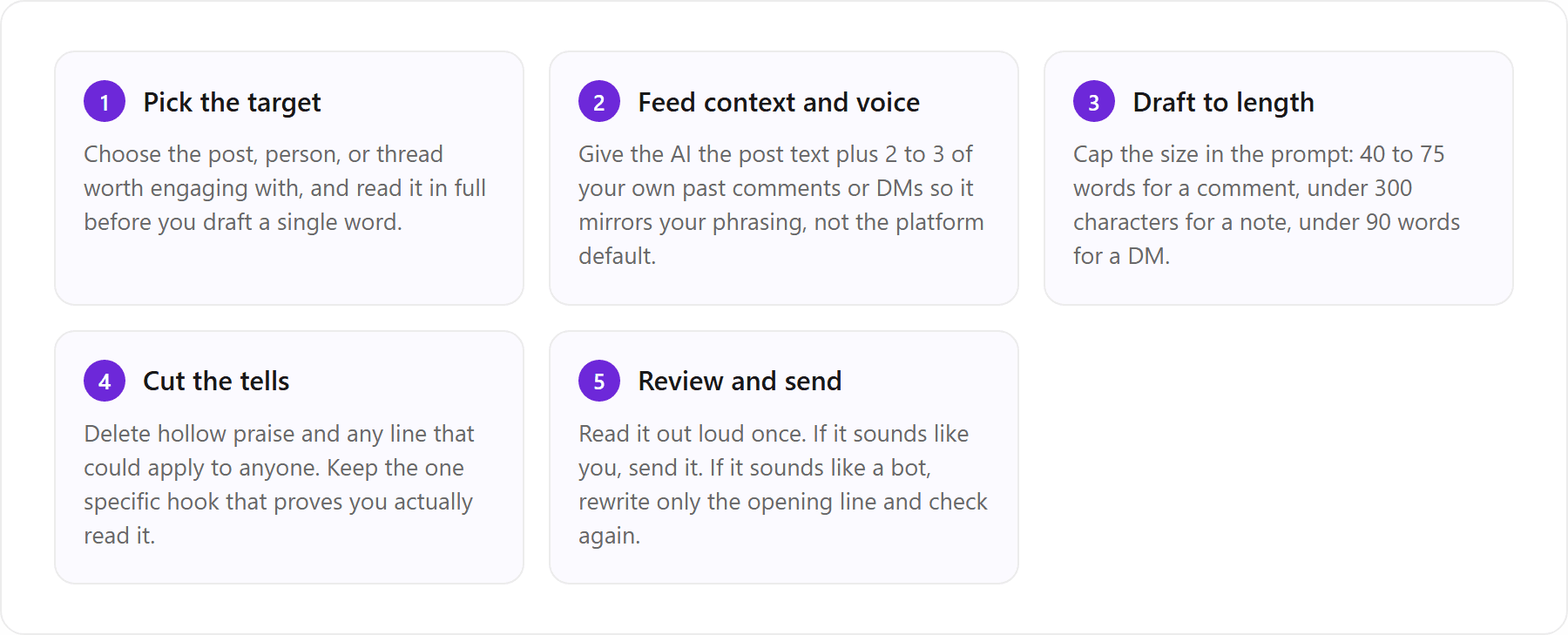
For comments, aim for 40 to 75 words that add one specific idea; for connection notes, stay under 300 characters and skip the pitch; for cold DMs, stay under 90 words and open with a real reason.
The 'paste three of my own comments so it matches my style' trick genuinely helps, but it lasts one session and asks you to re-describe your voice every single time.
Keep a human in the loop: read every AI draft before you send it, because automated-sounding outreach is what trips spam filters and reads as a bot.
VoiceMoat is the Personal Brand OS for LinkedIn and Twitter, and its Engage feature drafts comments, connection notes, and DMs in the voice audenAI has learned from your own posts, so personalization is built in rather than a template you fill in. (Disclosure: VoiceMoat is our own product.)
Using AI for LinkedIn engagement works, but only if the output does not read as a template that a thousand other people are also sending. That is the whole game. ChatGPT and Claude can draft a comment, a connection request, or a cold DM in seconds, and most of those drafts are fine. The problem is that ‘fine’ is exactly what makes them invisible. A LinkedIn feed is a wall of AI-flavored praise and hollow outreach, and the eye has learned to slide right past it. This guide gives you working prompts for each surface (comments, connection notes, cold DMs, and Instagram sell DMs), then it names the contradiction that every vendor blog post quietly skips: the fill-in-the-blank template they hand you is the reason your messages read as templated in the first place.
The contradiction at the heart of every AI LinkedIn template post
Search ‘ChatGPT LinkedIn comment prompt’ and you will find dozens of posts offering the same thing: a template with one or two blanks to fill in. Paste the post here, add the person’s name there, and out comes a comment. The pitch is personalization at scale. The reality is that a template with a variable slot is still a template, and readers can feel the seams. The promise and the product contradict each other, and almost no one names it out loud.
Why one-variable templates still read as templated
A template works by keeping the structure fixed and swapping one detail. ‘Great insight on {topic}, this really resonated with my experience in {field}.’ Change the two braces and you have a ‘personalized’ comment. But the shape never changes, and the shape is what people recognize. When the opening cadence, the sentence length, and the closing move are identical across a hundred messages, the brain pattern-matches it as mass-produced long before it reads the words. This is the same reason every AI LinkedIn post sounds the same: the model reaches for the same rhythms, and swapping nouns does not disturb the rhythm. It is also why AI drafts drift toward one house style unless you actively push against it.
The real fix: match your voice, not a placeholder
The fix is not a better blank to fill in. It is changing what stays constant. Instead of holding the template steady and varying the topic, you hold your voice steady and let the content vary. Your phrasing, your sentence length, the way you open and close, the words you never use: those are what make a message unmistakably yours, and they are exactly what a generic template strips out. The real fix, which we will get to near the end, is a tool that learns your voice once rather than handing you yet another template. For now, keep that idea in your back pocket, because it changes how you read every prompt below.
How to use ChatGPT and Claude to write LinkedIn comments
Comments are the highest-leverage LinkedIn engagement surface, because a good comment on someone else’s post puts you in front of their entire audience for free. The bar is not ‘be nice.’ The bar is ‘add something the post did not already say.’ A comment that just restates the post in different words is noise. A comment that contributes one specific idea, one counterexample, or one lived detail earns replies and profile visits.
A ChatGPT prompt for LinkedIn comments that add value
The best ChatGPT prompts to write LinkedIn comments do three things: they force a specific contribution, they ban the tells, and they feed the model your own past comments so it mirrors your tone. Here is one you can paste and reuse.
You are helping me write a LinkedIn comment. Here is the post: [paste the full post]. Write a comment of 40 to 75 words that adds one specific idea the post did not mention, references a concrete detail from the post so it is clearly not generic, and does not end with a question unless a question is genuinely useful. No emojis. No ‘Great post’, no ‘This resonated’, no restating what they already said. Match this tone exactly: [paste 2 to 3 of my own past comments].
The last line is the load-bearing one. Without your samples, ChatGPT defaults to LinkedIn-broadcaster voice: confident, tidy, faintly hollow. With two or three real comments of yours pasted in, it has something specific to imitate. If you want a deeper method for feeding samples, our guide on making ChatGPT sound like you on LinkedIn walks through it comment by comment.
Using Claude to write LinkedIn comments
You can use Claude to write LinkedIn comments with the same prompt structure, and many people find Claude a little better at restraint: it is less prone to the exclamation-mark enthusiasm that flags a comment as AI. Give it the same three instructions (specific contribution, banned tells, pasted samples) and it will usually hold your tone across a session more steadily. The sweet spot for a LinkedIn comment sits between roughly 40 and 75 words. Shorter than that and it reads as a drive-by ‘Love this.’ Longer and you are writing your own post in someone else’s comment section, which reads as attention-seeking. Whichever model you use, cap the length in the prompt and cut anything that could apply to any post on the platform. For a fuller comparison of how the two models handle voice, see how to make Claude write in your voice.
A prompt to reply to comments on your own posts
When your own post gets comments, replying fast and well keeps the post alive in the feed and turns strangers into repeat readers. The failure mode here is the reflexive ‘Thanks for sharing!’ on every reply, which is worse than silence because it signals you are not actually reading. Use a prompt that answers the point.
Someone commented on my LinkedIn post. My post was: [paste post]. Their comment was: [paste comment]. Write a reply of 20 to 45 words that acknowledges their specific point without saying ‘thanks for sharing’, adds one more thought or answers them directly, and keeps the conversation open. Match my voice from these samples: [paste 2 to 3 of my past replies].
AI for LinkedIn connection requests that are not salesy
A connection request is a first impression compressed into 300 characters. Most AI-written ones fail the same way: they are polite, generic, and immediately followed (everyone knows) by a pitch. The goal of a good note is not to sell. It is to give the person one honest reason to accept, so the relationship starts on a human footing instead of a sales one.
A ChatGPT connection request prompt (300-character limit)
LinkedIn caps the personal note on a connection request, so the prompt has to respect the ceiling. A ChatGPT LinkedIn connection request message prompt that stays not salesy looks like this.
Write a LinkedIn connection request note under 300 characters. The person is [name, role, company]. We share [common ground: a mutual connection, the same event, similar work, a post of theirs I read]. Do not pitch anything. Do not say ‘I would love to add you to my network’ or ‘let’s connect’. Reference the specific reason I am reaching out, keep it warm and low-pressure, and do not ask for anything. Match this tone: [paste one of my past notes].
Note the two explicit bans. ‘I would love to add you to my network’ and a bare ‘let’s connect’ are the exact phrases that read as auto-generated, so naming them in the prompt keeps the model away from the cliches. The character limit and note behavior are set by LinkedIn, so always give the model the ceiling.
Using Claude to write a connection request
To use Claude to write a connection request, keep the same three-part shape and let the model handle the compression: a hook (the specific reason you noticed them), common ground (why you two overlap), and a low-pressure close (no ask, no pitch, just an open door). That structure is what separates a note that gets accepted from one that gets ignored. Hook, common ground, low-pressure close, all under 300 characters. If you find yourself wanting to add a call to action, delete it. The connection request is not where you convert; it is where you earn the right to a later conversation. If you are weighing which model to lean on for outreach, our Claude versus ChatGPT breakdown for social posts covers the trade-offs.
[ from the team behind this blog ]
Post on LinkedIn and Twitter in a way that reads like you
VoiceMoat is the Personal Brand OS for LinkedIn and Twitter. audenAI, the brain inside it, learns from your own posts, then helps you create, schedule and grow.
Creator plan $35 a month after the trial. Cancel anytime.
AI for cold DMs that actually get replies
Cold DMs are where AI outreach earns its worst reputation, and deservedly so, because the volume-first playbook (blast a templated message to a thousand people and hope) is exactly what makes inboxes hostile. A cold DM that gets replies does the opposite of volume thinking. It reads as if you wrote it to one person, because you did, and the AI’s only job is to help you do that faster without flattening your voice.
A ChatGPT cold DM prompt that gets replies
A ChatGPT cold DM prompt that gets replies starts a conversation instead of booking a meeting. Asking for a call in the first message is the fastest way to get ignored. Ask for a one-sentence answer instead.
Write a LinkedIn direct message to [name, role, company]. Context: we are already connected and they recently [posted about X / commented on Y / launched Z]. Goal: start a real conversation, not book a call. Under 90 words. Open with a specific reason tied to what they did or said, give one short line of relevance about me, and close with a low-friction question they can answer in a single sentence. No ‘Hope this finds you well’, no calendar link, no pitch. Match my voice: [paste 2 of my past DMs].
Using Claude to write a cold DM
To use Claude to write a cold DM, the same rules apply, and Claude tends to be slightly better at keeping a message from tipping into salesperson-cheerful, which matters more in the DM than anywhere else. Whichever model you pick, the non-negotiables are: reference something real and recent, keep it short, and make the ask trivially easy to answer. A DM that requires the recipient to schedule time, click a link, or write a paragraph back will sit unread. A DM that asks one genuine question they can answer from their phone in ten seconds gets a reply, and the reply is where the actual relationship starts.
A ChatGPT prompt for an Instagram DM to sell
The engagement logic carries over to other platforms, so if you also sell on Instagram, here is a ChatGPT prompt for an Instagram DM to sell that avoids the copy-paste-blast smell. Instagram DMs run more casual than LinkedIn, so the tone dials down accordingly.
Write an Instagram DM to someone who [followed me / commented on my post / replied to my story about X]. I sell [product] that helps [specific outcome]. Keep it under 60 words, conversational and casual, reference what they actually did so it is clearly not a mass blast, lead with them and not my product, and end with a soft question. No links in the first message, no ‘Hey dear’, no hard pitch.
One honest note before we go further: the voice-learned tool we cover below is built for Twitter and LinkedIn, not Instagram, so treat the Instagram prompt as a standalone ChatGPT technique, not something that tool handles for you.
How AI engagement differs by surface, and the voice-first fix for each.
Surface | Length target | Core structure | Main failure mode | Voice-first fix |
|---|---|---|---|---|
LinkedIn comment | 40 to 75 words | One specific idea that extends the post | Hollow praise that restates the post | Draft in your own comment voice so the contribution reads as yours |
Connection request | Under 300 characters | Hook, common ground, low-pressure close | ‘Let’s connect’ with an implied pitch | Learned voice keeps the note warm and un-salesy without a template |
Cold DM | Under 90 words | Real reason, one line of relevance, easy question | Booking a call in message one | Voice match makes the DM read as one-to-one, not one-to-thousand |
Instagram sell DM | Under 60 words | Lead with them, soft question, no link | Mass-blast ‘Hey dear’ opener | Manual ChatGPT prompt only (voice-matching tools here cover Twitter and LinkedIn) |
The style-match trick everyone mentions and everyone forgets
Every good version of these prompts ends with the same instruction: ‘match my voice, here are some samples.’ It is the single most effective line in any of them. It is also the line almost everyone drops after the first week, and understanding why reveals the real limit of prompt-based engagement.
Pasting three of your own comments to mirror your voice
The technique is simple and it works. Paste two or three of your own real comments (or notes, or DMs) into the prompt, tell the model to match that tone, and the output shifts noticeably toward you. Your sentence length, your habit of opening with a concrete detail, your refusal to use certain filler words: the model picks up on all of it when it has examples to copy. This is genuinely the difference between a draft you delete and a draft you send with one small edit. If your drafts still feel off even with samples, our piece on why AI writing sounds generic and how to fix it covers the deeper causes.
Why the trick breaks by the next message
Here is the catch. Pasted into ChatGPT or Claude, the style match lasts exactly one session. Open a new chat tomorrow and the model has forgotten you completely; you are back to pasting samples again. It also leans on a skill most people do not have: describing your own voice. You know your writing when you see it, but articulating it (how long are my sentences, what is my opening move, which words do I avoid) is genuinely hard, and the prompt only works as well as your ability to hand-pick representative samples every time. So the trick that everyone recommends is the trick that everyone quietly abandons, because doing it properly on every comment, every note, and every DM is a chore no one sustains. That gap, between the technique that works and the effort it demands, is precisely where a purpose-built tool changes the math.
The faster way: LinkedIn engagement in your voice, at scale
VoiceMoat is the Personal Brand OS for LinkedIn and Twitter that writes your LinkedIn engagement in your own voice via audenAI, so the style match stops being something you re-type on every message. (Disclosure: VoiceMoat is our own product, so read this as us making our case, not an impartial verdict.) The whole pitch of this article, that personalization at scale reads like a contradiction, is exactly the contradiction VoiceMoat is built to dissolve. Instead of pasting three samples into a fresh chat every day, you connect your account once, audenAI learns from your real posts, and every draft after that already reads like you.
How VoiceMoat writes comments, notes, and DMs in your learned voice
audenAI is the brain inside VoiceMoat, an AI writing partner trained on your own posts. It does not run a fill-in-the-blank template. It models your patterns: your tone, your sentence structure, your vocabulary, the moves you make and the ones you never do. That is why its drafts read as personal rather than as a placeholder you filled in. On LinkedIn, the Engage feature uses that learned voice to draft the three surfaces this article covers: comments that add a specific idea, connection notes that stay warm and un-salesy, and cold DMs that read as one-to-one. You point it at a post or a person, and it hands you a draft that already reads like your writing, not the platform default. One clarification worth stating plainly: VoiceMoat is the Personal Brand OS for LinkedIn and Twitter, not the Voicemod voice changer, and despite the similar name the two do entirely different things.
Personalization that is automatic, not a per-message chore
This is the part that resolves the contradiction. With ChatGPT or Claude, personalization is a chore you perform on every single message: find your samples, paste them, describe your tone, hope the model holds it. With VoiceMoat, the voice is learned once and applied to every draft, so ‘personalized at scale’ stops being an oxymoron and becomes the default behavior. The table below shows the difference on the same prospect.
Two honest boundaries. First, this covers Twitter and LinkedIn only; it does not draft Instagram DMs, so the Instagram prompt earlier in this article stays a manual ChatGPT job. Second, it drafts while you review and send. Nothing goes out on autopilot, which is the point of the next section. You can see how the Engage surface works on the voice-matched LinkedIn engagement in Engage page.
Keep a human in the loop: review before you send
Whatever tool you use, the rule that protects your reputation is the same: read every message before it sends. AI-assisted engagement gets people in trouble in exactly one way, when it becomes AI-automated engagement. Fully automated comment bots and DM blasters are what LinkedIn’s spam systems are built to catch, and they are what make recipients feel processed rather than contacted. A draft you read, edit, and send by hand is engagement. A message that fires without you ever seeing it is spam, even if the words are identical.
VoiceMoat is built around this principle deliberately: audenAI suggests, you decide. Every comment, connection note, and DM is a draft you approve and edit before it goes anywhere, which is what keeps engagement in your voice from tripping spam filters or reading as automated outreach. It is also just good practice, because the ten seconds you spend reading a draft out loud is the difference between a message that reads like you and one that reads like software. For the full picture on staying inside platform rules, see whether it is safe to use AI on LinkedIn and Twitter. Tools like Taplio automate LinkedIn workflows too, but the same caution applies to all of them: keep a human on the send button.
Using AI for LinkedIn engagement is not about sending more messages faster. It is about sending messages that read as if a real person wrote them to a real person, at a volume you could not manage by hand. The prompts in this article get you most of the way with ChatGPT or Claude, and the paste-your-samples trick closes the gap on any given day. If you want your voice to persist instead of restarting every session, let audenAI learn your LinkedIn voice for $1 for 3 days, with plans from $35 a month, at VoiceMoat’s Engage.
Frequently asked questions
Can AI personalize LinkedIn comments and DMs in my own voice instead of using generic templates?
Yes. VoiceMoat is the Personal Brand OS for LinkedIn and Twitter, whose Engage feature drafts LinkedIn comments, connection notes, and cold DMs using audenAI, its writing partner trained on your own posts, so each message reads as personal rather than templated. You review and edit every draft before sending. Try it for $1 for 3 days; plans from $35 a month., and it covers Twitter and LinkedIn (not Instagram). (Disclosure: VoiceMoat is our product.)
What are the best ChatGPT prompts to write LinkedIn comments?
The best ones force a specific contribution, ban the tells, and feed the model your own past comments. Paste the post, ask for 40 to 75 words that add one idea the post did not mention and reference a concrete detail, then instruct: no 'Great post', no restating, and match the tone of two or three of your own comments pasted in. The samples are what shift the output from broadcaster voice toward yours.
How do I write a LinkedIn connection request that is not salesy?
Stay under the 300-character note limit, give one honest reason you are reaching out, and do not pitch. Explicitly tell the AI to avoid 'I would love to add you to my network' and a bare 'let's connect', since those are the phrases that read as auto-generated. Use a hook, common ground, and a low-pressure close with no call to action. The connection request earns the right to a later conversation; it is not where you convert.
What is a ChatGPT cold DM prompt that gets replies?
One that starts a conversation instead of booking a call. Keep it under 90 words, open with a specific reason tied to something the person recently posted or did, add one short line of relevance about you, and close with a question they can answer in a single sentence. Ban 'Hope this finds you well', calendar links, and any pitch, and paste two of your own past DMs so it matches your voice.
Can I use Claude instead of ChatGPT for LinkedIn outreach?
Yes. Claude handles the same comment, connection-request, and cold-DM prompts, and many people find it slightly better at restraint, which matters most in DMs where enthusiasm reads as salesy. Use the same structure: specific contribution or reason, banned cliches, and two or three pasted samples of your own writing so it mirrors your tone across the session.
Does AI-written LinkedIn engagement hurt my credibility?
Only if you let it send without you. AI-assisted engagement (you read, edit, and send each draft) is fine and normal. AI-automated engagement (bots that comment or DM without you ever seeing the message) is what trips spam filters and reads as processed rather than personal. Keep a human on the send button, match your own voice, and the credibility risk disappears.
AI disclosure
This article was written with AI assistance and reviewed by Prateek Singh. It discusses VoiceMoat, which is our own product, so the sections about VoiceMoat and audenAI are us making our case rather than an impartial verdict. Prompts and length targets are practical guidance, not guarantees of results.
Keep reading

AI and Voice
Every social MCP connector reaches both platforms. That is not the hard part
We were going to write that connecting one assistant to both Twitter and LinkedIn was rare. It is not. More than twenty connectors do it and several are free, so channel coverage is table stakes and every roundup ranking them by it is measuring the wrong thing. Here is what actually differs between them, and the one thing we read enumerated tool lists for six of them to confirm nobody does at all.
11 min read
·

AI and Voice
Why your Claude writing skill doesn't sound like you
There are dozens of free Claude skills for writing, and almost all of them do the same thing: strip out phrases that read as machine-written. That is subtraction, and it leaves you sounding like nobody in particular rather than like yourself. The handful that actually learn a voice from your own writing have a fraction of the users. Here is the difference, why a skill cannot post anything no matter what it says, and where the file actually goes on every surface.
13 min read
·

AI and Voice
Hootsuite alternatives in 2026, priced from the vendors' own pages
Hootsuite starts at $99 per user a month, not $19. Here is what the realistic alternatives cost, read off each vendor's own pricing page in both billing positions, plus the clause in Hootsuite's terms that its pricing page does not mention.
10 min read
·

AI and Voice
Taplio alternatives in 2026, priced from the vendors' own pages
Four LinkedIn tools people move to from Taplio, priced from each vendor's own pricing page rather than from each other. Includes the arithmetic on Taplio's Pro tier, which does not add up, and one name still on every recommendation list that has quietly shut down.
11 min read
·

AI and Voice
How to train AI to write in your voice: the cross-model guide
You can get ChatGPT, Claude or Gemini to write in your voice, but only partly and only for one session, because chat models forget your style between chats. This cross-model guide covers the analyze-then-write prompts that work, the settings that make them stick, the four levels of personalized AI content, a reusable instruction block for tweets, and the persistent alternative for anyone who posts regularly.
16 min read
·
From the Twitter algorithm series
The Twitter/X algorithm in May 2026: why voice wins under the new transformer
Read ›

