Key takeaways
A Personal Brand OS is one system that runs the five jobs of a personal brand on LinkedIn and Twitter: write, schedule, engage, analyse and grow.
What makes it an OS rather than a bundle of apps is shared memory: your voice on each platform, what you actually say, and what has worked for you.
The term is used loosely. Today it can mean a coach's all-in-one business stack, a Notion template or a done-for-you agency. This guide means the software that runs the daily loop on LinkedIn and Twitter.
A real one passes seven checks, starting with whether it learns from your own posts and ending with whether anything goes out without your approval (it should not).
Both platforms ban automation that fakes engagement, so a good Personal Brand OS drafts and you decide.
You may not need one. If you post once a week on one platform, a notes app and native scheduling are enough.
A Personal Brand OS is one system that runs the five jobs of building a personal brand on LinkedIn and Twitter: write, schedule, engage, analyse and grow. Unlike a stack of separate apps, it works from one shared memory: how you write, what you actually believe, and what has worked for you before.
The term is new, and people use it loosely. This guide pins down what a personal brand operating system means for LinkedIn and Twitter, what each of the five jobs involves, what a week inside one looks like, where AI belongs in it, what the platforms' own rules allow, and how to tell a real one from a bundle of personal branding tools. It also covers when you do not need one at all. (Disclosure: we make VoiceMoat, which is built as a Personal Brand OS. It appears near the end, with its limits.)
What is a Personal Brand OS?
"OS" is borrowed from computers. An operating system is the layer every app on your laptop shares: the apps do not each keep their own copy of your files, your settings or your accounts. A Personal Brand OS does the same for a personal brand. Every job runs on top of one shared memory, which holds three things:
Your voice, per platform. How you write: rhythm, vocabulary, hooks, structure, tone and the rest of the 10 signals of voice. It is kept separately for LinkedIn and Twitter, because almost nobody writes the same way in both places.
What you actually say. The views you repeat, the stories you reuse and the framings you avoid. Voice is how you write; this is what you stand for.
Your results. Which posts landed, with whom, and how they compare with your usual post.
Every job reads from that memory and writes back to it. That is the difference between an operating system and a folder of apps: when you fix a draft, the next draft knows; when a post lands, next week's plan knows.
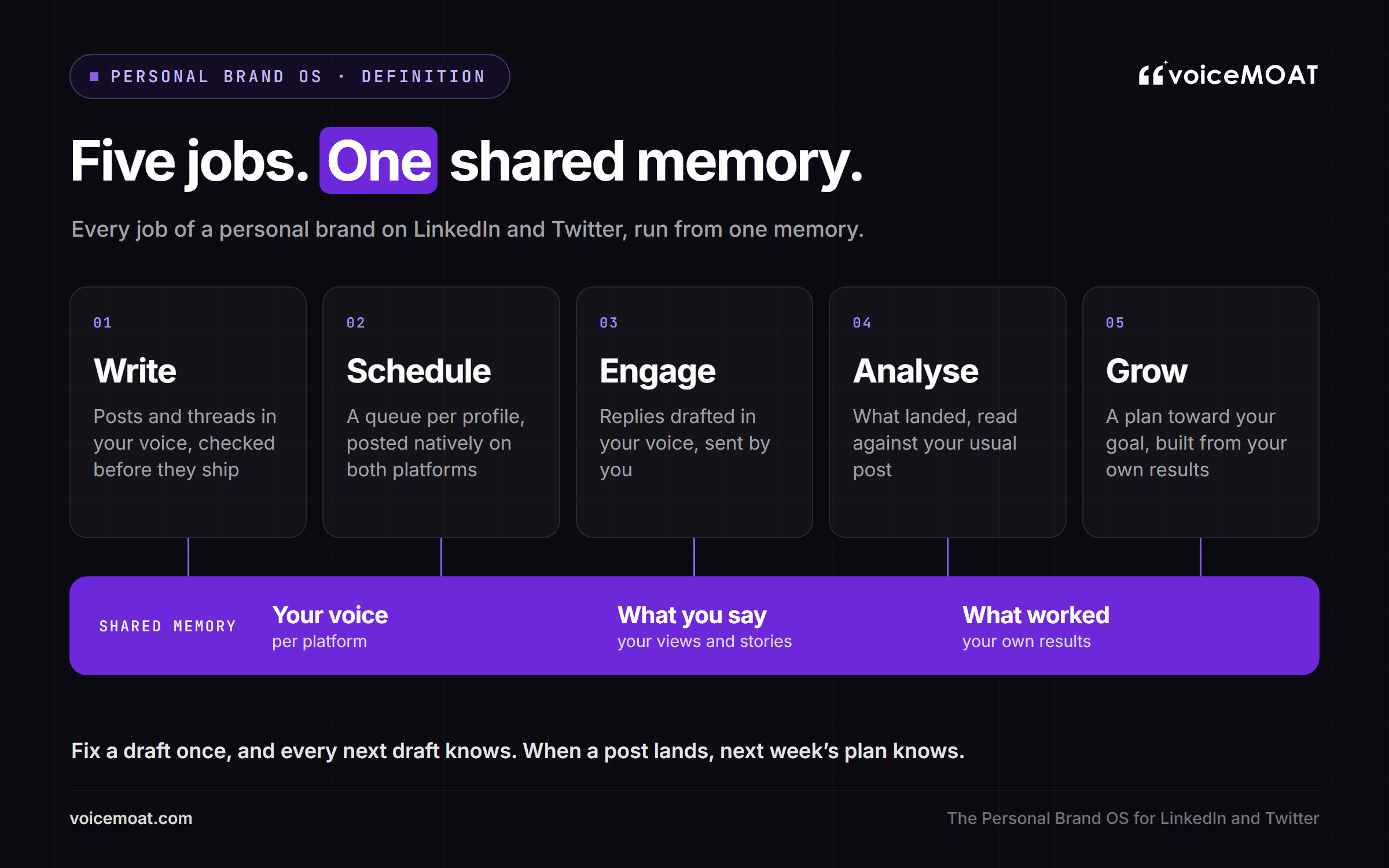
Five jobs, one shared memory: what makes it an operating system rather than a folder of apps.
A personal branding system on paper (a strategy doc, a list of content pillars, a calendar) describes what you intend to do. A Personal Brand OS is the part that does the work every day and remembers what happened. You still need the strategy. The OS is what keeps it from going stale in a folder.
Why does "Personal Brand OS" mean three different things right now?
Search "personal brand operating system" today and you will find three unrelated ideas sharing one name.
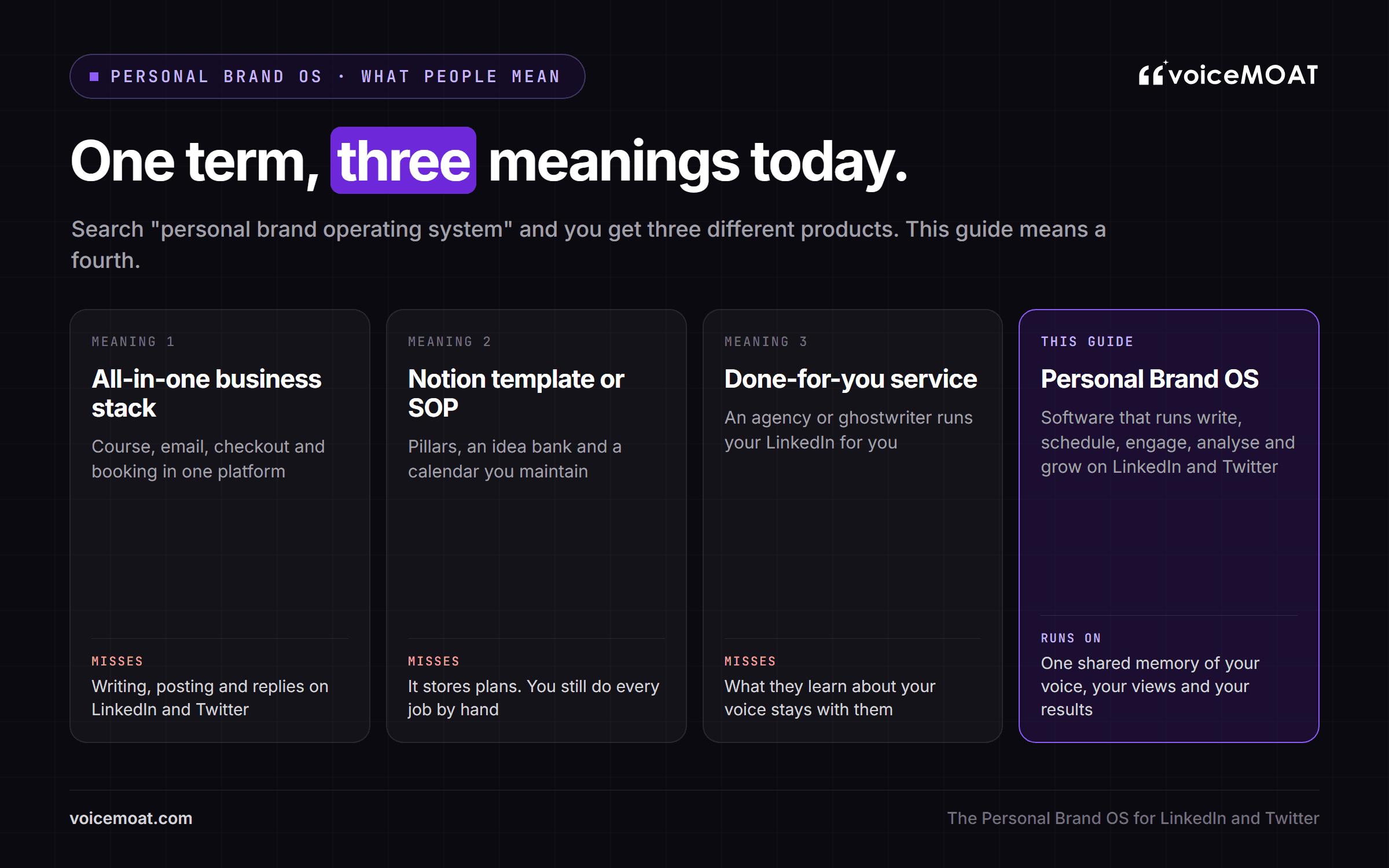
The three ways the term is used today, and the software meaning this guide uses.
What people mean by "Personal Brand OS" in 2026
What people mean | What it is | Who it suits | What it does not do |
|---|---|---|---|
An all-in-one business stack | One platform for your course, email list, checkout, website and booking, instead of five subscriptions | Coaches and course sellers | Write, post or reply on LinkedIn or Twitter |
A Notion template or SOP | A planning system: content pillars, an idea bank, a calendar, checklists | People who like building their own system | It stores plans; you still write, post, reply and track by hand |
A done-for-you service | An agency or ghostwriter running your LinkedIn for you | Executives with a budget | Your voice is theirs to learn, and what they learn stays with them |
All three are reasonable things to want. But when people ask for an OS for their personal brand on LinkedIn and Twitter, they usually mean the daily work: deciding what to post, writing it, posting it, replying, and knowing what worked. That is the meaning used in the rest of this guide, and it is a software category rather than a template or a service. It is close to what creators call a content operating system, with one difference: a personal brand is one person's voice and reputation, not a publishing schedule.
What are the five jobs of a Personal Brand OS?
The daily work of a personal brand on LinkedIn and Twitter breaks into five jobs. A Personal Brand OS has to do all five, and do them from the same memory.
1. Write
Turn an idea into a post, thread or reply in your voice, for the platform it is going to.
Pull from your own stories and views, never from invented anecdotes or numbers.
Check the draft before it goes out: does it look like your writing, and does it say what you actually think?
When writing lives in a general chatbot, the prompt describes your voice but the model does not know it, so drafts drift back to a neutral, helpful register. ChatGPT vs specialized AI tools for personal branding covers why. The check matters as much as the draft: a line can look like you and still say something you would never say, which is why style and stance are worth checking separately (how VoiceMoat checks drafts).
2. Schedule
Keep a queue per profile, with its own time zone and posting slots, for both platforms.
Use posting times based on when your own audience reads, where that data exists.
Publish natively on both networks, so nothing depends on a reminder and a copy-paste.
LinkedIn's API has no scheduling of its own, so a scheduler holds the post you approved and publishes it at the time you picked; Twitter schedulers work the same way. A separate scheduler knows times but not your voice, and edits made inside it never teach the writer anything. Consistency is the one part of scheduling with strong data behind it. In Buffer's analysis of more than 2 million LinkedIn posts, accounts that posted 2 to 5 times a week got 1,182 more impressions per post than in their own once-a-week weeks, and the lift grew with frequency (Buffer). It is observational data, so treat it as a strong hint, not a promise.
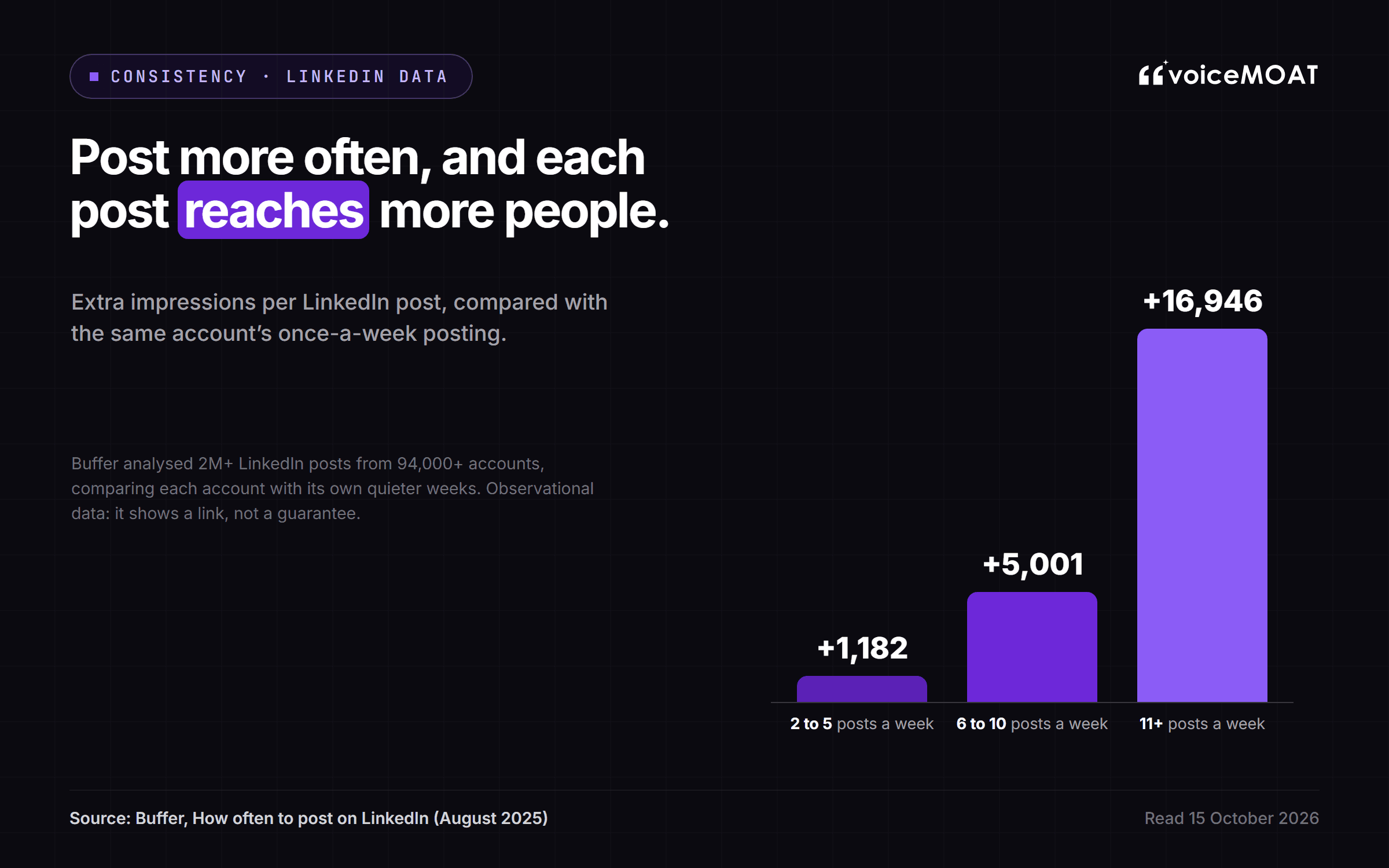
Source: Buffer, analysis of 2M+ LinkedIn posts from 94,000+ accounts (August 2025).
For timing itself, see the personal brand posting schedule for Twitter and LinkedIn.
3. Engage
Find the posts worth replying to: peers, prospects and people whose audience overlaps yours.
Draft replies and comments in your voice, for you to edit and send.
Never auto-comment. Replies are where people decide whether there is a person behind the posts.
Both platforms limit what tools may do here; the rules are in the platform section below. LinkedIn itself is moving in the same direction: in March 2026 it said it is working to make engagement pods ineffective and curb comment automation (LinkedIn).
Comments are worth the effort. LinkedIn reported comments up 24% in October 2025, and in July 2026 said time spent reading comments rose 18% (LinkedIn, October 2025; LinkedIn, July 2026). Replying to the comments on your own posts matters too: in Buffer's 2026 study, LinkedIn posts saw about 30% more engagement when the author replied (Buffer).
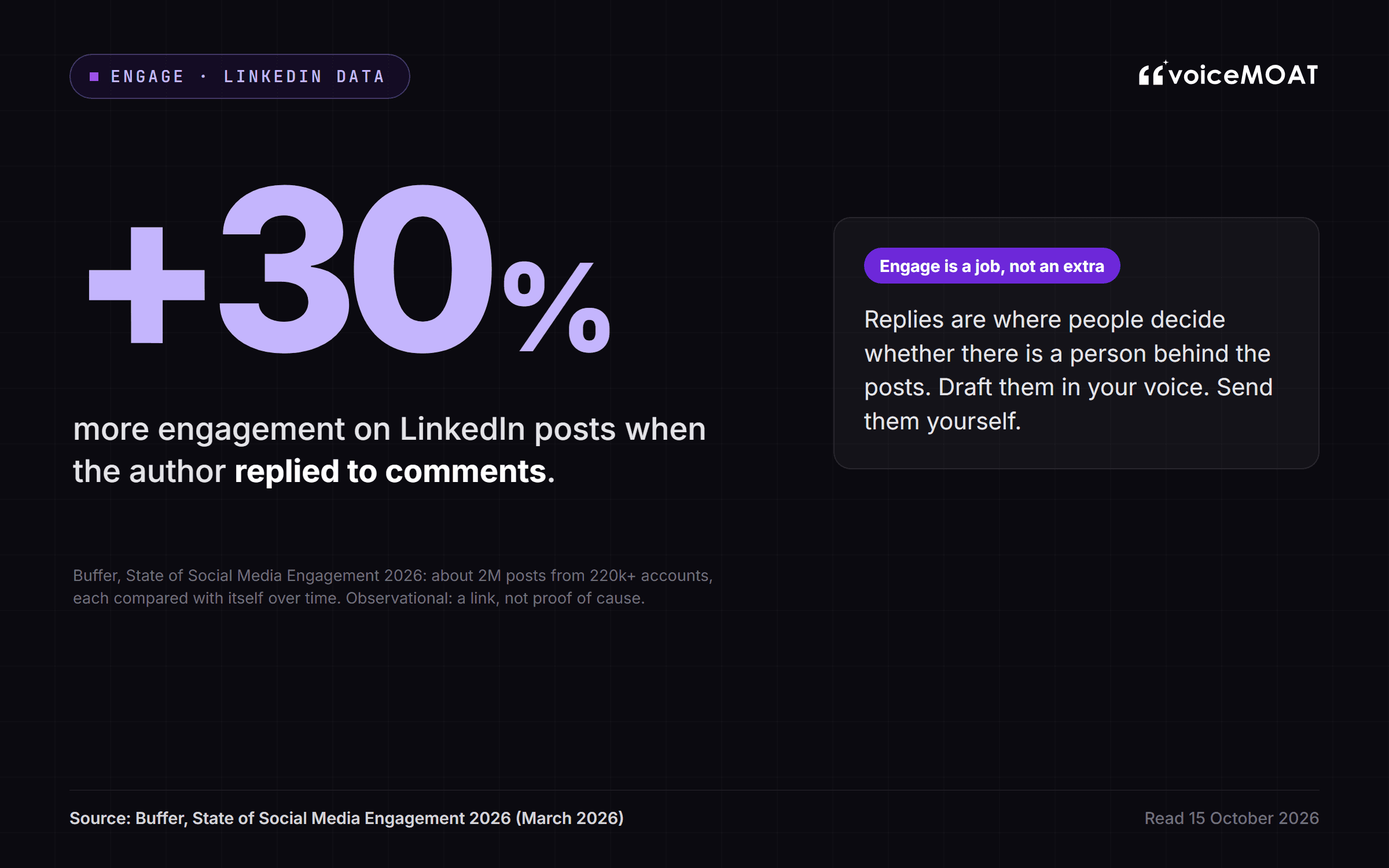
Source: Buffer, State of Social Media Engagement 2026.
The case for fewer, better replies is in the smart reply guy strategy.
4. Analyse
See what landed on both platforms in one place.
Read each post against your usual post, not against vanity totals.
Get a written read on what to do more of, not only a chart.
LinkedIn does have an API for your own post statistics, but only companies it has vetted and approved can use it, so many tools read your LinkedIn stats through a browser extension on your own logged-in session. Does LinkedIn have an analytics API? explains the access rules, and what reads your LinkedIn analytics now that Shield has shut down covers the options.
5. Grow
Set a goal (reach, clients, authority or a launch) and get a plan built from your own past results.
Turn the plan into drafts in your voice, for you to review.
Track whether you are on pace, and adjust next week.
Growth advice from a tool that cannot see your numbers or your voice is always generic: post more, use hooks, be consistent. A plan built from your own results is specific to you, and it gets better every week the loop runs.
What ties the five jobs together?
The shared memory. In practice it runs as a loop:
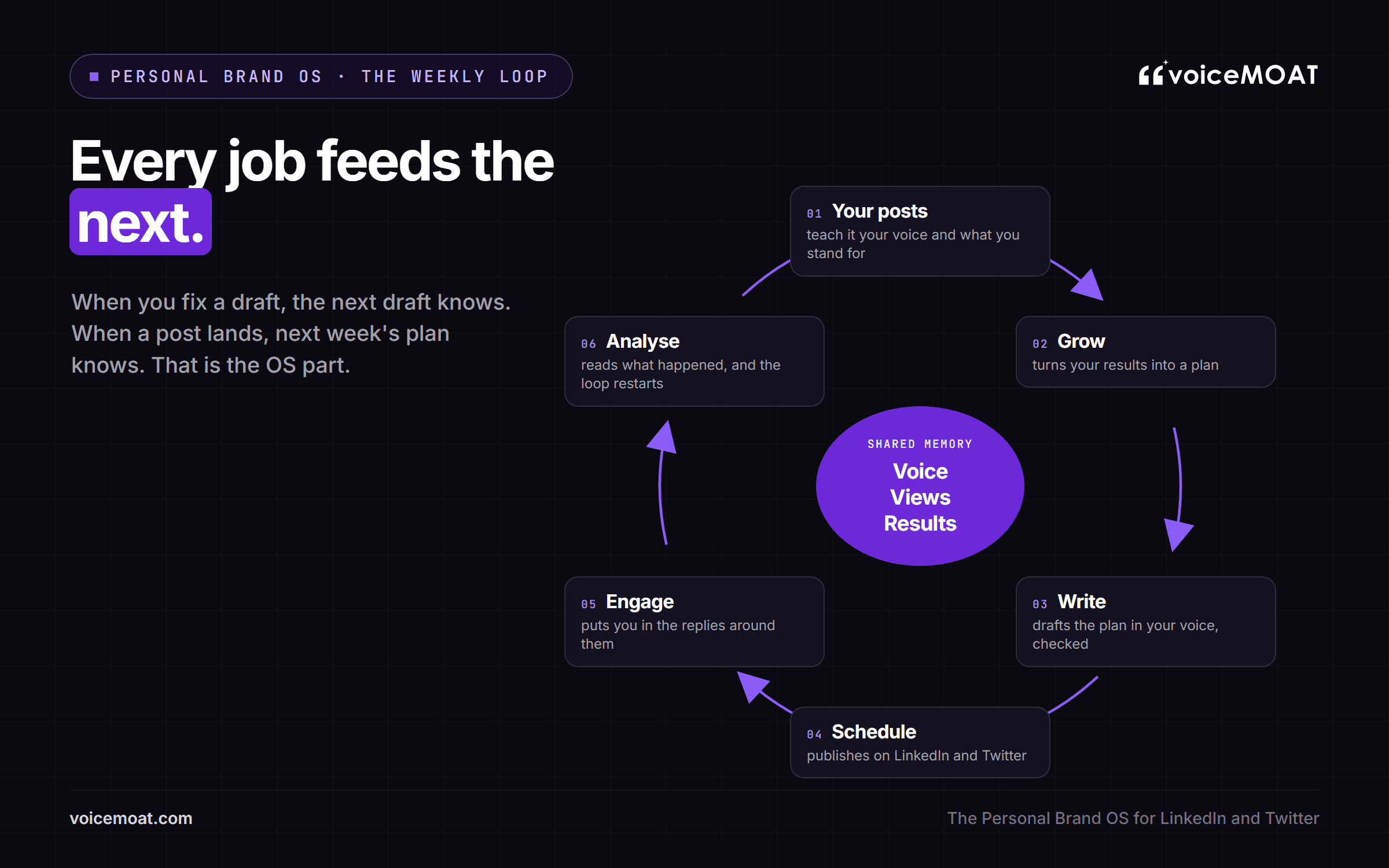
The weekly loop: every job feeds the next.
Your posts teach the system your voice and what you stand for.
Grow turns your results into a plan.
Write turns the plan into drafts that read like you, checked before they ship.
Schedule publishes them on both platforms.
Engage puts you in the conversations around them.
Analyse reads what happened, and the loop starts again with better data.
Edits belong in the loop too. If you fix the same phrase three times, the fourth draft should not contain it. A system that forgets your edits is asking you to repeat yourself forever, and that is exactly the work a personal brand operating system exists to remove.
What does a week inside a Personal Brand OS look like?
The clearest personal branding system examples are ordinary weeks. Here is one for a founder posting on LinkedIn and Twitter, with the jobs in the order they actually happen:
Monday. Read last week's results: which posts beat your usual post, and which replies turned into conversations. Accept or edit the week's plan, which is built from those results and from the goal you set.
Monday to Thursday. Open the day's drafts. Each one is already in your LinkedIn or Twitter voice and already checked; you change a line or two, approve it, and it publishes at its slot. Then reply to three or four posts the system surfaced, editing each draft before you send it.
Friday. Note anything that changed your mind this week, so the next drafts say what you think now, not what you thought in June.
The point is that each job is short because the others have already done their part. Without the shared memory, the same week means re-explaining your voice to a chatbot, copying drafts into a scheduler, replying from memory, and exporting numbers nobody reads.
Personal Brand OS vs a stack of personal branding tools
Most people already run a version of these five jobs, spread across personal branding tools that do not talk to each other.
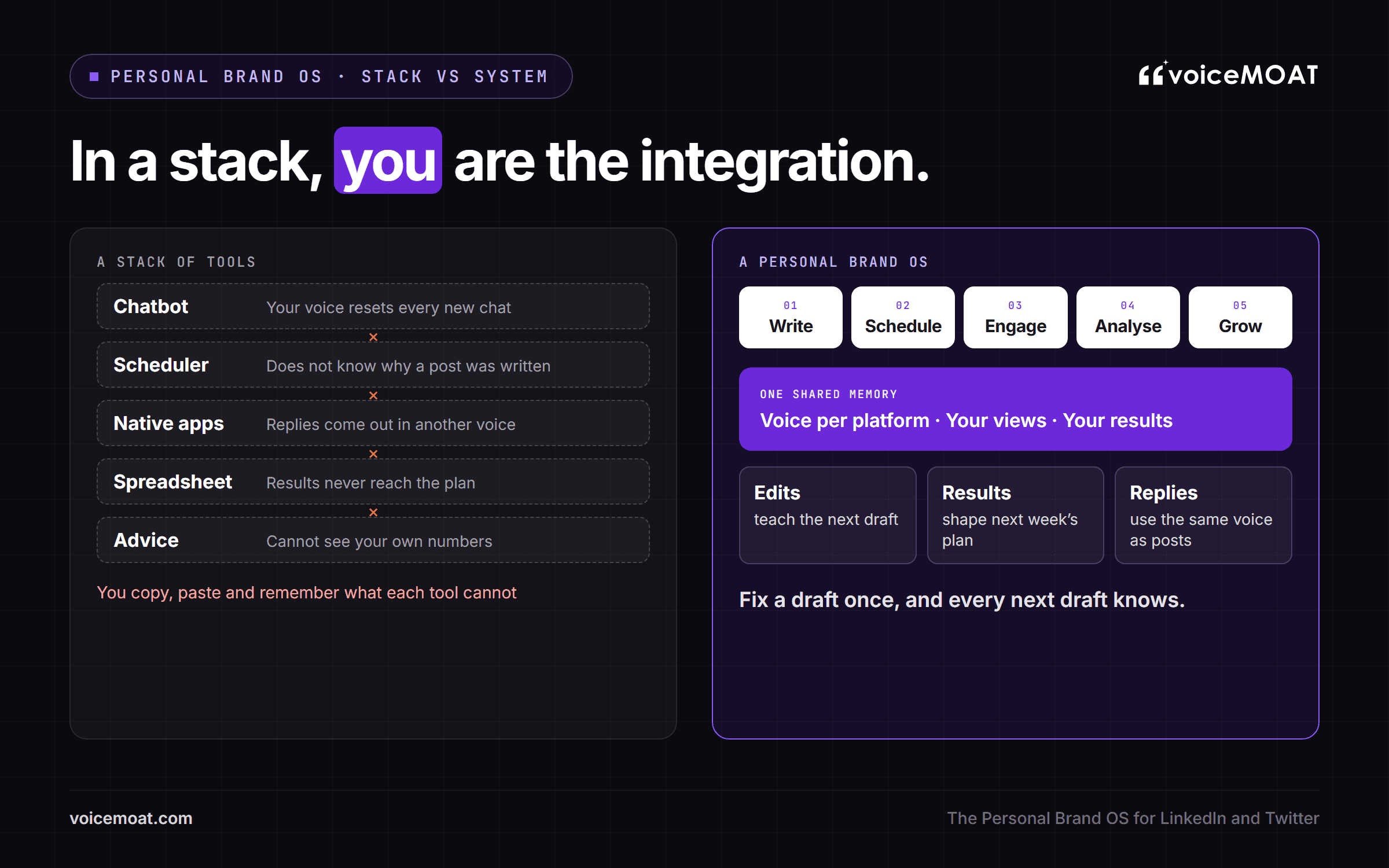
In a stack of tools, you carry the memory between them.
Where the memory gets lost in a typical stack
Job | Typical stack | What gets lost between tools | What a Personal Brand OS keeps |
|---|---|---|---|
Write | Your voice resets each chat; your edits do not carry over | One voice per platform that learns from your edits | |
Schedule | It does not know which drafts were checked, or why they were written | A queue tied to the drafts and the plan | |
Engage | The native apps, or a separate reply tool | Replies come out in a different voice from your posts | The same voice in posts and replies |
Analyse | Native analytics, a spreadsheet, or a LinkedIn analytics extension | Results never reach the writer or the plan | Results feed the next plan and the next drafts |
Grow | Courses, threads of advice, a coach | Advice cannot see your numbers | A plan built from your own results |
A stack is not always worse. It is often cheaper if you only need one or two of the jobs, and a specialist can beat any all-in-one at a single job: LinkedIn personal branding tools that only format posts, or schedulers that cover ten networks, are good at exactly that. The trade is that you become the integration: copying, pasting and remembering what each tool cannot. Switching has a cost of its own: in a Harvard Business Review study of 137 people at three Fortune 500 companies, workers toggled between apps nearly 1,200 times a day and lost close to four hours a week reorienting (Harvard Business Review, 2022). If you are comparing personal branding software, the best AI tools for personal branding sorts them by the job each one does.
Should you build a Personal Brand OS or buy one?
You can assemble one yourself, buy a template, pay an agency to set one up, subscribe to software, or hand the work to a person. Each option moves the same five jobs to a different place.
Build, buy or hand off: the five ways to get a Personal Brand OS
Option | What you get | Cost | The trade-off |
|---|---|---|---|
Build it yourself | A planning doc or Notion workspace, a chatbot and native scheduling | Free to low tool costs, plus your time every week | You are the integration, and the memory lives in your head |
A template | A ready-made personal branding system template for pillars, ideas and a calendar | A one-off price | It organises plans; it does not write, post, reply or read results |
A one-time agency build | Your positioning, voice notes and a knowledge base set up for you | Quoted per project | Accurate on delivery day, then it ages unless someone maintains it |
Personal branding software | An app that runs some or all of the five jobs | A monthly subscription; for example Merkion starts at €39 a month billed yearly, MilanAura lists $199 a month, and VoiceMoat starts at $35 a month (prices as listed on 15 October 2026) | Check which platforms and which of the five jobs each one actually covers |
Done for you | A ghostwriter or agency writes and posts | A monthly retainer | Someone else learns your voice, and the knowledge leaves with them |
None of these is wrong. The question is where you want the shared memory to live: in your head, in a document, with a person, or in software that keeps learning.
Who owns your voice and your data?
A Personal Brand OS holds the most personal data a marketing tool can: your writing, your opinions and your results. Before you connect accounts, ask any tool five questions:
Does it use your posts to train models shared with other customers?
Can you export your data, and delete it, whenever you want?
Are profiles kept apart, so one client's voice never leaks into another's?
If it connects to an AI assistant, does the assistant ever see your LinkedIn or Twitter tokens?
What happens to your voice profile if you cancel?
Good answers are short and specific. VoiceMoat's are on its security page: your writing is never used to train shared models, each profile is isolated, and you can export or delete everything at any time.
How do you move from a stack of tools to one system?
Moving does not have to be a big switch. A calm order of operations:
Map what you have. Write down which tool does each of the five jobs today, and which jobs nobody does.
Export your history. Keep your post history and analytics, so the new system learns from your real posts, not from a blank page.
Connect and train. Connect LinkedIn and Twitter, and let the system learn each voice separately.
Run both for a short while. Keep the old tools until the new drafts read like you and the queue runs on time.
Cancel what is covered, keep what is better. If a specialist still beats the OS at one job, keep it for that job.
Where does AI fit in a Personal Brand OS?
The feed is filling with machine-written posts. In Originality.ai's July 2026 sample, 81.2% of long-form LinkedIn posts were classed as likely AI-written, up from an estimated 54% in October 2024 in an earlier study with a different sample (Originality.ai). Pangram, measuring over a million posts its extension users saw, found more than 40% of long-form LinkedIn posts fully AI-written (Pangram). Both companies sell AI detectors, so read the numbers as a direction rather than a precise count. The direction is plain.
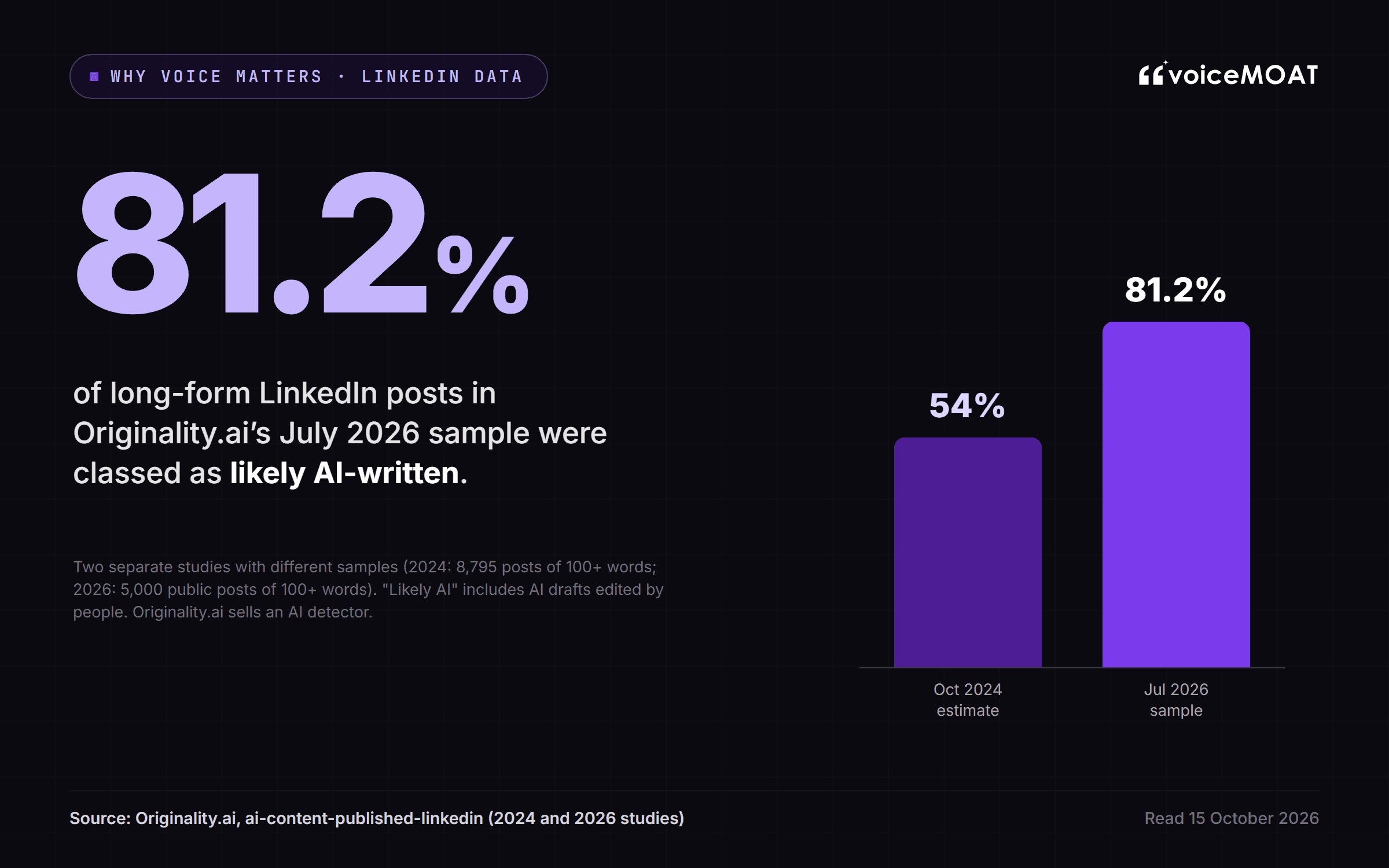
Source: Originality.ai, studies from 2024 and July 2026 with different samples.
Meanwhile, the people your brand is for still lean on people. In Edelman and LinkedIn's 2025 B2B study, 64% of hidden decision-makers said they trust thought leadership more than marketing materials and product sheets when judging what a company can do (Edelman and LinkedIn). Thought leadership that reads like everyone else's is not thought leadership.
That is the problem an AI personal branding content system has to solve, and it is why the order of operations matters. AI belongs in the OS as the drafter and the reader: it drafts from your voice and your own stories, checks each draft before you see it, and reads your results so the next plan is better. It does not belong as the author of record. Three rules keep it honest:
It learns from you, not from a description of you. A prompt that says "write like me" gets the average of everyone who ever asked the same thing.
It never invents. No stories you did not tell, no numbers you did not give it, no opinions you do not hold.
You approve everything. Drafts, replies and plans wait for you. Nothing posts or comments on its own.
If you want the detection side of this, is it safe to use AI on LinkedIn and Twitter covers detection, reach and the platforms' rules.
What do LinkedIn's and Twitter's rules allow these tools to do?
A Personal Brand OS lives inside two platforms with different rules, and a good one is built around them rather than around workarounds.
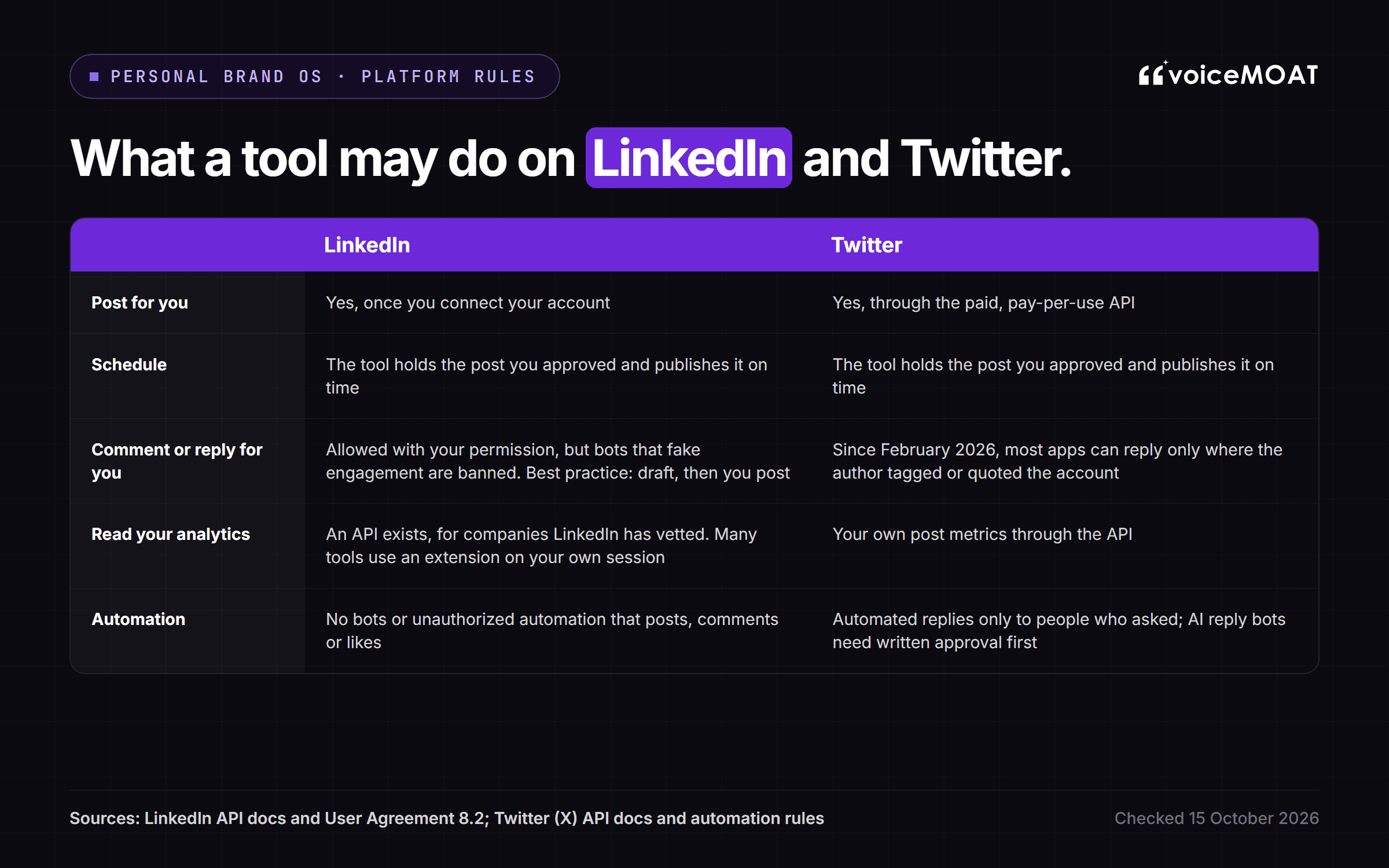
Checked 15 October 2026 against LinkedIn's post statistics API, the LinkedIn User Agreement, the X API changelog and the automation rules.
Posting. Both platforms let a tool publish for you once you connect your account. Twitter's API is paid and, since February 2026, priced per use (X API pricing).
Scheduling. LinkedIn's API has no scheduling, so the tool holds the post you approved and publishes it on time. Twitter schedulers work the same way.
Comments and replies. LinkedIn allows an approved tool to comment with your permission but bans automated engagement; Twitter now limits most API replies to posts where the author tagged or quoted the account.
Analytics. LinkedIn's API for your own post stats is open only to vetted companies (LinkedIn's post statistics API); Twitter returns your own post metrics through its API.
Automation. LinkedIn bans bots and unauthorized automation that posts, comments or likes. Twitter allows automated replies only to people who asked, and AI reply bots need written approval first.
The practical upshot: anything that promises to grow your account on autopilot is selling the one thing both platforms forbid.
How to tell if a tool is really a Personal Brand OS
Ask seven questions:

The seven-question test for any tool that calls itself a Personal Brand OS.
Does it learn from your own posts, or ask you to describe your voice?
Does it keep a separate voice for LinkedIn and for Twitter?
Does it check drafts before they go out, and tell you which line is off and why?
Does it post natively to both platforms, within each one's rules?
Does it draft replies without posting them on its own?
Do your results change what it suggests next?
Can anything go out without your approval?
A tool that answers yes to the first six and no to the seventh is doing the job. A tool that covers one or two of them can still be a very good tool. It is just not an OS.
Where do personal branding frameworks fit?
Ask anything about personal branding and the same frameworks appear: the 7 pillars, the 5 P's, the 3-7-27 rule and the 4-1-1 rule. They are strategy shortcuts, and most have no single official version. Here is what each one is, and which job in a Personal Brand OS it belongs to:
The 7 pillars of personal branding. There is no official list. A widely shared version (Entrepreneur, 2016) names authenticity, consistency, your story, expertise, visibility, a clear value proposition and connections; other lists swap in purpose, values or legacy. Most of them live in the shared memory (your story, your views, your voice), and the rest in Write and Engage (visibility, connections).
The 5 P's of personal branding. Several authors use the phrase with different words. Steve Jones's Start You Up (2014) uses positioning, presentation, passion, purpose and profit; Daniel Priestley uses pitch, publish, product, profile and partnership. Treat it as a memory aid: positioning and purpose shape the plan in Grow, and publishing is Write and Schedule.
The 3-7-27 rule. Marketing folklore: no author, book or study stands behind it, and the versions disagree on what the numbers even mean. The sound idea underneath, that people need repeated, consistent exposure before they remember and trust you, is what Schedule and a steady weekly loop are for.
The 4-1-1 rule on LinkedIn. It began as a Twitter guideline from Andrew Davis at Tippingpoint Labs, made popular by Joe Pulizzi: for every self-serving post, share one relevant post and four pieces of useful content written by others (Contently, 2012). LinkedIn advice often rewrites it as four helpful posts, one original and one promotional. In an OS it is a mix rule for Grow's plan, and Engage covers the "others' content" part through replies.
Frameworks tell you what to aim for. A Personal Brand OS is how you keep doing it every week.
Do you need a Personal Brand OS?
You probably do if:
you post on both LinkedIn and Twitter,
you post several times a week and reply most days,
you write for more than one person, as ghostwriters, agencies and founder-led teams do,
your words are your business: founders, consultants, coaches and creators.
You probably do not if:
you post once a week on one platform: native scheduling and a notes app are enough,
you need one job done well, such as scheduling across ten networks, where a dedicated scheduler suits better,
you would rather hand the whole thing to someone else, in which case hire a ghostwriter or an agency.
The need also changes by who you are:
Founders need the time back. Personal branding for founders on LinkedIn and Twitter fails on consistency, not ideas, so the jobs that matter most are Grow and Write.
Creators live in the replies. Engage and Analyse do the most work.
Ghostwriters and agencies need every client's voice kept apart. One shared memory per client is the whole point.
Consultants and coaches sell trust. Stance matters most: every post has to say what you would say in a sales call.
If you are still working out what your brand stands for, start with the 10-step personal branding guide and the personal brand voice framework before you pick any tool.
How do you know your Personal Brand OS is working?
Judge it on the brand, not on the tool:
Your posts beat your own usual post more often. Compare each post with your own baseline, not with someone else's numbers.
Replies turn into conversations. Count the threads that go two or three exchanges deep, not the replies sent.
The right people show up. Profile visits, follows and messages from the kind of people you want to reach.
You spend less time on the mechanics. If the week still takes the same hours, the jobs are not sharing memory.
Where VoiceMoat fits
Disclosure: this is our product. VoiceMoat is the Personal Brand OS for LinkedIn and Twitter. audenAI, the AI inside it, learns how you write from your own posts, then helps you write, schedule, engage, analyse and grow, with Style and Stance checks on every draft so posts read like you.
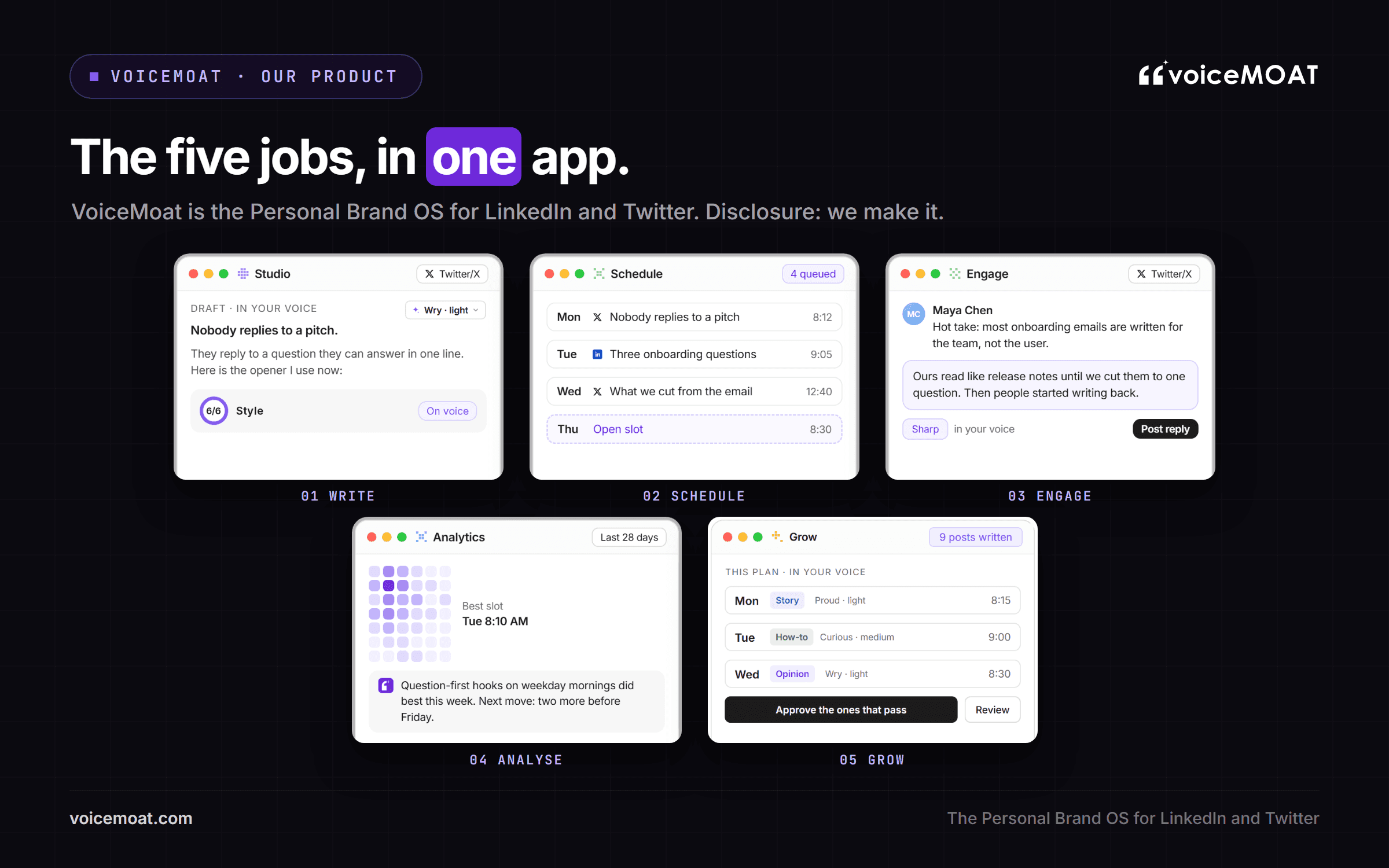
VoiceMoat's five jobs in one app: Studio, Schedule, Engage, Analytics and Grow.
The five jobs in VoiceMoat, and what to know about each
Job | In VoiceMoat | Worth knowing |
|---|---|---|
Write | Studio, with Style and Stance checks on every draft; Voice Lab trains a separate voice for each platform and learns from your edits | Threads are on Pro and up |
Schedule | A posting schedule per profile, with time zone, daily goal and slots (Schedule) | Times picked from your audience data on Twitter; LinkedIn uses preset times |
Engage | Replies on both platforms, plus the Chrome extension in your Twitter feed (Engage) | LinkedIn comments are drafted for you to copy and post yourself |
Analyse | Analytics, with a written read from audenAI on what to do more of | LinkedIn stats come in through the Chrome extension, from your own session |
Grow | Grow plans and writes posts toward a goal you set | Nothing is scheduled until you press Schedule |
It also turns posts into cards and carousels in Media Studio, and connects to Claude, ChatGPT and Grok through the VoiceMoat connector on Pro and up. The limits are real: it covers LinkedIn and Twitter only, and it is built for writing, not video or audio. More detail is in what is VoiceMoat and what is audenAI. Try it for $1 for 3 days. Plans from $35 a month (pricing).
Frequently asked questions
What does "OS" mean in Personal Brand OS?
Operating system. As on a computer, it is the shared layer the work runs on: one memory of your voice, what you say and what has worked, used by every job from writing to growth planning, instead of each app keeping its own partial copy.
Is a Personal Brand OS the same as a social media management tool?
They overlap, but the focus differs. A social media management tool such as Hootsuite or Buffer is built to schedule and report across many networks for a company. A Personal Brand OS is built around one person's voice, or a few people's, on LinkedIn and Twitter, and it also writes, drafts replies and plans growth.
Is a Personal Brand OS the same as a content operating system?
Close, but not the same. A content operating system organises how content is planned, produced and published, often for a team or a channel. A Personal Brand OS is built around one person: their voice, their views and their reputation on LinkedIn and Twitter, including the replies, which a content system usually leaves out.
Can I build a Personal Brand OS in Notion?
You can build the planning layer in Notion: pillars, an idea bank and a calendar, and a personal branding system template is a fine place to start. Notion does not post, reply, read your analytics or learn your voice, so you become the integration between it and every other tool.
Does a Personal Brand OS post for me automatically?
A good one should not post anything you have not approved. It drafts, checks and queues; you approve what goes out, and replies stay yours to send. Both LinkedIn and Twitter ban automation that fakes engagement.
Can LinkedIn be used for personal branding?
Yes, and LinkedIn says so itself: its Marketing Blog publishes personal branding advice, and its Social Selling Index scores how well you "establish a professional brand." In 2024 it removed the creator mode switch and began opening those creator tools to all members. Building a personal brand on LinkedIn works best with a voice of its own, kept separate from your Twitter voice but drawing on the same views.
What is the difference between a personal brand and personal branding?
Your personal brand is the result: what people think of when they hear your name. Personal branding is the work of shaping it. The idea went mainstream with Tom Peters's 1997 essay "The Brand Called You". A Personal Brand OS runs the second so the first compounds.
Does a Personal Brand OS work the same on LinkedIn and Twitter?
No. Both let a connected tool post for you, but LinkedIn keeps its analytics API for vetted companies, and Twitter limits most apps' replies to posts where they were tagged or quoted.
Is VoiceMoat a Personal Brand OS?
Yes, that is what it is built as, for LinkedIn and Twitter: audenAI learns how you write from your own posts and helps you write, schedule, engage, analyse and grow, with Style and Stance checks on every draft. It is our product, it covers those two platforms only, and it starts with a $1, 3-day trial.
AI disclosure
Written and fact-checked by Prateek Singh, founder of VoiceMoat. VoiceMoat is the publisher's own product and is disclosed as such; statistics are from the sources linked in the article, read on 15 October 2026, and product details reflect VoiceMoat as of October 2026.
Keep reading

Growth
Personal brand posting schedule for Twitter and LinkedIn in 2026
The best posting schedule for a personal brand is not a magic time slot. It is a repeatable system: the right frequency, the data-backed time windows, a content mix per platform, and enough consistency that both algorithms and audiences start to expect you. Here is that system for Twitter and LinkedIn in 2026, with frequency and timing tables, a sample weekly calendar, a 4-week ramp, and the honest reason most schedules quietly collapse.
16 min read
·

AI and Voice
The best AI tools for personal branding in 2026: an honest roundup
Most AI tools write for you; almost none write like you. This is an honest, layer-by-layer roundup of the best AI tools for personal branding in 2026, organized by the part of your brand stack each one actually fixes, with where every tool falls short named plainly.
16 min read
·

AI and Voice
ChatGPT vs specialized AI tools for personal branding
ChatGPT is a general assistant you prompt. A specialized tool like VoiceMoat trains on your writing. An honest comparison for personal branding in 2026.
20 min read
·

Brand
The 10-step personal branding guide, voice-first: 3 principles do the work, the other 7 are filler
The standard 10-step personal branding guide reads as a comprehensive list. Three of the ten do most of the work for social media creators. The other seven are surface-level moves that compound only when those three are in place. Here's the focused version.
7 min read
·

Brand
What is VoiceMoat?
VoiceMoat is the Personal Brand OS for LinkedIn and Twitter that trains a writing partner called audenAI on your writing voice so AI drafts read like you, not like ChatGPT. Here's the full picture: what it does, what it doesn't, who it's for, how it differs from just prompting ChatGPT with your old tweets, what it costs ($35 / $69 / $150 a month), which platforms it supports, and what makes it a category of its own.
13 min read
·
From the Twitter algorithm series
The Twitter/X algorithm in May 2026: why voice wins under the new transformer
Read ›

