ai and voice
Taplio pricing in 2026: the full breakdown and the real cost of AI
·
14 min read
·
By Prateek Singh, founder of VoiceMoat
Key takeaways
Taplio has three plans in 2026: Starter at $39 a month, Growth at $69, and Pro at $199. Annual billing takes about 25 percent off, so those become roughly $32, $49, and $149 a month (verified July 2026 from Taplio's own pricing; always confirm the live figure at taplio.com/pricing).
The advertised $39 is a price anchor. The Starter plan has no AI writing, so the real entry price for the AI features Taplio is known for is the $69 Growth plan, or $49 a month billed annually.
AI runs on a shared monthly credit pool. On Growth, drafting posts, generating hooks, and writing AI comments all draw from the same limited allowance, and there is no way to buy more credits without jumping to the $199 Pro plan (marketed as unlimited AI, but nearly a 3x increase with no middle tier).
Pro adds auto-DMs and auto-connection requests. Those run outside LinkedIn's official API, which is exactly the behavior LinkedIn's automation enforcement targets, so treat them as a real account-risk decision, not a free upgrade.
Taplio is LinkedIn-only. If you also post on Twitter, or you care most about drafts that read like you rather than a generic AI assistant, compare it against tools built for both platforms. VoiceMoat covers Twitter and LinkedIn from $35 a month, with a $1, 3-day trial. Disclosure: VoiceMoat is our own product, named where it genuinely fits; all Taplio figures are attributed to Taplio and were verified in July 2026.
If you are researching Taplio pricing, the number you actually need is not the one on the front of the box. Taplio advertises plans from $39 a month, but that entry tier does not include AI writing, which is the reason most people look at Taplio in the first place. The real entry price for the AI post generator, the hook writer, and the AI comment tools is the $69 Growth plan, or $49 a month if you pay for a year up front. This guide gives you the honest, numbers-first version: exactly what each plan costs, what you get and do not get at each tier, how the AI credit system really works (and where it runs out), the account-safety question hiding inside the Pro plan, and a clear framework for which plan fits which kind of user. We also compare the pricing to the main alternatives so you can see where Taplio is a good deal and where it is not. (Disclosure: VoiceMoat is our own product, named only where it genuinely fits the comparison. Every Taplio figure is attributed to Taplio and was verified in July 2026; prices change, so confirm the current numbers on Taplio’s own pricing page before you buy.) For what Taplio does beyond the price list, including its Claude connector, see our explainer on what Taplio is.
How much does Taplio cost in 2026?
Taplio sells three plans, billed monthly or annually. Annual billing applies roughly a 25 percent discount across all three tiers. Here is the full picture, with the monthly-equivalent price you actually pay on an annual plan broken out so you can compare like for like.
Taplio’s three plans, monthly and annual. Annual is billed as one up-front payment; the annual column shows the monthly-equivalent cost. Verified July 2026 from Taplio’s published pricing. Confirm the live figures at taplio.com/pricing before purchasing.
Plan | Billed monthly | Billed annually (per month) | Total paid up front for a year |
|---|---|---|---|
Starter | $39 | about $32 | about $384 |
Growth | $69 | about $49 | about $588 |
Pro | $199 | about $149 | about $1,788 |
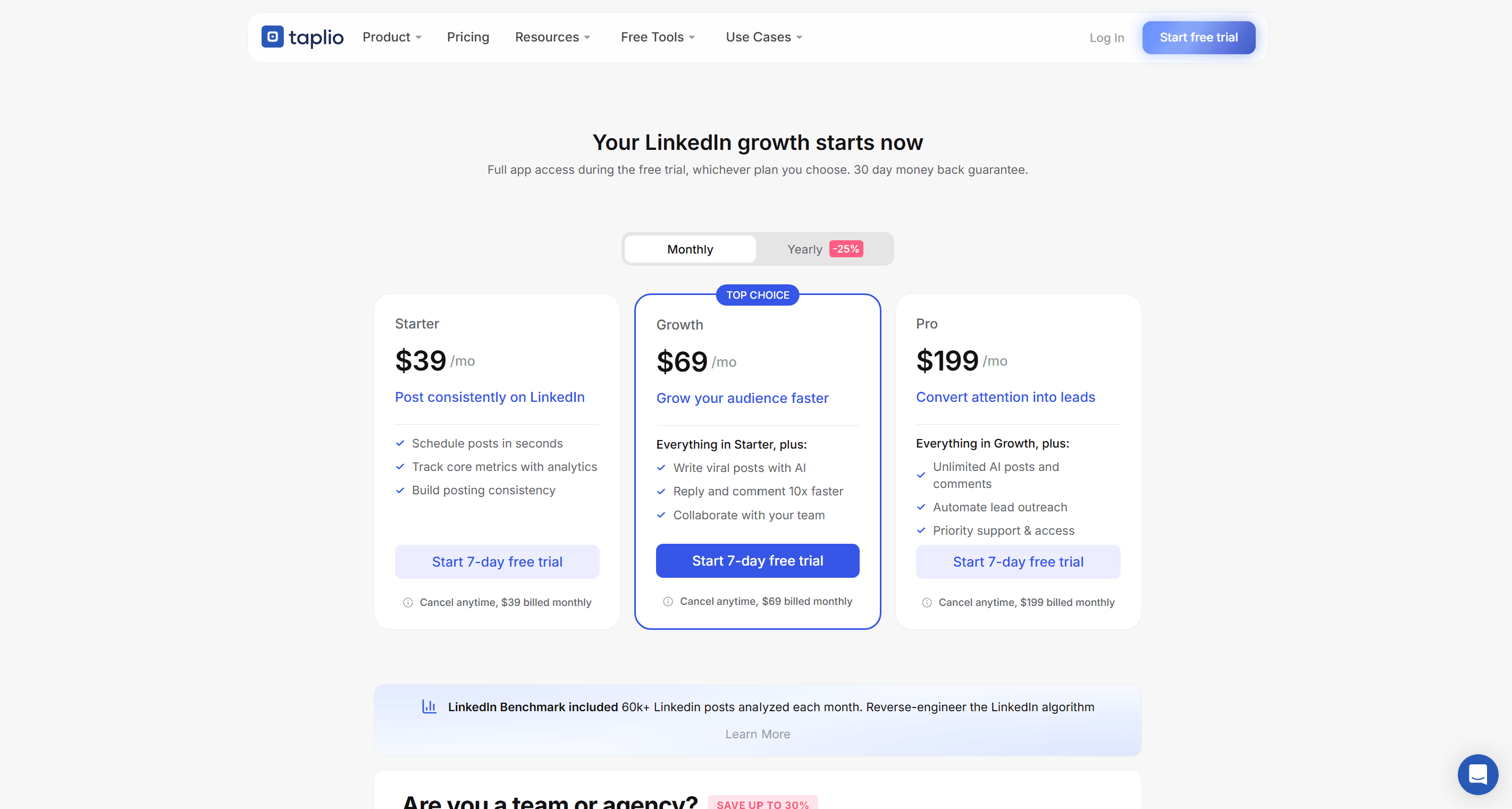
Taplio’s three plans on its own pricing page: Starter at $39, Growth (the highlighted top choice) at $69, and Pro at $199 a month, with 25 percent off on yearly billing. Note that AI writing (write viral posts with AI, reply and comment faster) first appears on the $69 Growth plan, not on Starter. Screenshot captured July 2026.
Every plan includes a 7-day trial with full Pro access (whichever tier you eventually pick), a 30-day money-back guarantee, and access to Taplio’s LinkedIn Benchmark data (more than 60,000 LinkedIn posts analyzed each month). There are no setup fees and no forced annual contract: you can start monthly and cancel from the billing settings yourself. So far, so reasonable. The catch is not in the fine print of the trial. It is in what the cheapest plan quietly leaves out.
The $39 Starter plan is a price anchor
The single most important thing to understand about Taplio’s pricing is that the Starter plan does not include AI writing. That is a large omission, because AI-assisted drafting is the headline reason most people evaluate Taplio at all. On Starter you get the scheduling queue, the viral post library, the basic analytics, and the carousel builder, but the AI post generator, the hook generator, the AI carousel, and the AI writing assistant are all locked. Here is the honest split of what is included where:
Starter ($39 a month): post scheduling, the viral post inspiration library, basic analytics, the manual carousel builder, and the Chrome extension. No AI writing of any kind.
Growth ($69 a month, or $49 annually): everything in Starter, plus the AI post generator, hook generator, AI comment and reply tools, and team collaboration. This is the first tier where the AI features actually turn on.
Pro ($199 a month, or $149 annually): everything in Growth, plus a much larger AI credit allowance, automated lead outreach (auto-DMs and auto-connect), and priority support.
In practical terms, the $39 figure functions as an anchor: it makes the product look like a sub-$40 tool in ads and comparison tables, while the tier almost everyone actually needs starts at $69, or $49 on an annual commitment. This is not unusual pricing psychology, and it is not a scandal, but you should budget around the real number. If your bottleneck is AI-assisted drafting, plan for the Growth plan from day one. The same logic applies when you evaluate any tool in this space, which is why our honest roundup of the best AI Twitter tools in 2026 lists the true AI-entry price for each, not the anchor tier.
How Taplio’s AI credits actually work
Once you are on a plan with AI, the next thing to understand is that Taplio’s AI runs on a shared monthly credit pool, not unlimited usage (until you reach the top plan). On the Growth plan, drafting a post, generating a set of hooks, and writing an AI comment all draw from the same allowance. That matters because the three activities you are most likely to use are competing for one budget. Here is the rough shape of what each AI tier includes, based on Taplio’s published limits.
How AI usage is metered per plan. Credit figures are Taplio’s published allowances as of July 2026 and can change; the structural point (a shared, depleting pool on Growth, with top-ups only via the Pro plan) is the durable one.
Capability | Starter | Growth ($69) | Pro ($199) |
|---|---|---|---|
AI post and hook generation | Not included | Shared monthly credit pool | Unlimited (as marketed) |
AI comment and reply writing | Not included | Draws from a separate comment allowance | Unlimited (as marketed) |
Buy extra credits when you run out | Not applicable | No, upgrade to Pro instead | Not usually needed |
Automated outreach (auto-DM, auto-connect) | No | No | Yes (see the safety note below) |
The chart below reframes the pricing around the question that actually matters: what does it cost to unlock AI writing at all? The Starter tier is left out because it cannot draft with AI at any price. What you are comparing is the first tier of each tool that can.

Monthly price to unlock AI writing on each tool, billed monthly. Taplio’s real AI-entry tier is the $69 Growth plan (highlighted), not the $39 anchor. Cheaper is not automatically better: Taplio and VoiceMoat bundle scheduling, analytics and engagement tools, and VoiceMoat spans both Twitter and LinkedIn while the others are LinkedIn-only. AuthoredUp is left out because it does not write with AI. Figures are each vendor’s own list price, checked October 2026.
The credit cliff: what happens when you run out
This is the part of Taplio’s pricing that catches active users off guard, and it is rarely spelled out on comparison pages. On the Growth plan, when your monthly AI credits run out, there is no option to buy a top-up. The only way to keep generating is to upgrade to the Pro plan at $199 a month, which is nearly a 3x jump from $69 with nothing in between. Three consequences follow from that:
Heavy drafting months hit the ceiling. If you batch a month of content in one sitting (a genuinely good habit, covered in our guide to repurposing tweets into LinkedIn posts), you can burn through a Growth allowance quickly and be stuck for the rest of the cycle.
There is no gentle next step. Many tools sell small credit packs so a busy month costs a few extra dollars. Taplio’s structure pushes you straight from $69 to $199, so a single high-volume month can more than double your effective cost.
The comment pool competes with the post pool. Because AI comments draw from their own separate allowance, engagement-heavy users and drafting-heavy users hit different walls, and it is easy to misjudge which one you will reach first.
None of this makes Taplio a bad tool. It makes it a tool with a specific cost shape: predictable if your usage is steady and moderate, and potentially expensive if your usage is spiky or high. Know which kind of user you are before you commit to an annual plan.
[ from the team behind this blog ]
Post on LinkedIn and Twitter in a way that reads like you
VoiceMoat is the Personal Brand OS for LinkedIn and Twitter. audenAI, the brain inside it, learns from your own posts, then helps you create, schedule and grow.
Creator plan $35 a month after the trial. Cancel anytime.
The Pro plan and the automation safety question
The Pro plan’s marquee additions are automated lead outreach: auto-DMs and automated connection requests. These are genuinely useful for pipeline generation, and they are also the feature that deserves the most scrutiny, because they operate outside LinkedIn’s official API. LinkedIn’s terms of service restrict automated actions on the platform, and the enforcement teams specifically target automated connecting and messaging. That does not mean every account using these features gets restricted, but it does mean the risk is real and it is yours, not the vendor’s. A few honest points to weigh:
The value of a LinkedIn account compounds over years. Weigh the upside of automated outreach against the downside of a restriction or ban on an account you cannot easily replace.
Automation risk scales with aggression. Conservative, low-volume, human-paced use is lower risk than blasting hundreds of connection requests a day, but the safest volume is the one you set deliberately, not the tool’s default.
The rest of Taplio (scheduling, drafting, analytics) does not carry this risk. The automation question is specific to the Pro plan’s outreach features, so you can use the core product without touching them.
Our own view, applied to our own product, is that reads and writes on social platforms should stay slow, human-paced, and inside what the platform allows. It is why VoiceMoat drafts LinkedIn comments into LinkedIn’s own comment box for you to post yourself rather than firing them through an unofficial automation layer. That is a slower workflow on purpose. The tradeoff is that your account is doing what a person would do, at a person’s pace.
Is Taplio worth it? A plan-by-plan framework
The honest answer to ‘is Taplio worth it’ is that it depends entirely on which plan you are comparing and what your bottleneck is. Taplio is a capable, mature LinkedIn tool. The question is whether the specific plan you would buy is the best use of that budget for your specific situation. Here is a decision framework rather than a verdict.
Which Taplio plan fits which user, and when to look elsewhere. Use this as a starting filter, then run the free trial before committing to an annual plan.
Your situation | Best fit | Honest caveat |
|---|---|---|
You post on LinkedIn regularly and your bottleneck is scheduling and consistency, not writing | Starter ($39) | You are paying mainly for scheduling and a post library. Cheaper dedicated schedulers exist if that is all you need. |
You want AI drafting, hooks, and engagement tools in one place for LinkedIn | Growth ($69 / $49 annually) | This is the real entry price. Watch the shared credit pool if you draft in big batches. |
You run outbound lead generation and accept the automation risk | Pro ($199) | The auto-DM and auto-connect features run outside LinkedIn’s official API. That is an account-risk decision, not a free upgrade. |
You also post on Twitter, or you want drafts that sound like you rather than a generic assistant | Look beyond Taplio | Taplio is LinkedIn-only, and its AI is a general writing assistant, not a system trained on your specific voice. |
That last row is where a lot of people quietly outgrow Taplio, and it is worth naming plainly. If your presence spans Twitter and LinkedIn, paying a LinkedIn-only tool means running a second stack for the other platform. And if what you care about is drafts that read like you wrote them, a general AI assistant will get you fluent, competent copy that still sounds like everyone else’s. The deeper argument for why that matters is in our piece on why AI drafts all sound the same, and the cost comparison against hiring a person is in AI ghostwriter versus human ghostwriter ROI.
Taplio alternatives and how the pricing compares
Taplio is not the only tool in this category, and on price alone it sits at the higher end for a LinkedIn-only product. Here is how the real AI-entry price compares across the main alternatives. Prices are each vendor’s own list price, verified July 2026, and should be reconfirmed before you buy.
Taplio versus the main alternatives on the price to unlock AI, platform coverage, and what each is best at. Verified July 2026. This is a starting map, not a ranking; the right pick depends on your platforms and your bottleneck.
Tool | Price to unlock AI (monthly) | Platforms | Best for |
|---|---|---|---|
Taplio | $69 (Growth) | All-in-one LinkedIn growth with outreach on the top tier | |
VoiceMoat | $35 (Creator) | Twitter and LinkedIn | Drafts that match your voice across both platforms |
AuthoredUp | about $20 | Post formatting, previews, and analytics for writers | |
SuperGrow | about $19 | Low-cost AI drafting and scheduling | |
Typefully | from about $12.50 | Multi-platform | Minimalist thread composing and scheduling |
The cheaper tools win on raw price, and if price is your only variable, start there. But price alone hides two things the table above makes visible. First, platform coverage: every alternative except VoiceMoat and Typefully is LinkedIn-only, so a creator active on both Twitter and LinkedIn ends up paying for two tools. Second, what the AI is actually optimizing for. Most of these tools ship a general-purpose AI writing assistant. That is a different product from one built around matching your specific writing patterns. For the full LinkedIn-specific comparison, see our guide to the best AI tools for LinkedIn personal branding in 2026. And because Taplio comes from the same team as Tweet Hunter, the best Tweet Hunter alternatives piece covers the Twitter side of the same lineup.
Where VoiceMoat fits, honestly
Since VoiceMoat appears in the comparison, here is the straight version of what it is and how it is priced, including the parts that are still maturing. VoiceMoat is the Personal Brand OS for LinkedIn and Twitter. The wedge is voice: audenAI, the brain inside VoiceMoat, studies your existing writing across a set of measurable signals so the drafts it suggests start from your patterns rather than a blank, generic default. It is a writing partner, not an autopilot: audenAI suggests, you decide and post.
VoiceMoat pricing, October 2026. Annual billing gives two months free. The trial costs $1 for 3 days (Creator) or $5 (Pro and Enterprise), with a card on file, and continues on the plan unless you cancel.
Plan | Price per month | Who it is for |
|---|---|---|
Free | $0 | Looking around; voice training is on paid plans |
Creator | $35 | One to three profiles posting every day |
Pro | $69 | Threads, posting media, Write like a creator, connecting an AI assistant |
Enterprise | $150 | The Deep writing model, team seats and the most profiles |
The honest mechanics matter as much as the price, so here they are without spin. On LinkedIn, VoiceMoat publishes and schedules your main posts natively. Comments are drafted straight into LinkedIn’s comment box by our Chrome extension for you to post yourself, because there is no safe official reply API and we will not route your account through an unofficial one. LinkedIn analytics are read through a Chrome extension running in your own logged-in session, and follower counts are entered manually. That is a deliberately more conservative posture than a tool that automates everything, and it is the tradeoff we stand behind: your account behaves like a person, at a person’s pace. If you want to pressure-test all of this yourself, the 3-day evaluation guide walks through exactly what to check.
The bottom line on Taplio’s pricing
Taplio costs $39, $69, or $199 a month, dropping to roughly $32, $49, and $149 on an annual plan. Ignore the $39 headline when you budget: it has no AI, so the real entry price for the product people actually want is $69 a month, or $49 annually. Above that, the two things that most affect your true cost are the shared AI credit pool (fine if your usage is steady, expensive if it is spiky, with no top-up short of the $199 Pro plan) and the Pro plan’s automated outreach (useful, but an account-risk decision you own, because it runs outside LinkedIn’s official rules). Weighed on its own terms, Taplio is a solid LinkedIn tool at a premium price. Whether it is the right tool depends on two questions the pricing page will not answer for you: do you post anywhere other than LinkedIn, and do you care whether the drafts sound like you? If the answer to either is yes, run the free trial, but compare it against tools built for both platforms and built around your voice before you commit to a year.
Frequently asked questions
How much does Taplio cost in 2026?
Taplio has three plans: Starter at $39 a month, Growth at $69 a month, and Pro at $199 a month. Annual billing takes roughly 25 percent off, making them about $32, $49, and $149 a month respectively (billed as one up-front payment). Every plan includes a 7-day trial with full Pro access and a 30-day money-back guarantee. Prices were verified in July 2026; confirm the current figures on taplio.com/pricing before buying.
Does the $39 Starter plan include AI writing?
No. The Starter plan has no AI writing of any kind. The AI post generator, hook generator, AI carousel, and AI assistant are all locked on Starter, which only includes scheduling, the post library, basic analytics, and the manual carousel builder. The real entry price for Taplio's AI features is the $69 Growth plan, or $49 a month billed annually.
What happens when you run out of Taplio AI credits?
On the Growth plan there is no option to buy extra credits. When your monthly AI allowance is used up, the only way to keep generating is to upgrade to the Pro plan at $199 a month, which is nearly a 3x jump from $69 with no tier in between. If you draft in large batches, you can hit that ceiling well before the month ends, so factor your usage pattern in before choosing an annual plan.
Are Taplio's automated LinkedIn features safe?
The auto-DM and auto-connection features on the Pro plan operate outside LinkedIn's official API, and automated connecting and messaging is exactly the behavior LinkedIn's enforcement targets. The risk is real and it falls on your account, not the vendor. Conservative, low-volume use is lower risk than high-volume blasting, but the safest approach is to weigh the outreach upside against the cost of a restriction on an account you cannot easily replace.
What is the best cheaper alternative to Taplio?
It depends on your platforms. For LinkedIn-only drafting, Supergrow ($39 a month with AI included) and AuthoredUp (around $20, an editor rather than an AI writer) undercut Taplio's $69 AI-entry price. If you also post on Twitter, a two-platform tool avoids paying for a second stack: VoiceMoat covers Twitter and LinkedIn from $35 a month, with a $1, 3-day trial, and focuses on drafts that match your own writing voice rather than a generic AI assistant. Compare the true AI-entry price of each rather than the advertised anchor tier.
Is Taplio worth it?
Taplio is a capable, mature LinkedIn tool, and the Growth plan at $69 (or $49 annually) is reasonable value if your bottleneck is consistency and you want AI drafting, scheduling, engagement, and analytics in one place for LinkedIn. It is less compelling if your usage is spiky (the credit cliff bites), if you also post on Twitter (it is LinkedIn-only), or if you want drafts that sound specifically like you rather than a general assistant. Run the 7-day trial and compare alternatives before committing to an annual plan.
AI disclosure
Written and fact-checked by Prateek Singh. VoiceMoat is the publisher's own product and is disclosed as such throughout; its LinkedIn mechanics (native main-post publishing and scheduling, comment drafting into LinkedIn's own comment box, extension-read analytics, manual follower counts) are stated honestly, not overclaimed. All Taplio prices and plan details are attributed to Taplio's own published pricing and were verified in July 2026; prices change, so confirm the current figures on taplio.com/pricing before purchasing.
Keep reading

AI and Voice
Every social MCP connector reaches both platforms. That is not the hard part
We were going to write that connecting one assistant to both Twitter and LinkedIn was rare. It is not. More than twenty connectors do it and several are free, so channel coverage is table stakes and every roundup ranking them by it is measuring the wrong thing. Here is what actually differs between them, and the one thing we read enumerated tool lists for six of them to confirm nobody does at all.
11 min read
·

AI and Voice
Why your Claude writing skill doesn't sound like you
There are dozens of free Claude skills for writing, and almost all of them do the same thing: strip out phrases that read as machine-written. That is subtraction, and it leaves you sounding like nobody in particular rather than like yourself. The handful that actually learn a voice from your own writing have a fraction of the users. Here is the difference, why a skill cannot post anything no matter what it says, and where the file actually goes on every surface.
13 min read
·

AI and Voice
Hootsuite alternatives in 2026, priced from the vendors' own pages
Hootsuite starts at $99 per user a month, not $19. Here is what the realistic alternatives cost, read off each vendor's own pricing page in both billing positions, plus the clause in Hootsuite's terms that its pricing page does not mention.
10 min read
·

AI and Voice
Taplio alternatives in 2026, priced from the vendors' own pages
Four LinkedIn tools people move to from Taplio, priced from each vendor's own pricing page rather than from each other. Includes the arithmetic on Taplio's Pro tier, which does not add up, and one name still on every recommendation list that has quietly shut down.
11 min read
·

AI and Voice
How to train AI to write in your voice: the cross-model guide
You can get ChatGPT, Claude or Gemini to write in your voice, but only partly and only for one session, because chat models forget your style between chats. This cross-model guide covers the analyze-then-write prompts that work, the settings that make them stick, the four levels of personalized AI content, a reusable instruction block for tweets, and the persistent alternative for anyone who posts regularly.
16 min read
·
From the Twitter algorithm series
The Twitter/X algorithm in May 2026: why voice wins under the new transformer
Read ›

