ai and voice
Supergrow pricing in 2026: the $39 Pro plan, $199 Teams, and what changed
·
7 min read
·
By Prateek Singh, founder of VoiceMoat
Key takeaways
Supergrow now has two public plans: Pro at $39 a month ($31 billed yearly) for one account, and Teams at $199 a month ($189 billed yearly) for five accounts. Enterprise is a custom quote. Checked on supergrow.ai/pricing on 12 October 2026.
The $19 Starter plan is gone, and so is the $139 four-seat Teams plan. Most reviews still quote both, so check the date on anything you read.
The upside of the change: analytics, the carousel maker, Engage, unlimited Postcast interviews and the Supergrow MCP all come with the $39 plan. There is no feature gate below it any more.
Every plan has a 7-day free trial, and if you do not pick a plan the account pauses instead of charging you.
Supergrow is LinkedIn-only. If you also post on Twitter, compare it with VoiceMoat, the Personal Brand OS for LinkedIn and Twitter: $1 for 3 days, plans from $35 a month. Disclosure: VoiceMoat is our product.
Supergrow used to be the budget pick for AI writing on LinkedIn, with a $19 Starter plan that most comparison pages still quote. That plan no longer exists. In 2026 Supergrow moved to a simpler line-up: one plan for individuals at $39 a month, one for teams at $199, and a custom tier above that. This guide covers what each plan costs, what you get, what changed, and who each plan suits. (Disclosure: VoiceMoat is our own product, named only where it fits. Every Supergrow figure comes from Supergrow’s own pricing page, checked on 12 October 2026; prices change, so confirm them there before you buy.) For what the product does beyond the price list, including Postcast and Content DNA, see our Supergrow AI review.
How much does Supergrow cost in 2026?
There are two public plans, billed monthly or yearly with about 20% off for paying yearly, plus a custom Enterprise tier.
Plan | Billed monthly | Billed yearly (per month) | Accounts |
|---|---|---|---|
Pro | $39 | $31 | 1 |
Teams | $199 | $189 | 5 |
Enterprise | Custom | Custom | More than 5 |

Supergrow’s plans on its own pricing page, captured 12 October 2026.
Every plan starts with a 7-day free trial. Supergrow’s FAQ says that if you do not pick a plan when the trial ends, your account pauses: no surprise charge and no lost data, and you can reactivate later. That is friendlier than the auto-converting trials common in this category.
What changed since mid-2026
Starter ($19) was removed. It included AI drafting and scheduling but no analytics and only a couple of Postcast sessions.
Pro now includes everything for one person, including analytics and a weekly report, which used to be the reason to upgrade.
Teams went from $139 for four accounts to $199 for five, with more team features such as challenges, a leaderboard and Slack notifications.
The Supergrow MCP arrived on Pro: connect Claude or ChatGPT to draft posts, pull analytics and manage a team from a prompt.
The net effect: the entry price roughly doubled, but there is no longer a stripped-down tier to trip over. If you were budgeting around $19, budget $39 (or $31 a month yearly).
What the $39 Pro plan includes
Content DNA: a voice profile built from your writing, vocabulary, tone and opinions.
Unlimited Postcast: a 10 to 15 minute AI interview that turns a conversation into several LinkedIn drafts.
Repurposing from YouTube videos, articles and PDFs.
Scheduling with a calendar view, a Kanban board and auto first comment.
Carousel maker and Engage for commenting on others’ posts.
Supergrow MCP for Claude or ChatGPT.
Profile analytics and a weekly report.
Supergrow does not publish an AI credit limit, so we will not invent one. Some older third-party reviews describe credit numbers; treat those as unverified.
[ from the team behind this blog ]
Post on LinkedIn and Twitter in a way that reads like you
VoiceMoat is the Personal Brand OS for LinkedIn and Twitter. audenAI, the brain inside it, learns from your own posts, then helps you create, schedule and grow.
Creator plan $35 a month after the trial. Cancel anytime.
What Teams adds for $199
Teams is built for a marketing lead activating up to five executives. On top of everything in Pro, each member gets their own Content DNA, and the team gets approval workflows, an organisation dashboard, a shared content calendar and inspiration, the ability to push content and Postcast interviews to members and publish on their behalf, team-wide analytics and weekly reports, challenges with a leaderboard, and Slack notifications. For more than five people, or for API access, an SLA and invoice billing, Supergrow quotes Enterprise.
How Supergrow’s price compares
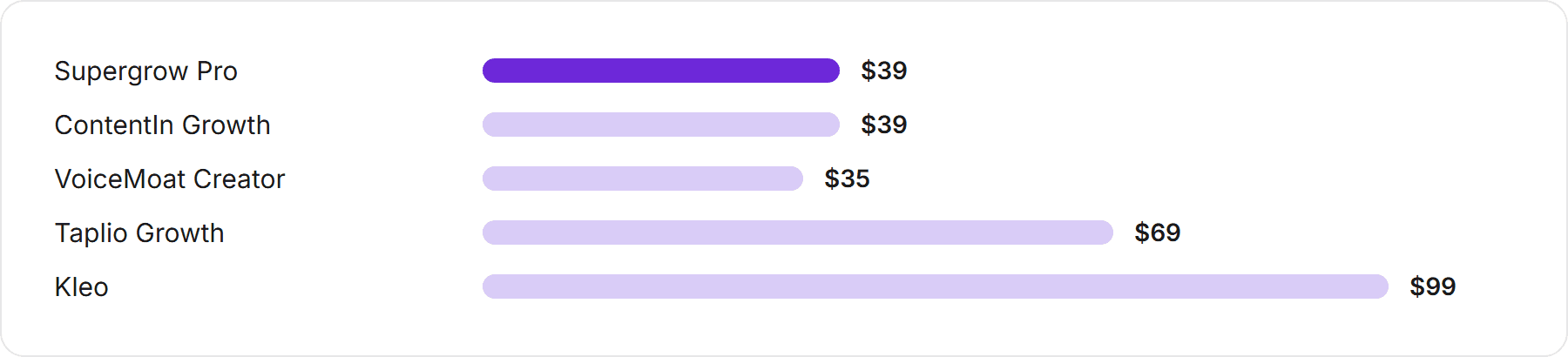
Monthly price of AI LinkedIn writing tools, billed monthly, checked on each vendor’s own pricing page in October 2026.
Tool | Entry price with AI writing | Platforms | Best for |
|---|---|---|---|
Supergrow | $39 a month (Pro) | Voice capture through interviews; teams activating executives | |
ContentIn | $39 a month (Growth) | A ghostwriter that learns from your edits | |
Taplio | $69 a month (Growth; the $39 Starter has no AI credits) | An all-in-one LinkedIn suite | |
Kleo | $99 a month | AI writing bundled with live coaching | |
VoiceMoat | $35 a month (Creator) | Twitter and LinkedIn | A trained voice per platform with Style and Stance checks |
Supergrow now sits in the middle of the LinkedIn market rather than at the bottom. For the full field see the best AI tools for LinkedIn personal branding, and for the same numbers-first treatment of the others, our Taplio and Kleo pricing breakdowns.
Which Supergrow plan fits you
Your situation | Best fit | Honest caveat |
|---|---|---|
You post only on LinkedIn and want to turn what you know into posts by talking | Pro ($39) | LinkedIn-only; still read every draft against your own posts |
You lead marketing and want up to five executives posting with approvals | Teams ($199) | Each extra person beyond five means an Enterprise quote |
You wanted the old $19 plan | Pro ($39), or a writing-only tool | There is no cheaper Supergrow plan now |
You also post on Twitter | A two-platform tool | Supergrow can only ever be half of your stack |
Where VoiceMoat fits, honestly
VoiceMoat is the Personal Brand OS for LinkedIn and Twitter. audenAI, the AI inside it, learns how you write from your own posts, then helps you write, schedule, engage, analyse and grow, with Style and Stance checks on your drafts so posts read like you. Try it for $1 for 3 days. Plans from $35 a month. Compared with Supergrow, the differences are platforms (Twitter as well as LinkedIn, each with its own trained voice), checking (Style and Stance on your drafts) and price ($35 on Creator). Supergrow’s $39 Pro includes an MCP server; on VoiceMoat, connecting an AI assistant is on the $69 Pro plan. audenAI suggests, you decide and post.
VoiceMoat pricing, October 2026. Annual billing gives two months free. The trial costs $1 for 3 days (Creator) or $5 (Pro and Enterprise), with a card on file, and continues on the plan unless you cancel.
Plan | Price a month | Who it is for |
|---|---|---|
Free | $0 | Looking around; voice training is on paid plans |
Creator | $35 | One to three profiles posting every day |
Pro | $69 | Threads, posting media, Write like a creator, connecting an AI assistant |
Enterprise | $150 | The Deep writing model, team seats and the most profiles |
How it posts: on Twitter, VoiceMoat posts and replies directly. On LinkedIn, posting and scheduling are native, the Chrome extension writes comments straight into LinkedIn’s comment box for you to post yourself, and analytics come through the extension too, because LinkedIn’s API rules are stricter. To pressure-test it, the 3-day evaluation guide walks through what to check.
The bottom line on Supergrow’s pricing
Supergrow is no longer a $19 tool. It is a $39 LinkedIn content platform with everything included for one person, a $199 plan for teams of five, and a 7-day trial that pauses rather than charges. Postcast is the reason to choose it, and the official-API approach makes it a safe pick. If LinkedIn is your whole world, it earns a trial. If you also post on Twitter, or you want every draft checked against your own writing, compare it with tools built for both before you commit.
Frequently asked questions
How much does Supergrow cost in 2026?
Supergrow Pro is $39 a month, or $31 a month billed yearly, for one account. Teams is $199 a month, or $189 billed yearly, for five accounts. Enterprise is a custom quote. Every plan has a 7-day free trial. Checked on supergrow.ai/pricing on 12 October 2026.
Does Supergrow still have a $19 plan?
No. The $19 Starter plan has been removed, along with the $139 four-account Teams plan. The cheapest plan is now Pro at $39 a month ($31 billed yearly). Older reviews that quote $19 are out of date.
Does Supergrow Pro include analytics?
Yes. Profile analytics and a weekly report are included in the $39 Pro plan, along with the carousel maker, Engage, unlimited Postcast interviews and the Supergrow MCP.
What happens after the Supergrow free trial?
You are asked to pick a plan. If you do not, Supergrow pauses the account instead of charging you, and your data is kept so you can reactivate later.
Is Supergrow only for LinkedIn?
Yes. Supergrow is a LinkedIn content platform and does not post to Twitter or other networks. If you post on both, VoiceMoat covers Twitter and LinkedIn with a trained voice for each, from $35 a month (disclosure: our product).
Is Supergrow worth $39 a month?
For a LinkedIn-only creator or executive who would rather talk through ideas than write, yes: Postcast is genuinely useful and the plan now includes analytics and carousels. It is harder to justify if you also post on Twitter or wanted the old $19 price. Use the 7-day trial on your own writing first.
AI disclosure
Written and fact-checked by Prateek Singh with AI assistance. All Supergrow prices and plan details come from Supergrow's own pricing page, checked on 12 October 2026; the pricing screenshot was captured the same day. Competitor prices come from each vendor's own pricing page in October 2026. VoiceMoat is the publisher's own product and is described from docs.voicemoat.com. Prices change, so confirm them at supergrow.ai/pricing before buying.
Keep reading

AI and Voice
Every social MCP connector reaches both platforms. That is not the hard part
We were going to write that connecting one assistant to both Twitter and LinkedIn was rare. It is not. More than twenty connectors do it and several are free, so channel coverage is table stakes and every roundup ranking them by it is measuring the wrong thing. Here is what actually differs between them, and the one thing we read enumerated tool lists for six of them to confirm nobody does at all.
11 min read
·

AI and Voice
Why your Claude writing skill doesn't sound like you
There are dozens of free Claude skills for writing, and almost all of them do the same thing: strip out phrases that read as machine-written. That is subtraction, and it leaves you sounding like nobody in particular rather than like yourself. The handful that actually learn a voice from your own writing have a fraction of the users. Here is the difference, why a skill cannot post anything no matter what it says, and where the file actually goes on every surface.
13 min read
·

AI and Voice
Hootsuite alternatives in 2026, priced from the vendors' own pages
Hootsuite starts at $99 per user a month, not $19. Here is what the realistic alternatives cost, read off each vendor's own pricing page in both billing positions, plus the clause in Hootsuite's terms that its pricing page does not mention.
10 min read
·

AI and Voice
Taplio alternatives in 2026, priced from the vendors' own pages
Four LinkedIn tools people move to from Taplio, priced from each vendor's own pricing page rather than from each other. Includes the arithmetic on Taplio's Pro tier, which does not add up, and one name still on every recommendation list that has quietly shut down.
11 min read
·

AI and Voice
How to train AI to write in your voice: the cross-model guide
You can get ChatGPT, Claude or Gemini to write in your voice, but only partly and only for one session, because chat models forget your style between chats. This cross-model guide covers the analyze-then-write prompts that work, the settings that make them stick, the four levels of personalized AI content, a reusable instruction block for tweets, and the persistent alternative for anyone who posts regularly.
16 min read
·
From the Twitter algorithm series
The Twitter/X algorithm in May 2026: why voice wins under the new transformer
Read ›

