Key takeaways
ChatGPT cannot post to LinkedIn or Twitter by itself. It has no built-in publishing, and the official LinkedIn plugin in ChatGPT only looks people up.
Five routes can get a ChatGPT draft published: copy and paste, a third-party plugin from ChatGPT's Plugin Directory, a custom MCP connector, an automation tool (Zapier, Make, n8n), or a cloud browser that clicks Post on the website.
Plans matter. OpenAI's help page says full custom connectors, including write actions such as posting, are for ChatGPT Business, Enterprise and Edu; on Pro they are read and fetch only.
Custom GPTs retire on 11 December 2026, and their custom actions do not transfer. Guides built on a GPT that posts for you have weeks left.
Both platforms allow posting through their official API and ban bots that run your account. Twitter now charges per post: $0.015, or $0.200 with a link.
No. ChatGPT cannot post to LinkedIn or Twitter by itself. It writes the draft; something else has to publish it. In October 2026 that something is one of five routes: you copy and paste, a third-party plugin from ChatGPT's Plugin Directory posts it after you approve, a custom MCP connector posts it (on Business, Enterprise and Edu plans), an automation tool such as Zapier posts it on a trigger, or a cloud browser signs in to the website and clicks Post.
Which one fits depends on three things most guides skip: your ChatGPT plan, the platform (Zapier, for one, cannot post to Twitter at all), and what LinkedIn and Twitter allow. This guide covers each route for both platforms, with what changed in 2026 and what each costs. (Disclosure: we make VoiceMoat, the Personal Brand OS for LinkedIn and Twitter, which connects to ChatGPT, Claude and Grok. It appears near the end. If you use Claude, read the Claude version of this question.)
Everything below was checked on 20 October 2026, on OpenAI's help center, the ChatGPT Plugin Directory, X's developer docs, LinkedIn's legal pages and Zapier's site.
The short answer, by platform
Can ChatGPT post on its own? | No | No |
Official plugin in ChatGPT | Yes, from LinkedIn, but it only looks people up | None |
Third-party plugins that post | Yes, several in the Plugin Directory | Yes, several in the Plugin Directory |
Zapier | Can post (Create Share Update) | Cannot; its Twitter integration stopped in 2023 |
Official API cost to post | No per-post fee | $0.015 a post, $0.200 with a link |
Automated posting allowed? | Through the API with your approval; its terms ban automating posting | Through the API with your consent; scripting the website is banned |
What changed in 2026
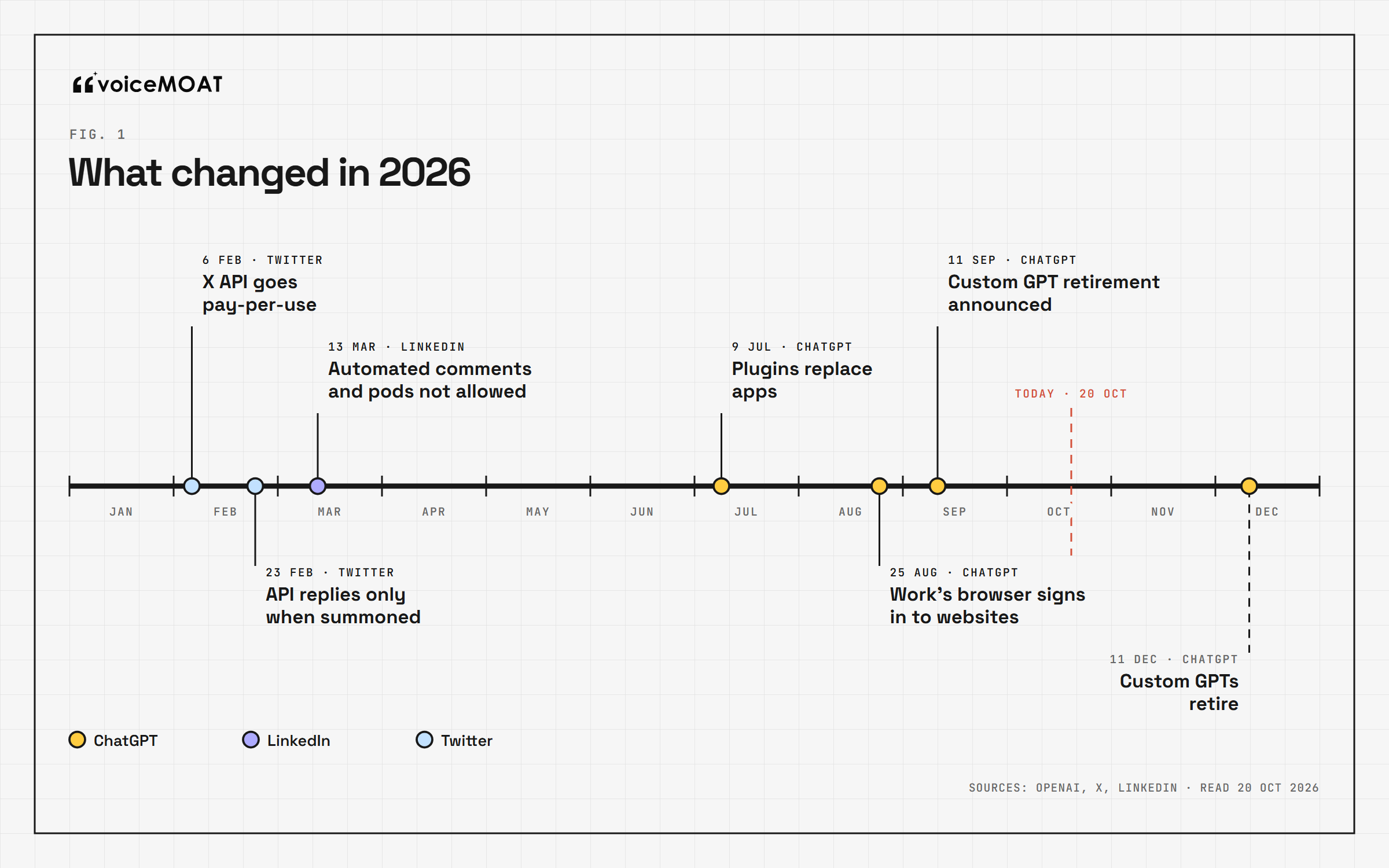
The 2026 changes behind every answer on this page.
Most answers to this question were written for a ChatGPT and a Twitter that no longer exist. Six changes matter:
6 February: Twitter's API went pay-per-use. No subscriptions; you buy credits and pay per request.
23 February: Twitter limited replies through the API. A reply from an app only goes through if the original author summoned the account, by mentioning it or quoting one of its posts.
13 March: LinkedIn declared automated comments and engagement pods "not allowed", and warned members using automation tools of restrictions.
9 July: plugins replaced apps. OpenAI replaced the App Directory with the Plugin Directory. Existing app connections kept working, but most menu paths in older guides ("Settings, Connectors", "Apps") are out of date.
August: ChatGPT Work's browser started handling websites that need a sign-in. ChatGPT's earlier agent mode is now "no longer available", according to its own help page; ChatGPT Work and its cloud browser replace it.
11 September: OpenAI announced that custom GPTs will retire, on 11 December 2026 for most accounts (11 February 2027 for Enterprise workspaces with an approved deferral). Custom actions, the feature many "post from a GPT" tutorials rely on, "do not transfer through the migration workflow" (OpenAI's migration FAQ).
The official LinkedIn plugin does not post
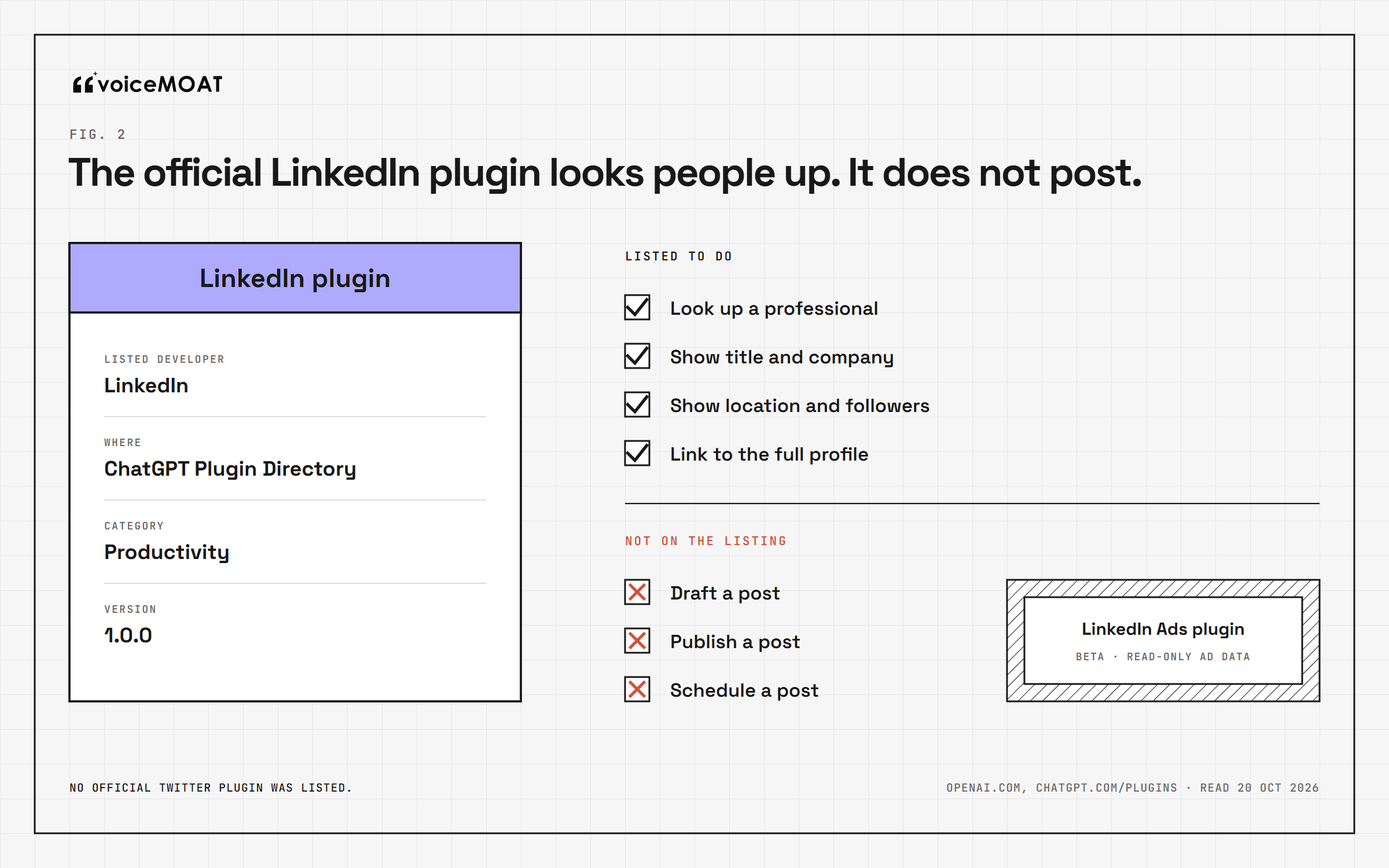
Look-up only, as listed on 20 October 2026.
Search the Plugin Directory for LinkedIn and the first result is LinkedIn's own plugin. It is easy to assume that is the posting route. It is not.
According to its listing and OpenAI's plugin page, it looks up professionals: their title, company, location and follower count, with a link to the full profile. The examples are attendee briefs and speaker research. Nothing on the listing mentions drafting, posting or scheduling. LinkedIn also lists a LinkedIn Ads plugin, described as a beta with read-only access to ad performance.
There is no official Twitter plugin in the directory at all; searching for Twitter returned unrelated results when we checked.
The five routes
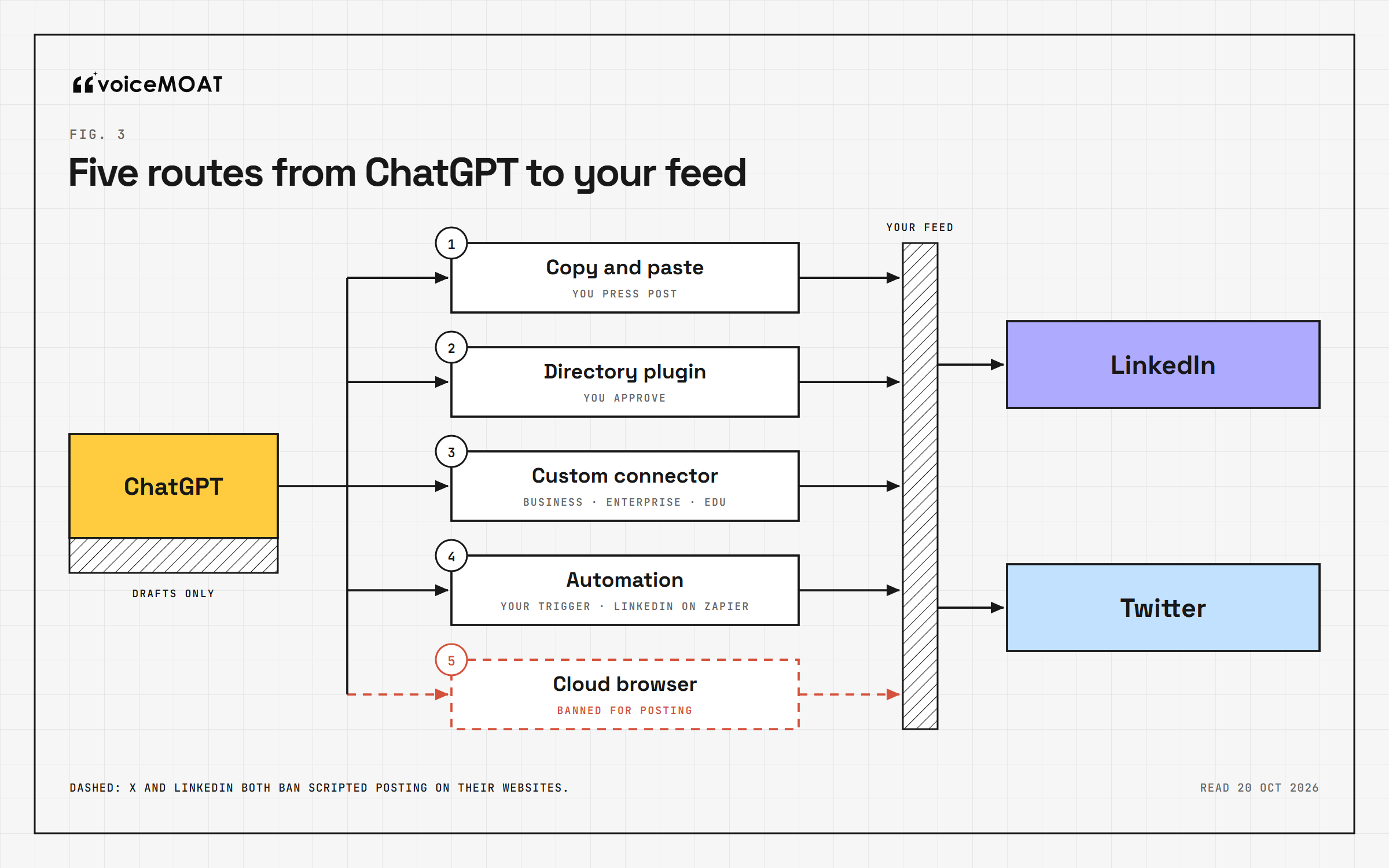
Every route reaches both platforms. They differ in who presses Post.
Route 1: copy and paste
ChatGPT drafts, you paste the text into LinkedIn or Twitter and press Post.
Plans: any, including Free.
Cost: nothing beyond your ChatGPT plan.
Rules: none to worry about. It is you posting.
Weak spot: ChatGPT does not know what you have posted before, how your posts usually read, or what performed. Every draft starts from zero unless you paste that context in.
For most people this is still the right starting point, and the fastest way to see whether ChatGPT's drafts are worth automating at all. Our guide to making ChatGPT write LinkedIn posts that read like you covers the context to give it.
Route 2: a third-party plugin from the Plugin Directory
Several social media tools have published plugins in ChatGPT's directory that can publish or schedule for you. When we checked the public directory on 20 October, listings that describe posting to both LinkedIn and Twitter included Shapeless, FeedClaw, post bridge, xpost and Ocoya, among others, and Postbeam's covers LinkedIn. Several describe an approval step before anything goes out.
How it works: open Plugins, find the plugin, connect it, then sign in to the posting tool and connect your LinkedIn or Twitter account there. ChatGPT drafts; the plugin sends the post through the tool's own connection.
Plans: OpenAI says availability "depends on the plugin, your plan, and workspace settings". Plugins in the directory are reviewed by OpenAI before they are listed.
Cost: the posting tool's own subscription, usually with a free tier or trial.
Rules: the tool posts through LinkedIn's and Twitter's official APIs, so the platform rules below apply to the tool, and the approval step is what keeps each post yours.
What to check before connecting one: whether every post waits for your approval, whether you can see the exact text and account before it publishes, and whether scheduled posts still go out if you disconnect.
Route 3: a custom MCP connector
MCP, the Model Context Protocol, is the open standard ChatGPT uses to connect to outside tools. Many posting tools (Buffer, Hootsuite, Typefully, Taplio and others) run MCP servers you can add yourself, even when they are not listed in the directory.
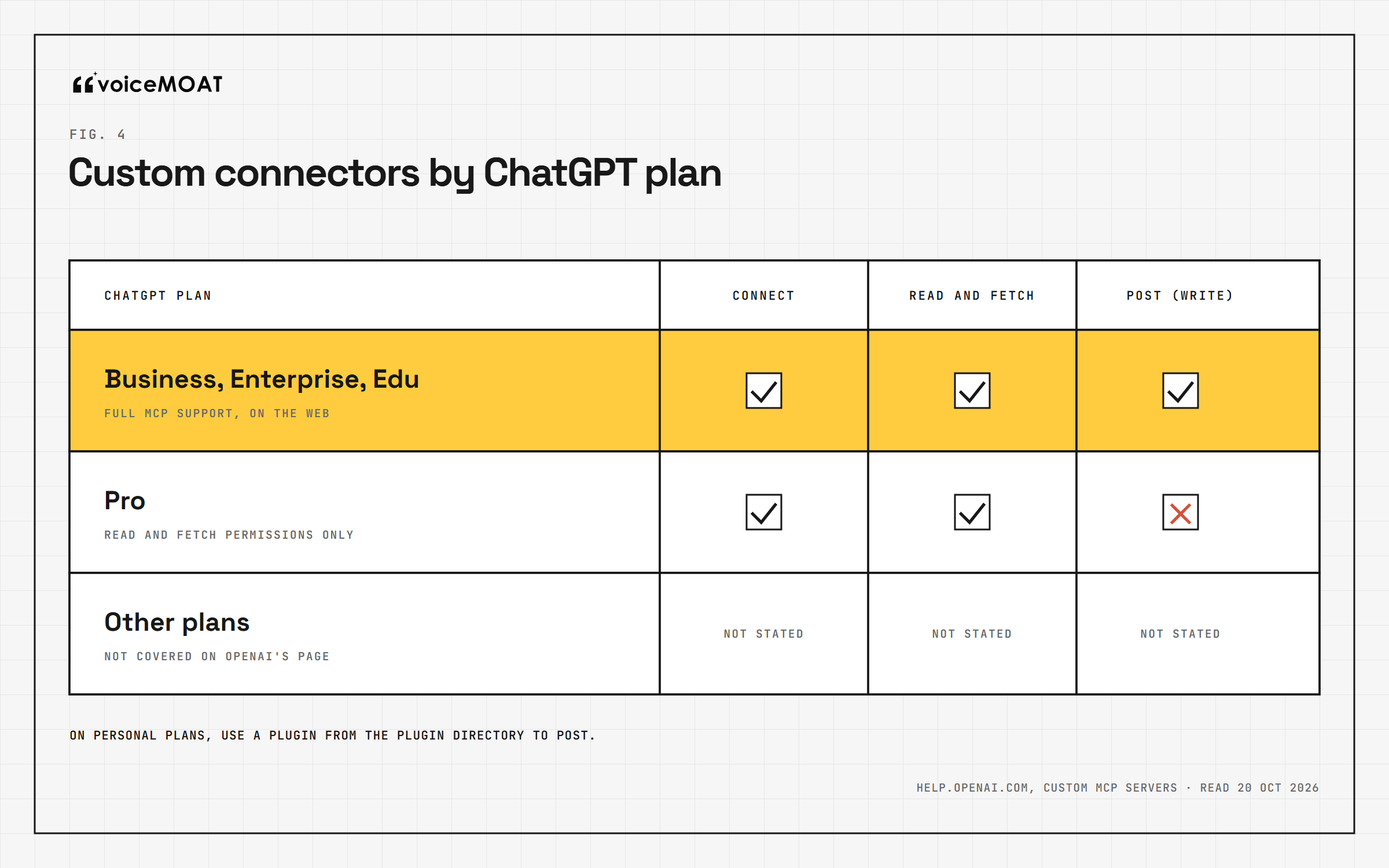
From OpenAI's help page, read 20 October 2026.
This is where plans decide everything. OpenAI's help page on custom MCP servers says full MCP support, including write and modify actions, is available on ChatGPT Business and Enterprise/Edu, on the web. Pro users "can connect custom MCP servers with read/fetch permissions". In other words, on a personal plan a custom connector can read your drafts and numbers but cannot press Post.
How it works: open Plugins, select the plus button, add a custom MCP server, paste its address and sign in. You no longer need to switch on Developer Mode first; you acknowledge a risk warning for each server instead.
Plans: Business, Enterprise and Edu for posting; Pro for reading.
Cost: the tool's subscription.
Safety: ChatGPT may ask you to confirm write actions, depending on the app's permissions and the action. Set the connector's permission to always ask.
X also publishes its own MCP server, which you run yourself with your own developer app and pay-per-use credits. It is a route for developers, not for most creators.
Route 4: an automation tool (Zapier, Make, n8n)
An automation tool watches for a trigger (a new row in a sheet, a scheduled time, a message from ChatGPT) and runs an action such as "post to LinkedIn".
Zapier: its LinkedIn actions include Create Share Update (a post on your profile) and Create Company Update. Its Twitter integration stopped working on 31 August 2023, after Twitter's API changes, and the notice is still live. Guides that say "send ChatGPT drafts to Twitter with Zapier" are out of date. Zapier's free plan includes 100 tasks a month; its Professional plan starts at $19.99 a month billed yearly.
Make: a free plan with 1,000 credits a month and a LinkedIn module.
n8n: its X node can create a post, using X API credentials you set up yourself (and pay for per post).
The trade-off: automation is good at moving a finished, approved post to the platform on schedule. It is bad at the moment that matters, reading the post before it goes out. If the trigger is "ChatGPT produced something", nobody reads it first. Make the trigger your approval instead: a row you mark approved, a draft you move to a "ready" column.
Route 5: a cloud browser that clicks Post
ChatGPT Work's cloud browser can open websites, sign in through a secure form (OpenAI says the model does not see your password) and carry out tasks. In principle it could open LinkedIn or Twitter and press Post.
We do not recommend it for posting, for three reasons:
Twitter bans it. X's automation rules forbid automation that does not use the API, such as scripting the website, and warn that it can lead to permanent suspension.
LinkedIn bans it. LinkedIn's User Agreement prohibits bots or other unauthorized automated methods to create, comment on, like or share posts, and its help center says third-party software that automates activity on the website can get an account restricted or shut down.
Websites can block it anyway. OpenAI notes that each website decides whether to allow automated browser agents.
A cloud browser is useful for research: reading your own analytics page, collecting posts you want to reply to, checking a profile. Leave the Post button to you or to an API.
The platform rules, in plain English
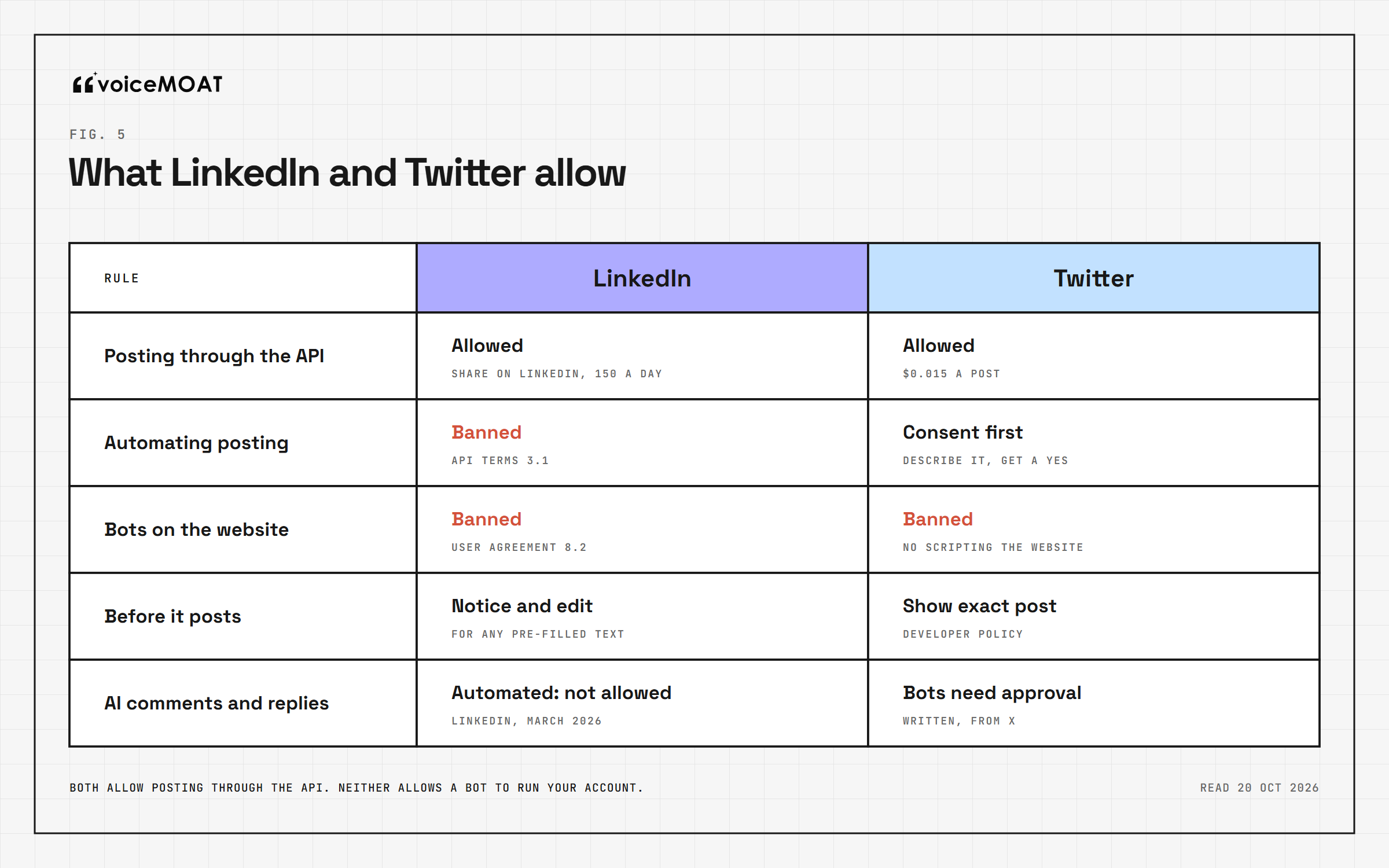
Both allow posting through their API. Neither allows a bot to run your account.
Posting through the API is allowed. LinkedIn's self-serve "Share on LinkedIn" product lets apps post on a member's behalf, with a limit of 150 requests per member per day.
Automating posting is not. Section 3.1 of LinkedIn's API Terms of Use lists, among things developers must not do, using the APIs "to automate posting on the LinkedIn Services". The same section allows an app to pre-fill a post only with a clear notice and a way for the member to edit it.
Bots on the website are banned. The User Agreement (section 8.2, effective 3 November 2025) bans bots or unauthorized automated methods to create, comment on, like or share posts.
Automated comments are a 2026 target. LinkedIn said in March that automated comments and pods are not allowed, and in July that it catches more than 200,000 automated comment attempts every day.
The reading that fits all four: a tool may post for you through the API, but each post should be your reviewed decision. A route where ChatGPT writes and publishes with no human in between is the one LinkedIn's terms describe.
Posting through the API is allowed, and it costs money. Since 6 February, X's API is pay-per-use. According to X's pricing page, creating a post costs $0.015 per request, $0.200 if the post contains a URL, and a reply to an account that summoned you costs $0.010.
Apps must show you the post first. X's Developer Policy says a service that lets people post to X must show exactly what will be published before it publishes.
Consent has to be explicit. X's automation rules say connecting an app through OAuth is not enough on its own; the app must describe what it will do automatically and get your express consent.
AI reply bots need X's written approval, and since 23 February API replies only go through when the author mentioned or quoted the replying account.
Scripting the website is banned, as above.
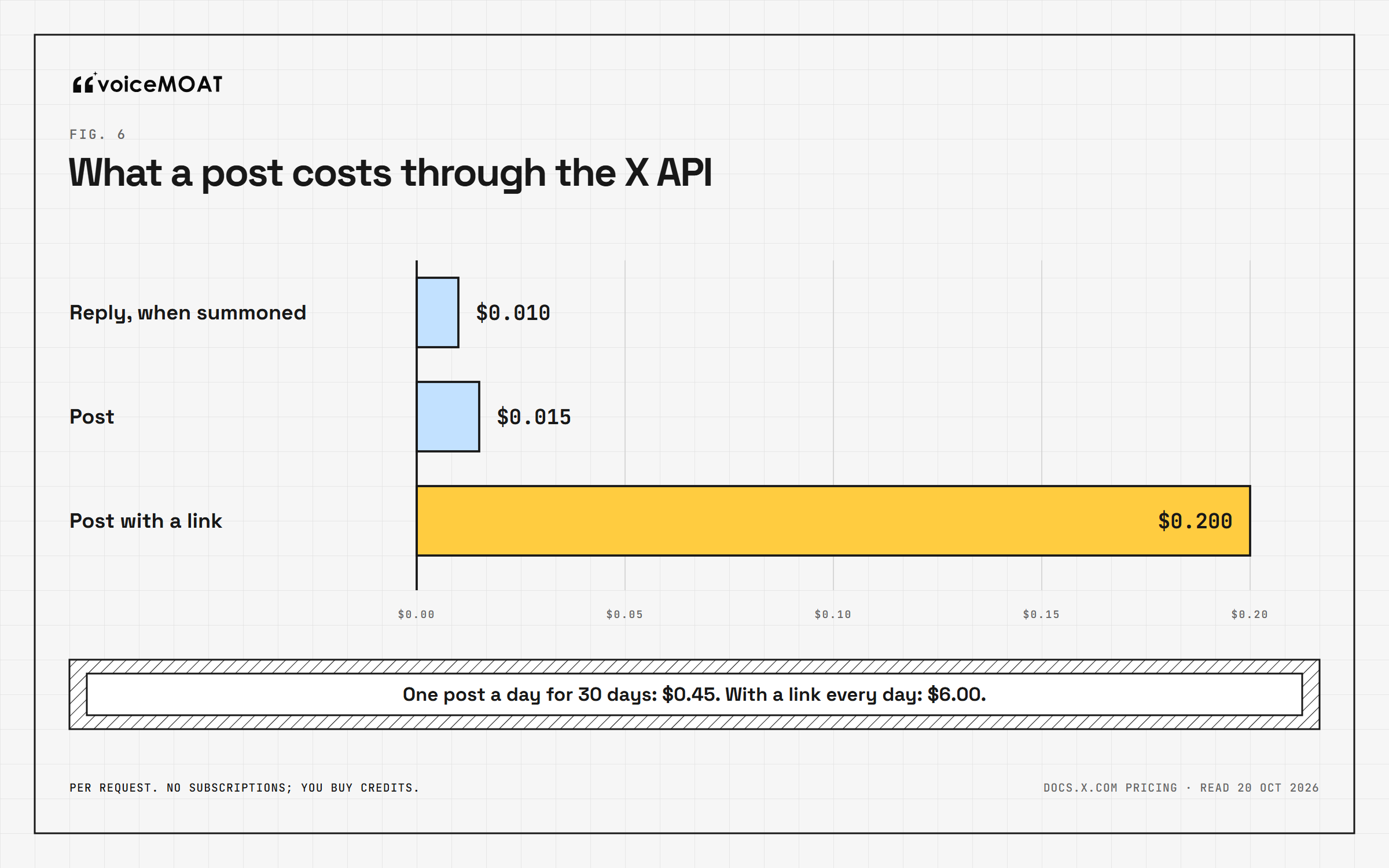
Source: docs.x.com pricing, read 20 October 2026.
The cost is small for one person: one post a day for 30 days is $0.45, or $6.00 if every post carries a link.
Which route should you use?
You are | Use | Why |
|---|---|---|
Testing whether ChatGPT's drafts are any good | Route 1, copy and paste | Free, no rules risk, and you read every word |
On Plus or Pro and want ChatGPT to publish | Route 2, a reviewed directory plugin | Custom connectors cannot post on personal plans |
On a Business, Enterprise or Edu workspace | Route 2 or 3 | Custom connectors can post; check the admin's settings |
Posting the same approved content on a schedule | Route 4 for LinkedIn | Zapier cannot post to Twitter; use a scheduler for that |
Hoping ChatGPT will just click Post | Not Route 5 | Both platforms ban scripted posting on the website |
Before you connect anything
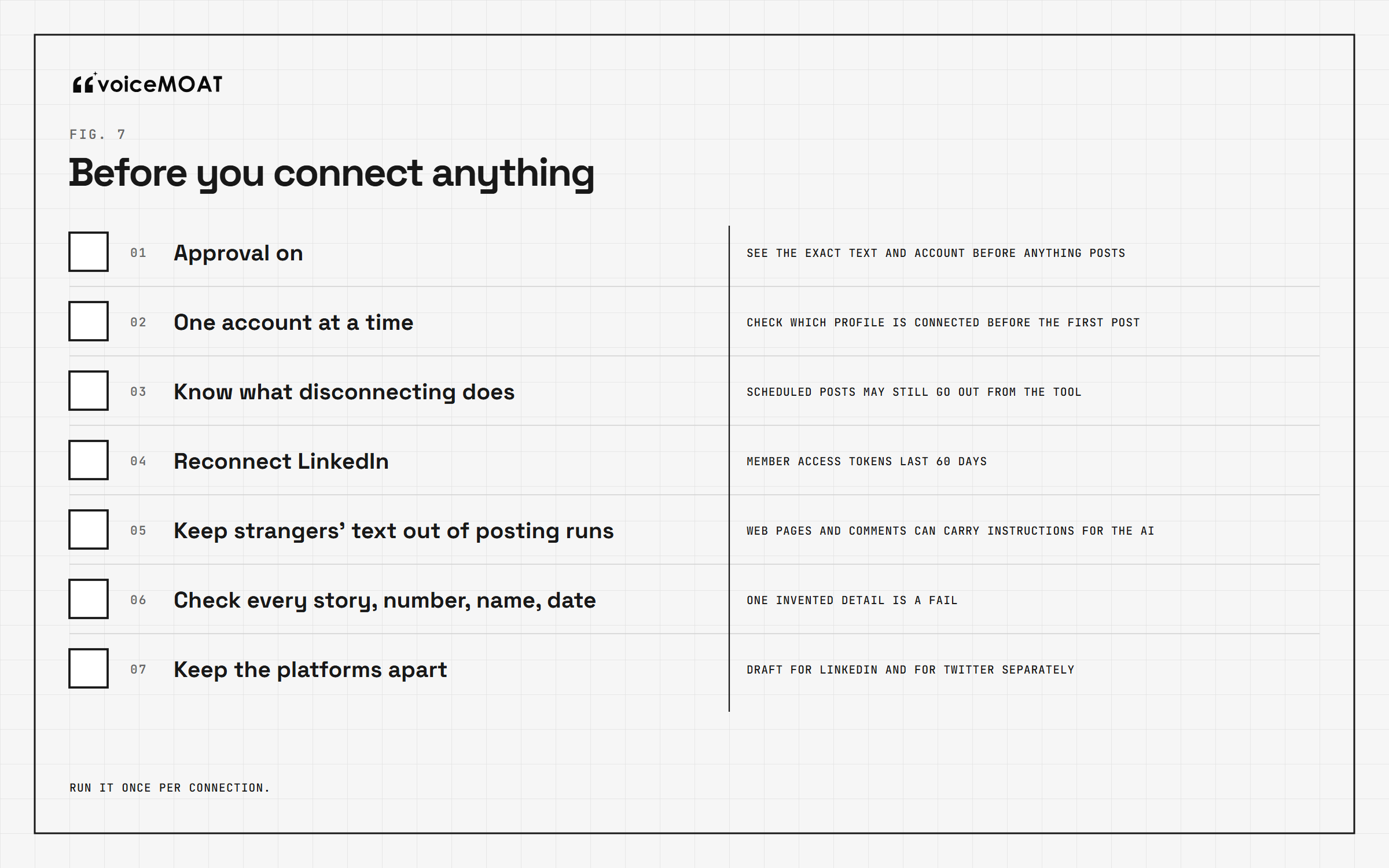
Run it once per connection.
Whatever route you pick, run this checklist once:
Approval on. Every post should show you the exact text and the account before it goes out. In ChatGPT, set the app's permission to always ask.
One account at a time. Check which LinkedIn or Twitter account the tool is connected to before the first post, especially if you manage more than one.
Know what happens when you disconnect. Some tools keep publishing scheduled posts after you remove the ChatGPT connection, because the schedule lives in the tool, not in ChatGPT.
Expect to reconnect LinkedIn. LinkedIn's member access tokens last 60 days, so many tools ask you to sign in again every two months.
Do not mix reading strangers' content and posting in one run. A web page or a comment can contain instructions aimed at the AI (prompt injection). Draft from your own notes; review before posting.
Check every story, number, name and date. ChatGPT will fill gaps with plausible details. One invented detail in a published post costs more than the time it saved.
Keep the platforms apart. A Twitter post pasted onto LinkedIn reads like someone else on LinkedIn, and the reverse. Draft for each.
The part no route solves

Plumbing gets a post out. The loop decides whether it was worth posting.
Every route above is plumbing. It moves text from ChatGPT to a feed. None of them changes what ChatGPT knows when it drafts: by default, nothing about what you have posted before, which posts worked, how your posts usually read, or which views are yours.
That matters more on LinkedIn in 2026 than it used to. LinkedIn now cuts the reach of posts that look AI-generated and lack a clear perspective beyond your own network, and lets members flag posts as "AI slop" (the dated record is here). A route that publishes a generic draft faster is a faster way to get there. The useful order is the same whichever route you choose: draft from your own content, check that it says what you would say, approve it, post it, then read how it did and let that shape the next draft. Our seven-test check covers the "check" step in detail.
Where VoiceMoat fits
Disclosure: this is what we build. VoiceMoat is the Personal Brand OS for LinkedIn and Twitter, and audenAI, the brain inside it, learns from your own content, kept separately for each platform. It connects to AI assistants through one MCP server:
One address, three assistants. The same server works in Claude (it is in Claude's connectors directory), ChatGPT and Grok, with fifteen tools: your voice profile, your posts and numbers on both platforms, drafting help, checks, and posting.
Nothing posts on the first call. Both posting tools first return a preview of the exact text and the target account with a one-time code; only if you agree does the assistant call again and the post goes out. That is the "show exactly what will be published" step X's policy asks for, built into the tool.
In ChatGPT today: VoiceMoat is not yet listed in the Plugin Directory, so it connects as a custom MCP server. Under OpenAI's current rules that means posting works on Business, Enterprise and Edu workspaces; on Pro, ChatGPT can read your numbers and voice profile but not post. In Claude and Grok, posting works today.
Plans: assistant access is on VoiceMoat Pro and Enterprise.
If you would rather not route posting through an assistant at all, VoiceMoat's Studio drafts from your own content and checks drafts before you post, and the Chrome extension drafts replies inside LinkedIn's and Twitter's own boxes, where you press Post yourself. More on the assistant side: connecting Claude to LinkedIn and Twitter and whether a LinkedIn MCP is safe.
The short version
ChatGPT drafts; it does not post. To publish, use copy and paste, a reviewed plugin from the Plugin Directory, a custom connector on a Business, Enterprise or Edu workspace, an automation tool for LinkedIn, or a scheduler for Twitter. Skip anything that clicks Post on the website, retire any plan built on a custom GPT before 11 December, and keep an approval step between the draft and the feed. The route is the easy part. What the post says is still up to you.
Frequently asked questions
Can ChatGPT post directly to LinkedIn?
No. ChatGPT has no built-in publishing to LinkedIn. To post from ChatGPT you need a third-party plugin from the Plugin Directory, a custom MCP connector on a Business, Enterprise or Edu workspace, an automation tool such as Zapier or Make, or you copy and paste the draft yourself.
Can ChatGPT post to Twitter (X)?
Not by itself, and there is no official Twitter plugin in ChatGPT. Third-party plugins in the Plugin Directory can post to Twitter after you approve, and developers can use X's API, which costs $0.015 per post ($0.200 with a link). Zapier cannot post to Twitter; its integration stopped in 2023.
Does the LinkedIn plugin for ChatGPT post for you?
No. LinkedIn's official plugin looks up professionals (title, company, location, follower count) and links to their profiles. Its listing describes no drafting, posting or scheduling.
Which ChatGPT plan do I need to post through a connector?
For a custom MCP connector that posts, ChatGPT Business, Enterprise or Edu; OpenAI limits custom connectors on Pro to read and fetch actions. Plugins from the Plugin Directory have their own availability, which depends on the plugin, your plan and your workspace.
Can ChatGPT schedule LinkedIn or Twitter posts?
Not natively. A posting plugin or tool can schedule a post you approve in ChatGPT. ChatGPT's scheduled tasks can use connected apps, but actions that change outside data may pause for your approval.
Is posting with ChatGPT against LinkedIn's rules?
Using ChatGPT to draft is fine, and tools may post through LinkedIn's official API. What LinkedIn's terms ban is automating posting and using bots on the website to create, comment on or like posts. Keep a human approval step on every post.
Can ChatGPT's cloud browser log in to LinkedIn or Twitter and post for me?
It can sign in to some websites, but both platforms ban it for posting: X forbids scripting its website, and LinkedIn bans bots that create or engage with posts. Use an API-based tool instead.
What happens to custom GPTs that post to social media?
Custom GPTs retire on 11 December 2026 (11 February 2027 for Enterprise workspaces with an approved deferral). Custom actions do not transfer to plugins, so a GPT that posts through an action stops working unless its maker rebuilds it as a plugin or MCP server.
How much does it cost to post to Twitter through the API?
$0.015 per post, $0.200 for a post with a link, and $0.010 for a reply to an account that mentioned or quoted you. There are no subscriptions; you buy credits.
Can Zapier post ChatGPT drafts to LinkedIn?
Yes. Zapier's LinkedIn actions include Create Share Update for your profile and Create Company Update for a page. Make the trigger your approval, not ChatGPT's output, so you read every post before it publishes.
AI disclosure
Written and fact-checked by Prateek Singh, founder of VoiceMoat. VoiceMoat is the publisher's own product and is disclosed as such; OpenAI, LinkedIn, X and Zapier details are from their own pages, linked in the article and read on 20 October 2026, and product details reflect VoiceMoat as of October 2026.
Keep reading

AI and Voice
Every social MCP connector reaches both platforms. That is not the hard part
We were going to write that connecting one assistant to both Twitter and LinkedIn was rare. It is not. More than twenty connectors do it and several are free, so channel coverage is table stakes and every roundup ranking them by it is measuring the wrong thing. Here is what actually differs between them, and the one thing we read enumerated tool lists for six of them to confirm nobody does at all.
11 min read
·

Industry
Can Claude post to Twitter? Yes, and here is the bill
Twitter publishes three official MCP servers, and the one everybody installs cannot create a post. You can prove that from its OAuth scopes, which do not include write access to posts at all. Meanwhile every guide prices this as fifteen thousandths of a dollar per post, which is the sticker price and not the bill. A realistic assistant session costs two to eighteen times that, and the difference is mostly links.
13 min read
·

Industry
Can Claude post to LinkedIn? Yes, and LinkedIn's own developer terms say it should not
Claude can publish to LinkedIn through a connector, using a permission LinkedIn hands out self-serve. The final item in LinkedIn's API Terms of Use is a flat ban on using the APIs to automate posting. Every guide we read cites the wrong document, and several sell scheduling while calling themselves the compliant option. Here is the clause, what Claude can and cannot actually publish, and why the connector most people recommend cannot work on claude.ai at all.
12 min read
·

AI and Voice
How to Make ChatGPT Sound Like You on LinkedIn: Posts, Comments, and Custom Instructions
A LinkedIn-first, model-agnostic system for making ChatGPT, Claude, Copilot, and Gemini sound like you across posts and comments: a copy-paste custom instructions block, a banned-word list, comment-prompt packs, and an honest look at why the voice keeps resetting.
19 min read
·

AI and Voice
Is It Safe to Use AI on LinkedIn and Twitter? Detection, Reach, and the Rules in 2026
Is it safe to use AI on LinkedIn and Twitter? Separate the three real risks, reach suppression, reputation, and account trouble, learn the 2026 flagging rules, and get a recovery playbook for a flagged post.
21 min read
·
From the Twitter algorithm series
The Twitter/X algorithm in May 2026: why voice wins under the new transformer
Read ›

