Key takeaways
Claude has no built-in LinkedIn or Twitter connection, and neither LinkedIn nor Twitter has an official connector in Claude's directory. You connect through a third-party connector, from the directory or by pasting its address as a custom connector.
The click path is Customize > Connectors. Guides that say Settings > Connectors predate February 2026. Free plans can add one custom connector; directory connectors work on every plan.
Connectors switch on per chat ("+" > Connectors). Set posting tools to Needs approval before the first post, and switch them off before using Research, which runs connector tools without asking.
The platforms set the hard limits: a LinkedIn sign-in lasts 60 days, LinkedIn's API terms ban automating posting, and the X API charges $0.015 a post ($0.200 with a link).
A local MCP server works only in Claude Desktop or Claude Code on that computer. claude.ai, the mobile apps and Cowork reach connectors from Anthropic's cloud.
Claude can post to LinkedIn and Twitter once you add a connector, and setup takes a few minutes. Open Customize > Connectors, add a connector from the directory or paste a server address with Add custom connector, sign in, then switch the connector on in a chat from the "+" menu. Before the first post, set its posting tools to Needs approval.
There is no official LinkedIn or Twitter connector in Claude's directory, so every route runs through someone else's server: a posting tool's, an open-source server you run yourself, or the X API team's own tools if you have a developer account. This guide covers setup on each Claude app, the permissions to set, what each platform allows and charges, and fixes for the usual errors. (Disclosure: we make VoiceMoat, the Personal Brand OS for LinkedIn and Twitter, which has a connector in Claude's directory. It appears near the end. Wondering whether Claude should post for you at all? That is Can Claude post to LinkedIn? and the Twitter version.)
Everything below was checked on 21 October 2026 in Anthropic's help center and Claude Docs, inside Claude itself, and on Twitter's and LinkedIn's developer pages.
The setup in five steps
Pick a connector that posts to the platforms you use (the table further down compares them).
Add it in Claude. Open Customize > Connectors. Find it under Discover, or choose + Add > Add custom connector and paste its address.
Sign in, first to the connector, then to LinkedIn and Twitter inside it.
Switch it on in a chat. Press "+" (or type "/"), open Connectors, turn it on.
Set permissions and test. Put posting tools on Needs approval, then ask for a draft and a preview before anything goes out.
LinkedIn and Twitter at a glance
Official connector in Claude's directory | None | None |
The platform's own MCP server | None public | Yes, from the X API team. The hosted one reads, searches and publishes Articles; the open-source one you run yourself can post |
Directory connectors that post (examples) | Taplio, Typefully, Metricool, VoiceMoat | Typefully, Metricool, VoiceMoat |
Cost per post through the official API | No per-post fee | $0.015, or $0.200 with a link |
How long a sign-in lasts | 60 days, then you reconnect | Depends on the connector |
What the rules ban | Automating posting (API terms); bots on the website | Scripting the website; posting without showing the exact text first |
What sits between you and your feed
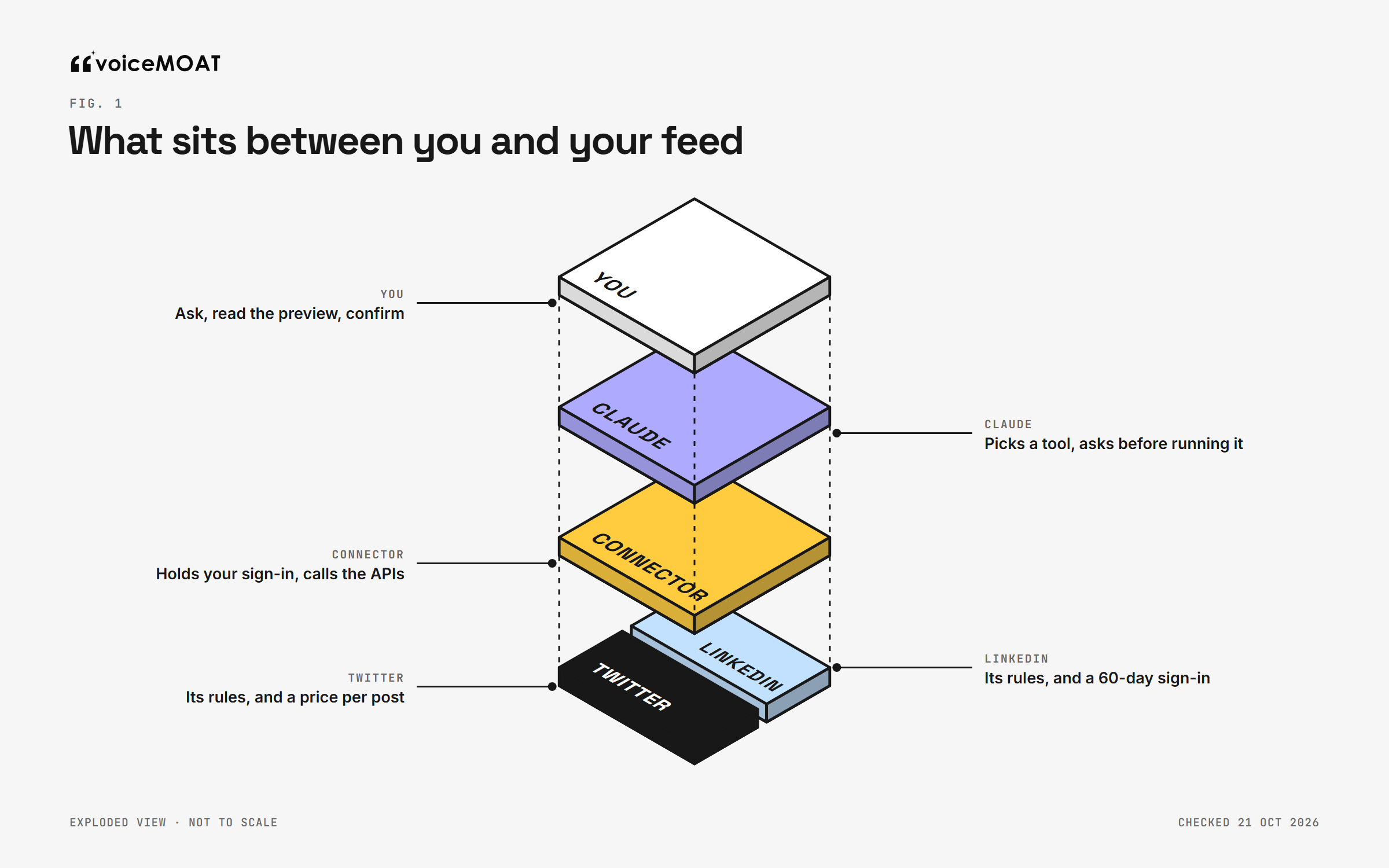
Every setup problem lives in one of these four layers.
Connecting Claude to a social account puts four layers between your request and your feed. Each one decides something different:
You ask, read the preview and confirm. You are the only layer that knows whether the post is true and whether you would say it.
Claude decides which tool to call and, depending on your settings, asks before it runs one.
The connector is a server, usually run by a posting tool, that holds your LinkedIn and Twitter sign-in and calls their APIs. It decides which tools exist and whether posting needs a preview.
LinkedIn and Twitter set the rules, the costs and how long a sign-in lasts.
Most setup problems are a mismatch between two layers: a server running on your laptop while Claude looks for it from the cloud, or a LinkedIn sign-in that expired while Claude still lists the tools. Knowing which layer owns what makes the fixes at the end quick.
Three ways to connect
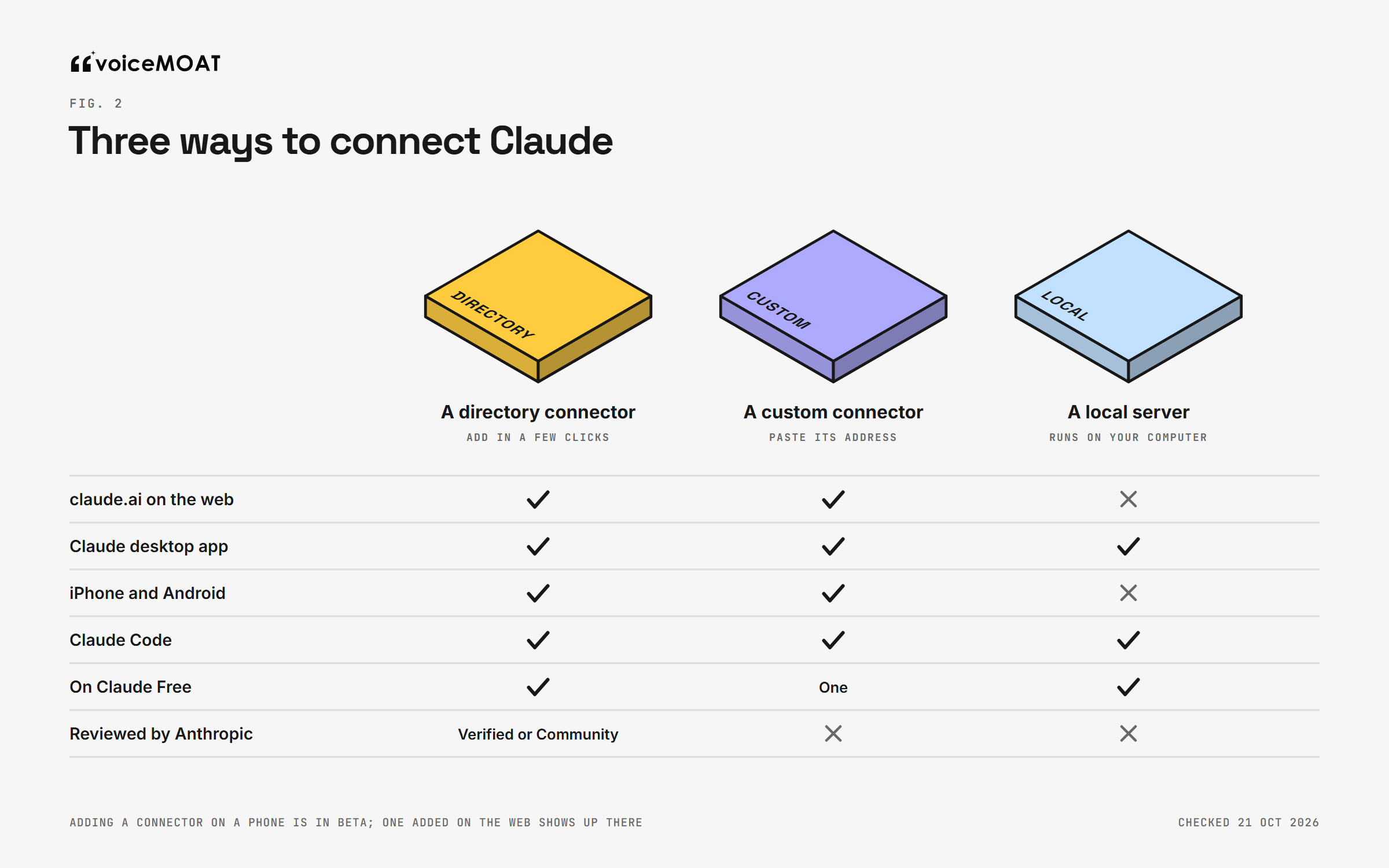
Only a local server is limited to one computer.
A connector from Claude's directory
Anthropic's directory lists connectors you add in a few clicks. Directory connectors are available on every plan, Free included, on the web, the desktop app and the mobile apps. Listings carry labels worth reading: Verified means Anthropic tested it (not a security audit), Community means it passed automated review only, and connectors you add by address are unreviewed.
When we searched the directory for LinkedIn on 21 October, tools that post or schedule included Taplio (LinkedIn), Typefully (Twitter, LinkedIn and others), Metricool (several networks) and VoiceMoat (both platforms). None comes from LinkedIn or X.
A custom connector
Any tool that runs a remote MCP server can be added by its address, listed or not. Buffer is one example: its MCP page gives the address and says the server works on every Buffer plan. Two limits apply. Free Claude accounts can add one custom connector. And Claude reaches every custom connector from Anthropic's cloud, not from your computer, so the server must be on the public internet.
A local server on your computer
Open-source servers, including xmcp from the X API team, run on your own machine. You add them to Claude Desktop (Settings > Developer > Edit Config) or to Claude Code. They work only on that computer: not on claude.ai, not on your phone, and not in Cowork tasks that run in the cloud. You also bring your own developer credentials. For Twitter that means a developer app on the X API, with pay-per-use credits; xmcp can create posts, while the hosted X MCP server lists reading, search, bookmarks and Articles, not ordinary posts.
What about Claude in Chrome?
Claude in Chrome, on paid plans, can click buttons on websites. Do not use it to post. Twitter's automation rules forbid automation that does not use the API, such as scripting the website, and warn of permanent suspension. LinkedIn's User Agreement bans bots that create, comment on, like or share posts. Anthropic's own safety page puts responsibility for anything published, and for following each site's terms, on you. Use the browser for reading; leave the Post button to an API.
You want | Use |
|---|---|
The fewest steps | A directory connector |
A tool that is not listed | A custom connector, by address |
Full control, and you have developer accounts | A local server in Claude Code or Claude Desktop |
Claude to press Post on the website | None of these. Both platforms ban it |
For a side-by-side of the connectors themselves, see every social MCP connector, compared.
Step by step: add the connector in each Claude app
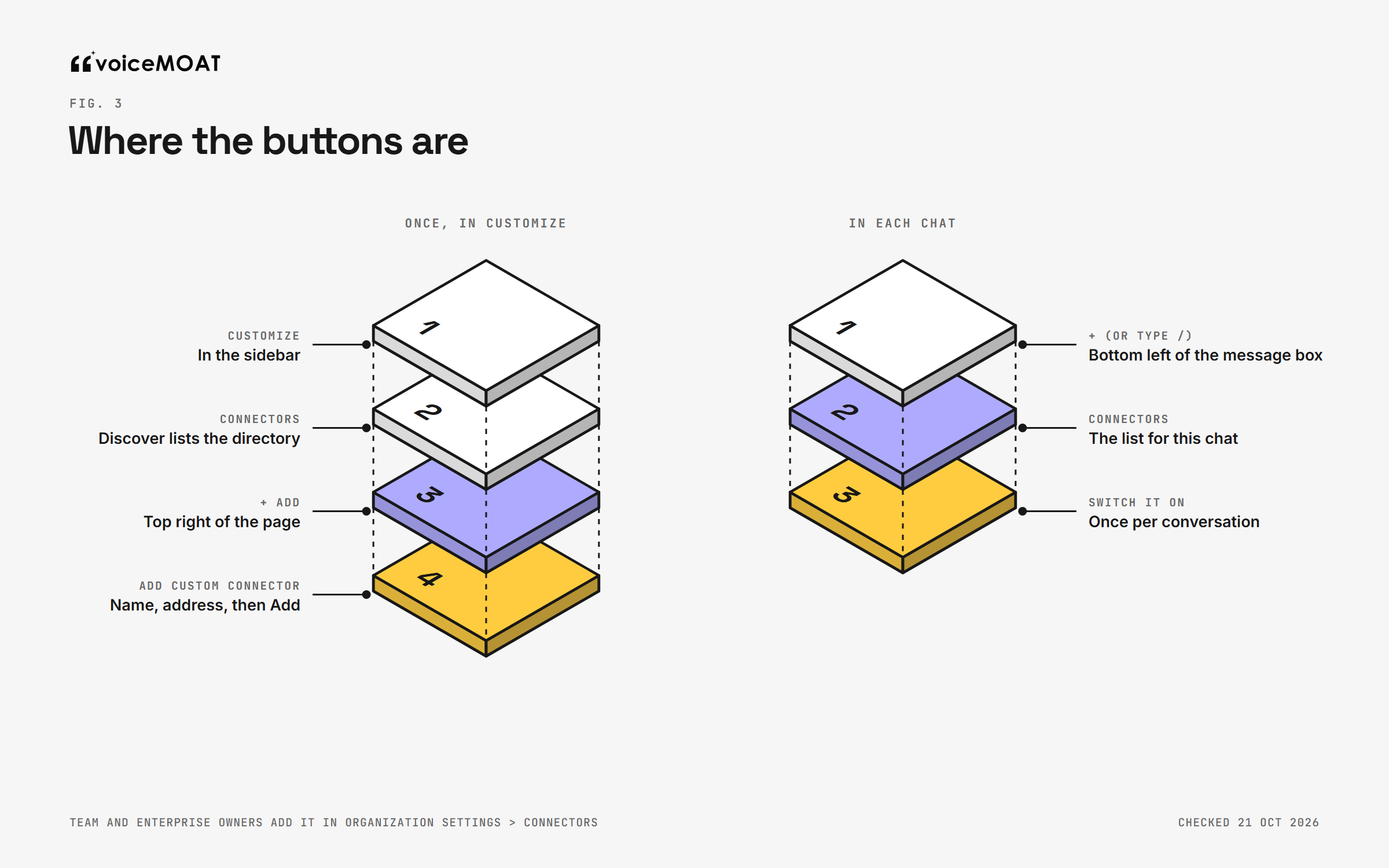
As shown in Claude on 21 October 2026.
claude.ai and Claude Desktop (Free, Pro and Max)
Open Customize in the sidebar.
Choose Connectors. The Discover tab lists directory connectors; search for the tool by name.
For a directory connector, open its listing and connect it. For any other, choose + Add, then Add custom connector, give it a name, paste the server address and add it.
Sign in when the tool's sign-in page opens.
The path moved in February 2026, when Anthropic grouped skills, plugins and connectors under Customize. A custom connector's sign-in settings cannot be edited later; to change them, remove the connector and add it again.
Team and Enterprise
An owner adds the connector first, under Organization settings > Connectors > Add > Custom > Web. Each member then connects with their own account from Customize > Connectors, where it shows a Custom label. Owners can also set tool permissions for everyone. On these plans, connectors are only available in private projects.
iPhone and Android
You can browse and connect connectors in the mobile apps, but installing on mobile is in beta, and Anthropic calls the web and desktop app the main path for custom connectors. A connector you add on the web shows up on your phone.
Claude Code
claude mcp add --transport http <name> <server address>
Add --scope user to use it in every project (Claude Code's MCP docs). Then run /mcp inside Claude Code and finish the sign-in in your browser. If you sign in to Claude Code with a claude.ai subscription, connectors you already added on claude.ai appear there too.
Sign in to LinkedIn and Twitter
Connecting Claude to the tool is half the job. The tool then needs your LinkedIn and Twitter accounts, usually through the platforms' own permission screens on linkedin.com and x.com.
Never hand over a password or browser cookies. LinkedIn's User Agreement bans sharing log-in credentials and copying cookies, and a connector that asks for them is driving your account outside the API.
Profile or Page. Posting to a LinkedIn Company Page needs your admin role on that Page and a connector that supports Pages.
Check the account. If you manage more than one profile, confirm which one is connected before the first post.
Turn it on in a chat and test it
Connectors are switched per conversation. Press "+" at the bottom left of the message box (or type "/"), open Connectors and turn yours on. The same menu has Tool access: Auto by default, Always available, or On demand, which Anthropic suggests once you have ten or more connectors.
Test with three prompts that cannot post anything by accident:
"Which LinkedIn and Twitter accounts can you see through [connector]?"
"Draft a LinkedIn post about [topic] and show me exactly what would be published. Do not post it."
"Schedule that for tomorrow at 9am." Watch for the approval prompt: it should name the tool and show the text.
If the first prompt gets no answer from the connector, go to the troubleshooting table below.
Set tool permissions before the first post
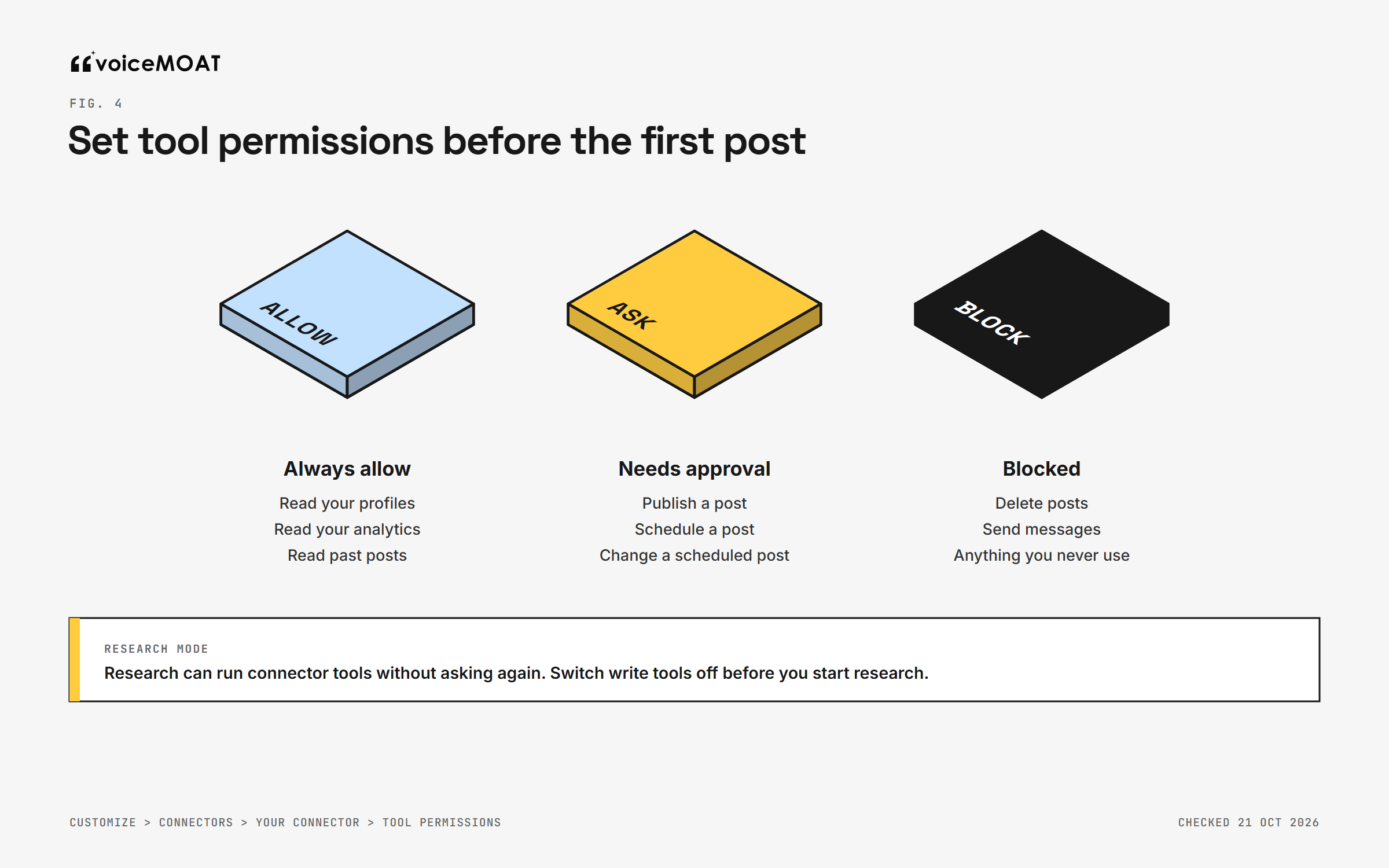
Set once per connector, before the first post.
Claude asks before using a connector tool, with Allow once or Always allow. You can set this ahead of time (Anthropic's connector guide): Customize > Connectors > select the connector > Tool permissions, then choose Always allow, Needs approval or Blocked for each group (read-only, or write and delete) or for each tool.
Reading (profiles, analytics, past posts): Always allow.
Posting and scheduling: Needs approval.
Anything you never use (deleting posts, messages): Blocked.
Two cautions from Anthropic's help pages. Research mode can call connector tools without asking again, so switch write tools off before you start research. And choose Always allow only for tools you would trust to run unsupervised. Team and Enterprise owners can lock these settings for the whole organization.
How a post should travel
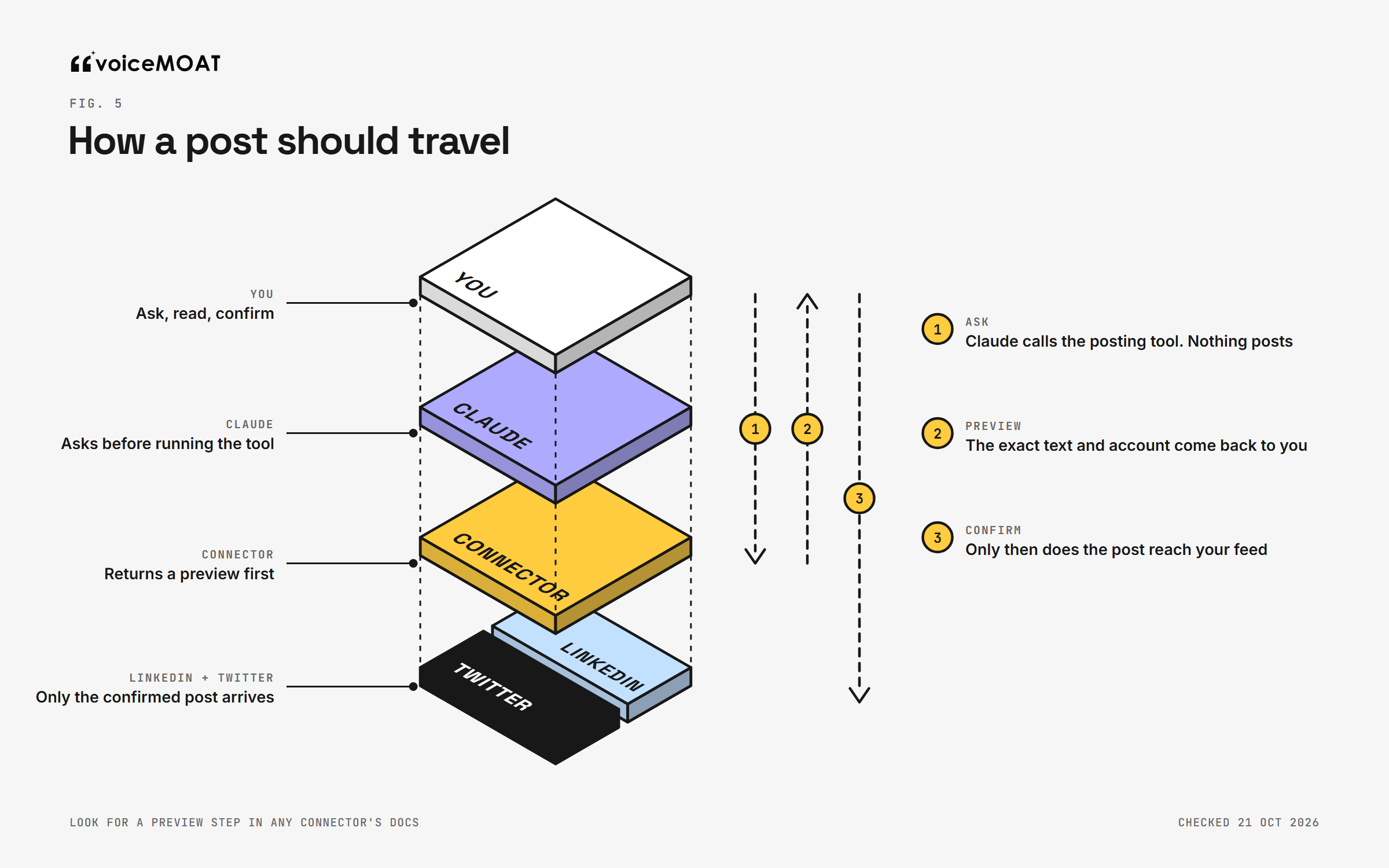
The preview is the step to look for in any connector.
A well-built posting tool works in three steps: Claude calls the tool and nothing posts; a preview comes back with the exact text and the account; only after you confirm does the post go out. The X Developer Policy asks for exactly this: a service that lets people post must show what will be published before it publishes.
Check each connector's documentation for the words preview, draft or confirmation. Taplio and Typefully say nothing goes live without your confirmation. Buffer's developer docs warn that its create tool can publish immediately. The permission prompt in Claude is your second gate either way, which is why Needs approval matters.
What the main connectors can do
Connector | What it does | In Claude's directory | Plans (checked 21 October) | ||
|---|---|---|---|---|---|
Taplio | Yes | No | Drafts, schedules, publishes after you confirm | Yes, verified | Paid plans from $39 a month |
Typefully | Yes | Yes | Drafts, schedules, publishes after you confirm | Yes, verified | Plans on its site |
Metricool | Yes | Paid add-on | Schedules posts, reads analytics | Yes, verified | Free plan includes it; Twitter costs $10 a month per account on Starter or higher |
Buffer | Yes | Yes | Queues, schedules, shares now | No, add by address | Every plan, including Free |
Zapier MCP | Yes | No | Posts to a profile or Page | Yes | Each tool call uses Zapier tasks |
X API team (hosted, xmcp) | No | Yes | Hosted: reads and Articles. xmcp: posts | No | Your own developer app and credits |
Prices and features are each vendor's, from their own pages. Zapier's Twitter integration has not worked since 31 August 2023.
Limits and costs to know
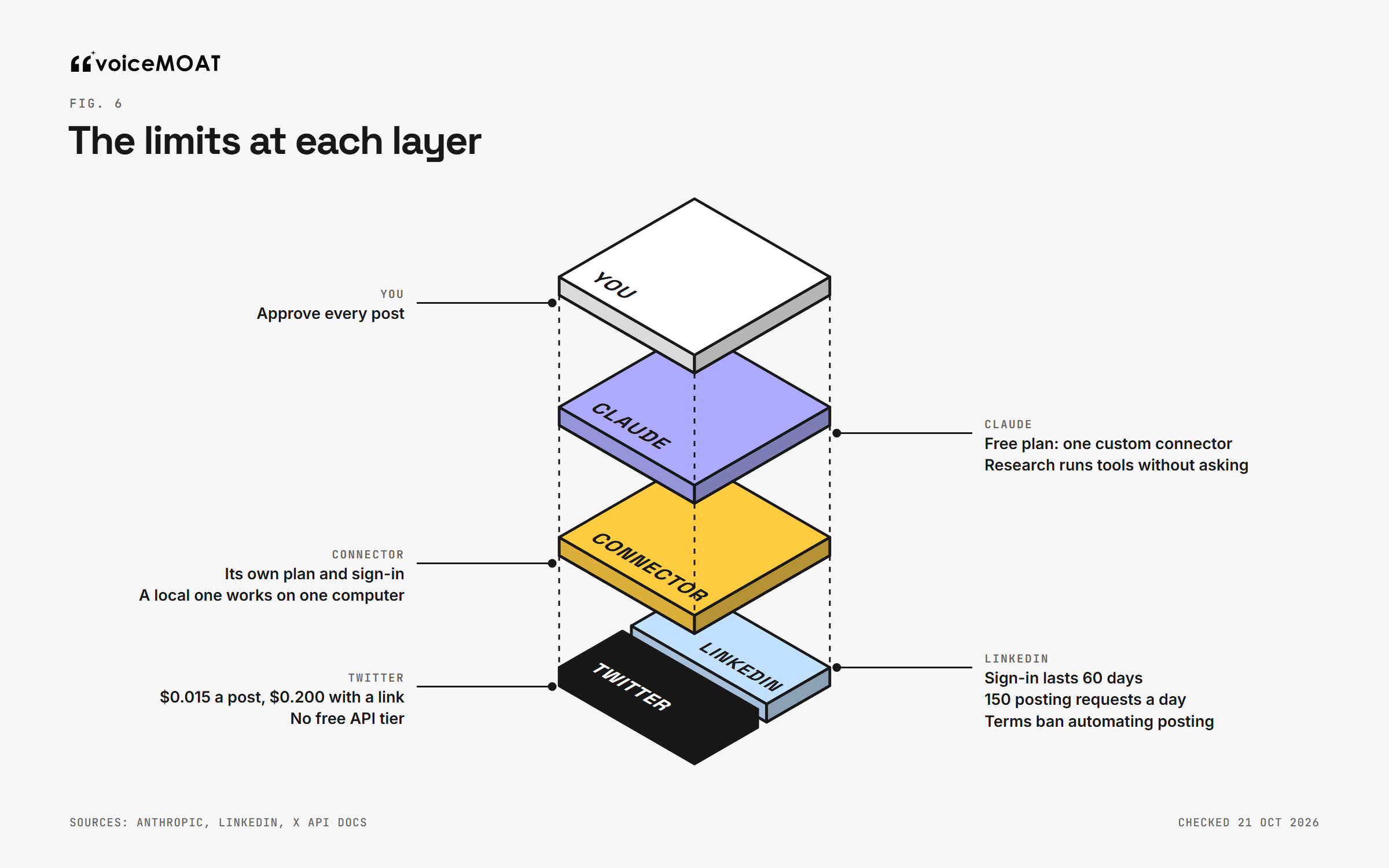
Checked 21 October 2026.
Limit | Set by | What it means for you |
|---|---|---|
One custom connector on Free | Anthropic | Directory connectors are the free route to more |
Research runs connector tools without asking | Anthropic | Switch write tools off before research |
Local servers stay local | Anthropic | Use a hosted address for web, phone and Cowork |
Sign-in lasts 60 days | Reconnect every two months; refresh tokens are for approved partners only | |
150 posting requests per member per day | Plenty for one person | |
API terms ban automating posting | Keep a human approval on every post | |
$0.015 a post, $0.200 with a link | X API, since 20 April | Some tools cover it; some make you bring your own keys and pay |
No free API tier | X API, pay-per-use since 6 February | One-off credits only |
Replies only when summoned | X API, since 23 February | A reply goes through only if the author mentioned or quoted you |
The LinkedIn clause is the one most guides skip. Section 3.1 of LinkedIn's API Terms of Use lists, among things developers must not do, "use the Content or the APIs to automate posting on the LinkedIn Services". We looked at what that means in practice in Can Claude post to LinkedIn?; the short reading is that a tool may post for you through the API, but each post should be your reviewed decision. On the 60-day sign-in, our token guide covers what breaks and when.
On Twitter, the money is small for one person: one post a day for 30 days is $0.45, or $6.00 if every post carries a link. X API pricing in 2026 has the full table.
Keep it safe
Anthropic's own guidance on custom connectors is blunt. They are not verified by Anthropic, so connect only servers from organizations you trust. A malicious server can hide instructions in what it returns, and a tool's behavior can change after you connect it. A Verified label means tested, not audited, and a Community listing has passed automated checks only. In practice:
Keep reading and posting apart. Do not ask Claude to read strangers' posts, comments or web pages and post in the same run. That is where hidden instructions (prompt injection) get in.
No passwords, no cookies. A connector should send you to linkedin.com or x.com to approve access.
Know how to disconnect. Remove the connector in Customize > Connectors, and remove the tool's access in your LinkedIn and Twitter settings for connected apps. Posts already scheduled may still go out, because the schedule lives in the tool, not in Claude.
More on the account-safety side in is a LinkedIn MCP safe?
Troubleshooting
Symptom | Likely cause | Fix |
|---|---|---|
Claude says it has no LinkedIn or Twitter tools | The connector is off in this chat | "+" > Connectors, turn it on, or name the connector in your request |
Add custom connector is missing | Free plan already has one, or you are a Team or Enterprise member | Remove the other custom connector, use a directory connector, or ask an owner to add it in Organization settings |
Works in Claude Code, fails on claude.ai | The server is on your computer or behind a VPN | Use a hosted address; Claude connects from Anthropic's cloud |
Works on desktop, missing on your phone | It was added through the desktop config file | Add it as a custom connector on the web; it syncs to mobile |
LinkedIn posting fails after about two months | The 60-day LinkedIn sign-in expired | Reconnect LinkedIn inside the posting tool |
Twitter posting fails with a payment or credits error | Your X API credits ran out (tools that use your own keys) | Top up credits, or use a tool that covers posting |
Your Company Page is not offered | You are not a Page admin, or the connector does not support Pages | Check your role and the connector's docs |
Claude asks every time, or never | Tool permissions | Reading on Always allow, posting on Needs approval |
A tool ran during research without asking | Research mode does not ask again | Switch write tools off before research |
The same server appears twice in Claude Code | Added at two scopes |
|
Where VoiceMoat fits
Disclosure: this is what we build. VoiceMoat is the Personal Brand OS for LinkedIn and Twitter, and audenAI, the brain inside it, learns from your own content, kept separately for each platform. Its connector works like any other in this guide:
Find it in Claude's directory. Search for VoiceMoat in Customize > Connectors. It carries the Community label (automated review, not verified by Anthropic). Or add it as a custom connector with
https://app.voicemoat.com/api/mcp, or in Claude Code withclaude mcp add --transport http voicemoat https://app.voicemoat.com/api/mcp, then/mcp.Both platforms, one connection. Your LinkedIn and Twitter accounts connect inside VoiceMoat, and the same address works in ChatGPT and Grok.
Fifteen tools. Read your voice profile, your posts and numbers on both platforms; check drafts for Style and Stance; get ideas, opening lines and improvements built from your own content; publish or schedule.
Posting asks twice. The first call returns the exact text, the account and a one-time code, and nothing posts until a second call. Keep the posting tools on Needs approval anyway.
What it does not do: reply to other people's posts, send messages, delete posts or attach images.
Plans: Pro or Enterprise, and the $5 Pro trial includes it. If you sign in before connecting an account or choosing a plan, a short setup step handles both.
More on the server, its tools and what it never does: the VoiceMoat MCP.
The short version
Open Customize > Connectors, add a connector from the directory or by address, sign in to the tool and then to LinkedIn and Twitter, and switch it on in each chat from the "+" menu. Put posting on Needs approval, keep write tools off during research, and pick a connector that shows you a preview. Expect to reconnect LinkedIn every 60 days and to pay per post on Twitter, one way or another. The setup takes minutes; the approval step is what keeps each post yours.
Frequently asked questions
Does Claude have an official LinkedIn connector?
No. Neither LinkedIn nor Microsoft publishes a connector or MCP server for Claude, and none is in Claude's directory. Third-party connectors such as Taplio, Typefully, Metricool and VoiceMoat post to LinkedIn through LinkedIn's API.
How do I connect Claude to Twitter?
Add a connector that supports Twitter, from Claude's directory or by its address under Customize > Connectors > + Add > Add custom connector, sign in, and connect your Twitter account inside the tool. Developers can also run the X API team's open-source xmcp server with their own developer app and credits.
Do I need a paid Claude plan?
No. Directory connectors work on every plan, and Free accounts can add one custom connector. Claude in Chrome and Cowork need a paid plan. The posting tool may have its own plan.
Where is the Connectors setting in Claude?
Under Customize > Connectors, in the sidebar of claude.ai and the desktop app. On Team and Enterprise, owners add custom connectors under Organization settings > Connectors.
Will Claude post without asking me?
Not by default. Claude asks before using a tool unless you chose Always allow, and Research mode can call tools without asking again. Set posting tools to Needs approval and use a connector that returns a preview first.
Does it work in Claude Code and on my phone?
Yes. In Claude Code, add it with claude mcp add --transport http and sign in with /mcp. On iPhone and Android, connectors added on the web show up automatically; installing on mobile is in beta.
Why does my MCP server work in Claude Code but not on claude.ai?
Claude reaches custom connectors from Anthropic's cloud, so a server on your computer or behind a VPN cannot be reached. Use a hosted server with a public address.
How much does it cost to post to Twitter from Claude?
The X API charges $0.015 per post and $0.200 for a post with a link, with no free tier. Some posting tools include this in their plan; others make you bring your own developer keys and pay Twitter directly.
Why does my LinkedIn connection stop after two months?
LinkedIn issues member sign-ins with a 60-day lifespan, and only approved partners get refresh tokens. Reconnect LinkedIn in the posting tool when it expires.
Is it against LinkedIn's rules to post from Claude?
Posting through LinkedIn's API with your approval is how these tools work, but section 3.1 of LinkedIn's API Terms bans using the APIs to automate posting, and the User Agreement bans bots on the website. Review and approve every post.
AI disclosure
Written and fact-checked by Prateek Singh, founder of VoiceMoat. VoiceMoat is the publisher's own product and is disclosed as such; Anthropic, LinkedIn, X and connector details are from their own pages, linked in the article and read on 21 October 2026, and product details reflect VoiceMoat as of October 2026.
Keep reading

Industry
Can ChatGPT post to LinkedIn and Twitter? Every route in 2026, and what each one allows
ChatGPT cannot post to LinkedIn or Twitter by itself. Five routes can, from a reviewed plugin to Zapier, and which one works depends on your ChatGPT plan and each platform's rules. Every route, checked in October 2026.
14 min read
·

AI and Voice
Every social MCP connector reaches both platforms. That is not the hard part
We were going to write that connecting one assistant to both Twitter and LinkedIn was rare. It is not. More than twenty connectors do it and several are free, so channel coverage is table stakes and every roundup ranking them by it is measuring the wrong thing. Here is what actually differs between them, and the one thing we read enumerated tool lists for six of them to confirm nobody does at all.
11 min read
·

Industry
Can Claude post to Twitter? Yes, and here is the bill
Twitter publishes three official MCP servers, and the one everybody installs cannot create a post. You can prove that from its OAuth scopes, which do not include write access to posts at all. Meanwhile every guide prices this as fifteen thousandths of a dollar per post, which is the sticker price and not the bill. A realistic assistant session costs two to eighteen times that, and the difference is mostly links.
13 min read
·

Industry
Can Claude post to LinkedIn? Yes, and LinkedIn's own developer terms say it should not
Claude can publish to LinkedIn through a connector, using a permission LinkedIn hands out self-serve. The final item in LinkedIn's API Terms of Use is a flat ban on using the APIs to automate posting. Every guide we read cites the wrong document, and several sell scheduling while calling themselves the compliant option. Here is the clause, what Claude can and cannot actually publish, and why the connector most people recommend cannot work on claude.ai at all.
12 min read
·

Industry
Will a LinkedIn MCP get your account restricted? What the terms actually say
Every answer to this question is confident and none of them cite anything. This one quotes the clauses. LinkedIn's user agreement names browser plugins specifically, the three routes an MCP server can use to reach your account land in very different places against it, and the enforcement cases everyone repeats are about companies rather than members. Including the part most vendors leave out: our own Chrome extension sits inside the clause we are quoting, and we would rather tell you that than claim otherwise.
13 min read
·
From the Twitter algorithm series
The Twitter/X algorithm in May 2026: why voice wins under the new transformer
Read ›

